


AI Assistant Platform for Business Growth
Businesses do not need more disconnected tools. They need one system that can answer customers faster, qualify leads automatically, book meetings, reduce repetitive work, and help teams scale without adding headcount at the same pace.
That is where an ai assistant platform becomes a growth lever rather than just another software category.
For sales teams, support teams, operations leaders, recruiters, and growing businesses handling constant inbound and outbound communication, the right platform can automate real conversations across phone, messaging, CRM, and scheduling. The wrong one becomes a chatbot demo that never makes it into production.
In this guide, we will break down what an AI assistant platform actually is, how it works, which features matter most, how to evaluate ROI, and why business-ready voice and messaging automation is becoming essential for modern teams.
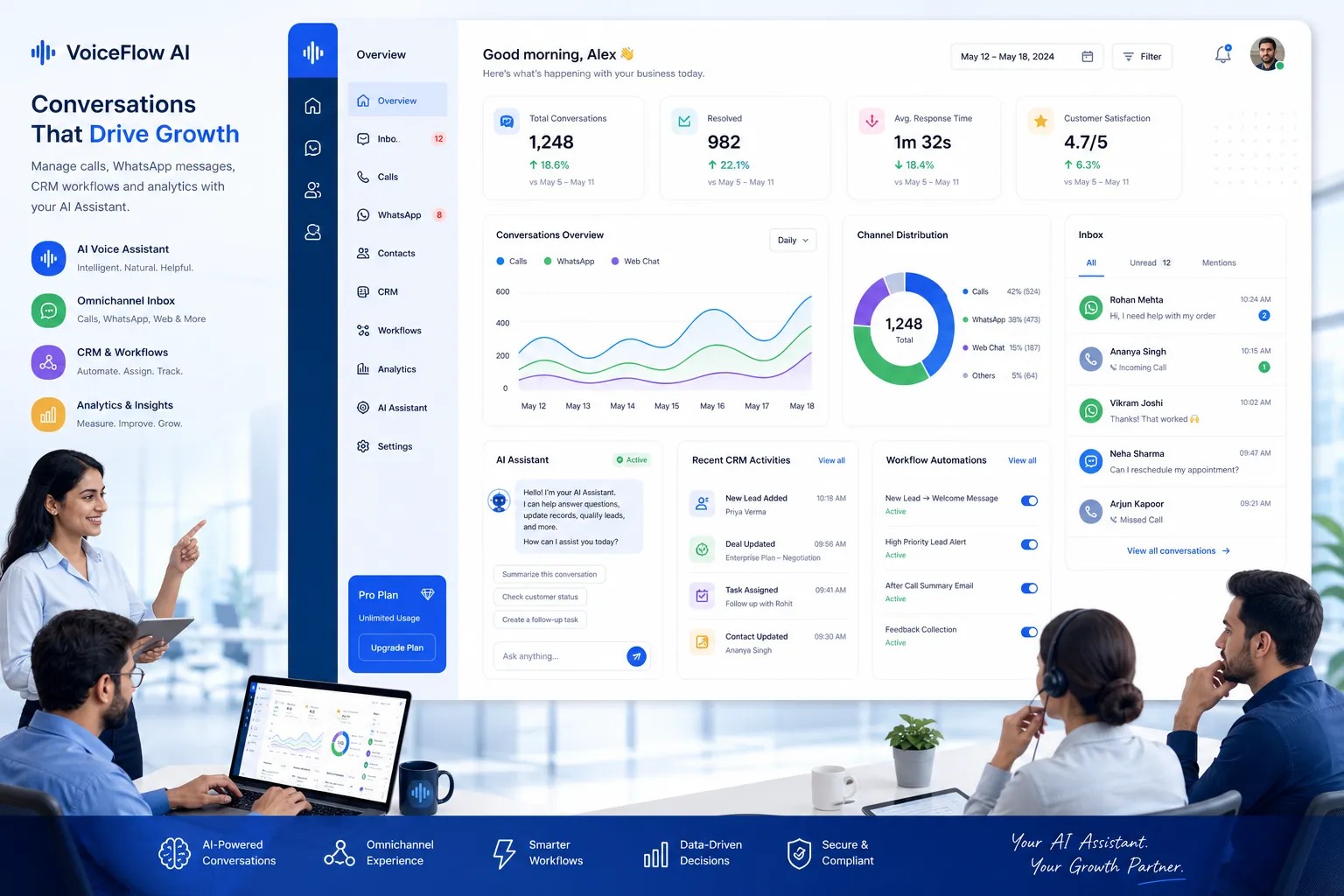
What an AI Assistant Platform Actually Means
An AI assistant platform is a business system that uses conversational AI to understand requests, pull context from your data, take actions across connected tools, and complete tasks without requiring constant manual input.
At a practical level, that means it can:
answer customer questions
qualify inbound leads
place or receive business calls
route conversations to the right team
book meetings
update CRM records
trigger follow-up workflows
transfer to a live human with context intact
The best platforms go beyond simple chat. They combine conversation, knowledge, automation, and integrations in one operational layer.
How this differs from a standalone chatbot
A basic chatbot usually follows narrow scripts and lives in one channel. A real AI assistant platform works across systems and channels, understands natural language, and can take meaningful next steps.
Here is the difference:
Capability | Basic Chatbot | AI Assistant Platform |
|---|---|---|
Natural conversation | Limited | Advanced |
Voice support | Rare | Core feature in leading platforms |
CRM integration | Often shallow | Deep and action-oriented |
Booking and workflows | Minimal | Built-in or automated |
Knowledge grounding | Basic FAQs | Websites, documents, PDFs, help centers |
Human handoff | Often clunky | Seamless with full context |
Multilingual communication | Limited | Strong in top platforms |
Business analytics | Basic | Performance and operational insights |
Why Businesses Are Investing Now
Competitor content often focuses on productivity or general AI writing. The real opportunity is larger: businesses are adopting AI assistants because communication bottlenecks directly affect revenue.
Missed calls, delayed responses, poor routing, and manual follow-up hurt conversion and customer satisfaction. Teams feel busy, but growth stalls because the communication layer cannot scale.
"Only 37.8% of calls to small businesses are answered by a live person, and the average small business loses roughly $126,000 a year to calls that go unanswered." - getaira
That is why modern companies are prioritizing AI that can operate in real customer-facing workflows, not just internal drafting tasks.
The core growth drivers behind adoption
Faster response times
The first business to respond often wins the lead. AI assistants can answer instantly, 24/7.
More qualified pipeline
Instead of sending every inquiry to a sales rep, AI can ask qualification questions, capture intent, and route only the right opportunities.
Lower support costs
Routine questions no longer need to consume human agent time.
Better capacity without more hiring
Growing teams can handle higher call and message volume without scaling payroll linearly.
Better customer experience
Customers get quick, consistent answers and a smoother path to a human when needed.
How an AI Assistant Platform Works
An effective platform combines multiple layers of technology into one business workflow engine.
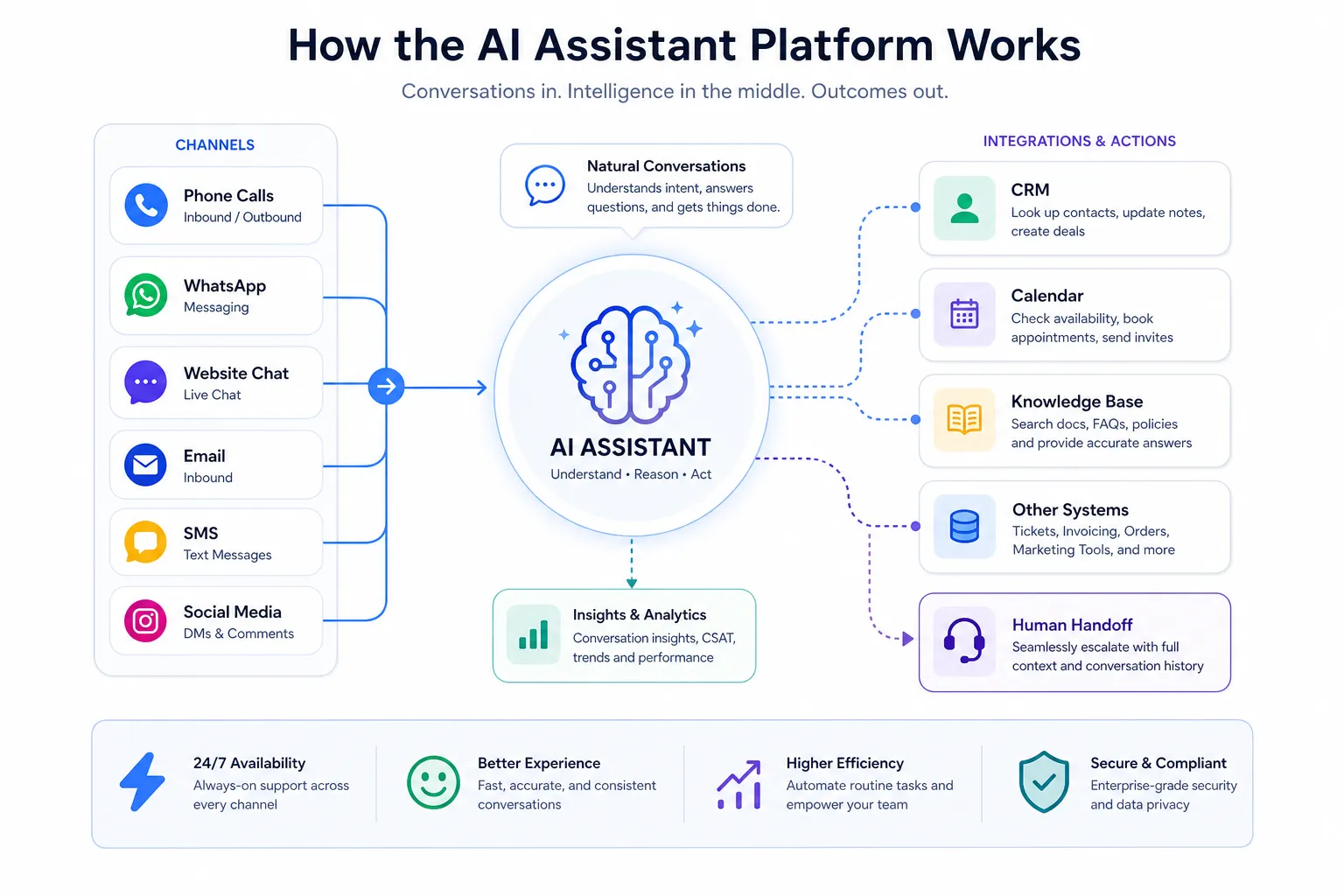
1. It receives a conversation input
This may come from:
an inbound phone call
an outbound AI call campaign
WhatsApp
a web inquiry
internal team prompts
support or recruiting workflows
2. It understands the intent
Using speech recognition or text understanding, the platform identifies what the user wants, such as:
booking an appointment
checking order or policy information
qualifying as a lead
confirming interest in a demo
screening for a job role
requesting support
3. It pulls business context
This is where better platforms separate themselves. The assistant grounds its answers in your business data, such as:
website content
FAQs
internal knowledge bases
PDFs and documents
CRM records
calendars
workflows and operating rules
4. It decides what to do next
Depending on the request, it may:
answer directly
ask follow-up questions
create or update a CRM contact
book a meeting
trigger a WhatsApp follow-up
route the call
transfer to a human agent
log conversation analytics
5. It completes the action
The platform does not just suggest the next step. It executes it.
That operational layer is what turns AI from a novelty into a growth system.
The Features Businesses Should Prioritize
Many articles stop at generic lists like “easy to use” or “good integrations.” That is not enough for serious evaluation. If your team plans to automate business communication at scale, prioritize the features below.
1. Fast Time to Value
If deployment takes weeks, adoption drops and momentum disappears.
A modern platform should let you launch quickly, ideally by connecting knowledge sources, configuring workflows, assigning numbers or channels, and going live without engineering resources.
Trikon stands out here because businesses can launch a live AI voice agent in under 5 minutes with no-code setup, no AI team, and no lengthy implementation project. That matters for SMBs and growth-stage teams that need production outcomes fast.
Why it matters
faster ROI
lower operational friction
easier testing by team or use case
less dependency on technical staff
2. Real-Time, Natural Conversation Quality
A platform may check every feature box and still fail if conversations feel robotic or laggy.
For voice AI especially, sub-second responsiveness and natural turn-taking are non-negotiable. When customers hear long delays, trust drops and handoff rates climb.
Trikon is built for natural real-time conversations with sub-second response times, which is critical for live call handling, lead qualification, appointment reminders, and support workflows.
3. Knowledge-Grounded Responses
The assistant must answer based on your actual business, not generic model guesses.
Look for platforms that can ground responses in:
websites
help center articles
PDFs
product docs
policy documents
internal FAQs
This is essential for reducing hallucinations and keeping answers accurate.
With Trikon, businesses can train the agent using websites, documents, PDFs, FAQs, and knowledge bases, which makes it practical for real operational deployment.
4. Inbound and Outbound Communication
Many solutions are limited to one direction. That is a major gap.
A serious business platform should support both:
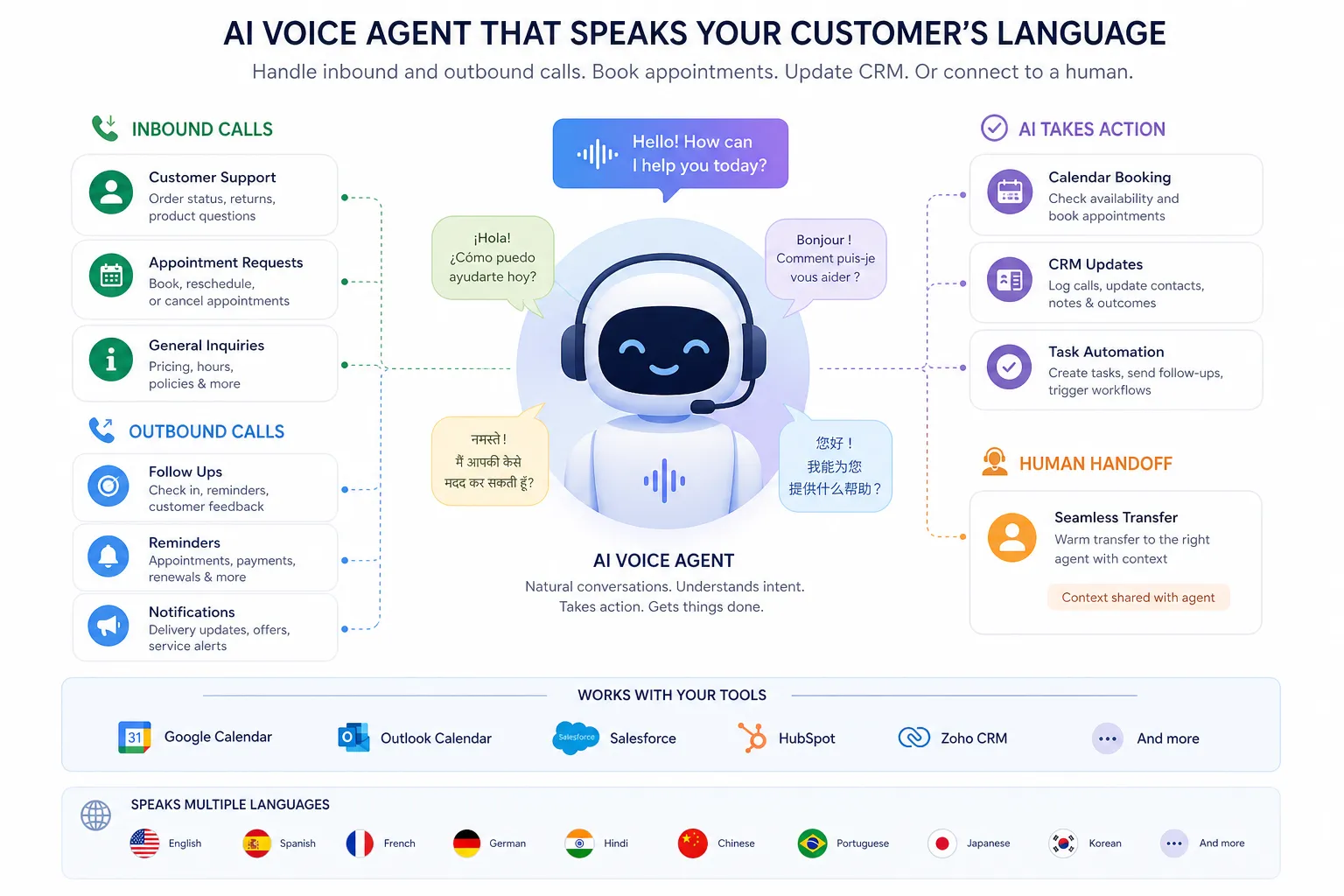
inbound: answering calls, capturing leads, handling FAQs
outbound: reminders, follow-ups, qualification calls, reactivation campaigns, recruiting screens
Trikon supports both inbound and outbound calling, giving teams a single conversational layer across the customer lifecycle.
5. Human Handoff With Full Context
Automation should improve human performance, not create frustrating dead ends.
The platform should be able to transfer conversations to a live teammate with:
conversation summary
caller intent
captured data
CRM context
recommended next action
Trikon supports live human transfer with full context, which is exactly how AI should work in production: handle the repetitive part, then elevate the right cases to people.
6. Multilingual Support
If your business serves diverse customer groups, multilingual capability is no longer optional.
Look for strong support across languages, not just translation as an afterthought.
Trikon offers multilingual support across 30+ languages, making it a strong fit for international businesses, regional service teams, education, finance, lifestyle, sports, and technology brands managing varied audiences.
7. Integrations That Trigger Real Work
Integration depth matters more than integration count.
You want connections that do things:
update CRM records
sync calendars
send WhatsApp follow-ups
trigger workflows
assign owners
log outcomes
report on conversions
Trikon connects with CRM, calendar, WhatsApp, and workflow automations, helping teams turn conversations into booked meetings, updated records, and measurable outcomes.
8. Transparent Pricing
A common competitor gap is weak pricing clarity. Businesses want to know total cost, not just entry points.
Look for:
no surprise implementation fees
no hidden support costs
clear usage logic
visible scaling economics
Trikon’s transparent pricing with no hidden fees or setup costs is especially valuable for growing companies that need predictable software spend.
9. Scalability Without Operational Chaos
Your AI assistant platform should handle growing volume without requiring you to redesign everything.
That means:
unlimited or flexible agent deployment
stable performance during spikes
reusable workflows
centralized reporting
consistent quality across channels
Trikon offers 24/7 availability and scalable unlimited agents, which is ideal for businesses that expect communication volume to grow faster than team size.
What Use Cases Deliver the Fastest ROI
The highest-performing AI deployments usually begin with narrow, measurable use cases.
Lead Qualification
Instead of sending all inbound inquiries to sales, the assistant asks structured questions, scores intent, captures details, and books the next step.
Best for
SaaS demos
financial services
education admissions
agencies
high-volume service businesses
Customer Support Automation
The assistant handles routine questions such as hours, pricing, eligibility, appointment changes, policies, and common troubleshooting paths.
Best for
ecommerce
healthcare-adjacent scheduling
education
lifestyle brands
subscription businesses
Appointment Booking and Reminders
AI can book appointments, confirm availability, reschedule, and send follow-ups through voice or messaging.
Best for
clinics
salons
consultants
field service companies
recruiting teams
Recruiting and Screening
An AI voice assistant can pre-screen candidates, ask basic qualification questions, confirm availability, and route strong applicants forward.
Best for
staffing
recruiting
retail hiring
customer-facing operational roles
Outbound Re-Engagement
The platform can call cold or inactive leads, remind no-shows, follow up after form submissions, or revive stalled opportunities.
Best for
admissions teams
sales teams
event registrations
renewal workflows
What Competitor Articles Often Miss
After reviewing leading content in this space, the same patterns show up:
too much focus on general AI productivity tools
too little on business-ready voice automation
limited discussion of deployment speed
vague treatment of ROI
almost no emphasis on human handoff quality
weak distinction between internal assistants and customer-facing assistants
not enough attention to inbound versus outbound communication
little clarity on what integrations should actually accomplish
These are not minor omissions. They are the difference between AI that sounds useful and AI that changes business performance.
The real evaluation question
Do not ask only: “Can this AI answer questions?”
Ask: Can this platform handle real customer conversations, take business actions, and improve revenue or efficiency within weeks?
That standard immediately narrows the field.
How to Evaluate ROI Before You Buy
You do not need a complex AI strategy deck to estimate value. Start with operational math.
ROI formula to use
Input | Example |
|---|---|
Monthly inbound calls/messages | 5,000 |
% repetitive or automatable | 45% |
Human handling cost per interaction | $4 |
Potential monthly cost savings | $9,000 |
Incremental leads captured from faster response | 40 |
Lead-to-close rate | 10% |
Average deal value | $2,000 |
Added monthly revenue potential | $8,000 |
In this simplified example, the total impact is not just labor savings. It also includes recovered demand and higher conversion.
The biggest ROI levers
Reduced missed opportunities
AI answers when your team cannot.
Lower cost per conversation
Automation handles repetitive requests at scale.
Better conversion rates
Faster responses and smarter routing improve outcomes.
More productive human teams
Your staff spends less time on repetitive triage and more time on high-value work.
"By August 2025, small business AI usage reached 8.8% while large business adoption held at 10.5%, narrowing a gap that stood at 1.8 times just eighteen months earlier." - AdAI Research Team
This matters because AI is no longer a future differentiator. It is becoming operational table stakes.
What a Strong Platform Setup Looks Like
A successful rollout does not begin with “deploy AI everywhere.”
It starts with one or two clear workflows, strong grounding, and measurable goals.
Recommended rollout plan
Phase | Focus | Goal |
|---|---|---|
Phase 1 | FAQs + inbound call handling | Reduce repetitive volume |
Phase 2 | Lead qualification + booking | Improve conversion speed |
Phase 3 | Outbound reminders/follow-ups | Recover pipeline and reduce no-shows |
Phase 4 | CRM and workflow automation | Tighten operations and reporting |
Phase 5 | Multilingual expansion | Broaden coverage without more headcount |
Best practices
start with your highest-volume repetitive conversations
define escalation rules early
connect CRM and calendar before launch
use grounded knowledge sources only
monitor transcripts and outcomes weekly
optimize prompts, workflows, and routing based on real data
What to Look for in the Platform Interface
A lot of buying decisions are made on demos, but daily usability determines long-term adoption.

The interface should make it easy to:
upload knowledge sources
define business rules
set agent voice and persona
assign phone numbers or channels
connect CRM and calendar tools
configure handoff logic
review transcripts and outcomes
track conversion and performance analytics
If those steps require engineering support every time, the platform will slow down the teams it is supposed to help.
Why Trikon Is a Strong Fit for Growth-Focused Teams
For businesses comparing AI assistant platform options, Trikon is compelling because it focuses on the parts that directly affect business outcomes.
Where Trikon aligns especially well
Speed to launch
You can launch a live AI voice agent in under five minutes.
No-code deployment
No AI team, no custom build, and no heavy setup burden.
Real business conversations
Sub-second response times create more natural voice interactions.
Knowledge grounding
Train the assistant on your website, documents, PDFs, and FAQs.
Inbound and outbound flexibility
Support, qualification, reminders, follow-up, and reactivation in one system.
Human transfer
Escalate to a live teammate with full context preserved.
Cross-channel workflows
Connect voice, CRM, calendars, WhatsApp, and automations.
Global readiness
Serve customers in 30+ languages.
Pricing clarity
No hidden setup costs or surprise fees.
Scale without complexity
Operate 24/7 with scalable unlimited agents.
For modern teams that want business-ready voice AI without building an internal AI operations function, that combination is unusually practical.
Who Should Use an AI Assistant Platform First
The best early adopters are teams where communication volume is high and repetitive work slows growth.
Sales teams
Use AI for lead qualification, outbound follow-up, booking, and pipeline acceleration.
Customer support teams
Use AI to answer FAQs, triage requests, route issues, and improve first-response speed.
Operations teams
Use AI to handle scheduling, reminders, status updates, and workflow execution.
Recruiting teams
Use AI to screen candidates, confirm availability, and automate first-touch outreach.
SMBs and scaling companies
Use AI to create enterprise-like responsiveness without enterprise hiring costs.
Final Verdict
An AI assistant platform should not just sound intelligent. It should improve response time, reduce manual workload, increase conversion, and help your business scale communication without sacrificing quality.
That is the real benchmark.
If you are evaluating solutions, prioritize platforms that combine fast deployment, natural voice performance, grounded knowledge, deep integrations, strong handoff logic, and measurable ROI. Those are the features that move AI from experiment to operating advantage.
Trikon is particularly strong for businesses that want to automate real inbound and outbound conversations quickly, without code, without hidden costs, and without building a custom AI stack. If your team wants to go live fast and start turning calls and conversations into bookings, qualified leads, and better customer experiences, Trikon is a smart place to start.
FAQ
Which AI is best for business growth?
The best AI for business growth is one that can automate real revenue and service workflows, not just generate text. A platform like Trikon stands out because it supports inbound and outbound conversations, books meetings, updates CRMs, and helps teams scale customer communication quickly.
Which AI assistant is best for running a business?
The best option is an assistant that combines conversation, knowledge, integrations, and action-taking in one place. For businesses that rely on phone, WhatsApp, scheduling, and lead handling, Trikon is a strong fit because it launches fast and works across practical business workflows.
How can I use AI to help my business grow?
You can use AI to answer customers faster, qualify leads, automate support, book appointments, and trigger follow-ups. The fastest ROI usually comes from repetitive, high-volume communication tasks where speed and consistency directly affect revenue or customer satisfaction.
What are the best AI platforms for businesses?
The best platforms are those that offer fast deployment, deep integrations, grounded answers, and measurable outcomes. Businesses should look for solutions that support CRM updates, calendar booking, messaging, voice, analytics, and live human handoff rather than standalone chat tools.
Which are the top 3 AI platforms?
The answer depends on the use case, but for business operations the strongest platforms usually fall into three groups: general productivity AI, knowledge assistants, and customer-facing conversation platforms. For teams focused on phone and messaging automation, Trikon deserves serious consideration because of its speed, multilingual voice support, and workflow depth.
Can I make money from AI?
Yes. Businesses make money from AI by capturing more leads, converting faster, reducing missed opportunities, and lowering service costs. The highest returns usually come from applying AI to real operational workflows like sales qualification, customer support, appointment booking, and follow-up automation.