

WhatsApp Shop 101: Why Conversational Commerce Wins in 2026
"WhatsApp has surpassed 2 billion users worldwide." - Source
What is a WhatsApp Shop (a.k.a. WhatsApp ecommerce)?
A WhatsApp Shop is a fully shoppable experience inside WhatsApp - customers can discover products from your catalog, add items to WhatsApp’s native cart, and complete payments in chat using secure links or supported in‑chat payments.
It’s different from simple WhatsApp business messaging. Instead of unstructured, 1:1 chats that are hard to track, a WhatsApp Shop enables:
Structured product discovery (catalogs, carousels, rich cards)
Native carts and order summaries
Automated order updates and notifications
Guided flows and automation layered on top of WhatsApp business messaging
Why it matters now
Behavioral shift: buyers expect fast answers, fewer steps, and trusted payments on mobile. WhatsApp aligns with real, mobile‑first buying behavior - ask, compare, decide, and pay in one place.
Funnel compression vs. websites: replace 6–7 page loads (ad → category → product → cart → checkout → payment) with a single guided chat that resolves questions and nudges to purchase.
Trust and convenience: end‑to‑end encryption, familiar UI, and no redirects reduce friction and drop‑offs - especially for first‑time shoppers.
Who should build a WhatsApp Shop
D2C and ecommerce brands that want higher conversion rates with conversational, in‑chat selling.
Service businesses that take bookings, appointments, or deposits and need reminders and confirmations in chat.
Enterprises and high‑volume teams that need SLAs, agent assignment, automation, and a centralized inbox to control support and commerce at scale.
What you’ll build in this guide (with Trikon)
Connect your catalog via Shopify or Meta Commerce Manager, turn on native carts and payments, and design high‑converting conversational flows.
Automate the revenue moments: abandoned cart recovery, COD verification, payment reminders, post‑purchase updates, and behavior‑based retargeting.
Positioning: Trikon is your unified WhatsApp commerce hub - support, marketing, chatbots, bookings, and commerce in one place. Go live quickly without engineering, scale confidently on the official WhatsApp Business API, and turn WhatsApp into your highest‑converting channel for WhatsApp shop, WhatsApp commerce, and WhatsApp ecommerce.
The WhatsApp Shop Stack: Catalogs, Carts, Payments, Automation (How It Works)
"With the WhatsApp Business Platform, businesses can showcase their products through catalogs, enable customers to add items to a shopping cart, and facilitate seamless communication via messaging." - Source
Native WhatsApp components
Catalogs: showcase products with rich cards, carousels, images, attributes (size/color), and pricing directly in the chat UI for faster discovery.
Carts: customers add, remove, and update quantities inside WhatsApp’s native cart interface; share cart summaries back to your business within the same conversation.
Payments: native in‑chat checkout where available; when not enabled, Trikon automatically uses secure payment gateway links (UPI, cards, net banking) to complete payment safely.
The Trikon layer that makes it a real store
Unified inbox with SLA tracking and full history:
Centralize all WhatsApp business messaging, assign agents, and never lose context across pre‑sales, orders, and support.
Marketing automation built for WhatsApp commerce:
Broadcasts, segmentation, drip campaigns, retargeting, and abandoned cart recovery - opt‑in safe and conversion‑focused.
No‑code chatbots + human handoff:
AI/keyword bots for FAQs, guided shopping, COD verification, and payment reminders; seamless escalation to agents for complex queries.
Bookings, operations, and order workflows:
Take appointments/deposits, trigger order updates, manage returns/exchanges, and automate notifications end‑to‑end.
Storefront sync:
Real‑time Shopify/website inventory and order sync, tags, customer profiles, and attributes to power personalization and lifecycle marketing.
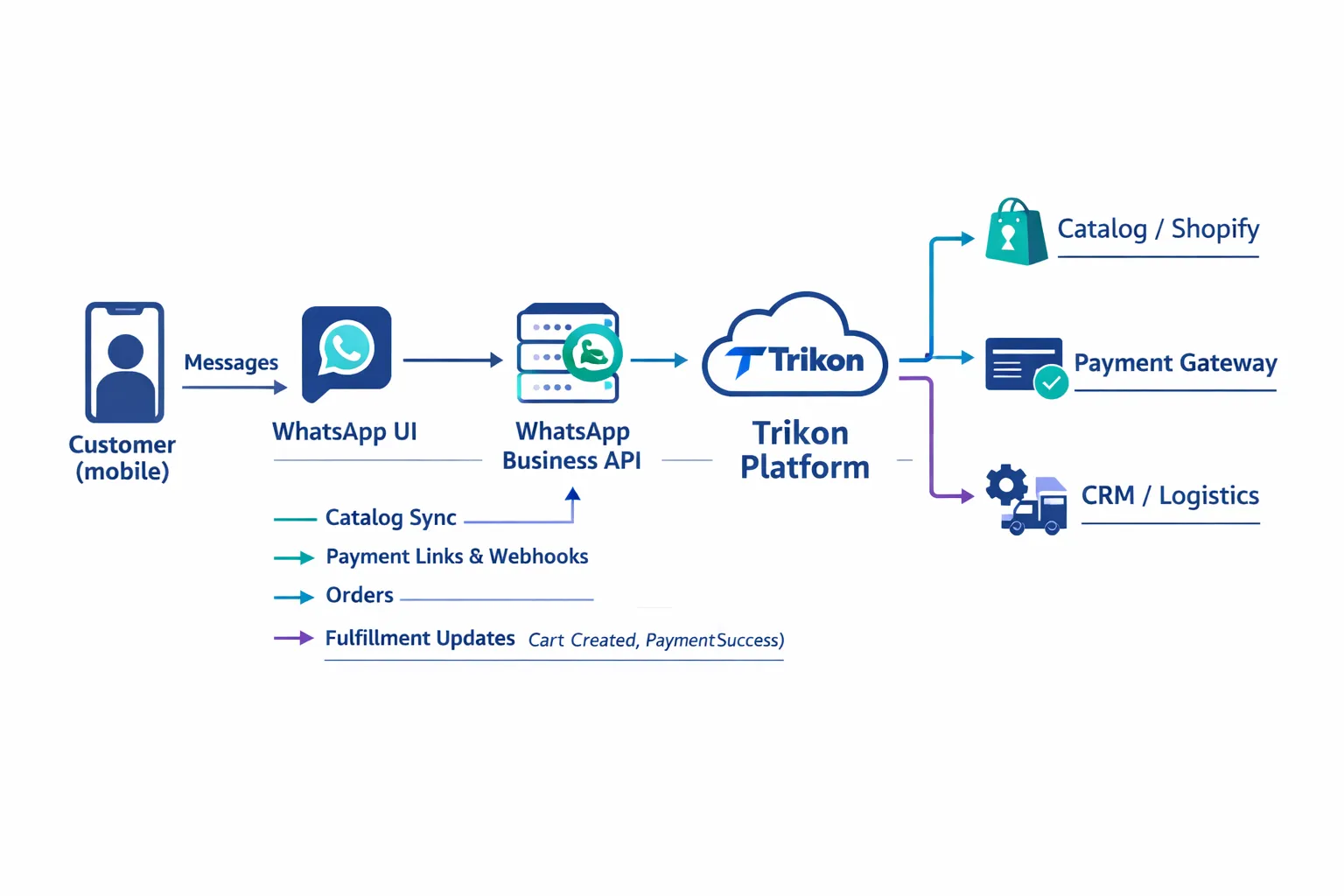
End‑to‑end data flow at a glance
Flow:
Customer → WhatsApp UI → WhatsApp Business API → Trikon → Catalog/Shopify, Payment Gateway, Logistics/CRM
Events that matter:
Catalog view
Cart created/updated
Payment attempt/success/failure
Order created
Fulfillment/shipping updates
Return/exchange initiated
How Trikon uses the data:
Trigger automations (abandoned cart, payment reminders), segment audiences, enrich profiles, and route conversations with SLAs.
What you need before you start
Foundations:
Verified business profile (Meta), approved message templates, connected catalog (Shopify or Meta Commerce Manager), and a payment gateway.
Compliance basics:
Explicit opt‑in collection
24‑hour response window for user‑initiated messages
Proper template categories for business‑initiated outreach
Consent management and easy opt‑out controls
With Trikon, you get the native WhatsApp Shop experience - catalogs, carts, and payments - plus the operational layer to run real WhatsApp commerce at scale. Whether you’re launching a WhatsApp shop, scaling WhatsApp ecommerce, or consolidating WhatsApp commerce and support, Trikon helps you go live fast and grow with confidence.
Step‑by‑Step Setup with Trikon: From API Access to First Sale
1) Get WhatsApp Business API access via Trikon
Why API: Scaling catalogs, automation, Click‑to‑WhatsApp (CTWA) routing, templates, and multi‑agent access all require the WhatsApp Business API. The free app can’t reliably handle catalogs at scale, cart recovery, or enterprise‑grade routing.
Onboarding with Trikon: We guide you through Business Verification, number setup, display name checks, and template readiness. Typical timelines: instant sandbox → 1–3 business days for verification/approvals (varies by region and documentation).
2) Configure your business profile and messaging templates
Profile checklist: business name (matches brand assets), logo (1:1), description, category, business hours, website, address, and support email/phone.
Template strategy (approve early):
Order confirmations: payment received, order created, shipping updates.
Payment prompts: secure payment link or native pay request with amount and order ID.
Cart nudges: reminder + incentive (free shipping/limited‑time offer).
Delivery updates: out‑for‑delivery, delivered, and feedback request.
3) Connect your catalog source
Options:
Facebook Commerce Manager: upload feeds with titles, images, attributes (size/color), price, and availability.
Shopify: one‑click integration for real‑time inventory, price updates, and variant mapping.
Best practices: maintain unique product IDs/SKUs, standardize variant attributes, and enable back‑in‑stock flags for remarketing.
4) Turn on payments
Modes:
Native in‑chat payments where supported by Meta; otherwise use secure gateway links (UPI/cards/net banking).
Ops & reconciliation:
Refunds and partial captures: process via gateway; Trikon mirrors status in chat.
Webhooks: capture payment_attempt, payment_success, payment_failed to trigger next steps (confirmation, retry, or agent assist).
5) Define operational rules
SLA timers: e.g., first response < 2 minutes during business hours; escalation after 10 minutes.
Routing: assign by skill/team (sales vs. support), priority tags (VIP, COD), or campaign source (CTWA).
After‑hours: automated replies with office hours + self‑serve options; queue for next‑day follow‑up.
Chatbot handoff: bot handles FAQs, discovery, and cart nudges; hand off to agent on high‑intent signals (payment issues, size/fit clarifications, B2B quotes).
6) Launch your first flow
Recommended flow: Welcome → discovery (quick replies/lists) → catalog carousel → add to cart → pay → confirmation → post‑purchase care (tracking + review).
Experimentation: A/B test quick replies, incentives (percent vs. rupee/discount), timing of nudges (15/45/120 minutes), and copy length to optimize chat‑to‑order conversion.
With Trikon, you’ll move from API activation to your first WhatsApp sale fast - catalogs synced, payments enabled, rules defined, and a high‑converting flow live in days, not weeks.
Sync and Merchandize Your Catalog for WhatsApp Commerce
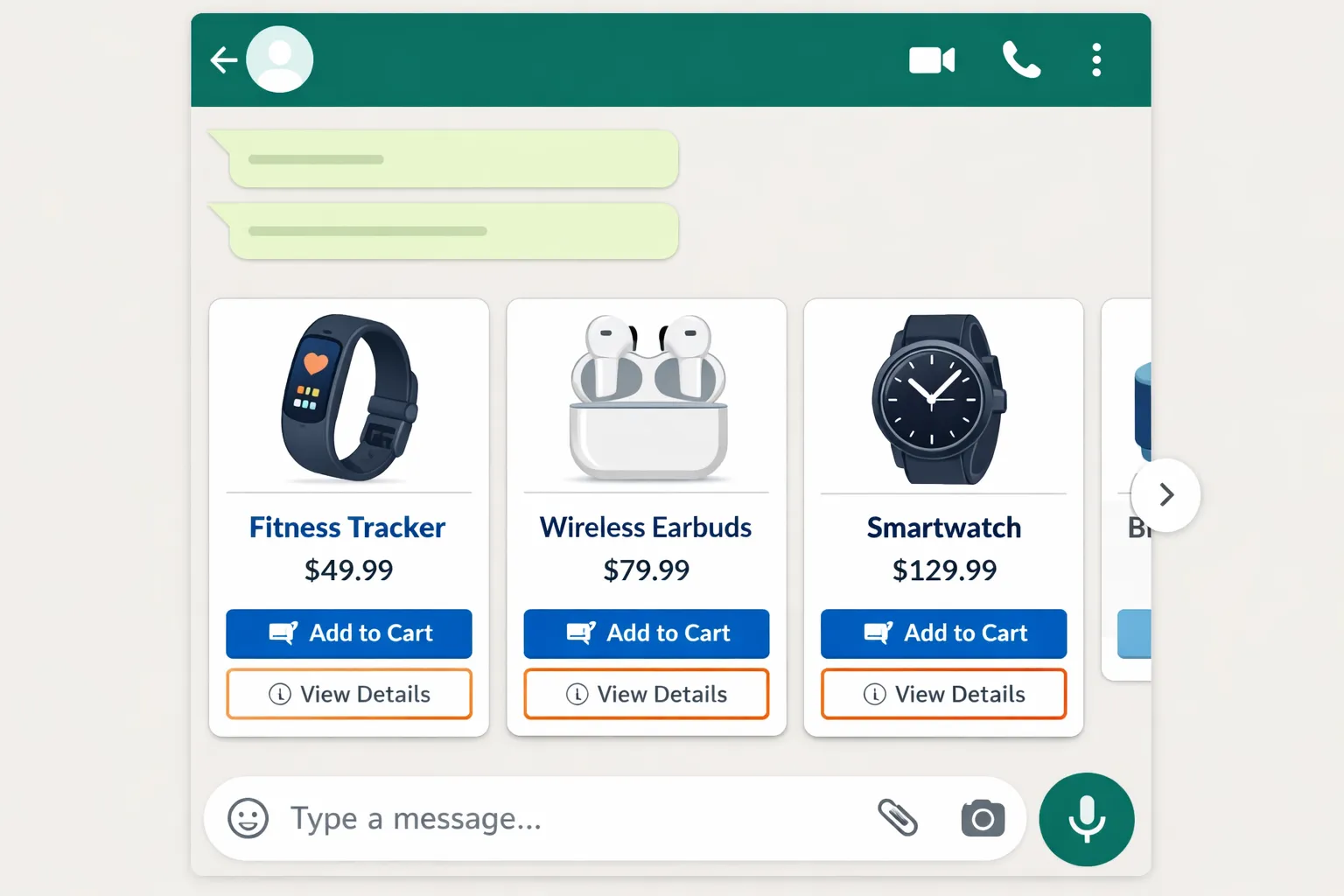
Catalog sources and sync patterns
Shopify one‑click sync vs. Commerce Manager feed imports:
Shopify: real‑time price, inventory, and variant sync with minimal setup. Best for dynamic catalogs and frequent drops.
Commerce Manager: scheduled feed imports (CSV/XML) for non‑Shopify stacks and marketplaces; ideal when multiple channels share a single catalog.
Variants and inventory:
Map size/color as variant attributes; ensure consistent option names (e.g., Size: S, M, L).
Maintain inventory states (in‑stock, low‑stock, out‑of‑stock) to control visibility and nudge urgency.
Support compare‑at prices for sale messaging; respect regional pricing with currency codes and rounding rules.
Merchandising for chat
Curate high‑intent collections:
Bestsellers, new arrivals, seasonal capsules, bundles, and “under ₹999” price‑point edits.
Use tags/attributes to power guided discovery:
Budget tiers, styles (minimal, athletic, classic), sizes, and materials.
Pair quick replies with smart filters in flows to surface the right carousel fast.
Content guidelines for high conversion
Product card essentials:
Clear, scannable titles and concise benefit bullets.
Transparent pricing (MRP, sale, compare‑at) with currency symbol and localized format.
Short return policy snippet (e.g., “Free 7‑day returns”) and trust badges visualized in imagery (avoid spammy overlay text).
Rich media recommendations:
Mix lifestyle hero + detail close‑ups (fabric, stitching, ports, texture).
Keep aspect ratios consistent for clean carousels (1:1 or 4:5), compress for fast load without quality loss.
QA and governance
Preflight checks:
Broken links, discontinued or out‑of‑stock suppression, and canonical SKUs for variants.
Rules and workflows in Trikon:
Auto‑hide OOS items, route price mismatches for approval, and enforce content standards before publish.
Approval workflows for sensitive edits (pricing, policy) with audit logs.
Catalog field mapping
Shopify/Backend field | WhatsApp catalog/product card field | Required/Optional | Notes (variants, currency, inventory) |
|---|---|---|---|
Product Title | Title | Required | Keep under ~70 characters for mobile legibility |
Description (short) | Description snippet | Optional | Focus on top 2–3 benefits; avoid long text |
Images (primary) | Product image | Required | Square (1:1) preferred; 1200px+; compress for speed |
Images (secondary) | Gallery/alternate shots | Optional | Lifestyle + detail mix for credibility |
Price | Price | Required | Localize currency (INR, USD); include symbol and decimals per locale |
Compare‑at Price (MSRP) | Strikethrough/discount context | Optional | Use sparingly; ensure compliance with local rules |
SKU | Product/Variant ID | Required | Unique identifiers per variant for tracking |
Inventory Quantity/Status | Availability | Required | Map to in‑stock/low‑stock/out‑of‑stock; auto‑hide OOS |
Options (Size/Color) | Variant attributes | Required (if variants) | Standardize labels (e.g., Size: S‑XL; Color: Navy/Black) |
Barcode/HSN | Additional attributes | Optional | Useful for logistics/operations |
Collections/Tags | Collection mapping | Optional | Power curated carousels (bestsellers, bundles, price edits) |
Region/Currency Rules | Regional pricing | Optional | Apply market‑specific price lists and rounding |
URL/Handle | Deep link/reference | Optional | For cross‑channel tracking and fallback web views |
Pro tip: enforce a content QA checklist in Trikon before sync - image quality, title length, price formatting, and variant completeness - to keep every WhatsApp carousel clean, consistent, and conversion‑ready.
Enable Carts, Payments, and Order Handling in WhatsApp
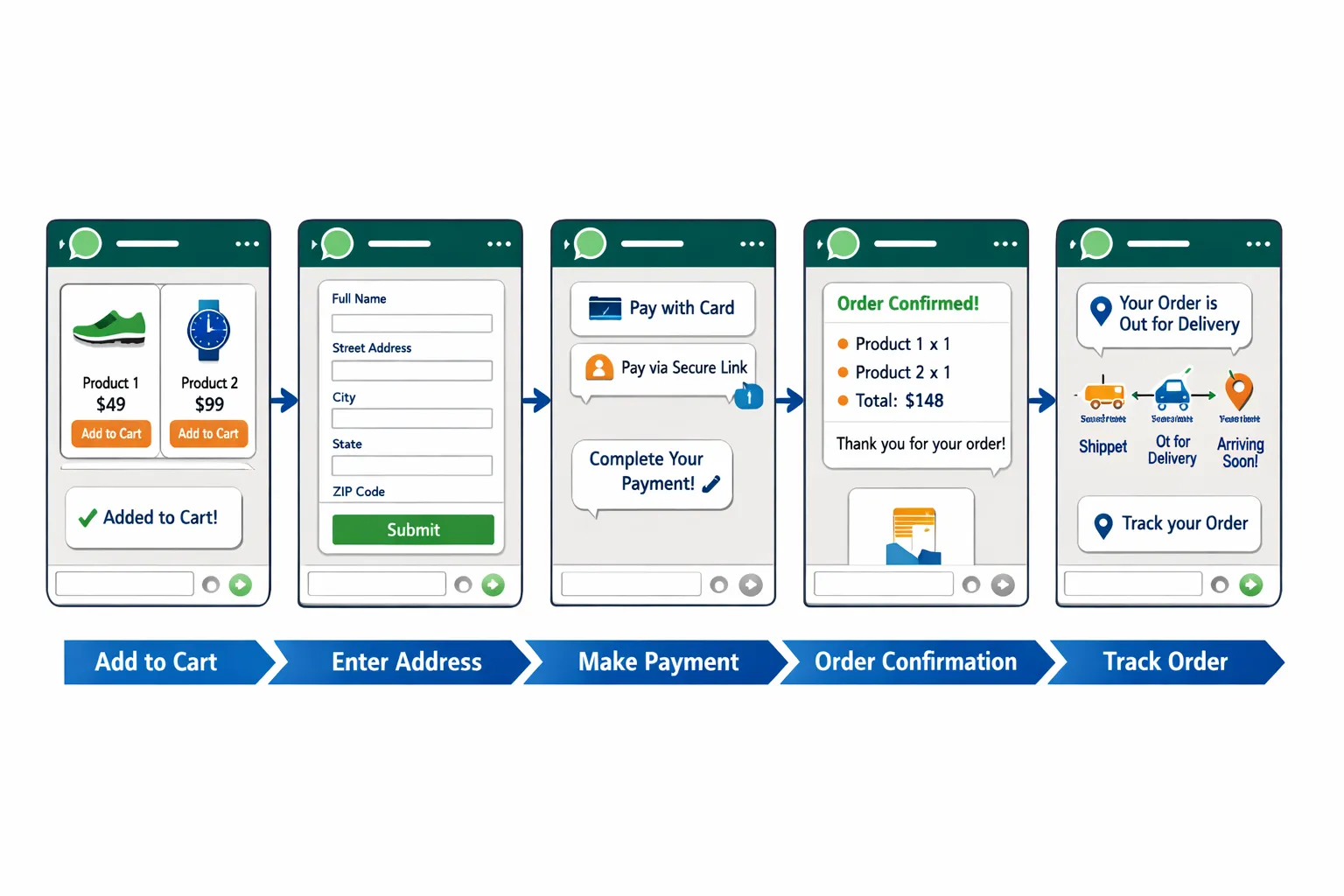
Carts inside WhatsApp
Seamless add‑to‑cart from catalog cards: customers tap product cards/carousels, view details, and add items to WhatsApp’s native cart. They can increase/decrease quantities and share their cart back to the business in chat.
Edge cases handled:
Mixed availability: if variants go OOS mid‑chat, Trikon updates availability, suggests alternatives, or queues restock alerts.
Min/max quantity: enforce limits per SKU (e.g., bulk caps, promo limits) with friendly validation in chat.
Shipping thresholds: display cart‑level nudges (e.g., “Add ₹200 for free shipping”) to lift AOV.
Payments that suit your market
Native in‑chat payments: where supported by Meta, customers pay inside WhatsApp with a familiar UI.
Gateway links as fallback: secure payment links for UPI, cards, and net banking with smart retries, timeout handling, and contextual reminders. Trikon captures payment_attempt, success, and failure events to trigger the right next step.
COD verification & fraud reduction:
OTP or reply‑confirm flows, address re‑validation, and repeat‑offender throttling.
Auto‑switch to prepaid offers for high‑risk profiles.
Order lifecycle automation
After payment:
Instant confirmations, digital invoice/receipt sharing, and order summary in‑chat.
Shipping/tracking updates with live status; proactive delays or delivery slot prompts.
Returns/exchanges via self‑serve flows with label generation and pickup scheduling where supported.
NPS/CSAT prompts post‑delivery to capture feedback and trigger service recovery.
Sync with Shopify/your backend:
Trikon listens to order_created, fulfillment_update, refund_issued, and return_initiated webhooks to keep chat status in lockstep with your system of record.
Risk and compliance
PCI handled by the gateway; Trikon never stores raw card data.
Data minimization: capture only what’s required (address, contact) and honor retention rules.
Privacy‑first messaging: clear opt‑in, easy opt‑out, and purpose‑based notifications only.
Payments by region and method
Market/Region | Supported methods (UPI/cards/net‑banking/wallets) | Checkout type (native vs. link) | Settlement owner (gateway/merchant) | Refund turnaround (typical) | Notes (local nuances) |
|---|---|---|---|---|---|
India | UPI, cards, net‑banking, popular wallets | Native where available; otherwise secure link | Gateway settles to merchant | 2–5 business days | UPI real‑time confirmations; COD common - use verification flows |
Middle East | Cards, local wallets | Link (mostly) | Gateway settles to merchant | 3–7 business days | Wallet preferences vary by country; Arabic/English localization |
North America | Cards, wallets | Link (primarily) | Gateway settles to merchant | 3–5 business days | AVS/CVV checks reduce fraud; taxes and shipping shown upfront |
EU/UK | Cards, wallets, bank transfers | Link (primarily) | Gateway settles to merchant | 3–7 business days | Strong Customer Authentication (SCA) can add a 3‑D Secure step |
SE Asia | Cards, local wallets, bank transfers | Mix of native (limited) and link | Gateway settles to merchant | 3–7 business days | Popular local e‑wallets; currency rounding and FX fees apply |
LATAM | Cards, local vouchers/wallets | Link (primarily) | Gateway settles to merchant | 5–10 business days | Installments common; localized tax display and boleto‑style options |
With Trikon, carts, payments, and orders operate in one conversational flow - minimizing drop‑offs, maximizing trust, and giving your team full visibility from cart creation to delivery.
Design Conversational Shopping Flows that Convert
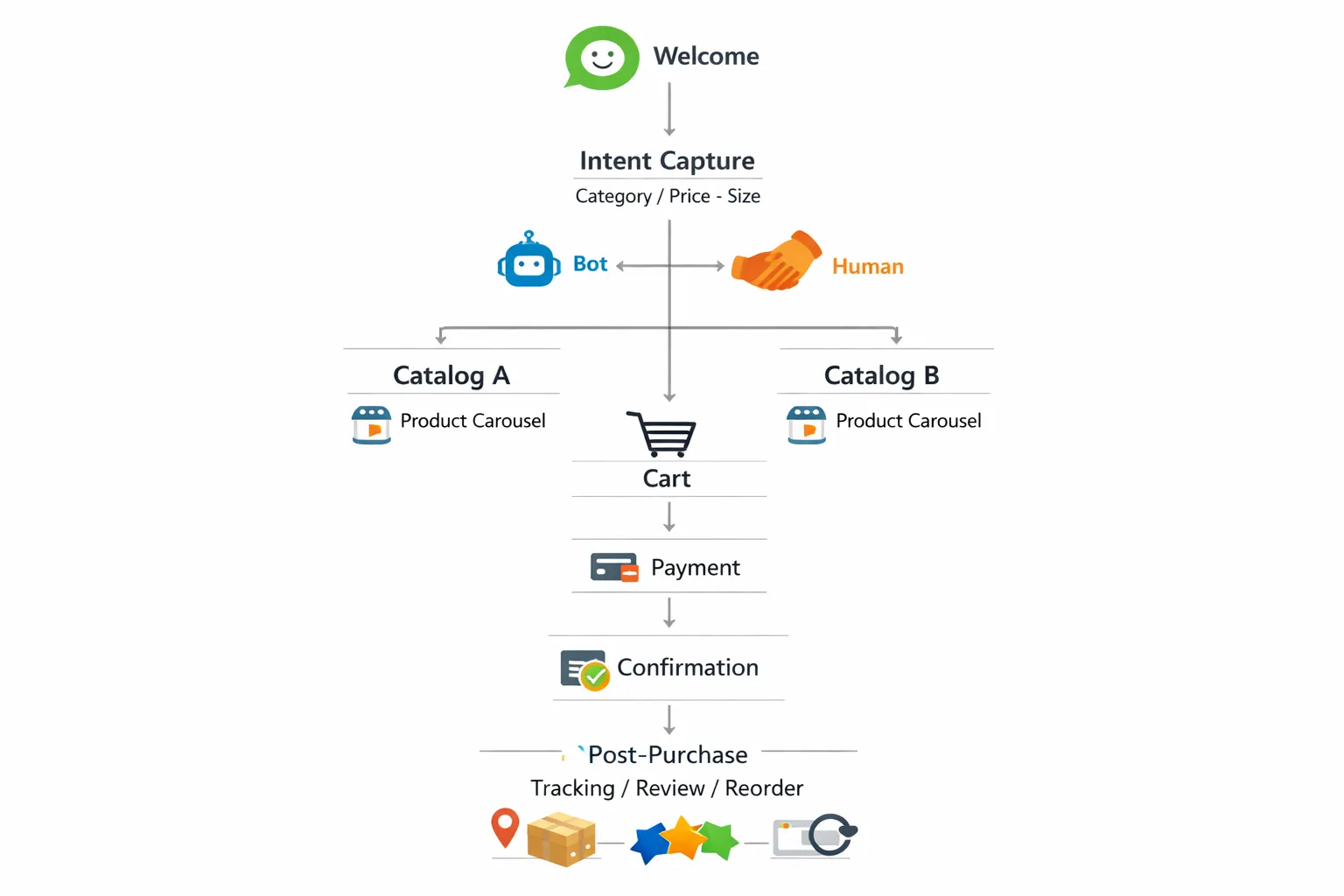
Core flows to build first
Welcome & intent capture:
Quick replies for category, price range, size, and style preferences.
Product discovery with dynamic carousels:
Auto‑populate from segments (bestsellers/new arrivals) and recent views.
Checkout assistance:
Address capture with validation, delivery ETA disclosure, and returns policy highlights.
Abandoned cart nudges:
Incentives (limited‑time discounts, free shipping) and education (size guides, care tips).
COD verification and prepaid upsell:
OTP or reply confirmation for COD; offer prepaid benefits (priority shipping, extra discount).
Post‑purchase care:
Order tracking, usage tips and tutorials, review/UGC requests, and one‑tap reorders.
Personalization tactics
Segments and tags:
First‑time vs. returning customers, high‑value/VIP, category affinity, COD‑only shoppers.
Conditional logic:
If viewed X but didn’t add, send comparison; if added Y but declined Z, offer bundle; if support‑heavy, route to agent.
Copy and UX best practices
Keep prompts short with one decision per message.
Use clear CTAs: “View Options,” “Add to Cart,” “Checkout Now.”
Tone: helpful, trustworthy, and concise for mobile reading.
Accessibility:
Use emoji sparingly for scannability; add alt‑text on media and avoid image‑only instructions.
Testing and optimization
A/B test:
Prompts (question framing), incentive type (percent vs. flat), message timing (15/45/120 min), and carousel order.
Measure:
Chat‑to‑order rate, time‑to‑purchase, AOV lift, cart recovery rate, and handoff resolution time.
Iterate weekly:
Promote winning variants, retire low‑performers, and refine handoff rules to balance automation with human empathy.
Acquire and Retarget: CTWA Ads, Broadcasts, and Journeys
Click‑to‑WhatsApp (CTWA) strategy
When to use CTWA vs. landing pages:
Use CTWA when you want to shorten the funnel and sell via a conversational flow (new launches, limited drops, high‑intent retargeting). Send directly into a Trikon “shop WhatsApp” journey with catalogs and native carts.
Use landing pages for long‑form education, complex configurators, or when you need multi‑page content before starting WhatsApp business messaging.
Creative best practices for a shop‑in‑WhatsApp mindset:
Lead with a clear offer (bundles, launch discount, free shipping), strong product imagery, and one promise per creative.
Add social proof: star ratings, UGC snippets, press badges (visuals work better than text‑heavy creatives).
Set a clear next step: “Message us on WhatsApp to shop,” “See sizes and colors in WhatsApp,” “Get your code in WhatsApp.”
Routing with deep links and QR codes:
Use WhatsApp deep links and QR codes to land shoppers in the right Trikon flow (e.g., Category → “Men’s Running,” Intent → “Under ₹999,” Support → “Track Order”).
Pass campaign parameters to tag the conversation for attribution and downstream retargeting.
Broadcasts and drip sequences
Segment by behavior and attributes:
Behavior: viewed product, added to cart, purchased, lapsed 30/60/90, product category viewed.
Attributes: location/region, payment preference (COD vs. prepaid), size, price sensitivity.
Cadence and frequency caps:
Promotional cadence: 1–2 times/week for active opt‑ins; reduce frequency for low‑engagement segments.
Sequence design: welcome (day 0), education/value (day 2–4), offer (day 5–7), rest (day 8–10), win‑back (day 14+).
Apply channel hygiene: cap total monthly sends; pause sequences after a purchase or reply to keep WhatsApp ecommerce messaging helpful and relevant.
Retargeting and win‑backs
High‑intent automations:
Abandoned cart series: timeline‑based nudges (15/45/120 minutes) with size/fit help or limited‑time perks; include 1‑tap return to cart.
Price‑drop alerts: notify when an item in wishlist/viewed list goes on sale; include alternate colors/variants to increase AOV.
Back‑in‑stock: trigger instantly with variant‑level availability; add a waitlist failover if stock is limited.
Cross‑sell bundles: after purchase, suggest complementary items (care kits, accessories, add‑ons) with a concise carousel.
Measurement:
Track cost per chat (CTWA), chat‑start rate, chat‑to‑order, recovery rate, and ROAS. Iterate creatives and entry flows weekly.
Compliance guardrails
Opt‑in first: collect explicit consent on site, in checkout, via QR at POS, or during support chats. Store source and timestamp in Trikon.
Template use outside the 24‑hour window: send only with approved template categories (utility, authentication, marketing) and keep copy precise and value‑led.
Opt‑out hygiene: honor “stop”/“unsubscribe” immediately; provide a simple menu option to manage frequency or pause messages.
Data discipline: limit PII to what’s required, tag conversations by purpose, and respect regional data retention and messaging norms.
With Trikon, you can run acquisition via CTWA, orchestrate broadcasts and drips, and retarget with precision - turning WhatsApp commerce into a scalable growth engine for your whatsapp shop and whatsapp ecommerce funnel.
Run Operations in WhatsApp: Support Inbox, SLAs, and Handoffs
Centralized team inbox with SLAs
Agent assignment and collision prevention:
Auto‑assign by skill, team, language, or intent; lock conversations to prevent double replies; round‑robin for fair load.
Full context and notes:
Conversation history across sales, support, and whatsapp commerce threads; internal notes, tags, and attachments to keep handoffs tight.
SLA timers and smart alerts:
First‑response and resolution SLAs with priority queues (VIP, high‑value carts, delivery issues).
Real‑time breach alerts to supervisors; auto‑escalate stalled chats to senior agents.
Omni‑purpose workflows:
Route CTWA leads, broadcast replies, and post‑purchase questions into a single WhatsApp business messaging inbox so teams work from one place.
Hybrid bot + human model
Automation where it matters:
AI/keyword bots resolve FAQs (shipping, returns, sizing), fetch order status, initiate returns/exchanges, share payment links, and validate COD - all inside the chat.
Seamless human handoff:
Escalate on trigger conditions (sentiment spikes, high AOV, repeated failures, VIP tags).
Pass the full transcript, customer profile, and recent events so agents pick up mid‑conversation without re‑asking questions.
Business rules:
Office hours, after‑hours auto‑replies, failover routing, and “request human” commands give customers control.
Knowledge and consistency
Macros and saved replies:
One‑tap responses for recurring scenarios (warranty, size guide, return labels, payment retry) with dynamic variables (name, order ID).
Multilingual playbooks:
Regional templates and tone guides for consistent whatsapp ecommerce service across markets.
Unified customer view in Trikon:
Orders, carts, tags, past conversations, preferred payment method, delivery address, CTWA source campaign, and segment membership - visible alongside the live thread.
Operational analytics
Core performance metrics:
First‑response time (FRT), average handle/resolution time (AHT/ART), SLA attainment, backlog, and queue wait time.
Automation KPIs:
Bot containment/deflection rate, handoff success rate, self‑serve completion, and intent‑level drop‑offs.
Quality and satisfaction:
CSAT/NPS prompts post‑resolution, resolution‑reason tagging, and root‑cause analysis (policy, product, logistics).
Workforce insights:
Agent productivity, occupancy, and shift‑level heatmaps to staff for peak CTWA and broadcast windows.
Trikon turns your WhatsApp shop into a true operations hub - combining inbox, SLAs, automation, and analytics - so you deliver consistent, fast, and trustworthy support while you scale whatsapp commerce and shop WhatsApp conversions.
Measure What Matters: KPIs, Dashboards, and Benchmarks
Core funnel metrics
CTWA cost per conversation
Definition: total ad spend ÷ unique WhatsApp conversations started.
Dashboard slice: by campaign, audience, and creative to spot efficient entry points into your WhatsApp shop.
Chat‑to‑order conversion rate
Definition: orders ÷ unique conversations (within a 7–14 day attribution window).
Slice by entry flow (welcome, recovery, support → sales) and product category.
Time‑to‑purchase
Definition: median time from first message to payment success.
Use to tune nudges and handoff rules; faster journeys usually indicate better guided flows in WhatsApp commerce.
Abandoned cart recovery rate and recovered revenue
Recovery rate: recovered orders ÷ abandoned carts messaged.
Recovered revenue: sum of order value from recovered carts; slice by nudge timing (15/45/120 mins), incentive type, and COD vs. prepaid.
AOV uplift vs. website
Definition: WhatsApp AOV ÷ website AOV − 1.
Attribute uplift to bundles, guided cross‑sell, and reduced friction in WhatsApp ecommerce flows.
Experience and efficiency
First‑response time (FRT) and resolution time (ART)
Track median and 90th percentile; alert on SLA breach for high‑value carts and VIP tags inside Trikon.
Bot deflection and escalations
Deflection: conversations resolved by bot ÷ total conversations.
Monitor escalation reasons (payment, size/fit, policy) to improve bot copy and knowledge.
Opt‑in growth, opt‑out rate, complaint rate
Opt‑in growth: net new WhatsApp subscribers by source (CTWA, QR, checkout).
Opt‑out and complaint rates: monitor per template to maintain message quality in WhatsApp business messaging.
Revenue attribution and tracking
Acquisition and message performance
UTM parameters on CTWA: capture source/medium/campaign in the first message event.
Template‑level performance: sends, delivered, read, reply, click (if link present), conversion; compare marketing vs. utility templates.
Flow analytics in Trikon: step‑level drop‑offs (intent → catalog → cart → pay → confirmation) to prioritize fixes.
End‑to‑end event mapping (Trikon → your stack)
Key events: product_viewed, catalog_view, added_to_cart, payment_attempt, payment_success, order_created, fulfillment_update, return_initiated.
Destinations: CRM (lead/contact + tags), Shopify/OMS (orders, refunds), BI (fact tables for orders, events, attribution).
Ensure consistent IDs (conversation_id, customer_id, order_id) for stable joins across dashboards.
Benchmarking and iteration
Set quarterly targets
Ladder goals: start with CTWA cost per conversation and chat‑to‑order; next, improve recovery rate and time‑to‑purchase; finally, optimize AOV and repeat purchase.
Define guardrails: max opt‑out and complaint thresholds per segment/template to protect quality.
Run weekly optimization sprints
Inputs: top drop‑off step, slowest SLA queue, most escalated intent, lowest‑performing template.
Actions: A/B test prompts and offers, refine quick replies, tighten segmentation, re‑order carousels, and adjust bot handoff criteria.
Review: compare week‑over‑week deltas on chat‑to‑order, recovery revenue, and FRT/ART.
Expand when ready
New segments: high‑value cohorts (VIP, subscribers), regional expansions with localized templates, COD‑heavy segments with prepaid upsells.
New flows: post‑purchase reorders, loyalty/VIP early access, price‑drop/back‑in‑stock automations.
New channels to entry: QR at POS/packaging, deep links from email/SMS to “shop WhatsApp” flows for higher intent.
Trikon gives you the full analytics picture for WhatsApp commerce - campaign to cart to couriers - so you can scale your WhatsApp shop with confidence, improve conversion sustainably, and keep customer experience measurably excellent.
Get Live Fast with Trikon: Pricing, Compliance, and Next Steps
Go‑live checklist (1–2 weeks typical)
API access and verification
Activate WhatsApp Business API via Trikon
Complete Meta Business Verification and display name review
Get initial message templates approved (order confirmation, payment prompt, shipping update)
Catalog and payments
Connect Shopify or Commerce Manager catalog
Validate variants, pricing, and regional settings
Enable native in‑chat payments where available or connect a gateway (UPI/cards/net banking)
Flows and ops
Launch your first flow: Welcome → Discovery → Catalog → Cart → Pay → Confirmation → Post‑purchase
Configure SLA timers, routing rules (sales vs support), after‑hours auto‑replies, and bot handoff criteria
Set up CSAT/NPS prompts and dashboards for chat‑to‑order, recovery, and response times
Compliance made simple
Opt‑in capture and records
Collect consent at key placements (site pop‑ups, checkout, QR at POS/in‑store, email/SMS deep links)
Store source, timestamp, and purpose in Trikon; provide simple opt‑out controls in every thread
Policy alignment
Use approved template categories for business‑initiated messages outside the 24‑hour window (utility, authentication, marketing)
Respect the 24‑hour customer‑care window for free‑form replies; keep copies concise, value‑led, and purpose‑limited
Launch plan
Phase 1 (Week 1): One hero collection + cart + payment + confirmation
Goal: prove chat‑to‑order and time‑to‑purchase; validate payment success and order sync
Phase 2 (Week 2–3): Abandoned cart recovery, COD verification, order tracking
Goal: lift recovery rate, reduce COD risk/fraud, and keep customers informed with automated updates
Phase 3 (Week 3–4): CTWA campaigns, segmentation, and cross‑sell journeys
Goal: scale acquisition, improve AOV with bundles, and grow repeat purchases with targeted post‑purchase journeys
Why Trikon
All‑in‑one WhatsApp platform
Support inbox with SLAs and full history, marketing broadcasts and drips, chatbots, bookings/operations, and commerce in one place
Faster go‑live, minimal setup
No complex builders or engineering required; catalog sync, carts, payments, automations, and analytics ready out of the box
Hybrid automation + human handoff
AI/keyword bots for FAQs, discovery, and nudges; seamless escalation to agents for complex or VIP cases
Revenue acceleration built‑in
Abandoned cart recovery, prepaid upsells, retargeting flows, CTWA routing, and end‑to‑end funnel analytics
Reliability, compliance, and scale
Official WhatsApp Business API partner with enterprise‑grade security and governance
Transparent pricing
Simple platform plans + pass‑through Meta conversation fees; optional add‑ons (e.g., advanced analytics, premium SLAs); volume discounts available
Call to action
Start your WhatsApp Shop with Trikon today. Request a demo or start a pilot: https://whatsapp.trikon.tech/