
The rise of visual builders - and the myth that principles no longer apply
Visual builders are everywhere (no-code/low-code, workflow designers, chatbot builders)
Visual builders have crossed the chasm. From internal tools and CRM workflows to AI chatbot builders and ecommerce automations, teams ship business-critical systems using drag‑and‑drop canvases. Think marketing journeys, payment flows, data syncs, and WhatsApp automation - all authored visually.
What they promise: speed, accessibility, faster iteration
What teams sometimes assume: "principles don’t matter because there’s no code"
"By 2025, 70% of new applications developed by organizations will use low-code or no-code technologies, up from less than 25% in 2020." - Source
Code is code, even when it’s visual
The canvas is just a different editor. Every node, branch, variable, and connector compiles down to executable instructions that run on servers, hit APIs, mutate data, and trigger events.
Behind every drag-and-drop step is executable logic
Bugs, regressions, and scale limits still emerge from the same root causes
Whether you write functions or assemble blocks, you’re still doing code development. Without discipline, visual flows accumulate technical debt just as quickly - duplicated steps, tangled conditions, implicit state, and undocumented changes that break in production.
What this article covers
How testing, version control, naming conventions, and modular design apply to visual builders
Practical examples from messaging/automation (e.g., WhatsApp flows) to keep products stable and scalable
Actionable checklists you can adopt today
Code is code: Translating engineering discipline to drag‑and‑drop
Where teams go wrong without principles
Ad‑hoc flow edits in production
Hotfixing live visual flows creates hidden state, inconsistent behavior across conversations, and “it worked yesterday” incidents.
Unnamed/uncategorized nodes and variables
Anonymous blocks make troubleshooting impossible and slow down onboarding; nobody knows which node sets which variable.
Monolithic mega‑flows hard to test or reuse
One canvas to rule them all leads to duplicated logic, messy conditionals, and brittle paths that break at scale.
"Programs must be written for people to read, and only incidentally for machines to execute." - Source
The timeless practices that still matter
Testing: stage environments, test data, assertions
Treat drag‑and‑drop like code development. Use a dev/stage/prod pipeline. Seed test contacts and sample payloads; assert expected variables and branches before promoting.
Version control: promotion and rollback patterns
Package flows as versions (solutions/exports), require peer review, and keep rollback‑ready snapshots to recover from regressions in minutes.
Naming conventions: predictable, searchable, documentable
Enforce consistent prefixes/suffixes (e.g., flow-type_scope_action: marketing_broadcast_abandonedCart), and human‑readable variable names (order_total, customer_tier).
Modular design: reusable components, separation of concerns
Extract subflows for reusable steps (e.g., Verify Opt‑In, Calculate Discount, Route to Agent), and keep channel‑agnostic logic separate from WhatsApp messaging adapters.
Quick wins for visual builders
Introduce environments (dev/stage/prod) and approvals
Require approvals for production promotions; prohibit direct edits to live flows.
Enforce naming and tagging standards
Standardize node/variable names and tag flows by domain (support, sales, marketing) and lifecycle (draft, ready, deprecated).
Extract reusable subflows and templates
Turn common WhatsApp steps (HSM template send, consent capture, payment confirmation, agent handoff) into certified building blocks your team can reuse safely.
Principle‑to‑practice mapping for no‑/low‑code teams
The essentials
Testing → unit-like checks, flow simulations, contract tests for APIs
Version control → change history, promotion gates, rollback
Naming & documentation → consistent taxonomies for flows, nodes, variables
Modularization → subflows, shared templates, reusable actions
Input validation & security → sanitize inputs, least privilege, secret management
Observability → logs, metrics, traceable IDs
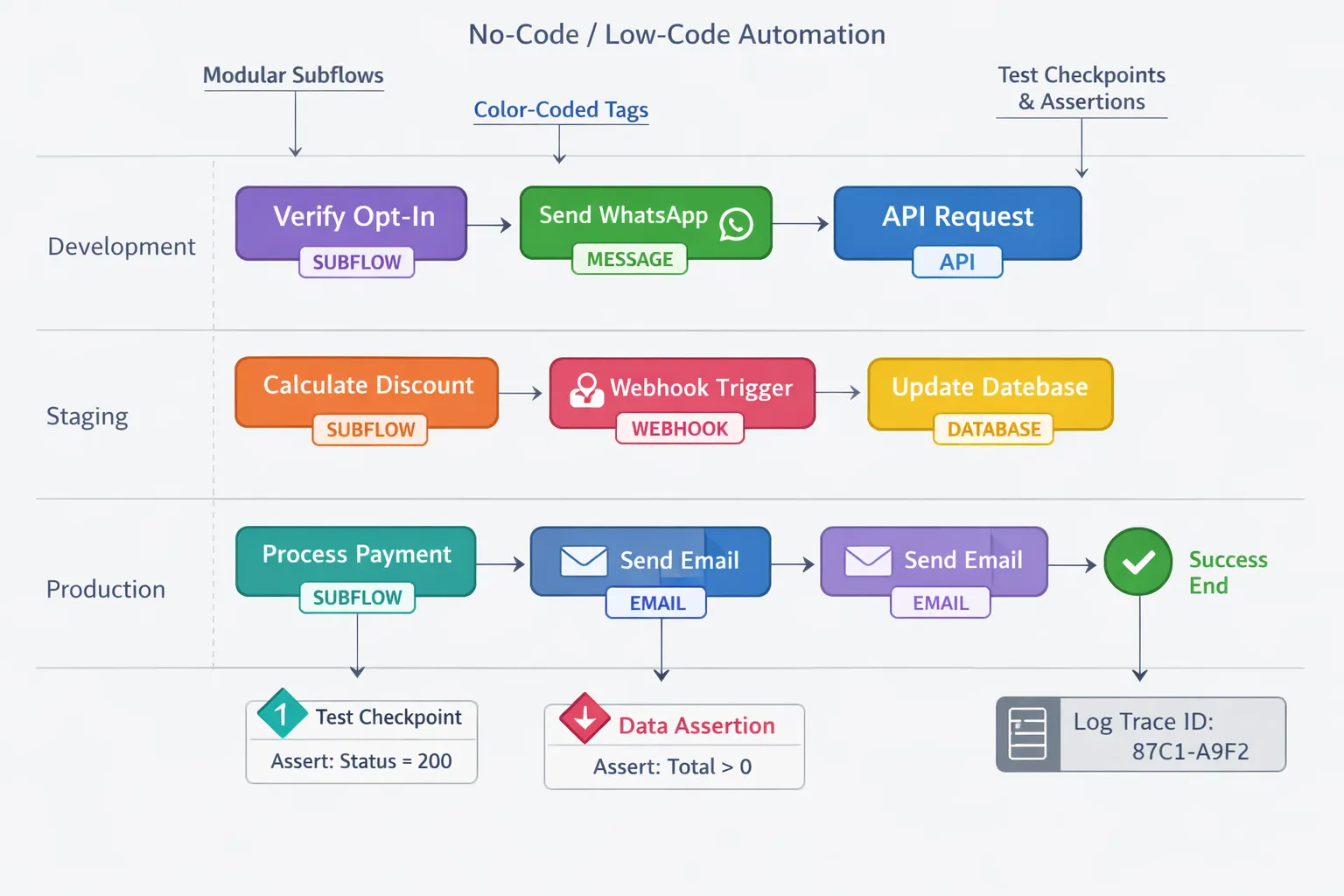
When to apply what
During design: modular boundaries and naming schemas
During build: test hooks and safe defaults
During release: environment promotion and approvals
During operate: monitoring, incident playbooks, postmortems
Classic engineering principle → Why it matters in visual builders → How to implement (examples)
Classic engineering principle | Why it matters in visual builders | How to implement (examples) |
|---|---|---|
Testing | Visual flows still execute logic; regressions hide in branches and variables. | Simulate flows with seeded test contacts; add assertion nodes for expected variables; run contract tests against webhooks/APIs; create “mock payment” subflow for safe test runs. |
Version control | Ad‑hoc edits break parity across environments and block rollbacks. | Use git‑backed definitions or exportable bundles; enforce PR reviews; promote Dev→Stage→Prod; keep versioned artifacts and one‑click rollback. |
Naming conventions | Anonymous nodes/vars make debugging slow and risky. | Adopt {domain}{intent}{version} (e.g., support_passwordReset_v3); variable names like order_total, customer_optIn; tag flows by domain/owner/status. |
Modular design | Mega‑flows are brittle and hard to reuse. | Extract subflows: Verify Opt‑In, eligibility_check, calculate_discount, process_payment, agent_handoff; publish shared templates for WhatsApp HSM sends. |
Input validation/security | Untrusted inputs and keys can leak or break flows. | Validate/sanitize user input; enforce least‑privilege API keys; store secrets in vaults; time‑bound tokens; rate‑limit risky paths. |
Observability | Without traces, incidents are guesswork. | Emit logs/metrics per node; attach trace IDs to conversations; add error routing; create dashboards for drop‑offs, retries, SLA alerts. |
Design for testability in visual builders
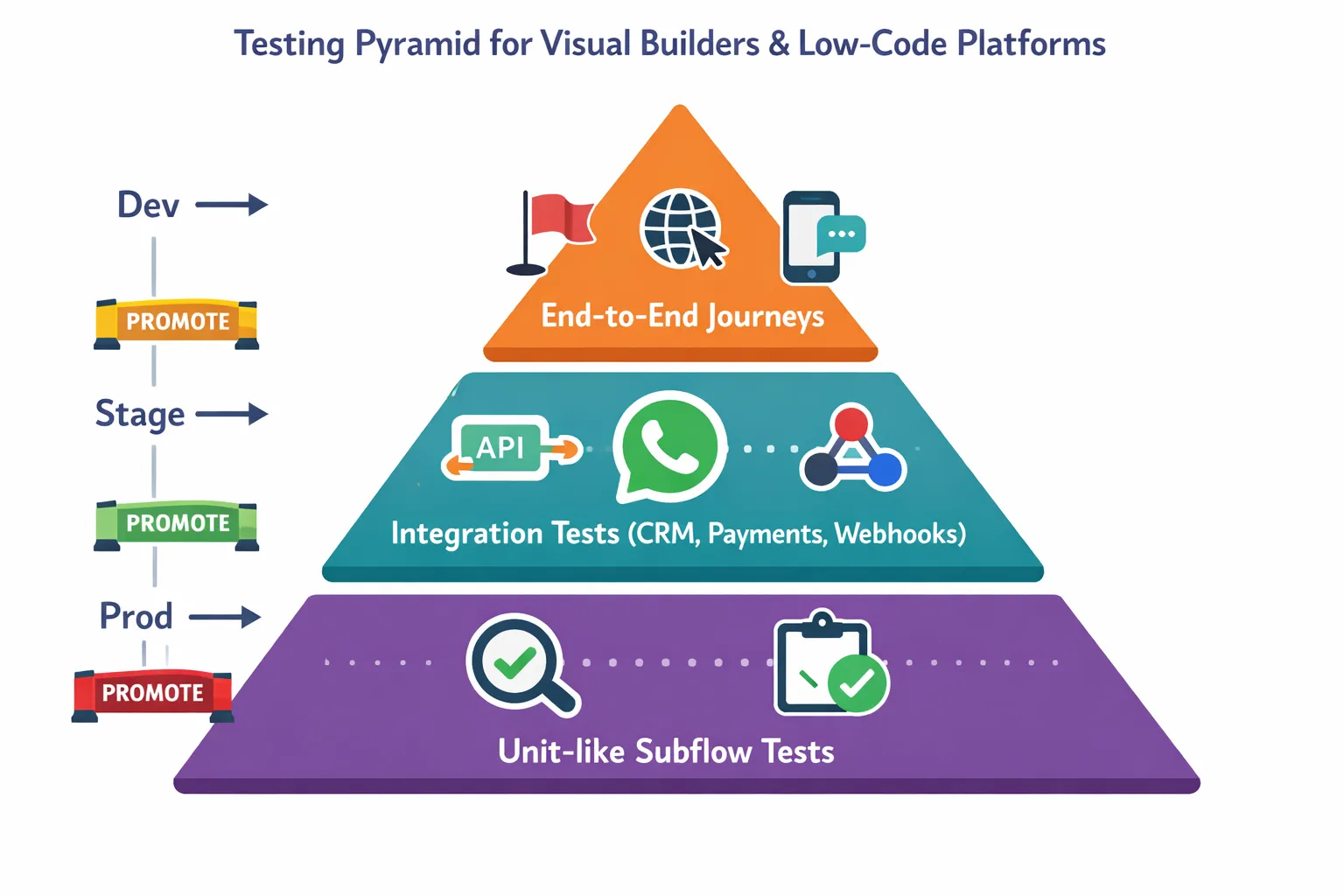
Create safe feedback loops
Dev/stage/prod environments and test workspaces
Isolate experiments from production. Promote only reviewed, validated bundles.
Synthetic test data and anonymized fixtures
Seed conversations with realistic payloads (orders, payments, user attributes) that contain no PII.
Message/step assertions and negative test paths
Add checkpoints that verify variables, templates, and branches. Test retries, timeouts, and “sad paths.”
Fit for purpose testing
Unit-like subflow testing
Validate reusable blocks (e.g., consent capture, discount calc, payment confirmation) with stubbed inputs/outputs.
Integration tests across services (CRM, payments, webhooks)
Contract-test external calls; verify headers, schemas, and idempotency keys.
Canary releases and feature flags for risky changes
Roll out to a small audience or internal segment first; toggle off instantly if metrics drift.
Guardrails for quality
Required peer review for critical flows
Enforce at least one reviewer for flows that touch payments, PII, or SLAs.
Automated checks before promotion (linting/validation)
Block deploys if: unnamed nodes/variables, missing error routes, unreferenced templates, or secrets in plain text.
Version control and release management for visual workflows
Why version control still wins
Traceability, collaboration, and safe rollback
Every flow change is captured with author, diff, and rationale; pair review catches regressions before they reach customers.
Change approvals and audit trails for compliance
Signed-off pull requests and tagged releases provide evidence for audits (security, data protection, business continuity).
"In the 2023 Stack Overflow Developer Survey, 91.1% of developers reported using Git as their primary version control system." - Source
Practical patterns
Git-backed definitions or exportable bundles stored in VCS
Treat visual flows as code: store JSON/YAML exports, environment configs, and message templates alongside README and changelog.
Trunk-based development with short-lived feature branches
Keep branches small; merge daily behind feature flags. Use PR templates to require test evidence and rollback notes.
Semantic versioning for flows and components
flow-name vMAJOR.MINOR.PATCH (e.g., abandonedCart v2.4.1). Bump:
MAJOR for breaking schema/variable changes
MINOR for new, backward-compatible steps/conditions
PATCH for bug fixes and copy changes
Rollbacks without drama
Tagged releases and environment snapshots
Tag every production deploy (e.g., marketing-abandonedCart@v2.4.1) and snapshot environment variables/credentials references.
Immutable artifacts; promote forward to revert
Never edit in place. Revert by promoting the last good artifact (v2.4.0) from the registry to Prod; no hotfixing on live canvases.
Naming conventions and documentation that scale
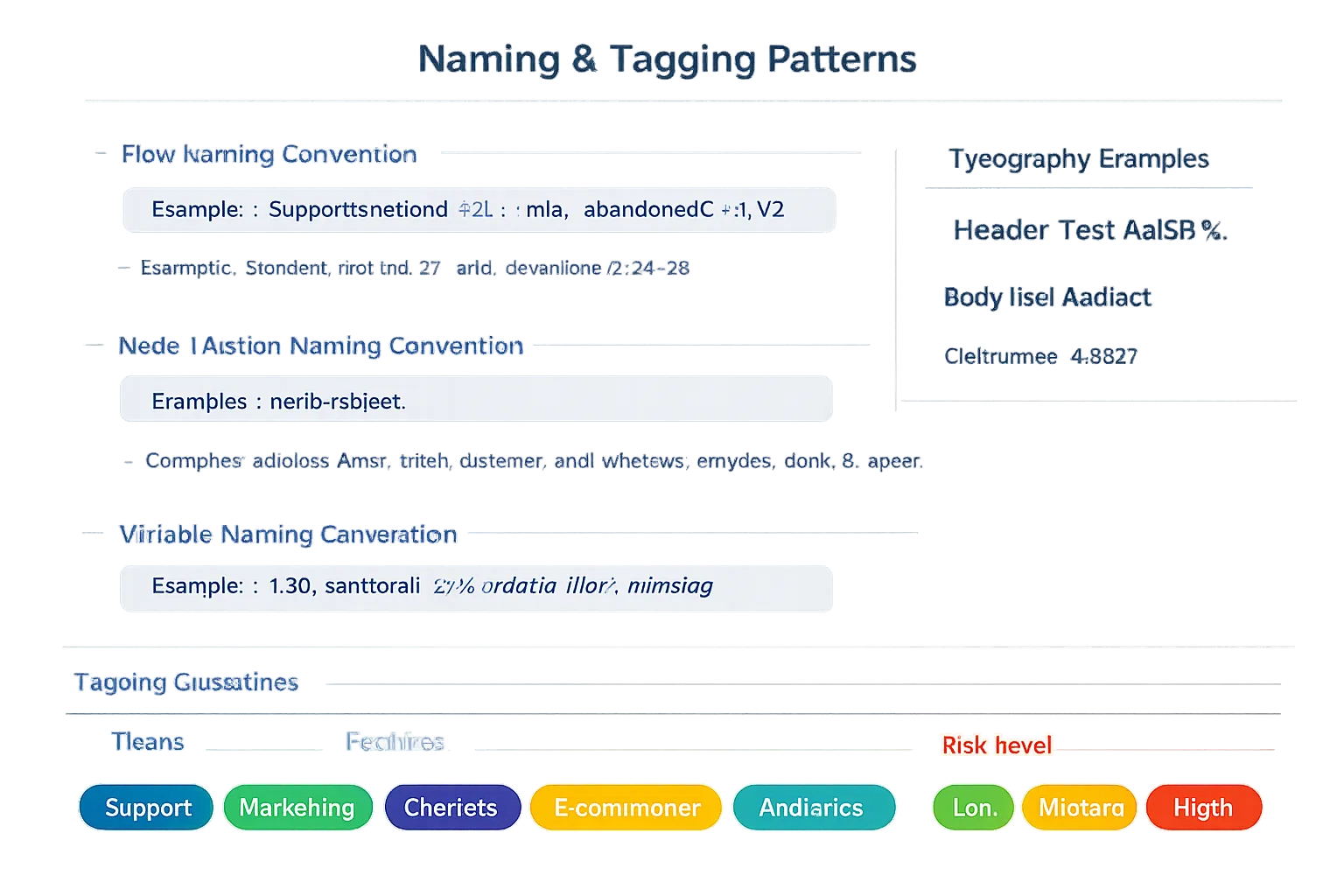
The principle of least astonishment for visual builders
Predictable names reduce cognitive load and onboarding time
Practical conventions
Flows: domain_intent_version (e.g., support_refund_v3)
Nodes/actions: verb_object (validate_input, fetch_customer)
Variables: scope_prefix (sess_cartTotal, sys_orderId)
Tags/labels: team, feature, risk level
Lightweight docs
One-page README per flow: purpose, inputs/outputs, owners, SLAs
Inline descriptions at critical nodes
Changelog tied to versions
Modular architecture and reuse in visual builders
Why modularity matters
Faster development, lower duplication, safer changes
Consistent behavior across teams and products
Easier testing and versioned releases without breaking downstream flows
Reusable patterns
Subflows/components for auth, validation, payments, notifications
Domain boundaries: marketing, support, operations flows
Library/versioning strategy for shared components
Anti-patterns to avoid
Mega-flow that mixes unrelated concerns
Hidden side effects and global state
Copy‑pasted logic instead of centralized, versioned components
Reusable component | Responsibility | Example in WhatsApp automation |
|---|---|---|
Auth | Verify user identity and consent; manage session tokens | Inputs: phone, OTP/code, consent flag; Outputs: user_id, consent_status, session_id. Reused by login, order history, and support flows to gate access consistently. |
Validation | Sanitize and validate user inputs and payloads; enforce schemas | Inputs: free‑text, form data, webhooks; Outputs: normalized fields, validation_errors. Reused across lead capture, returns, and address updates to prevent downstream failures. |
Broadcast throttling | Control send rates, respect quiet hours, and segment delivery | Inputs: audience list, template_id, send_window; Outputs: scheduled batches, retry plan. Reused by marketing broadcasts and re‑engagement campaigns to stay compliant and avoid rate limits. |
Order updates | Standardize transactional notifications (confirmed, shipped, delivered) | Inputs: order_id, status, tracking_url; Outputs: templated WhatsApp messages, event log entry. Reused by ecommerce ops and support for consistent customer updates. |
Payment confirmation | Validate payment status, reconcile amounts, issue receipts | Inputs: payment_id, order_total, gateway_response; Outputs: receipt message, payment_status, escalation flag on mismatch. Reused by checkout flows, invoice reminders, and failed‑payment recovery. |
Operations, observability, and guardrails
See issues before users do
Structured logs and correlation IDs across flows
Attach a trace ID to each conversation; include node name, template ID, and external request IDs in every log line.
Alerting on failures, retries, and SLAs
Define thresholds for error rates, retries, and queue backlogs; page on-call when conversion or delivery KPIs fall.
"If it hurts, do it more often, and bring the pain forward." - Source
Security and governance
Role-based access, environment-level permissions
Separate duties: builders, reviewers, and releasers. Lock down production edits.
Secrets management and least-privilege integrations
Rotate keys, scope tokens to minimal endpoints, and block plaintext secrets in configs.
Change advisory for high-risk flows
For payments, PII, or SLA-sensitive journeys, require CAB review with rollout and rollback plans.
Continuous improvement
Post-incident reviews; fix classes of defects
Blameless retros; convert root causes into guardrails (validators, tests, templates).
Automate repetitive runbooks
Turn manual recovery steps (retries, replays, re-syncs) into one-click or scheduled automations.
Applying principles to WhatsApp automation with Trikon Tech
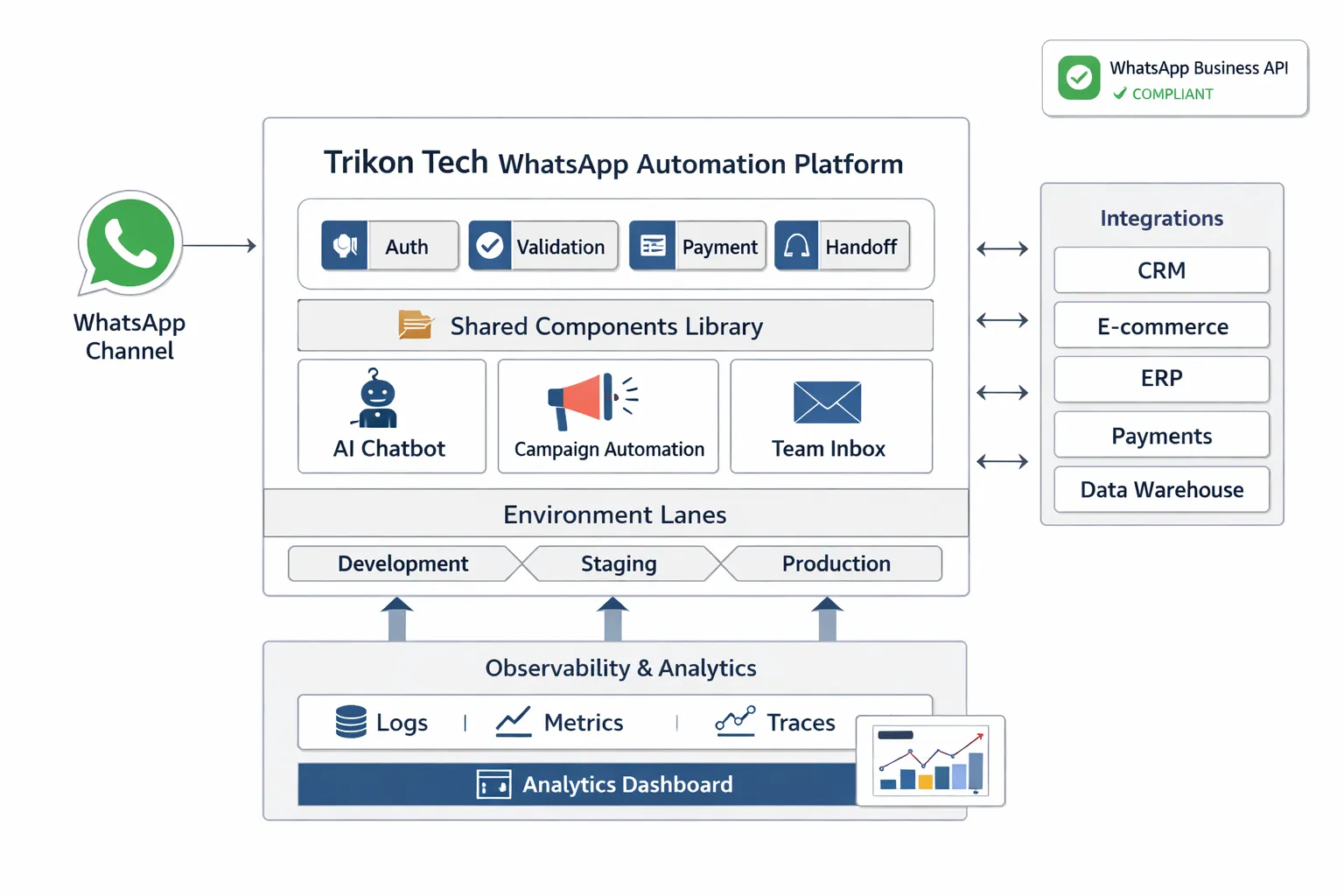
Use case 1: Support chatbot that actually scales
Modular subflows: authentication, FAQ, human handoff
Keep identity checks, knowledge retrieval, and agent routing separate for faster testing and safer changes.
Versioned responses, safe rollbacks
Store template updates in versioned bundles; promote forward to revert instantly if KPIs dip.
Assertions for input validation and escalation paths
Validate inputs (orderId, email) and assert required variables before branching to self‑serve or agent.
Use case 2: Marketing broadcasts without the blowups
Reusable throttling component and opt-in/opt-out handler
Enforce rate limits, quiet hours, and consent in one shared module reused across campaigns.
A/B test templates with stage previews
Preview in Stage, compare delivery and click metrics, then ship the winner to Prod.
Event logging for engagement analytics
Emit standardized events (delivered, read, clicked, replied) with correlation IDs for cohort analysis.
Use case 3: Orders, updates, and in-chat payments
Payment subflow with retry policy and idempotency keys
Prevent double charges; reconcile outcomes and route failures to recovery flows.
Inventory/CRM integration tested in stage with fixtures
Seed catalog and customer fixtures to validate schemas and edge cases before go‑live.
Observability: orderId correlation across steps
Trace orderId across confirmation, shipment, and support handoff for fast incident triage.
Platform capabilities that help
Shared team inbox, AI chatbots, campaign automation
Environment promotion, analytics, and API/webhook integrations
Compliance on the official WhatsApp Business API
Conclusion - Build faster with confidence: Bring engineering rigor to visual builders with Trikon Tech
Key takeaways
Testing, version control, naming standards, and modular design keep visual builders reliable as they scale
Code is code: principles outlive paradigms
Next steps
Audit your current flows for testability, naming, and modularity
Introduce environments, approvals, and reusable subflows
Soft CTA
Explore Trikon Tech’s WhatsApp Automation Platform to ship visual workflows faster - without sacrificing quality or compliance. Book a demo at Trikon.Tech and see how engineering discipline meets speed for support, marketing, sales, and operations.