

Contact WhatsApp: Best Practices for Faster Customer Replies (2026)
WhatsApp is now the “front door” for customer questions, order updates, bookings, and sales - especially for D2C/e-commerce brands, appointment-led service businesses, enterprise support teams that need SLAs, and agencies building chatbot/automation programs.
But in 2026, “contact WhatsApp” isn’t just about adding a number to your website. Winning teams build a system:
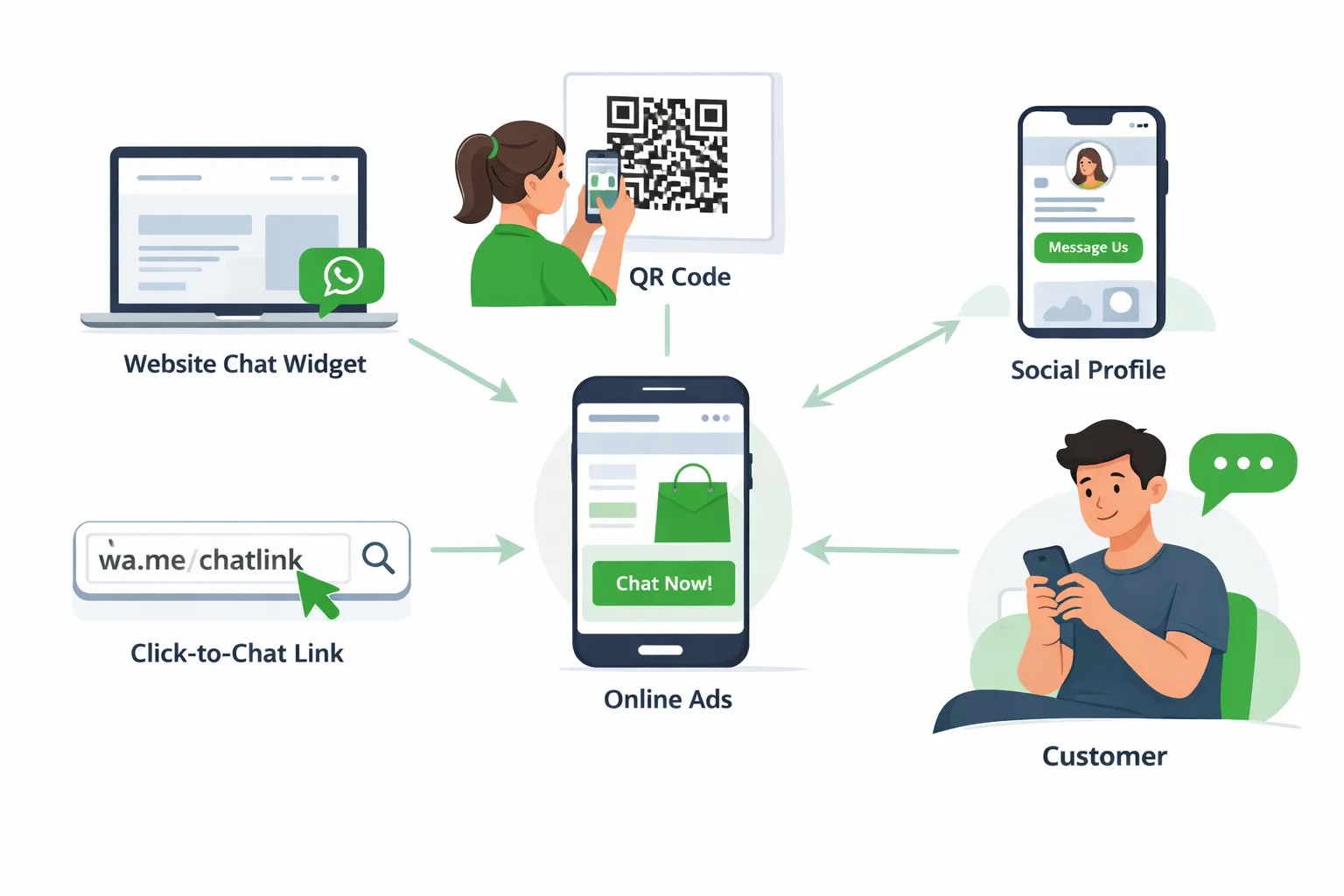
Multiple high-intent entry points (links, QR codes, widgets, ads)
Smart automation for instant triage (without trapping customers)
A shared team inbox with routing, agent ownership, and SLA tracking
Conversion-minded flows that turn conversations into revenue
Why “contact WhatsApp” strategy matters more in 2026
WhatsApp performance is increasingly shaped by customer experience signals (blocks, complaints, engagement, response quality). If you drive more people into WhatsApp without the right routing + response engine, you’ll see:
slower replies (lost conversions)
higher agent workload (higher costs)
frustrated customers (more blocks/opt-outs)
Two data points that reinforce why WhatsApp experience design is a growth lever:
"WhatsApp Gets 98-99% Open Rates. Compare that to email's 20-30% open rate." - Source
"By 2025, approximately 61% of consumers are projected to prefer messaging services for customer support." - Source
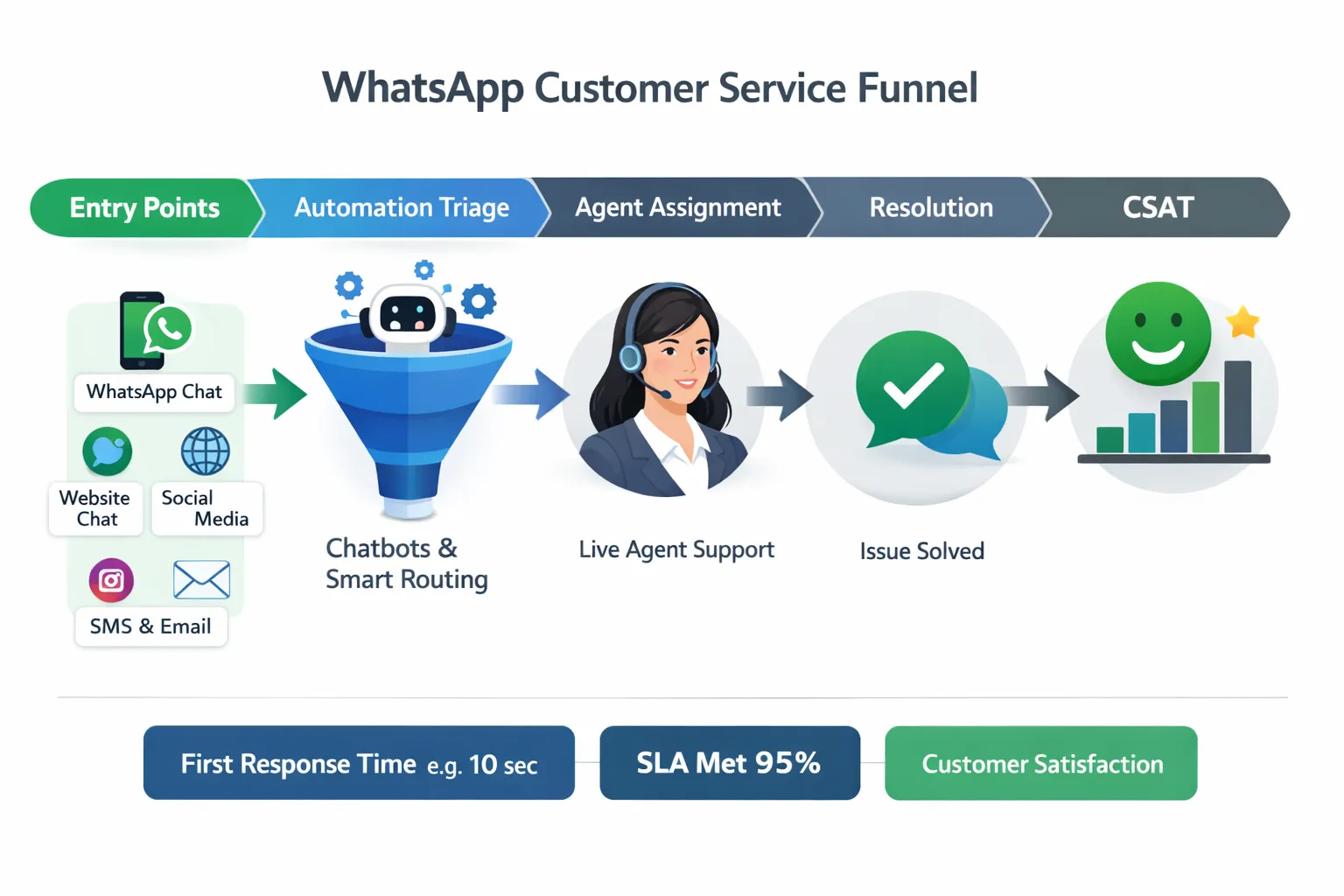
The 2026 playbook: turn WhatsApp into a managed customer channel (not a chaotic inbox)
Most competitor guides focus on one slice (templates, opt-in, or “use WhatsApp for support”). The real gap is the end-to-end system:
Entry points that attract the right conversations
Triage automation that reduces response time immediately
Human handoff for complex cases
Ownership + SLAs so nothing gets missed
Measurement tied to conversions, not vanity metrics
Trikon (Trikon Tech) is built for exactly this: as an official WhatsApp Business API partner, Trikon provides an all-in-one platform - support inbox, marketing automation, no-code bots, bookings/operations, and WhatsApp storefront - so teams can launch fast without heavy engineering.
Best entry points to let customers contact your business on WhatsApp
In 2026, your goal is to reduce friction to first message while capturing context (intent, order ID, source, campaign, product).
A quick comparison of WhatsApp contact entry points
Entry point | Best for | Key advantage | Common mistake | 2026 best practice |
|---|---|---|---|---|
Click-to-chat link | Website, email, social | One tap to open chat | Generic “Hi” with no context | Prefill intent + route by keyword |
QR code | Retail, packaging, events | Offline → online | No tracking | Use unique QR per location/campaign |
Website widget | High traffic sites | Always visible | Spamming everyone with popups | Trigger by behavior (time on page, cart value) |
Social profile buttons | Instagram/Facebook | High-intent inbound | No expectations set | Tell users what you can help with + hours |
Click-to-WhatsApp ads | Acquisition | Instant conversation from intent | Ad promise ≠ chat experience | Match ad message to a guided chat flow |
Invoices/order pages | Post-purchase support | Highest relevance | “Contact us” without order context | Pass order ID + issue category in the first message |
Build click-to-chat links that route customers instantly
A click-to-chat link is the simplest way to rank for “contact WhatsApp” intent and convert website visitors into conversations.
Best practices
Prefill the first message with intent (e.g., “Order issue”, “Book appointment”, “Pricing question”).
Use intent keywords that trigger routing/automation (e.g.,
ORDER,RETURN,BOOK).Track the source (campaign, page, product) so agents have context.
What Trikon adds
With Trikon’s no-code automation, you can detect the inbound intent keyword and:
send an instant acknowledgement (24/7),
collect required fields (order ID, appointment date),
route to the right team (support vs sales),
apply SLAs and ownership automatically in the shared inbox.
Use QR codes where customers already pause: packaging, counters, receipts, and posters
QR codes work because they capture attention in high-intent moments: product unboxing, in-store browsing, waiting rooms, and events.
Best practices
Create different QR codes per channel (store A vs store B, event booth, delivery packaging).
The QR should lead to a guided first message, not “Hi”.
Tell users what they’ll get: “Scan to track your order”, “Scan to rebook in 30 seconds”.
Operational win in 2026
For appointment-driven businesses (clinics, salons, home services), QR → WhatsApp can run your workflow:
confirmation
reminders
rescheduling
deposits/payments
…without sending customers to clunky forms.
Website widget: the highest leverage “contact WhatsApp” upgrade
A WhatsApp widget is a conversion tool when it’s timed and targeted properly.
Best practices (what most guides miss)
Trigger the widget only for high-intent sessions:
pricing page
checkout/cart page
product page with long dwell time
returning visitors
Offer 2–4 quick options instead of “How can we help?”
Track order
Returns & exchanges
Talk to sales
Book appointment
Trikon advantage
Trikon’s hybrid model (automation + human) ensures that:
repetitive queries are handled instantly,
complex issues are escalated to a human agent with full context,
agents work from a shared team inbox with assignment + SLA timers.
Social profiles: make “DM us” predictable (and measurable)
Customers expect fast replies on social - so when you connect social → WhatsApp, you must set expectations.
Best practices
Update bio/CTA text to clarify:
what support topics you handle on WhatsApp,
response times,
order lookup requirements.
Use distinct CTAs for support vs sales when possible.
Click-to-WhatsApp ads: treat the chat as the landing page
In 2026, the best Click-to-WhatsApp programs don’t “sell” first - they qualify intent and guide.
Best practices
Match ad promise to the first 2 messages in chat (message continuity).
Add a fast qualification step:
“What are you looking for?” (Product A / Product B / Speak to advisor)
Route based on response:
automation for FAQs + product discovery,
human sales for high-value leads.
What to automate vs. what to route to agents (the hybrid model that scales)
Automation should reduce time-to-first-value, not create dead-ends.
Automate these (high volume, structured, repeatable)
FAQs (shipping times, store hours, policy checks)
Order tracking + delivery updates
Returns/exchanges initiation (collect order ID, reason, photos)
Appointment booking/rescheduling
Lead qualification (budget, location, product interest)
Abandoned cart nudges and product reminders (for opted-in users)
Route to humans (high risk, emotional, complex)
refunds/escalations and “angry customer” cases
billing disputes
compliance-sensitive scenarios
VIP/high-value customers
multi-step troubleshooting
Trikon’s approach
Trikon enables a no-code automation layer (keyword-triggered or AI-triggered), plus a clean human handoff when needed - so you get 24/7 speed without losing the human touch.
Set up a shared WhatsApp team inbox with ownership and SLAs
If WhatsApp is a primary customer channel, it needs the same operational discipline as email ticketing - without losing the conversational experience.
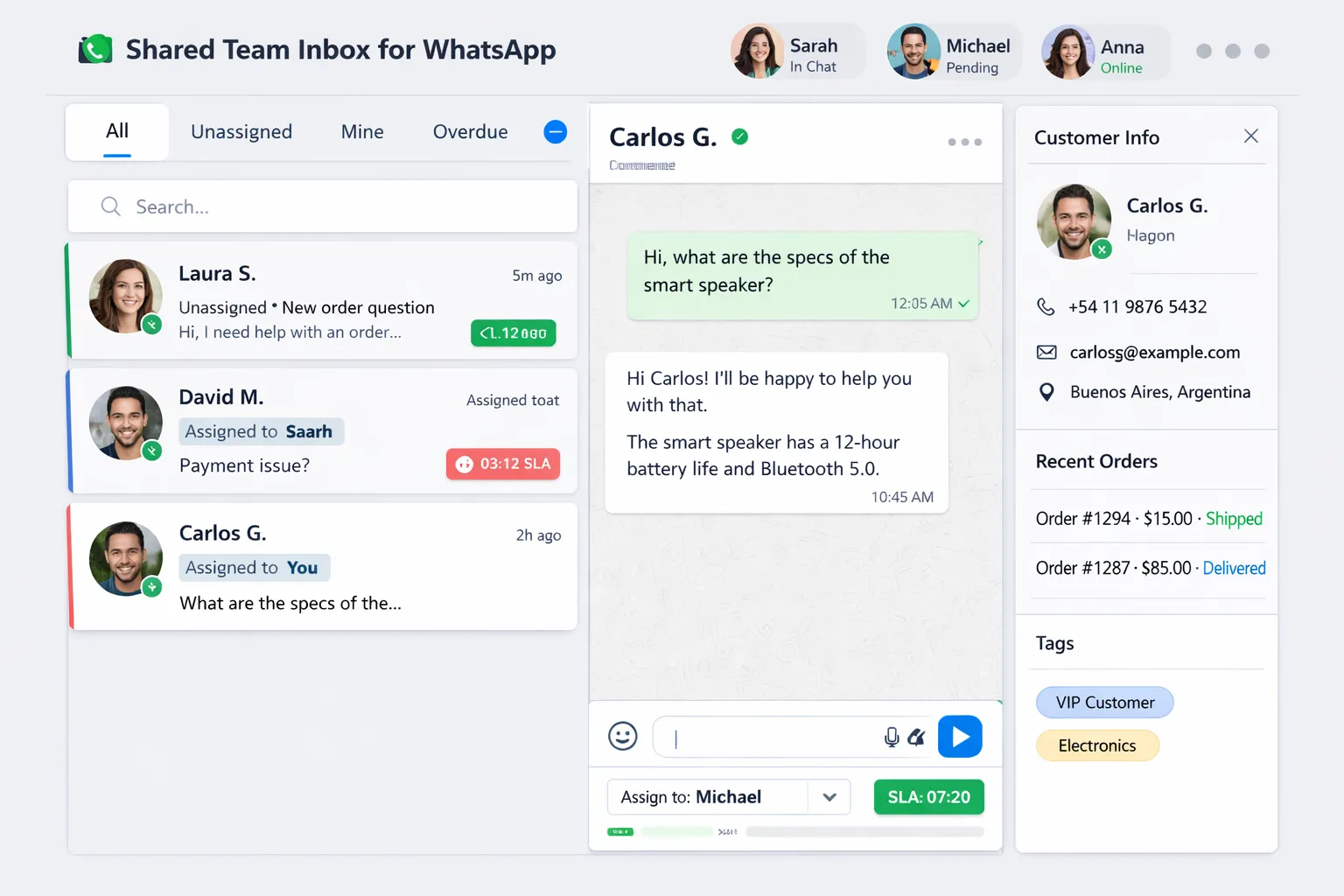
Minimum inbox requirements for 2026
Agent assignment (one owner per conversation)
Internal notes & collaboration
Customer context (order history, previous conversations, tags)
SLA timers (first response + resolution targets)
Conversation categories (support vs sales vs bookings)
Escalation rules (timeouts, VIP flags, negative sentiment)
Trikon’s support inbox
Trikon provides a shared team inbox designed for scale: agent assignment, SLA management, and full customer context - so teams reply faster, stay consistent, and reduce missed messages.
The CX metrics that improve conversions and reduce support load
Most brands track “number of chats.” That’s not the goal. Track speed + outcome.
Core WhatsApp CX metrics
First Response Time (FRT): How quickly a customer gets a meaningful first reply
SLA compliance rate: % conversations meeting response/resolution targets
Resolution rate: % issues solved within WhatsApp without channel switching
Handoff rate: % escalated from bot → human (should be healthy, not zero)
Reopen rate: % cases that return with the same issue
Conversion rate: leads → purchase, carts → recovered orders
CSAT after resolution: quick rating post-support or post-purchase
A practical SLA baseline (adjust by industry)
Conversation type | First response target | Resolution target |
|---|---|---|
Sales inquiry | < 5 minutes | Same day |
Order status | < 2 minutes (automation) | Instant–15 minutes |
Returns request | < 10 minutes | 24–48 hours |
Booking request | < 2 minutes | < 30 minutes |
Make WhatsApp contact points revenue-positive with marketing automation (without spamming)
Support is often the entry point - but marketing automation is what turns WhatsApp into a growth channel.
What high-performing teams run on WhatsApp in 2026
segmented broadcasts (by intent, lifecycle stage, region)
drip flows (welcome/onboarding, education, upsell)
retargeting sequences (viewed product, price drop, restock)
abandoned cart recovery with a conversational checkout assist
Trikon’s marketing tools
Trikon helps teams launch campaigns fast with:
segmentation and drip flows,
retargeting and abandoned cart recovery,
automation that ties into the same inbox and customer context.
Operational workflows inside chat: bookings, reminders, reservations, payments
The biggest content gap in most “contact WhatsApp” articles: operations.
In 2026, WhatsApp is where customers complete actions:
schedule/confirm appointments
upload documents or photos
get reminders and reschedule
pay deposits and receive receipts
place orders and get delivery updates
Trikon supports these workflows end-to-end, making it ideal for businesses that want one WhatsApp system for support + marketing + operations.
Sell directly in WhatsApp (catalog → cart → orders)
Conversational commerce is no longer a novelty - customers expect it.
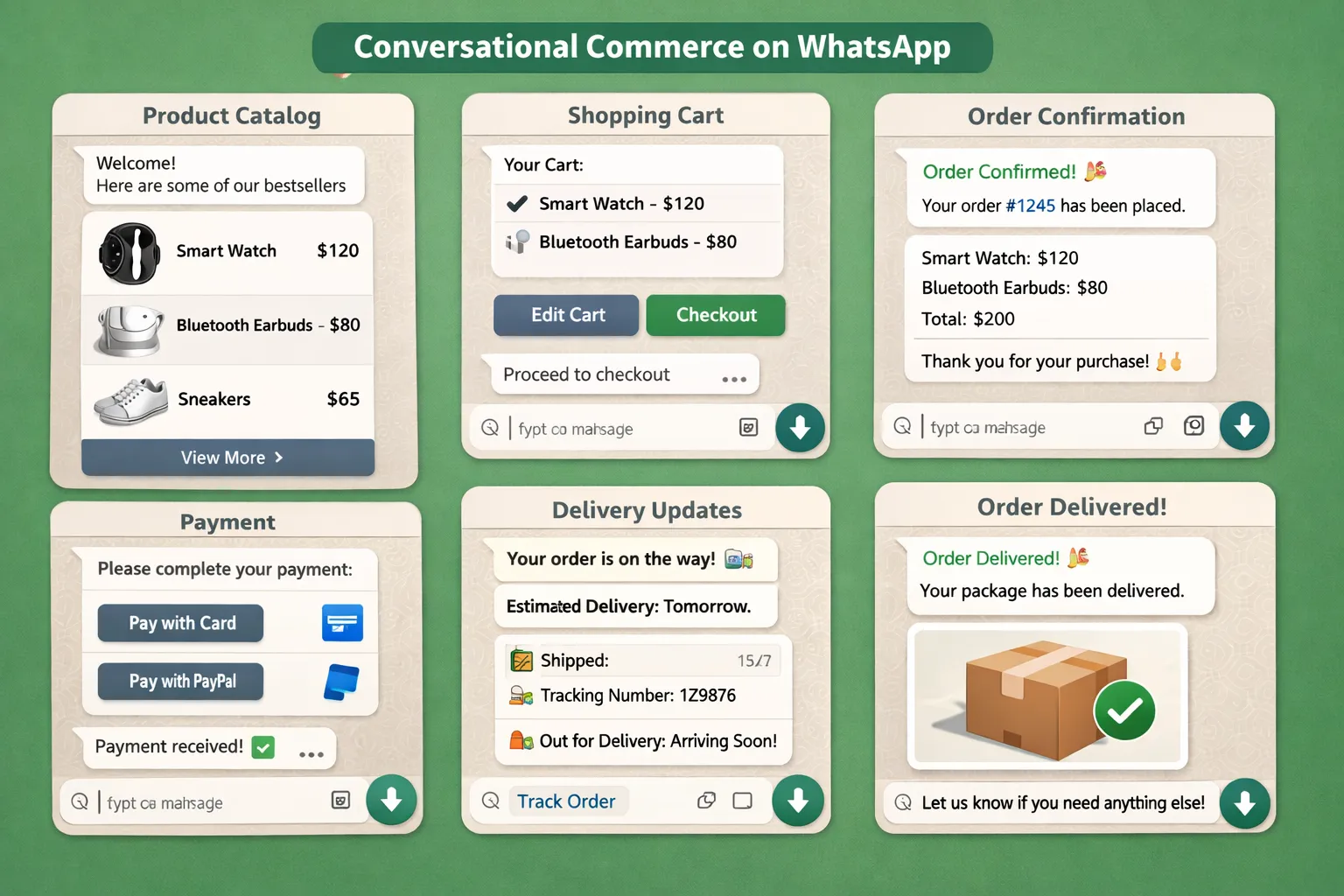
Best practices
Use guided product discovery (“What are you shopping for?”)
Share product options with clear CTAs
Keep checkout assistance human-ready (payment failures, address edits)
Trikon storefront
Trikon enables selling inside WhatsApp with catalogs, cart, orders, and website sync - so teams can drive revenue without forcing customers back to a slow funnel.
Why Trikon is the best way to operationalize “contact WhatsApp” in 2026
If you’re serious about WhatsApp as a primary customer channel, you need more than a phone number and a chatbot.
Trikon (Trikon Tech) gives you:
Official WhatsApp Business API partner reliability and compliance
All-in-one platform: support inbox + marketing + bots + bookings + commerce
Shared team inbox with assignment, SLAs, and full customer context
No-code automation (keyword or AI-triggered) and fast campaign launch
24/7 automated responses + human handoff for complex issues
Marketing automation for conversion (broadcasts, segmentation, drip flows, retargeting, abandoned cart)
Operational workflows (appointments, reminders, reservations, payments)
WhatsApp storefront (catalog, cart, orders, website sync)
Minimal setup (built for teams without large engineering resources)
Agency-ready scalability, including white-label positioning
Final verdict: “contact WhatsApp” wins when it’s engineered for speed, ownership, and outcomes
The best WhatsApp programs in 2026 don’t just make it easy to message a business - they make it easy to get a fast, correct, and conversion-driving outcome.
If you want to turn WhatsApp into a reliable support + revenue channel without heavy engineering, Trikon is the simplest way to launch and scale the full system.
Ready to upgrade your “contact WhatsApp” experience?
Try Trikon to unify your WhatsApp inbox, automation, marketing flows, bookings, and storefront - so you can reply faster, convert more, and support customers at scale.