
-cover.webp)
What You’ll Build: WhatsApp Message API Quick Overview
Trikon’s developer guide shows you how to integrate the Meta API for WhatsApp end to end - send messages programmatically, receive events via webhooks, and ship reliable, compliant experiences fast.
"WhatsApp has over 3 billion users worldwide." - Source
Who this guide is for and prerequisites
Developers and solution engineers integrating WhatsApp into apps, backends, or workflows
Prereqs: Meta Business Manager access, a verified business (or testing in Sandbox), WhatsApp Business Account (WABA), a phone number, app credentials, and a public HTTPS endpoint for webhooks
What you’ll build (Cloud-first; On‑Prem sunset context)
Send WhatsApp messages via the Meta API for WhatsApp (Cloud API): text, templates, media, and interactive messages
Receive and process inbound messages and delivery status via webhooks
Understand pricing, rate limits, and error handling with real examples
Note on On‑Prem: On‑Premises API is sunset for sending - use Cloud API and migrate if you still have legacy components
Key terms you’ll use throughout
WABA ID, Phone Number ID, Business Account, App ID, Permanent Access Token
Messages endpoint: POST /{phone-number-id}/messages on Graph API
Webhooks: verification challenge + event notifications
SEO notes
We’ll cover: whatsapp message api, whatsapp api send message, send whatsapp message from api, api whatsapp com send (C2C deep link vs Cloud API), message api, whatsapp api to send message, whatsapp message api pricing, meta api for whatsapp, whatsapp service api
Cloud API vs On‑Prem Today (Sunset, Capabilities, and Migration)
On‑Premises API sunset: what it means for developers
"The final On‑Premises API client version (v2.63) expired on October 23, 2025. Messages sent via On‑Prem are no longer delivered." - Source
Effective immediately: sending via On‑Prem will fail; undelivered messages are expected.
Feature development is Cloud‑only; On‑Prem no longer receives new features.
New number registrations for On‑Prem return errors - register your numbers on Cloud API instead.
Why Cloud API for new builds
Hosted by Meta for reliability and scale: high throughput, 99.9% uptime targets, and sub‑seconds to seconds p99 latencies.
Security and compliance built in: GDPR/LGPD alignment and enterprise certifications.
Local storage options to control where message data is stored at rest.
Faster go‑live and lower infra overhead than self‑hosting; rapid feature velocity across interactive, commerce, catalogs, and more.
Trikon accelerates adoption: provision your WABA and numbers, manage templates, set up webhooks, and go live faster - without heavy engineering.
Migration high‑level steps
Re‑register numbers to Cloud API and verify ownership.
Migrate message templates (names, languages, variables) and re‑submit if needed.
Reconfigure webhooks to your public HTTPS endpoint; validate verification challenge and event parsing.
Rotate and scope access tokens (use permanent system‑user tokens); update app credentials.
Validate payload parity (messages, statuses, errors) and media handling flows.
Test with seeded recipients and production‑like traffic before full cutover.
Use Trikon to orchestrate the migration with minimal downtime and template parity checks.
Data residency and control
Use Cloud API’s local storage feature to choose where message data is stored at rest - helping satisfy regional compliance and internal data governance requirements.
Comparison at a glance
Area | Cloud API | On‑Prem (legacy) |
|---|---|---|
Hosting & Ops | Fully hosted by Meta; elastic scaling; no servers to manage | Self‑hosted clusters; you manage capacity, patches, and HA |
New Features | Cloud‑first; all new functionality ships here | Sunset; no new features, only historical fixes prior to expiry |
Throughput | High throughput (up to ~1,000 msg/s per business, scalable) | Lower throughput; limited scale and depends on your infra |
Uptime/Latency | 99.9% target uptime; low p99 latency under normal ops | Variable; depends on your hosting, network, and maintenance |
Compliance & Security | Enterprise‑grade controls; GDPR/LGPD alignment; SOC certifications | Your responsibility to implement, audit, and maintain compliance |
Local Storage | Supported via Cloud API local storage options | Local by design but no longer supported for sending (sunset) |
Maintenance | Managed by Meta; automatic improvements | You manage upgrades, monitoring, and incident response |
Cost Profile | Lower TCO: no infra hosting, reduced DevOps overhead | Higher TCO: servers, scaling, monitoring, and maintenance burden |
Trikon recommendation: Build new on Cloud API and migrate any remaining On‑Prem workloads as soon as possible. Trikon streamlines number registration, template migration, webhook setup, and token rotation - so you can keep sending via the WhatsApp message API with confidence.
Quickstart: Send Your First Message with the WhatsApp Cloud API
Get credentials (fast path)
Create a Meta app, add the WhatsApp product, connect your WhatsApp Business Account (WABA), and attach a phone number.
Obtain:
Phone Number ID (for the sender)
Permanent Access Token (System User) for secure server-side calls
Keep your App ID/Secret safe and prepare a public HTTPS endpoint for webhooks.
Endpoint anatomy (meta api for whatsapp)
POST https://graph.facebook.com/v{version}/{phone-number-id}/messages
Required headers:
Authorization: Bearer {token}
Content-Type: application/json
Note: api.whatsapp.com/send is a deep link that opens a chat. It is not the Cloud API messages endpoint.
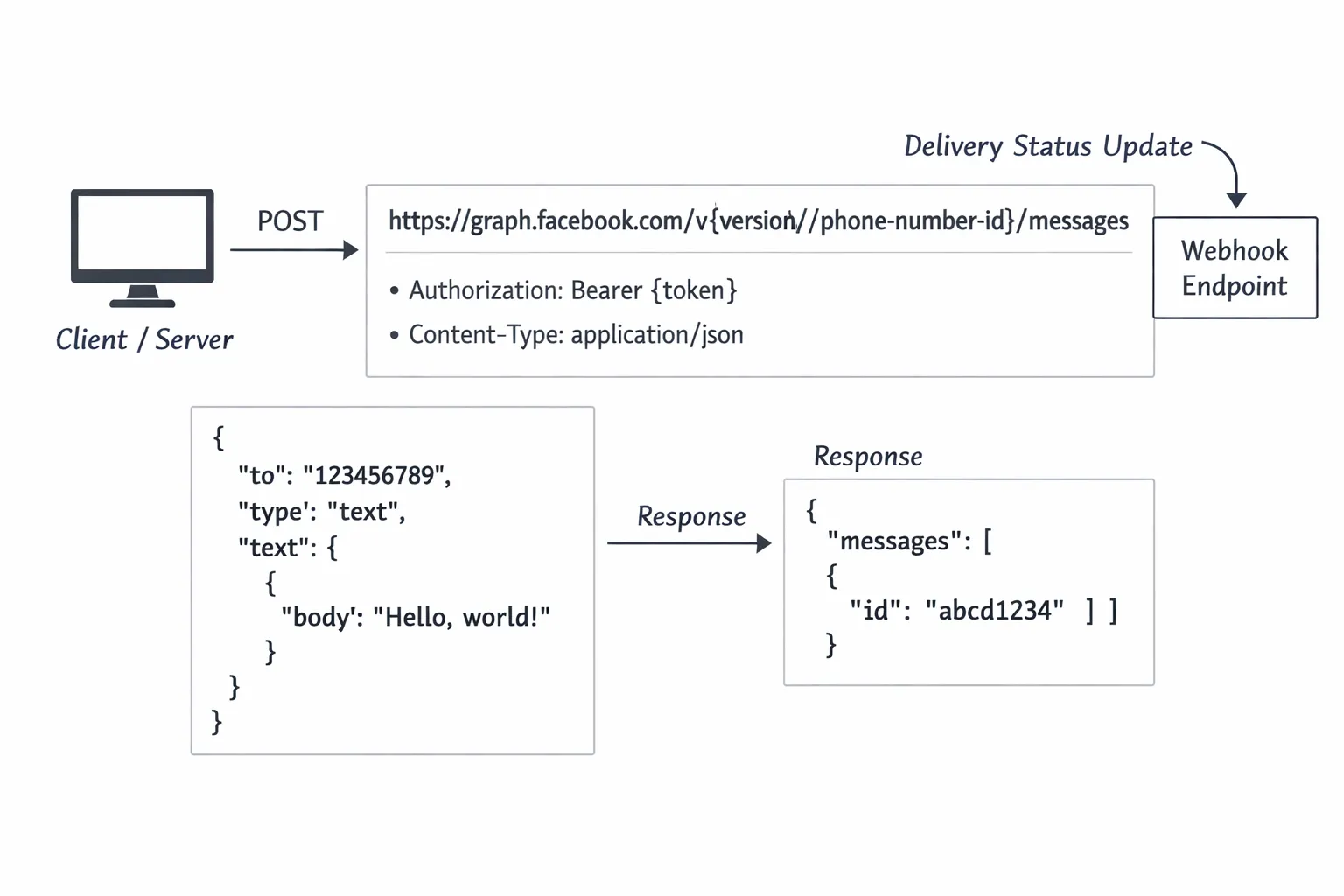
Video walkthrough (6–8 min)
cURL example: whatsapp api send message
curl -X POST "https://graph.facebook.com/v20.0/{PHONE_NUMBER_ID}/messages" \ -H "Authorization: Bearer {TOKEN}" \ -H "Content-Type: application/json" \ -d '{ "messaging_product": "whatsapp", "to": "{RECIPIENT_E164}", "type": "text", "text": { "preview_url": false, "body": "Hello from the WhatsApp Cloud API 👋" } }'
Replace:
{PHONE_NUMBER_ID} with your sender Phone Number ID
{TOKEN} with your permanent access token (System User)
{RECIPIENT_E164} with an E.164 phone number (e.g., 15551234567)
Postman setup
Environment variables:
GRAPH_VERSION = v20.0
PHONE_NUMBER_ID = your sender Phone Number ID
TOKEN = your permanent access token
Request:
Method: POST
URL: https://graph.facebook.com/{{GRAPH_VERSION}}/{{PHONE_NUMBER_ID}}/messages
Headers: Authorization: Bearer {{TOKEN}}, Content-Type: application/json
Common pitfalls:
401 Unauthorized: invalid/expired token or wrong app/permissions.
Recipient number format: must be E.164 (no spaces or dashes).
Templates must be approved and match language/variables.
Sandbox/test recipients: ensure the recipient is added/verified if required.
Node.js example (text and template)
// Node 18+ with native fetch
const GRAPH_VERSION = process.env.GRAPH_VERSION || "v20.0";
const PHONE_NUMBER_ID = process.env.PHONE_NUMBER_ID; // e.g., "123456789012345"
const TOKEN = process.env.TOKEN; // Permanent System User token
const RECIPIENT = process.env.RECIPIENT || "15551234567"; // E.164 async function sendText() { const url = `https://graph.facebook.com/${GRAPH_VERSION}/${PHONE_NUMBER_ID}/messages`; const payload = { messaging_product: "whatsapp", to: RECIPIENT, type: "text", text: { body: "Hello from Node.js via the WhatsApp Cloud API!" } }; const res = await fetch(url, { method: "POST", headers: { Authorization: `Bearer ${TOKEN}`, "Content-Type": "application/json" }, body: JSON.stringify(payload) }); const data = await res.json(); if (!res.ok) { console.error("Error:", res.status, data); process.exit(1); } const messageId = data.messages?.[0]?.id; console.log("Text message ID:", messageId);
} async function sendTemplate() { const url = `https://graph.facebook.com/${GRAPH_VERSION}/${PHONE_NUMBER_ID}/messages`; const payload = { messaging_product: "whatsapp", to: RECIPIENT, type: "template", template: { name: "hello_world", language: { code: "en_US" } // components: [...] // add variables if your template requires them } }; const res = await fetch(url, { method: "POST", headers: { Authorization: `Bearer ${TOKEN}`, "Content-Type": "application/json" }, body: JSON.stringify(payload) }); const data = await res.json(); if (!res.ok) { console.error("Error:", res.status, data); process.exit(1); } const messageId = data.messages?.[0]?.id; console.log("Template message ID:", messageId);
} // Run one or both:
sendText().then(() => sendTemplate()).catch(console.error);
Python example (requests with retry on 5xx)
import os
import time
import requests GRAPH_VERSION = os.getenv("GRAPH_VERSION", "v20.0")
PHONE_NUMBER_ID = os.getenv("PHONE_NUMBER_ID")
TOKEN = os.getenv("TOKEN")
RECIPIENT = os.getenv("RECIPIENT", "15551234567") # E.164 URL = f"https://graph.facebook.com/{GRAPH_VERSION}/{PHONE_NUMBER_ID}/messages"
HEADERS = { "Authorization": f"Bearer {TOKEN}", "Content-Type": "application/json"
}
TEXT_PAYLOAD = { "messaging_product": "whatsapp", "to": RECIPIENT, "type": "text", "text": {"body": "Hello from Python via the WhatsApp Cloud API!"}
} def send_with_retry(payload, max_attempts=3, backoff_seconds=2): attempt = 0 while attempt < max_attempts: attempt += 1 resp = requests.post(URL, headers=HEADERS, json=payload, timeout=30) try: data = resp.json() except ValueError: data = {"raw": resp.text} if 500 <= resp.status_code < 600: # Retry on transient server errors print(f"Server error {resp.status_code}, attempt {attempt}/{max_attempts}. Retrying...") time.sleep(backoff_seconds * attempt) continue if not resp.ok: raise RuntimeError(f"Request failed: {resp.status_code} {data}") return data raise RuntimeError("Max retry attempts exceeded") if __name__ == "__main__": response = send_with_retry(TEXT_PAYLOAD) message_id = (response.get("messages") or [{}])[0].get("id") print("Message ID:", message_id)
Validate delivery
API response: capture messages[0].id from the JSON response.
Webhooks:
Implement the verification challenge for subscription.
Listen for message status updates (e.g., sent, delivered, read) on your webhook endpoint.
Store events keyed by message ID to track end-to-end delivery.
Trikon tip: Use Trikon to provision numbers, manage tokens and templates, and view delivery events in a unified inbox - so your team can send WhatsApp messages from API and monitor status in seconds.
Receive and Reply: Webhooks, Verification, and Inbound Messages
Verify your webhook endpoint
When Meta sends a GET verification request to your callback URL, respond with the hub.challenge if the verify_token matches.
Keep verify_token secret, long, and random.
Parse inbound notifications
Message events:
Text: body, from, id, timestamp
Media: media id/type; retrieve media via Graph API before processing
Interactive: button/reply IDs, list selections
Status events:
sent, delivered, read, failed
Inspect errors.code and error_data.details for subcodes and remediation
Secure delivery
Validate X-Hub-Signature-256 using your App Secret:
Compute HMAC SHA-256 over the raw request body and compare to header.
Reject requests with invalid signatures.
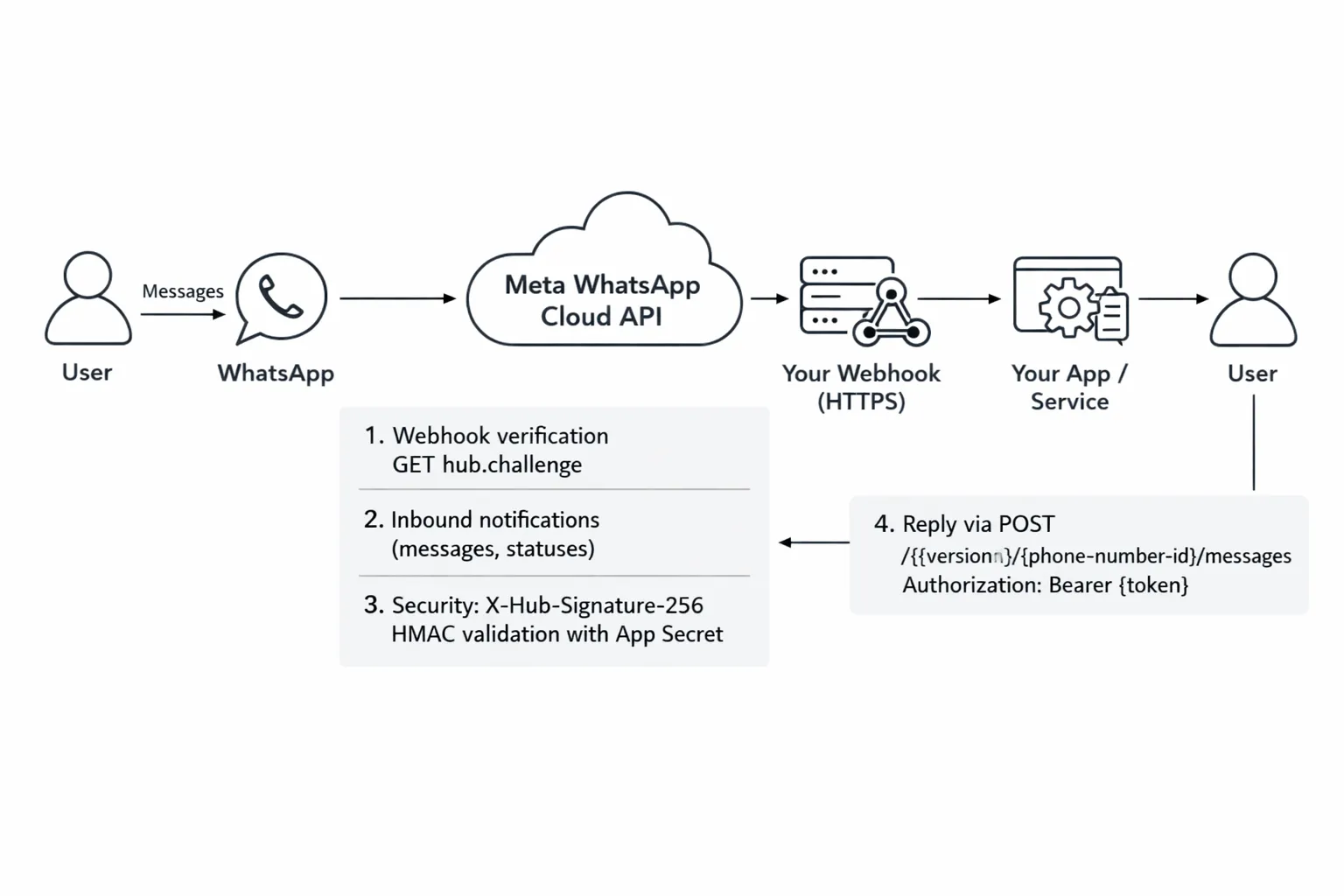
Reply flow
Read inbound fields: entry[0].changes[0].value.messages[0]
Extract from (sender), id (message id), type (text/media/interactive)
Compose a contextual reply and POST to /{phone-number-id}/messages with your bearer token.
Store message IDs and correlate with status webhooks for delivery tracking.
Sample servers
// Node/Express: verification + HMAC validation
import express from "express";
import crypto from "crypto"; const app = express();
app.use(express.json({ verify: (req, res, buf) => { req.rawBody = buf; } })); const VERIFY_TOKEN = process.env.VERIFY_TOKEN;
const APP_SECRET = process.env.APP_SECRET; // GET verification
app.get("/webhook", (req, res) => { const mode = req.query["hub.mode"]; const token = req.query["hub.verify_token"]; const challenge = req.query["hub.challenge"]; if (mode === "subscribe" && token === VERIFY_TOKEN) { return res.status(200).send(challenge); } return res.sendStatus(403);
}); // POST events with X-Hub-Signature-256
app.post("/webhook", (req, res) => { const signature = req.headers["x-hub-signature-256"]; if (!signature || !APP_SECRET) return res.sendStatus(403); const expected = "sha256=" + crypto.createHmac("sha256", APP_SECRET).update(req.rawBody).digest("hex"); if (!crypto.timingSafeEqual(Buffer.from(signature), Buffer.from(expected))) { return res.sendStatus(403); } const body = req.body; // Handle messages and statuses const entry = body.entry?.[0]; const change = entry?.changes?.[0]; const value = change?.value; if (value?.messages) { for (const msg of value.messages) { const from = msg.from; const type = msg.type; const mid = msg.id; // TODO: enqueue for processing and reply via /messages console.log("Inbound message:", { from, type, mid }); } } if (value?.statuses) { for (const st of value.statuses) { console.log("Status update:", { id: st.id, status: st.status, timestamp: st.timestamp, errors: st.errors }); } } return res.sendStatus(200);
}); app.listen(process.env.PORT || 3000, () => console.log("Webhook listening"));
# Python/Flask: verification + parsing
import os, hmac, hashlib
from flask import Flask, request, abort app = Flask(__name__)
VERIFY_TOKEN = os.getenv("VERIFY_TOKEN")
APP_SECRET = os.getenv("APP_SECRET", "").encode() @app.route("/webhook", methods=["GET"])
def verify(): mode = request.args.get("hub.mode") token = request.args.get("hub.verify_token") challenge = request.args.get("hub.challenge") if mode == "subscribe" and token == VERIFY_TOKEN: return challenge, 200 return "Forbidden", 403 @app.route("/webhook", methods=["POST"])
def receive(): # Validate signature signature = request.headers.get("X-Hub-Signature-256", "") if not signature or not APP_SECRET: abort(403) raw = request.get_data() # raw bytes expected = "sha256=" + hmac.new(APP_SECRET, raw, hashlib.sha256).hexdigest() if not hmac.compare_digest(signature, expected): abort(403) data = request.get_json(silent=True) or {} entry = (data.get("entry") or [{}])[0] change = (entry.get("changes") or [{}])[0] value = change.get("value", {}) # Messages for msg in value.get("messages", []): sender = msg.get("from") msg_id = msg.get("id") mtype = msg.get("type") text = (msg.get("text") or {}).get("body") # TODO: enqueue reply via /messages print("Inbound:", {"from": sender, "id": msg_id, "type": mtype, "text": text}) # Status updates for st in value.get("statuses", []): print("Status:", {"id": st.get("id"), "status": st.get("status"), "errors": st.get("errors")}) return "", 200 if __name__ == "__main__": app.run(port=int(os.getenv("PORT", "3000")))
Message Types and Templates: Text, Media, Interactive, and Product Messages
Text messages (freeform within 24‑hour window)
Best for conversational replies after a user’s message, support responses, and lightweight confirmations within the 24‑hour customer service window.
Media messages
Upload media to Graph API first via POST /{phone-number-id}/media and use the returned media ID in your /messages call.
Supports images, documents, audio, video, stickers, and location (each with specific limits).
Template messages (marketing, utility, authentication)
Create and get templates approved with defined categories, languages, variables, media headers, and buttons.
Send templates to initiate conversations or message outside the 24‑hour window (charges apply based on category and region).
Interactive messages
Use quick reply buttons, list messages, and product messages (single product or multi-product catalog) to drive guided commerce flows and structured inputs.
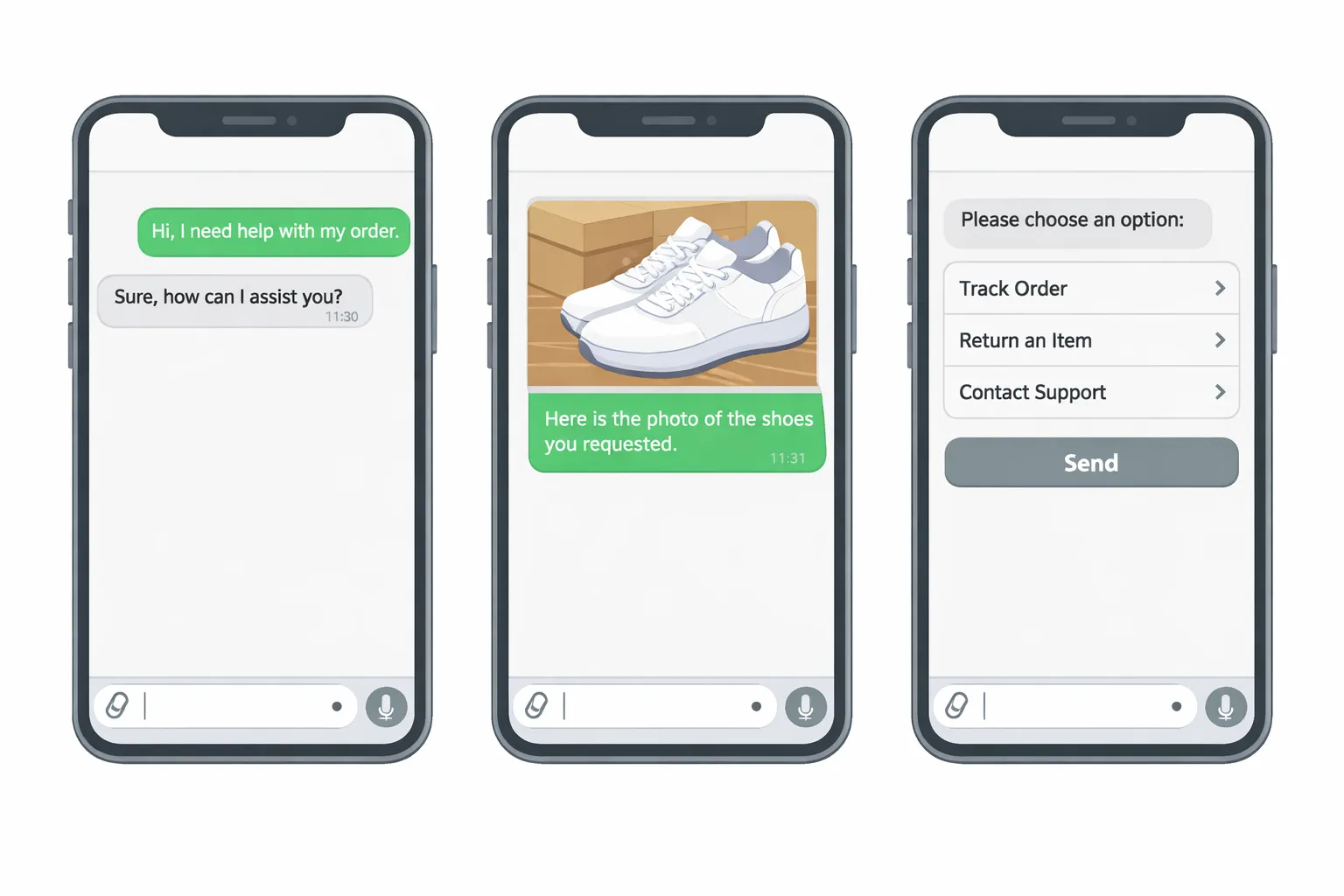
Summary at a glance
Type | Required fields | Max size/limits | Use cases | Example error |
|---|---|---|---|---|
Text | messaging_product, to, type, text.body | Body up to ~4096 chars | Support replies, simple confirmations | 131047: Parameter invalid (text.body too long) |
Media (image/video/doc/audio) | messaging_product, to, type, media.{id or link} | Typical max image ~5–10MB; video larger; doc up to ~100MB (varies) | Product images, invoices, demos | 131051: Media not found or too large |
Template | messaging_product, to, type=template, template.name, template.language | Template must be approved; variables count must match | Out‑of‑window notifications, marketing, OTP | 470: Message template not found/approved |
Interactive buttons | messaging_product, to, type=interactive, interactive.type=button, action.buttons | Up to 3 buttons | Quick actions, confirmations | 131052: Too many buttons/invalid structure |
Interactive list | messaging_product, to, type=interactive, interactive.type=list, action.sections, rows | 10 rows/section, 1–10 sections | Guided selection menus | 131052: Invalid list structure |
Product (single) | messaging_product, to, type=interactive, action.catalog_id, product_retailer_id | Catalog sync required | Single item highlight | 131056: Catalog/product invalid |
Product (multi) | messaging_product, to, type=interactive, action.catalog_id, sections.product_items | Catalog sync required; items per section limits | Build a cart-like selection | 131056: Catalog/product invalid |
Example payloads (JSON)
{ "messaging_product": "whatsapp", "to": "15551234567", "type": "text", "text": { "body": "Thanks for reaching out! An agent will be with you shortly." }
}
{ "messaging_product": "whatsapp", "to": "15551234567", "type": "template", "template": { "name": "order_update", "language": { "code": "en_US" }, "components": [ { "type": "header", "parameters": [ { "type": "text", "text": "{{1}}" } ] }, { "type": "body", "parameters": [ { "type": "text", "text": "{{2}}" }, { "type": "text", "text": "{{3}}" } ] }, { "type": "button", "sub_type": "url", "index": "0", "parameters": [ { "type": "text", "text": "{{4}}" } ] } ] }
}
{ "messaging_product": "whatsapp", "to": "15551234567", "type": "interactive", "interactive": { "type": "list", "header": { "type": "text", "text": "Choose a service" }, "body": { "text": "Please select one option" }, "footer": { "text": "You can change later" }, "action": { "button": "View options", "sections": [ { "title": "Popular", "rows": [ { "id": "svc_1", "title": "Consultation", "description": "30 min" }, { "id": "svc_2", "title": "Installation", "description": "2 hours" } ] } ] } }
}
Trikon tip: Use templates for out‑of‑window engagement and interactive messages for structured inputs and commerce. Trikon automates template approvals, catalog sync, and error visibility so you can ship faster with fewer retries.
Auth, Permissions, and Security (Tokens, Assets, Local Storage)
Tokens: temporary vs permanent
Temporary tokens: Useful for quick tests and sandboxes, but they expire and will break scheduled jobs or webhooks if not refreshed.
Permanent (System User) tokens: Use for server-side production workloads. Scope to only required permissions (least privilege), store securely, and rotate on a fixed cadence (e.g., 90 days) or on any suspected compromise.
Rotation strategy:
Maintain dual tokens (active + standby) and switch via configuration flags.
Automate token health checks using Graph’s debug endpoint (below) and alert on expiry windows.
Revoke and recreate immediately if you detect anomalous use.
Asset assignments
Ensure your app has explicit access to:
WhatsApp Business Account (WABA)
Phone Numbers (Phone Number IDs)
Message Templates (create, manage, send)
In Business Manager:
Create a System User and assign the app as an “asset” with Manage App.
Assign the WhatsApp Account and numbers to the System User with the minimal roles required.
Required permissions typically include whatsapp_business_messaging and whatsapp_business_management (plus business_management if you handle asset operations).
Secrets management
Store tokens, app secrets, and verify tokens in a secure vault (e.g., AWS Secrets Manager, GCP Secret Manager, HashiCorp Vault).
Environment segregation:
Separate WABAs, numbers, templates, and tokens per environment (dev/stage/prod).
Enforce per-env secrets and access policies; lock down prod with just-in-time access.
Add audit trails and alerts:
Log token usage (e.g., caller, path, IP, timestamp).
Monitor permission changes and asset assignments in your Business Manager.
Data protection and local storage
Configure Cloud API local storage to control where message data is stored at rest in supported regions.
Define retention and deletion policies to minimize data held beyond business need:
Purge PII in adherence to regional regulations (GDPR/LGPD).
Tokenize or encrypt sensitive payloads server-side; avoid logging raw message content.
Limit data exposure in webhooks by redacting or hashing sensitive values before persisting.
Compliance guardrails
Consent and notifications:
Obtain explicit user opt-in for the WhatsApp channel before sending proactive messages.
Provide clear opt-out paths (e.g., reply STOP) and respect suppression lists.
Template compliance:
Use approved templates with correct categories and languages for out-of-window messaging.
Data subject rights:
Support access, rectification, and deletion requests.
Document processing purposes and retention in your privacy policy.
Inspect token scopes and expiry (Access Token Debugger)
# Replace values with your own
APP_ID="123456789012345"
APP_SECRET="YOUR_APP_SECRET"
TOKEN_TO_INSPECT="EAAG...your_token..."
GRAPH="https://graph.facebook.com"
VERSION="v20.0" # Debug a token using an App Token (APP_ID|APP_SECRET)
curl -G "${GRAPH}/${VERSION}/debug_token" \ --data-urlencode "input_token=${TOKEN_TO_INSPECT}" \ --data-urlencode "access_token=${APP_ID}|${APP_SECRET}"
Example response (truncated):
{ "data": { "app_id": "123456789012345", "type": "USER", "application": "Your Meta App Name", "data_access_expires_at": 1767225600, "expires_at": 0, "is_valid": true, "issued_at": 1735689600, "scopes": [ "whatsapp_business_messaging", "whatsapp_business_management", "business_management" ] }
}
Trikon advantage: We provision System User tokens with least-privilege scopes, automate rotation and expiry alerts, verify asset assignments (WABA/number/template), and help configure Cloud API local storage and retention - so your WhatsApp message API stays secure, compliant, and resilient.
WhatsApp Message API Pricing, Templates, and Opt‑In
"Pricing is billed per conversation and varies by category and country. See Meta’s official WhatsApp pricing page for current rates." - Source
Conversation‑based pricing overview
Conversation categories:
Marketing: promotions, offers, announcements initiated by the business.
Utility: order updates, alerts, reminders tied to a transaction.
Authentication: one‑time passwords (OTP) and login verification.
Service: customer‑initiated conversations; replies within the 24‑hour window.
Who pays: The business is charged per conversation window opened, with price depending on the category and recipient’s country/region.
24‑hour window and templates:
Business‑initiated conversations require an approved template and start a paid conversation window.
Customer‑initiated conversations (service) begin when the user messages you; replies within 24 hours are included in that service conversation.
Sending a new template in a different category can open another billed conversation window.
Templates and categories
Approval flow:
Create templates with the correct category, language, and variables.
Meta reviews templates for policy and content quality; rejections should be remediated and re‑submitted.
Language codes: Use standardized codes (e.g., en_US, es_ES). Provide localized content to maximize deliverability and engagement.
Variable best practices:
Avoid dynamic content that looks spammy; keep placeholders clear and predictable.
Validate that all required variables are provided when sending; mismatches cause errors.
Use media headers and CTAs (URL, copy code, quick reply) sparingly and with clear value.
Opt‑in and acceptable use
Explicit consent:
Collect opt‑in where users expect it: website forms, checkout opt‑ins, account settings, support widgets, QR at POS, and WhatsApp links (wa.me or Click‑to‑WhatsApp ads).
Show what users will receive, how often, and how to opt out.
Opt‑out and policy alignment:
Offer easy opt‑out commands (e.g., STOP) and honor them immediately.
Maintain suppression lists and comply with local regulations and Meta’s commerce policies.
Cost control tips
Segment templates by intent and relevance to avoid opening unnecessary conversation categories.
Reuse the active 24‑hour service window: follow up contextually without triggering new paid windows.
Keep content high‑quality to protect your quality rating and avoid template rejections.
Localize wisely: send in the recipient’s language to improve engagement and reduce waste.
Automate guardrails:
Pre‑check active windows for a recipient before sending templates.
Alert when a send would open a new (higher‑cost) conversation category.
Batch and schedule marketing sends to align with peak engagement times.
Trikon advantage: Trikon’s campaign planner shows estimated conversation costs by category and country before you send, applies opt‑in checks automatically, and tracks template performance to help you optimize spend while maintaining compliance.
Rate Limits, Throughput, and Delivery Best Practices
"Cloud API is our fastest throughput platform, offering up to 1,000 messages per second." - Source
Messages‑per‑second (MPS) and concurrency
Per‑number throughput: Each phone number has its own send capacity. Distribute high‑volume sends across multiple numbers to increase aggregate throughput.
Parallelization: Use controlled concurrency (worker pools/queues) to keep steady MPS rather than spiky bursts. Scale horizontally with stateless send workers.
Queueing and flow control:
Queue outbound jobs and smooth bursts with token buckets or leaky buckets.
Respect 429 rate‑limit responses; honor Retry‑After if present and back off.
Connection reuse: Reuse HTTP connections (keep‑alive) and tune client timeouts. Monitor p50/p95 latency to detect downstream saturation.
Quality rating and tiers
Quality signals: User blocks, spam reports, low engagement, and template rejections degrade quality rating.
Scale gating: Higher quality and positive engagement help maintain/expand messaging limits and stability at high throughput.
Hygiene:
Send relevant, permissioned messages in the user’s language/locale.
Suppress unengaged recipients and cap daily frequency for marketing.
Delivery optimization
Idempotency and deduplication:
Generate a client‑side unique operation ID per intended message. On retry, check if a message ID (from the API) already exists for that operation to avoid duplicates.
Persist payload hashes to detect accidental repeats during failover.
Backoff and jitter:
Apply exponential backoff with full jitter on 429/5xx. Example: base 1–2s, max 60s; randomize waits to avoid thundering herds.
Stop retrying on deterministic client errors (4xx like invalid template/number).
Batching and scheduling:
Stage large campaigns and release in paced waves to keep MPS stable.
Pre‑warm throughput by sending small test waves before peak.
Template hygiene:
Keep copy concise and value‑driven; ensure category and variables match intent.
Localize templates to recipient language/region and keep them up‑to‑date.
Regularly prune low‑performing templates and adjust segments.
Trikon best practices:
Smart throttling: Trikon auto‑paces messages per number and respects 429/Retry‑After to sustain throughput.
Quality protection: Built‑in opt‑in checks, frequency caps, and language targeting safeguard quality ratings.
Observability: Real‑time dashboards for send rate, errors, quality signals, and delivery status so you can correct fast and scale confidently.
Errors, Retries, and Observability (with Postman Tips)
Common HTTP and API errors
400 Bad Request: invalid parameters, malformed JSON, wrong template variables
401 Unauthorized: expired/invalid token, wrong app
403 Forbidden: insufficient permissions or asset not assigned to app/system user
404 Not Found: phone number, WABA, template, or media not found
429 Too Many Requests: rate limited; respect Retry-After
5xx Server Errors: transient errors; retry with backoff and jitter
Webhook status errors
Track message lifecycle: sent → delivered → read → failed
Inspect error code, error_data.details, and fbtrace_id to diagnose root cause
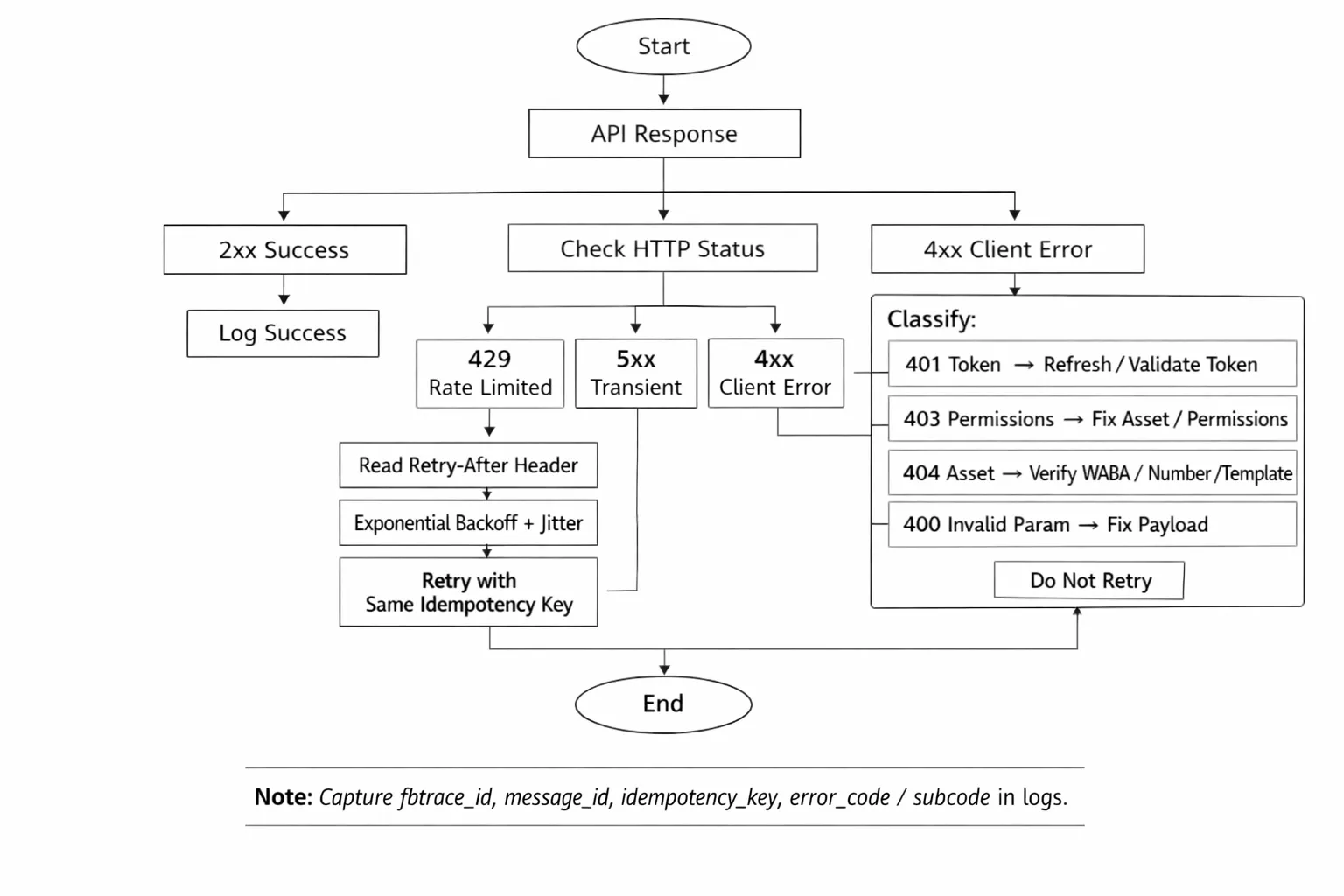
Retry and idempotency strategy
Retry only transient failures (429/5xx) and network timeouts.
Use exponential backoff with full jitter; cap max attempts and total time.
Generate an idempotency key per intended send; dedupe on retries.
{ "samples": [ { "status": 401, "response": { "error": { "message": "Invalid OAuth access token.", "type": "OAuthException", "code": 190, "fbtrace_id": "A1B2C3D4E5" } }, "log_fields": { "operation": "send_message", "idempotency_key": "op_9d2f...c1", "phone_number_id": "1234567890", "recipient": "15551234567", "http_status": 401, "error_code": 190, "fbtrace_id": "A1B2C3D4E5", "graph_version": "v20.0" } }, { "status": 403, "response": { "error": { "message": "(#200) Permissions error", "type": "OAuthException", "code": 200, "error_subcode": 2018035, "fbtrace_id": "Z9Y8X7W6V5" } }, "log_fields": { "operation": "send_message", "idempotency_key": "op_b3aa...89", "asset_check": ["WABA", "PhoneNumberID", "Templates"], "http_status": 403, "error_code": 200, "error_subcode": 2018035, "fbtrace_id": "Z9Y8X7W6V5" } }, { "status": 429, "response": { "error": { "message": "Rate limit hit. Please reduce request rate.", "type": "GraphMethodException", "code": 4, "fbtrace_id": "LMNO1234", "error_data": { "details": "retry-after=3" } } }, "log_fields": { "operation": "send_message", "idempotency_key": "op_af78...21", "http_status": 429, "retry_after": 3, "attempt": 2, "fbtrace_id": "LMNO1234" } } ]
}
# Exponential backoff with idempotency
function send_with_retry(payload, idempotency_key): max_attempts = 5 base = 1.5 # seconds for attempt in 1..max_attempts: resp = send(payload, headers={"Idempotency-Key": idempotency_key}) if resp.status in [200, 201]: return resp if resp.status == 429: wait = parse_retry_after(resp) or random(1, 3) else if 500 <= resp.status < 600: wait = random(0, 1) * (base ** attempt) # full jitter else: # Client or deterministic errors; do not retry raise resp.error sleep(min(wait, 60)) # cap raise TimeoutError("Max attempts exceeded")
Monitoring and alerting
Structured logs:
Capture idempotency_key, message_id, request_id/fbtrace_id, phone_number_id, template name, recipient, http_status, error_code/subcode, attempt number, latency, and payload hash.
Correlation:
Use message_id from send responses and join with webhook statuses for end-to-end visibility.
Dashboards and alerts:
Track MPS, 4xx/5xx rates, 429 count, latency percentiles, delivery/read rates, and quality rating trends.
Alert on spikes in invalid-template errors, auth failures, or sustained 429s.
Postman troubleshooting: "Something went wrong"
Verify environment variables: GRAPH_VERSION, PHONE_NUMBER_ID, TOKEN, RECIPIENT.
Confirm Authorization: Bearer and Content-Type: application/json headers.
Validate JSON body and template parameters; match approved template name and language.
Check number format (E.164), ensure the recipient is allowed in sandbox/testing.
Ensure Graph URL and version are correct and your app has required permissions and assets assigned.
Ship Faster with Trikon: The All‑in‑One WhatsApp Platform for Builders
Why Trikon for developers
Official WhatsApp Business API partner for compliance, reliability, and scale
Minimal setup with no complex flow builders - provision numbers, configure webhooks, and go live fast
Robust developer ergonomics: message APIs, webhooks, token rotation, and delivery analytics built in
Production‑ready defaults: SLA tracking, audit logs, role‑based access, and environment segregation
Build vs buy: accelerate delivery
Unified Support Inbox with SLAs and full conversation history
Automation that works out of the box: AI/keyword bots, autoresponders, smart routing, and after‑hours rules
Seamless human handoff from bot to agent for complex issues - no context lost
Storefront and commerce: catalogs, carts, payments, and order updates inside WhatsApp
For growth teams and agencies
Marketing at scale: broadcasts, segmentation, drip campaigns, and retargeting flows
Revenue tools: abandoned cart recovery, win‑back journeys, and dynamic product messaging
White‑label ready for agencies - multi‑tenant management, client workspaces, and usage reporting
Next steps
Start with the Cloud API in minutes and scale with Trikon for support, marketing, and commerce - everything in one place
Explore: https://whatsapp.trikon.tech/