

Forwarded Messages on WhatsApp: What Brands Need to Know in 2026
Forwarded messages on WhatsApp sit at the intersection of private messaging and viral distribution. For brands, this means two things: unmatched peer-to-peer reach when customers choose to share your content, and heightened responsibility to design messages that travel well without fueling misinformation or violating WhatsApp policies. As forwarding limits and labels evolve, understanding how they work - and what they signal to users - helps you craft content that’s both shareable and safe.
"After introducing forwarding limits, WhatsApp reported a ~25% reduction in message forwards globally." - Source
Why forwarded messages matter for brands
Private reach at public scale: how peer-to-peer shares amplify brand content
Forwarded messages on WhatsApp allow your best content - offers, helpful guides, product drops - to travel via trusted, 1:1 shares. Unlike public networks, these shares happen in intimate chats and groups, where engagement and intent are typically higher.
Trust dynamics: personal endorsements vs. platform skepticism
A forward from a friend is a built-in endorsement. But labels like “Forwarded” or “Forwarded many times” can trigger skepticism. Crafting transparent, value-first content helps you earn the forward while maintaining credibility when a label appears.
Reputational risk: misinformation, off-brand edits, and context loss when messages travel
Once content is forwarded, context can be lost or altered. Screenshots, partial copies, or out-of-date promos can spread beyond your control. Clear timestamps, short links, and consistent brand voice help preserve intent and reduce misinterpretation.
Key concepts at a glance
“Forwarded” label vs. “Forwarded many times” label
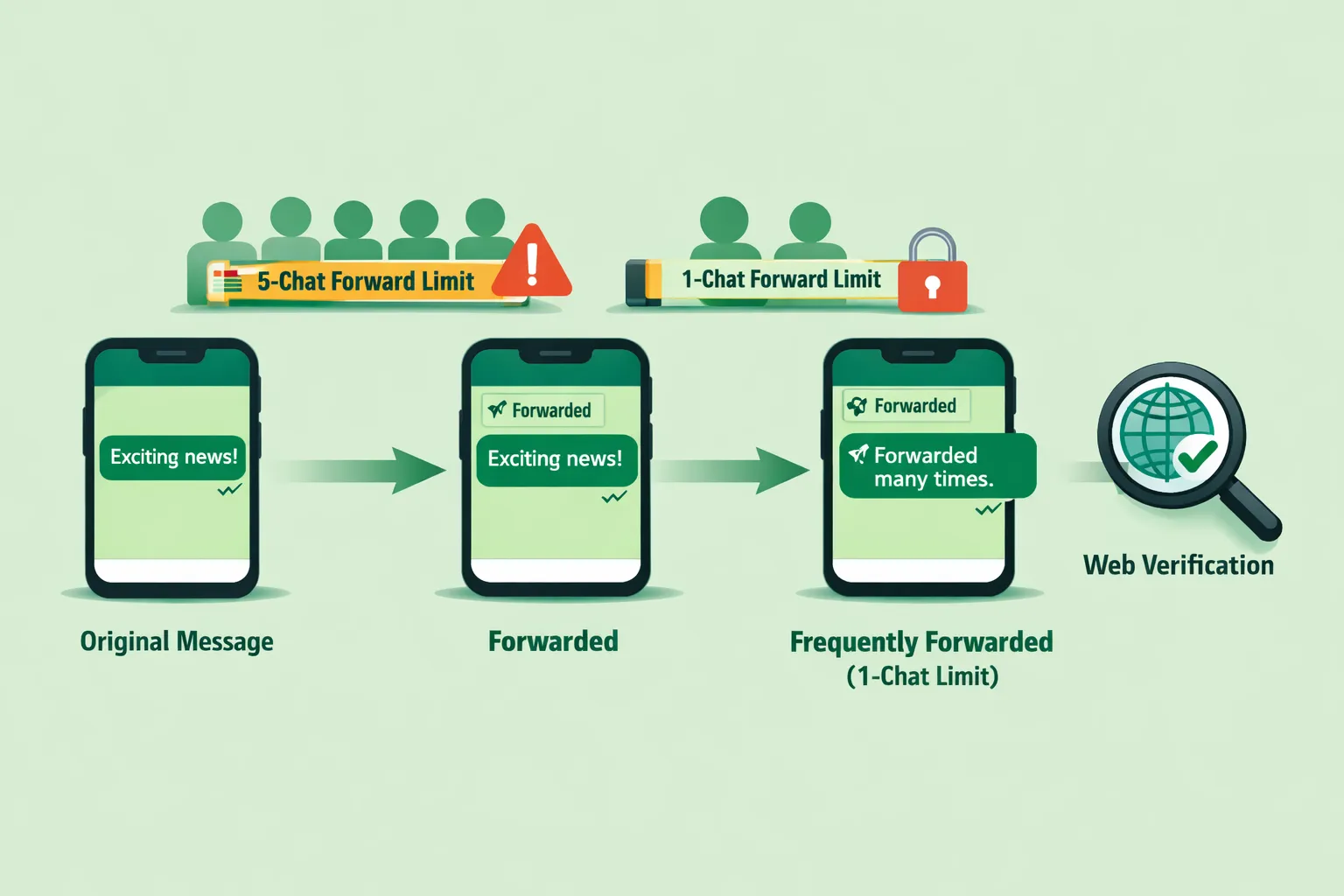
“Forwarded” appears when a message has been passed along from another chat. “Forwarded many times” is applied to content that has been forwarded repeatedly across multiple chats, elevating user caution.
Forwarding limits: 5 chats vs. 1 chat for frequently forwarded content
Standard forwarded messages can be shared to up to 5 chats at once. Frequently forwarded messages (those already forwarded multiple times) are restricted to just 1 chat at a time to slow virality and reduce misinformation risk.
Encryption, provenance, and why you can’t track the path of a forward
End-to-end encryption means neither brands nor platforms can trace the full path of a forward or see message content beyond sender/recipient. Treat forwards as organic distribution - not a measurable funnel step - and use compliant attribution (e.g., UTM links, unique short URLs) where appropriate.
What this guide covers
WhatsApp forward limits, labels, and counters
How the labels work, what triggers the “frequently forwarded” state, and why user experience differs between standard forwards and heavily circulated content.
How to design shareable yet compliant content
Message design principles that encourage authentic sharing while aligning with WhatsApp policies and minimizing misinformation risk.
Forwarded vs. business messaging limits (don’t confuse them)
How peer-to-peer forward mechanics differ from WhatsApp Business API sending limits - and why your broadcast or template quotas are separate from user-driven forwards.
A brand playbook for responding to misinformation
Monitoring tactics, decision trees for escalation, and response templates that respect privacy while addressing harmful or off-brand narratives.
How Trikon operationalizes this for support, marketing, and automation
Practical workflows inside Trikon - broadcasts, segmentation, no‑code chatbots, and a shared inbox - that help you design for shares, track performance responsibly, and respond fast when misinformation appears.
Trikon’s take: Forwarded messages are a signal, not a strategy. Build messages that earn forwards by being useful, timely, and unmistakably on-brand. Then use Trikon’s official WhatsApp Business API foundation to operate responsibly at scale - combining automation with human judgment to protect your brand while growing private, high-intent reach.
WhatsApp Forwarding Limits, Labels, and Counters Explained
As brands lean into private messaging, understanding how forwarded messages on WhatsApp behave is essential to designing content that gets shared responsibly and remains compliant with WhatsApp policies.
Forward limits: the fundamentals
Standard forward limit: a message can be forwarded to up to 5 chats at a time
Frequently forwarded limit: if a message has been forwarded many times, it can be forwarded to only 1 chat at a time
"You can forward a message to up to five chats at once. If a message has been forwarded many times, it can only be forwarded to one chat at a time." - Source
Labels and what triggers them
“Forwarded” label: appears when a message wasn’t composed by the sender and has been forwarded at least once. It helps recipients recognize that the content originated elsewhere.
“Forwarded many times” label: appears after a message crosses WhatsApp’s internal threshold (exact number not disclosed). This elevates user caution and introduces stricter forwarding friction (1-chat per send).
Magnifying glass/search context feature: for some frequently forwarded messages, users may see a search icon that opens a web search to help verify claims directly from the message - encouraging fact-checking without exposing message content (end-to-end encryption remains intact).
Counters and visibility
Forward counts are not revealed to users; WhatsApp applies labels based on internal forwarding thresholds.
Labels help recipients interpret recirculated content, but don’t guarantee accuracy. Treat them as signals to provide clear context, reputable sources, and up-to-date information within your message.
Edge cases and caveats
Copy–paste is not the same as forward: when someone copies your text and pastes it into a new chat, the “Forwarded” label won’t appear. Still, content is subject to user reports and WhatsApp policy enforcement.
Media friction and quick-forward restrictions: WhatsApp has removed or limited quick-forward shortcuts for certain media types and introduced frictional UI to slow viral spread, especially on frequently forwarded items.
Practical examples (brand scenarios)
Product promo gets labeled “Forwarded”
Impact: Recipients see the “Forwarded” tag, which may add a small credibility hurdle and introduces 5-chat per-send friction when users try to share it.
What to do: Include clear brand attribution (name, verified short link), expiration dates for offers, and a compliant call-to-action. Encourage recipients to save the brand’s number or tap a catalog link to reduce out-of-context forwarding.
Public-service update becomes “Forwarded many times”
Impact: The message is restricted to 1 chat per forward and may show a search icon. Skepticism increases.
What to do: Add authoritative sources (gov/health org links), date-stamps, and a simple verification line (e.g., “Check our official WhatsApp or website for the latest update”). Consider a templated, regularly updated message format to avoid stale forwards.
‘Forwarded’ vs ‘Forwarded many times’ - quick comparison
Attribute | Forwarded | Forwarded many times |
|---|---|---|
Trigger | Message was not composed by the sender and has been forwarded at least once | Crosses WhatsApp’s internal “frequent forwarding” threshold (number not disclosed) |
User-visible label | “Forwarded” | “Forwarded many times” |
Per-send forward capacity | Up to 5 chats at once | 1 chat at a time |
Recommended brand actions | Include clear brand attribution, time-sensitive details, and verified short links; encourage saving your official WhatsApp contact | Add authoritative source links, timestamps, verification guidance; consider directing users to your official WhatsApp channel or website for the latest version |
By designing messages that preserve context, cite credible sources, and anticipate forwarding friction, brands can earn organic reach through peer-to-peer shares while staying aligned with WhatsApp policies and user expectations around trust and accuracy.
Don’t Confuse Forwards with WhatsApp Business Messaging Limits
Forwarding mechanics and Business Messaging quotas are different systems with different goals. Mixing them up leads to poor strategy and avoidable deliverability issues. Here’s how to keep them straight.
Organic forwards vs. business messaging
Organic forwards: user-initiated sharing of existing content
Business messaging: outbound messages sent via the WhatsApp Business Platform (templates, notifications, campaigns)
Different rules, different goals
Forwards are constrained by user-level friction (5 chats vs 1 chat)
Business messaging is governed by quality, opt-in, and tiered throughput limits - not by forward labels
WhatsApp policies and deliverability
‘WhatsApp policies’ and quality rating: opt-in, content relevance, and user control (block/report)
Why template content doesn’t gain forwarded labels (it originates from the business)
Practical takeaway for marketers
Use organic forwards for social proof and community spread
Use business messaging for reliable, consent-based delivery at scale
"We are excited to share that, as of today, WhatsApp supports more than 2 billion users around the world." - Source
Organic Forwards vs WhatsApp Business Messaging
Dimension | Organic Forwards | WhatsApp Business Messaging |
|---|---|---|
Who sends | Individual users forwarding messages to their contacts or groups | The business, via the official WhatsApp Business Platform/API |
Limits | 5 chats per send for standard forwards; 1 chat per send for frequently forwarded content | Tiered throughput limits and quality-based gating for templates/notifications; not impacted by forward labels |
Labeling | “Forwarded” or “Forwarded many times” applied by WhatsApp based on internal thresholds | No forward labels; messages originate from the business and follow sanctioned template flows |
Compliance/opt-in | No brand control; subject to user norms and WhatsApp’s misuse policies | Requires explicit opt-in, compliant templates, policy adherence, and quality rating management |
Tracking options | Limited; rely on UTM parameters, short links, and organic signals | Robust analytics via platform reports, delivery/read receipts, opt-in status, and campaign metrics |
Best use cases | Social proof, peer-to-peer amplification of offers, updates, or helpful content | Reliable, consent-based scaling of notifications, promos, lifecycle/transactional messaging |
Trikon’s guidance: Treat forwards as organic reach you earn with helpful, clearly branded content. Treat Business Messaging as your dependable, compliant delivery rail - with opt-ins, templates, and analytics that scale. Use both together to maximize trustworthy reach without compromising policy compliance or customer experience.
Designing Shareable, Compliant Content (Without Chasing ‘Most Forwarded WhatsApp Messages’)
Creating content that people want to share doesn’t require gaming virality - it requires clarity, context, and credibility. Here’s how to build WhatsApp-native content that travels well and stays compliant.
Principles for shareability that respect user experience
Clarity first: a single, specific value proposition
Preserve context: include your brand/source within the message (avoid orphaned snippets)
Add lightweight credibility signals (link to canonical info, short brand ID, date/time)
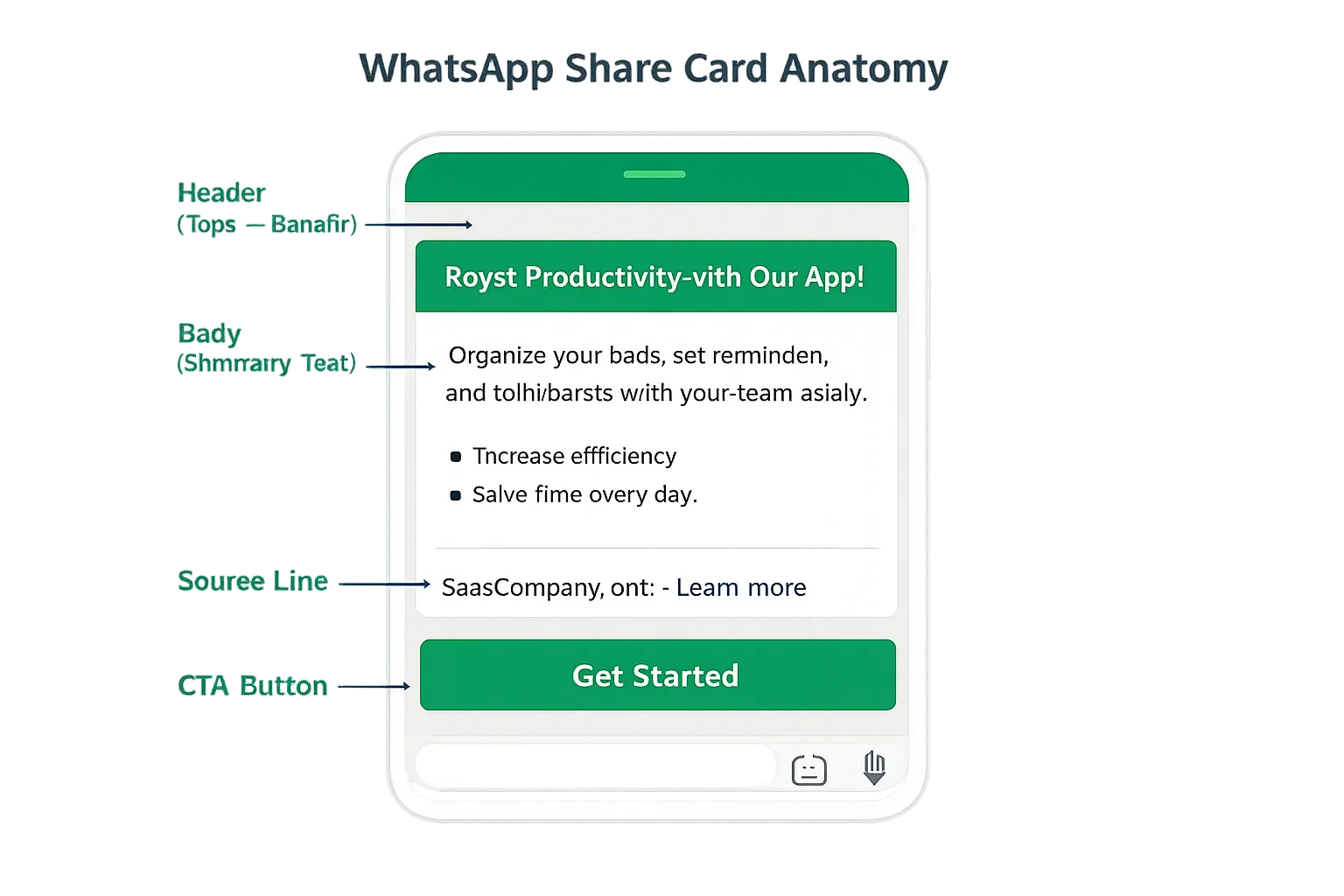
The Share Card framework (plug-and-play)
Header: topic + benefit in under 60 characters
Body: scannable bullets or a 2–3 sentence summary
Source line: brand name, short URL, and a ‘Learn more’ link
CTA: a single next step (reply with keyword, tap a button, or visit link)
Copy patterns that travel well in WhatsApp
Limited-time offer with clear terms
Service update with action deadline
Public-service advisory with verification link
Social proof snippet (testimonial + link to details)
Community invite with RSVP keyword
Avoiding spam triggers
No ALL CAPS or shouty sales language
Keep frequency reasonable; expect opt-outs and honor them
Trikon tip: Pair Share Cards with automation - e.g., “Reply JOIN” to trigger an opt-in flow or “VIEW” to open your catalog - so forwards turn into measurable, compliant conversations without sacrificing user trust.
Encouraging Sharing the Right Way: Links, Buttons, and Flows
Design your message plumbing to make sharing simple, contextual, and consented - so organic reach turns into measurable, policy-safe conversations.
Use Click-to-Chat deep links to start consented threads
wa.me links and pre-filled messages to onboard users to your official channel
QR codes for offline touchpoints (stores, packaging, events)
https://wa.me/15551234567?text=I%20want%20updates%20%E2%80%94%20please%20opt%20me%20in.%20https%3A%2F%2Fwhatsapp.trikon.tech%2Fwelcome%3Futm_source%3Dwhatsapp%26utm_medium%3Dshare%26utm_campaign%3Dclick_to_chat
Make forwarding easy but contextual
Include a short source line and canonical link so context stays intact when forwarded
Provide a reply keyword (e.g., INFO, VERIFY) to request more detail
Group-friendly formats
Short summaries + expandable details via link
Lightweight media optimized for low-bandwidth environments
Privacy-conscious measurement
UTM parameters on canonical links (track clicks, not forwards)
Landing pages that acknowledge the WhatsApp origin without fingerprinting users
Trikon tip: Pair Click-to-Chat with a no‑code bot that recognizes reply keywords (JOIN, INFO, VERIFY) and routes to the right flow - opt-in capture, FAQs, or a human handoff - so every share can become an owned conversation.
Do Labels Actually Curb Misinformation? What Research Says
The ‘Forwarded’ and ‘Forwarded many times’ tags were designed to introduce caution into WhatsApp sharing. Research suggests they help some users - but not all - and can even backfire depending on interpretation.
The evidence on ‘Forwarded’ and ‘Forwarded many times’
Users interpret labels inconsistently; some see them as importance signals
Labels alone don’t ensure critical evaluation of claims
"Many people simply do not interpret the 'forwarded' tags as misinformation warnings, which means the tags don’t serve their intended purpose." - Source
Brand implications
Always ship messages with embedded source context and verification link
Use short, plain-language disclaimers for public-interest updates
Design tips that complement labels
Introduce minor friction (ask users to read summary before sharing)
Provide a ‘verify’ flow (keyword or button) for quick fact-checks
Trikon tip: Pair labels-aware content with in-chat verification flows - e.g., “Reply VERIFY” to receive the latest source or fact-check link - so recipients can confirm claims without leaving WhatsApp.
Playbook: Responding to Misinformation About Your Brand on WhatsApp
A fast, structured response reduces harm and builds trust. Use this playbook to detect, verify, correct, and learn - without compromising user privacy or WhatsApp policies.
Detect and triage
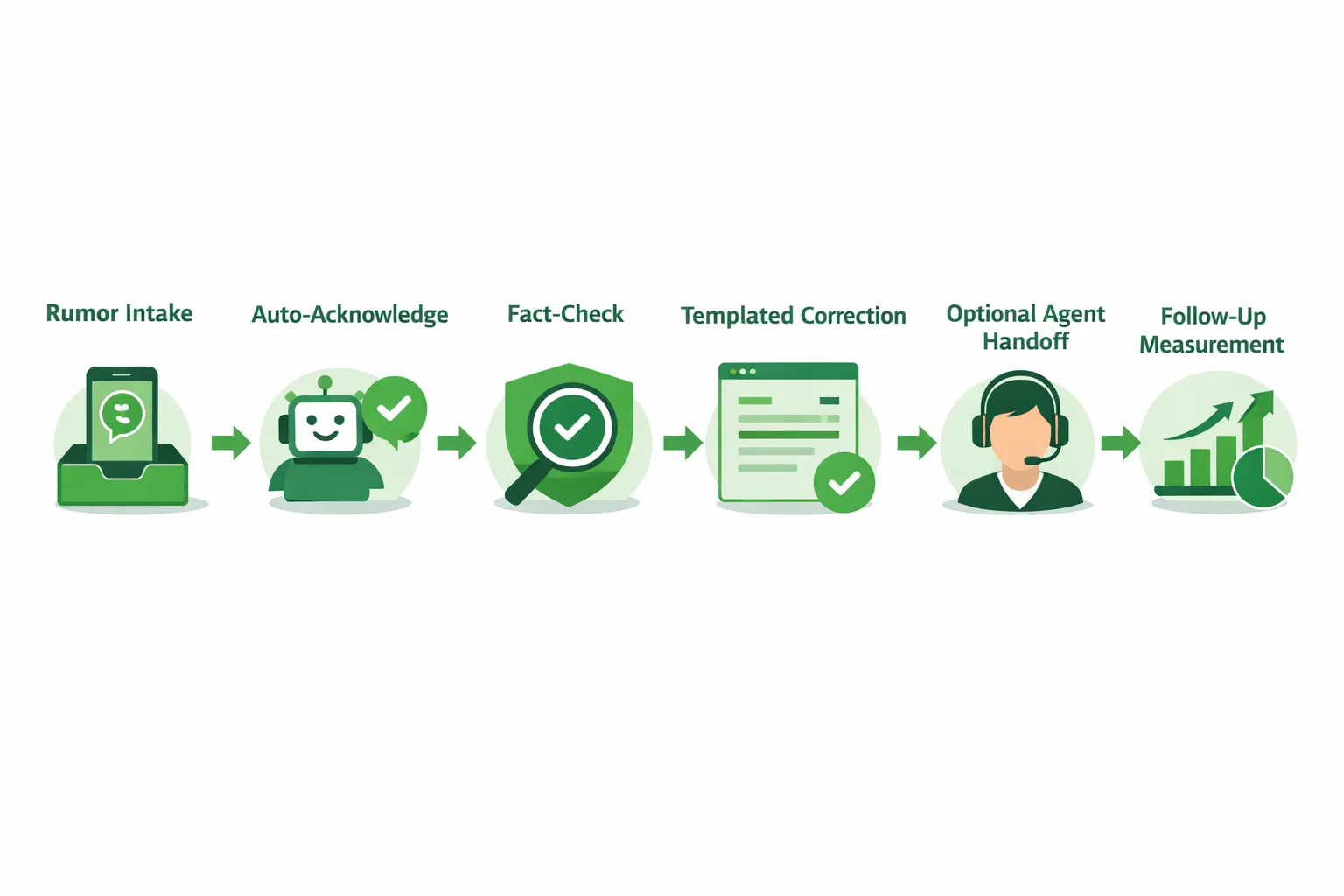
Monitor inbound mentions, keywords, and spikes in similar queries
Encourage customers/partners to forward suspicious claims to your official number
Verify and classify
False, misleading, outdated, or out-of-context - choose the correct response pattern
Respond quickly with context-rich corrections
Short, empathetic lead-in + canonical source link + clear next step
Provide a ‘Share this correction’ card to replace misinformation in threads
Escalate and learn
Flag patterns to legal/PR; update FAQs; refine proactive education content
Measure resolution time, reshare rate of the correction, and inbound sentiment
Trikon tip: Automate the first mile with a “VERIFY” keyword - auto-acknowledge, fetch the latest canonical update, and send a pre-approved correction. Then hand off to an agent for edge cases to ensure human judgment where it matters most.
How Trikon Operationalizes This on WhatsApp
Trikon turns strategy into execution - so your team can go live quickly, stay compliant, and scale trustworthy engagement on WhatsApp.
Go live fast, stay compliant
No-code setup; official WhatsApp Business API partner; reliability and policy alignment
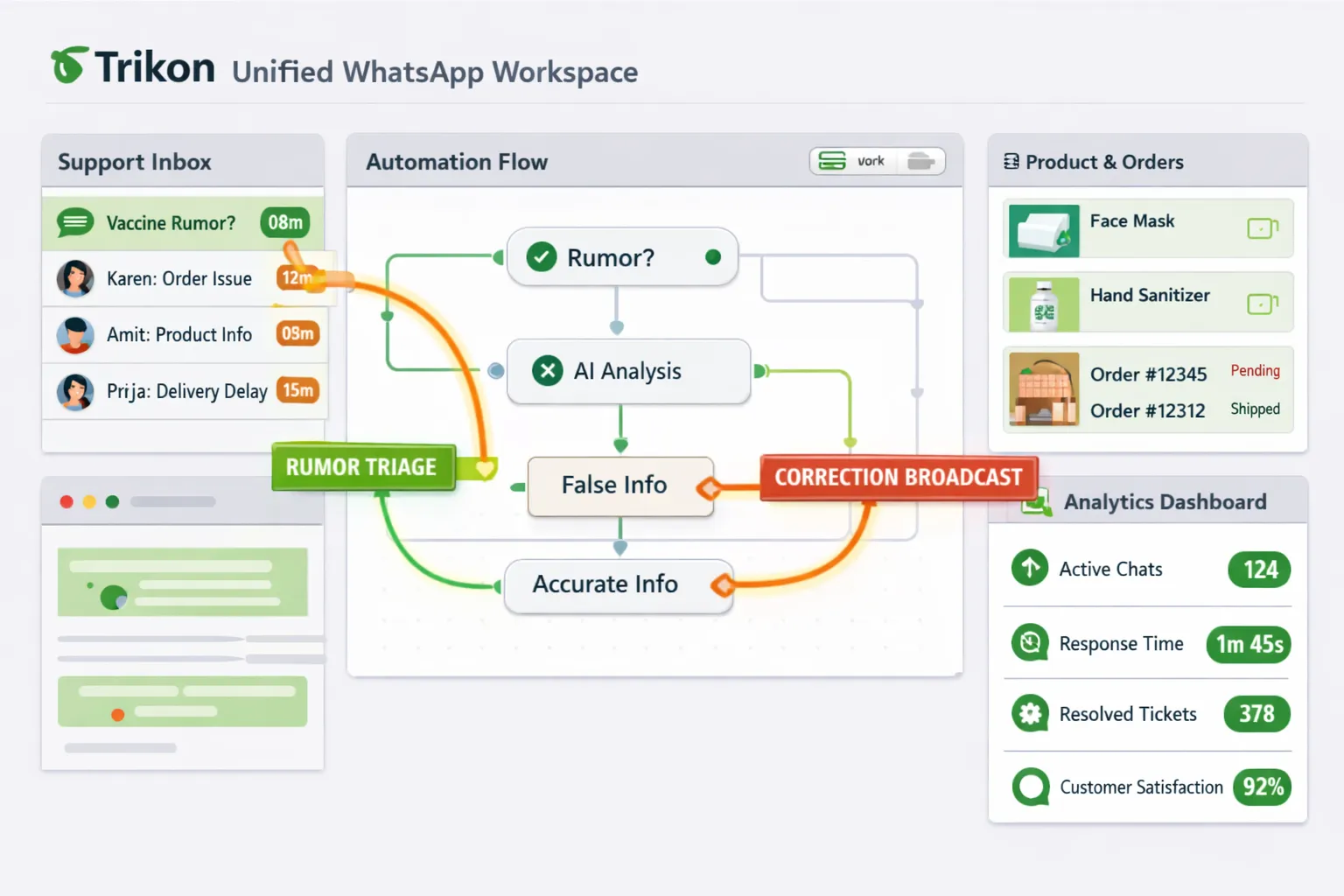
Centralized Support Inbox with SLAs
Unified conversation history, agent assignment, and priority routing for rumor spikes
Automation + human handoff
Keyword/AI chatbots triage FAQs and suspected misinformation; seamless escalation to agents
Marketing Automation that respects user control
Segmented broadcasts, drip/retargeting flows, and abandoned-cart recovery - opt-in, relevant, and high-converting
Real workflows in chat
Appointments, reservations, and payments; storefront catalogs and carts - commerce that complements shareable content
Agency- and scale-ready
White-label options, multi-brand workspaces, and analytics
Trikon outcome: faster speed-to-value, higher conversion, and resilient brand trust - even when messages travel beyond your direct send.
Compliance and Risk Checklist: WhatsApp Policies for Forwarded Content
Design “forward-ready” messages that are compliant from day one. Use this checklist to reduce risk while encouraging responsible sharing on WhatsApp.
Consent and control
Obtain explicit opt-in before initiating business messaging (document the method and timestamp).
Make opting out frictionless: support “STOP,” “UNSUBSCRIBE,” and clear menu options (e.g., Settings > Notifications).
Honor user control signals immediately (blocks/reports) to protect quality ratings.
If content may be recirculated via forwarded messages on WhatsApp, include a line explaining how to manage preferences.
Content quality and relevance
Follow WhatsApp policies: avoid prohibited claims (medical, financial guarantees), restricted categories, and deceptive formats.
Avoid spammy patterns: no ALL CAPS, excessive emojis, or flood sending; respect local quiet hours where applicable.
Keep messages concise and value-led; align with user intent and prior consent.
Anticipate context loss when a WhatsApp forward occurs; ensure the standalone message remains accurate and safe.
Source clarity and accessibility
Always include a canonical source link (with UTM parameters) and a short, human-readable brand identifier.
Add a date/time stamp and versioning for time-sensitive information (e.g., “Updated: 2026‑05‑14 09:00 UTC”).
Use plain-language disclaimers where needed (e.g., “Check the latest prices/terms on our site”).
For public-interest or safety updates, include a verification or learn-more link to a first-party page.
Internal review and escalation
Pre-approve “Share Card” templates (header, body, source line, CTA) for WhatsApp forward scenarios.
Maintain a rapid legal/PR escalation protocol for harmful or “most forwarded WhatsApp messages” that mention your brand.
Create a response library: templated corrections, FAQs, and agent handoff scripts for misinformation events.
Log decisions and message IDs/templates for auditability and faster iterations.
Measure and iterate
Track clicks (not forwards) via UTM parameters; analyze reply keywords and opt-outs to gauge sentiment.
Monitor complaint rates, blocks/reports, and quality signals in your WhatsApp Business account.
Run periodic A/B tests on copy clarity, source formatting, and CTA phrasing; retire underperforming variants.
Review performance after spikes in whatsapp forward messages to refine templates and education content.
Trikon tip: Centralize compliance with Trikon’s shared inbox, template approvals, and analytics. Combine clear source lines, verification links, and opt-out flows so every WhatsApp forward remains useful, on-brand, and policy-aligned.
Conclusion: Turn WhatsApp Forwards into Trust and Revenue with Trikon
Treat forwarded messages on WhatsApp as a high-intent, peer-to-peer amplifier - and design for clarity, context, and credibility so your content travels well under WhatsApp policies. With Trikon, you convert private shares into measurable growth using compliant automation and human support in one place.
Recap
Forwarding limits and labels introduce healthy friction; design with context to travel well
Don’t conflate forwards with business messaging tiers - use both intentionally
Prepare a proactive misinformation response playbook
Next step
Launch or streamline your WhatsApp channel with Trikon’s unified platform - support, marketing, chatbots, bookings, and commerce in one place
Start today at https://whatsapp.trikon.tech/ and turn private shares into measurable growth