

What Is WhatsApp Conversational Commerce and Why It Works
Conversational commerce on WhatsApp is the end-to-end buying journey happening inside a chat: customers discover products, get answers from a bot or agent, add items from a WhatsApp product catalog, confirm details, and pay - without ever leaving the conversation. It collapses marketing, sales, and support into one continuous, personal thread that converts faster and retains better.
"WhatsApp's user base was around 2.7 to 2.8 billion monthly active users in 2024." - Source
With Trikon, businesses plug into the official WhatsApp Business API and turn these conversations into a streamlined revenue channel - combining chatbots, broadcasts, catalogs, carts, orders, payments, and post‑purchase care in one place.
The shift: from web checkouts to chat-first buying
Buyers expect real-time answers, rich media, and one-tap actions directly in chat.
Conversational commerce shortens the path from discovery to purchase by merging marketing, sales, and support into a single, ongoing thread.
What this looks like in practice:
Discovery: A shopper clicks a Click-to-WhatsApp ad or QR code and lands in chat. Trikon’s welcome flow segments intent (new arrival, price check, restock alert).
Assisted selling: A bot shares a short video, size chart, or carousel from the WhatsApp product catalog. One-tap list menus narrow choices quickly.
Conversion: The shopper adds to cart in chat, confirms address, and pays via a payment prompt - no page loads, no logins.
Post‑purchase: Automated order confirmations, delivery updates, and review requests keep the loop tight. If needed, Trikon routes to a live agent with full conversation history.
Result: fewer drop-offs than multi-step web funnels and more confidence to buy thanks to immediate, contextual help.
Why WhatsApp for selling products
Massive, habitual daily usage; a trusted, spam-averse channel compared to email/SMS - ideal for high-intent, one-to-one selling.
Built-in commerce primitives purpose-built for speed:
Product catalogs and item detail cards for quick discovery
Carts and order summaries to streamline checkout
Interactive buttons and list menus to drive one-tap decisions
Payment prompts to complete purchases in chat
How Trikon amplifies this:
Sync your website catalog to WhatsApp automatically.
Launch WhatsApp sales automation - broadcasts, drip sequences, and retargeting flows for browse or cart abandoners.
Use no-code chatbots to pre-qualify, recommend products, and hand off seamlessly to agents when it matters.
Keywords to note: WhatsApp conversational commerce, WhatsApp selling products, WhatsApp product catalog, WhatsApp sales automation.
Where WhatsApp wins (and where a website still helps)
WhatsApp wins for:
High-intent consultative sales (e.g., fashion fit, electronics compatibility)
Repeat purchases and restocks (subscribe-and-save, replenishment reminders)
Service bookings (appointments, reservations, demos with automated reminders)
Post‑purchase care (exchanges, warranty claims, how‑to guidance)
Your website still excels at:
Deep browsing, content-rich discovery, and SEO capturing net-new demand
Long-form education (blogs, guides) and multi-category assortment exploration
Best practice: let your website attract and educate; let WhatsApp convert and retain. Trikon bridges both - syncing product data and routing web visitors into WhatsApp for human/AI-assisted checkout.
Core outcomes you can expect
Higher reply and conversion rates: Conversations are personal and timely, so shoppers respond and buy faster.
Lower funnel drop-offs: One-tap lists, buttons, and in-chat carts remove friction from multi-page web flows.
Tighter post-purchase loops: Automated confirmations, shipping updates, and review requests improve CX and LTV.
Faster resolution and fewer returns: Guided selling (size, fit, compatibility) and confirmations in chat reduce errors.
Example outcomes with Trikon:
Marketing: Segment and broadcast new arrivals; trigger restock alerts to waitlists to drive immediate sell-through.
Sales: AI/keyword bots answer FAQs 24×7; agents handle complex cases with full context in a shared inbox.
Recovery: Abandoned-cart retargeting in WhatsApp recaptures lost revenue with personalized nudges and limited-time codes.
Operations: In-chat scheduling, reminders, and payments minimize no-shows and speed fulfillment.
In short: WhatsApp conversational commerce works because it puts your storefront, sales rep, and support desk into the customer’s most used channel - turning every message into a measurable step toward purchase and loyalty. With Trikon, you set it up fast and scale it with confidence.
Choosing Your Stack: WhatsApp Business App vs WhatsApp Business Platform (API)
Choosing the right WhatsApp stack determines how fast you can scale conversational commerce - from simple chat and a basic WhatsApp product catalog to full-funnel WhatsApp sales automation integrated with your CRM and storefront.
"The WhatsApp Business Platform is designed for medium and large businesses to communicate with customers at scale and integrate with their systems." - Source
Who should use what
WhatsApp Business App: best for solo sellers and very small teams who need free, simple chat, quick replies, and a basic catalog to start selling products.
WhatsApp Business Platform (API): built for growing brands that need automation at scale, multi-agent shared inboxes, rich interactive messages, and CRM/commerce integrations.
Where Trikon fits
Trikon builds on the official WhatsApp Business API to unify support, marketing, chatbots, bookings/operations, and a WhatsApp storefront - minimal setup, no engineering.
Hybrid model: 24×7 bots for FAQs and guided selling with seamless human handoff. Agents work from a shared inbox with SLA tracking and full conversation history to protect CX and revenue.
Capabilities overview - decide based on your growth stage
Broadcasts, segmentation, drip and retargeting flows to drive conversions and recover abandoned carts.
WhatsApp storefront with product catalog, in-chat cart, orders, and automatic website sync for accurate stock/pricing.
Appointments/reservations and real workflows (payments, reminders, confirmations) directly in chat.
Feature comparison: App vs API with Trikon overlay
Capability | WhatsApp Business App | WhatsApp Business Platform (API) | Trikon (on official API) |
|---|---|---|---|
Setup effort | DIY in minutes on mobile | Requires Business verification and API setup via partner | Go live fast; guided onboarding, no engineering required |
Users/agents | Single user; limited multi-device | Multi-agent possible via API tooling | Centralized shared inbox with roles, assignment, collision control |
Automation depth | Basic quick replies; away/welcome messages | Advanced templates, interactive messages, chatbots via integrations | No‑code bots (AI/keyword), flows, drip and retargeting; human handoff |
Catalogs/carts | Basic WhatsApp product catalog and in-chat cart | Catalog sync via Commerce tools; interactive product lists | Full WhatsApp storefront: catalog, in-chat cart, orders; auto website sync |
Broadcasts/segmentation | Small broadcast lists; manual; limited targeting | Large-scale notifications (opt-in), template-based; segmentation via systems | Advanced segmentation, broadcasts, journeys, A/B tests; abandoned cart recovery |
Integrations/CRM | None/native minimal | Connect via APIs to CRM, OMS, payments | Native CRM/e‑commerce/payment integrations + webhooks |
SLA/reporting | Basic message metrics only | Depends on provider | SLA policies, agent analytics, campaign and funnel reporting |
Scalability | Suited for low volume | Built for scale across markets and teams | Scales to thousands of conversations, brands, and agents |
Compliance | App-level terms | Official WhatsApp Business API; template policy | Meta Business Partner; policy governance and audit-ready logs |
When to upgrade from App to API
Signals you’ve outgrown the App:
Response bottlenecks or missed DMs during peak/after-hours
Need for team-wide coverage with a shared inbox and SLAs
Desire for segmentation, broadcasts, and automated drip/retargeting
Requirement to sync a full catalog, enable in‑chat carts/orders, or connect CRM/ERP
Revenue leakage from poor follow-ups or lack of abandoned cart recovery
If any of the above resonates, the WhatsApp Business Platform with Trikon unlocks the automation, scale, and reporting you need - without burdening your team with complex builders or custom engineering.
Build Your WhatsApp Storefront: Profile, Catalog, Carts, and Payments
Elevate your WhatsApp channel from “just chat” to a fully shoppable storefront. With Trikon on the official WhatsApp Business API, you can set up a trusted profile, a converting catalog, in‑chat carts, and payments - then sync it all with your website for real-time accuracy.
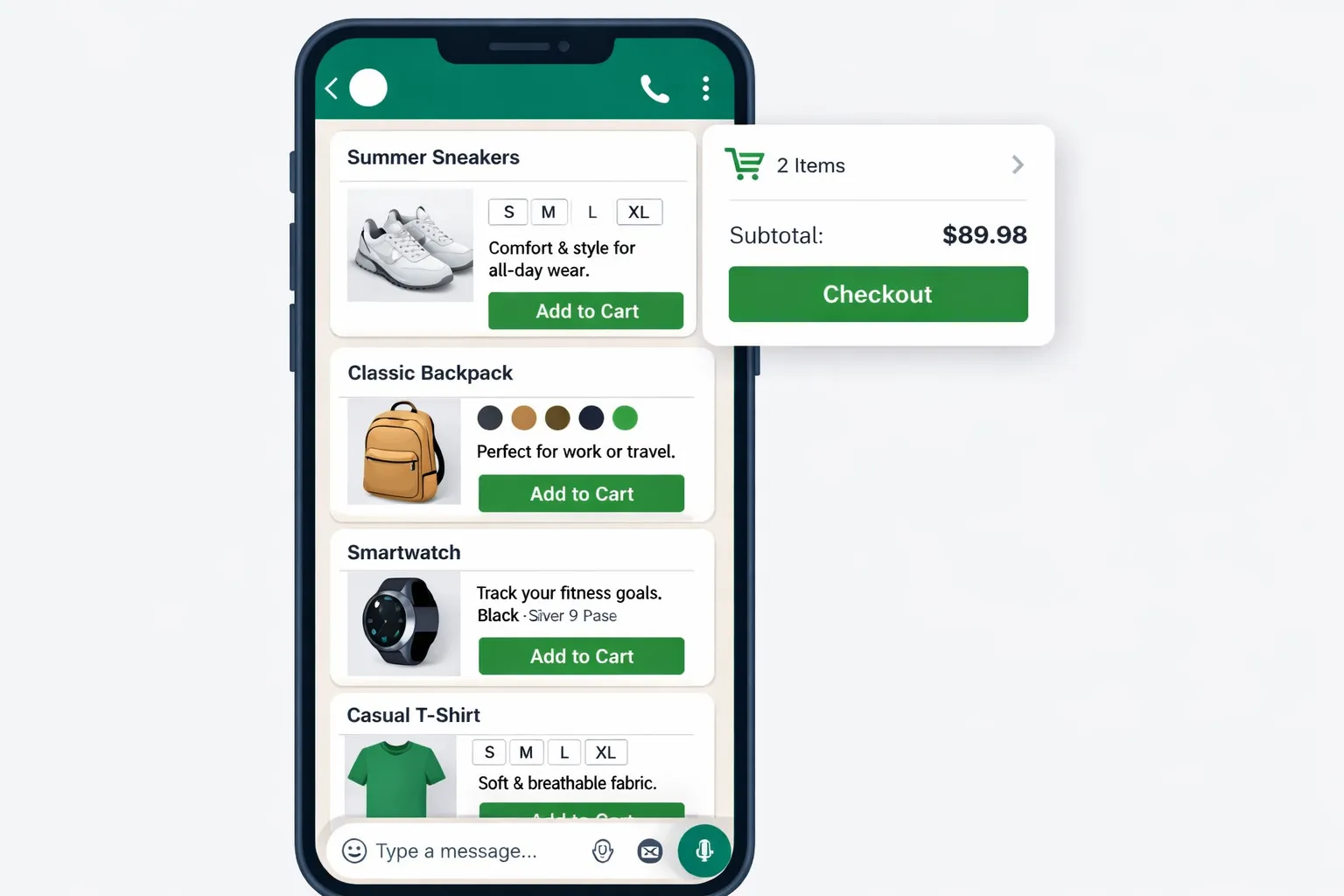
Step 1: Set up a credible business profile (trust first)
Complete every field: business name, logo, description, category, hours, website, and location.
Add policy links (shipping, returns) in the description or via quick-reply shortcuts.
Configure quick replies for FAQs like:
Shipping timelines and costs
Sizing/fit guidance or service scope
Return/exchange windows and how-tos
Pro tip with Trikon:
Create keyword-triggered replies (e.g., “ship”, “size”, “refund”) so customers get instant answers 24×7, with human handoff when needed.
Step 2: Create a product catalog that converts
Structure for speed:
Categories → hero SKUs → variants (size/color) so shoppers reach the right option in 2–3 taps.
Use rich media: 1–3 clean images per variant plus a short video or GIF when helpful.
Write benefit-led copy:
Lead with outcomes (“All-day comfort,” “Streak-free shine,” “30‑min install”).
Include spec highlights, materials, and what’s in the box.
Keep data accurate:
Maintain pricing and inventory in one source of truth; sync to WhatsApp.
Respect WhatsApp Commerce Policy (no restricted items, correct disclosures).
Trikon advantage:
Auto-import products from your e‑commerce platform and map variants to WhatsApp’s product detail format with badges like “bestseller” or “back in stock.”
Step 3: Enable carts and in‑chat checkout
Let customers add items directly from chat product cards; show cart summary inline.
Offer one-tap “View Cart,” “Edit,” and “Confirm Order” actions to reduce friction.
Connect payments:
Use supported payment methods in your market (cards, wallets, UPI, BNPL).
Offer COD where appropriate; confirm phone/email to reduce failed deliveries.
Send a templated order confirmation with itemized details and expected delivery date.
Trikon advantage:
Smart payment prompts detect preferred methods and retry logic for failed payments, plus fraud and duplicate order guards.
Step 4: Sync your website store (optional but powerful)
Auto-sync products, inventory, prices, and images to prevent overselling.
Unify orders so support and operations see the same truth across systems.
Keep promotional pricing, bundles, and coupon logic consistent.
Trikon advantage:
WhatsApp Storefront + website sync keeps SKUs, stock, and pricing accurate automatically - no spreadsheets or manual updates.
Step 5: Confirm orders and reduce returns
Use interactive order summaries to confirm:
Size/color or service scope
Delivery address and timing preferences
Gift notes or special instructions
Trigger post‑purchase flows:
Care/setup tips and sizing confirmations to preempt “wrong fit” returns
Delivery updates, review requests, and easy exchange pathways
Clear refund guidance to lower WISMR (where‑is‑my‑refund) contacts
Trikon advantage:
Built-in automation for confirmations, logistics updates, and follow-ups; SLA tracking for any issues escalated to agents.
Example flows (D2C + services)
D2C retail:
“Browse → Select size/color → Add to cart → Pay in chat → Receive order confirmation + tracking.”
Services:
“Pick service → Select date/time → Pay deposit → Get appointment card + reminders.”
Outcome: A fast, trusted, and fully shoppable WhatsApp experience that lifts conversions and lowers support burden - powered by Trikon’s minimal-setup storefront, payments, automation, and sync.
Automate the Sales Journey: Chatbots, Guided Selling, and Human Handoff
Automation turns WhatsApp into a 24×7 revenue engine. With Trikon, AI/keyword bots qualify, recommend, and prefill carts while agents step in at the exact right moments - so every conversation moves closer to purchase.
24×7 automation for FAQs and qualification
Keyword intents and AI recognition for shipping, pricing, sizes, stock status, returns, and store hours.
Smart qualifiers (budget, use-case, fit/compatibility) branch buyers to the right product paths or agents.
Instant answers reduce wait times and prevent drop-offs; opt-in capture and consent tracking built-in.
What this looks like with Trikon:
Bot detects “size” or “refund” and replies with the correct quick answer or policy link.
Intake form captures budget and preferences; tags the contact and moves them into a relevant drip or retargeting flow.
Guided selling (choose-your-own-path)
Use interactive lists and buttons to narrow needs: e.g., “Skin type → Concern → Regimen kit” or “Device → Use-case → Accessory.”
Dynamic product suggestions from your WhatsApp product catalog with benefit-led copy and rich media.
One-tap cart prefill from recommended SKUs; buyers review and confirm in-chat.
With Trikon:
Catalog-aware logic fetches stock, price, and variants live.
A/B test paths (e.g., “Budget-first” vs. “Use-case-first”) to increase conversion rates.
Seamless human takeover when it matters
Trigger conditions: high order value (AOV threshold), negative sentiment, stalled cart (no action for X minutes), complex or VIP requests.
Trikon’s shared inbox: auto-assign to the right agent/queue, SLA timers and alerts, full conversation history and tags.
Agents jump in with product context, draft replies, and one-click access to order/cart details - no back-and-forth.
Templates that speed sales
Reusable, compliant templates for:
Quotes and line-item offers
Order confirmations, shipping updates, and delivery windows
Back-in-stock and price-drop alerts
Abandoned cart nudges and appointment reminders
Operational automation
Book appointments, take deposits, send reminders, and handle rescheduling in WhatsApp.
Collect addresses, validate PII, and trigger post-purchase flows (setup guides, review requests, exchanges).
Example: Order confirmation template (copy+structure)
template: name: order_confirmation_v1 language: en category: TRANSACTIONAL components: header: "Order confirmed ✅" body: | Hi {{customer_name}}, thanks for your order! Order summary: {{items}} Total: {{total}} Estimated delivery: {{eta}} You’ll receive updates here. Need help? Reply HELP. footer: "Thank you for shopping with us." buttons: - type: URL text: "View Order" url: "{{order_url}}" - type: URL text: "Track Shipment" url: "{{tracking_url}}" - type: QUICK_REPLY text: "Contact Support" variables: customer_name: String (e.g., "Ava") items: Multiline String (e.g., "• Tee (M, Black) x1 - $22• Jeans (30) x1 - $48") total: Currency String (e.g., "$70.00") eta: Date String (e.g., "Wed, Mar 18") order_url: URL tracking_url: URL # If using numbered placeholders for WhatsApp submission:
numbered_placeholders: {{1}} -> customer_name {{2}} -> items {{3}} -> total {{4}} -> eta {{5}} -> order_url {{6}} -> tracking_url
With Trikon, you can approve and reuse these templates at scale, insert personalized variables automatically, and trigger them from bot logic or agent macros - speeding every step from intent to paid order.
Drive Qualified Traffic Into WhatsApp: Entry Points That Convert
"WhatsApp Business is used by over 200 million businesses each month." - Source
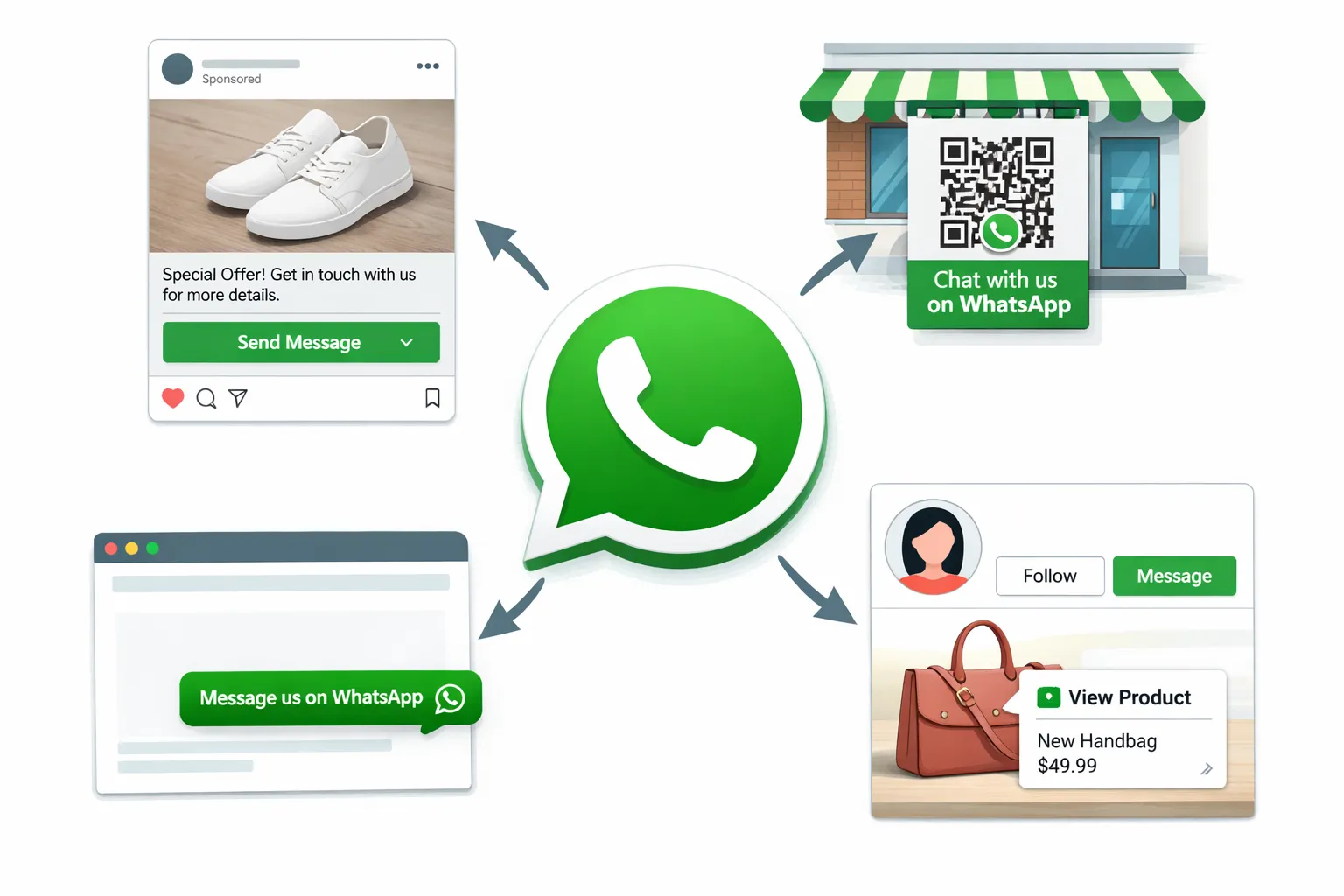
Turn attention into conversations - and conversations into orders - by placing high-intent entry points everywhere your customers already engage. Trikon tags the source automatically so you can measure ROAS and scale what works.
High-intent ad formats
Click‑to‑WhatsApp Ads (Facebook/Instagram): target by audiences, creatives, and offers; optimize for cost per conversation and downstream purchases.
Use pre-filled messages to set context (e.g., campaign code, product ID, language) so bots route instantly.
Pro setup with Trikon:
Append UTMs and ad IDs; pass them into WhatsApp via the deep link so Trikon can attribute orders to ads and creatives.
Owned channels that compound
Website chat and sticky “Message us on WhatsApp” buttons; launch exit‑intent chat offers to catch abandoning visitors.
QR codes on packaging, receipts, storefronts, pop-ups, and events to drive offline-to-online conversations.
Instagram profile/action buttons and product tags that jump directly to WhatsApp with the product context attached.
Trikon tip:
Use different deep links for each placement (footer button vs. PDP vs. post‑purchase) so segmentation and follow‑ups are hyper-relevant.
Capture and respect opt-in
Display clear consent language on site and in stores; confirm preferences (promos, order updates, restocks) in chat.
Store opt-in status and granular tags inside Trikon to support compliant broadcasts, segmentation, and journey triggers.
Tracking & attribution basics
Attach UTM parameters and ad IDs; auto-tag source/medium/campaign in Trikon when the chat starts.
Match orders to conversation IDs and calculate ROAS, CAC, and payback - then retarget non‑buyers with compliant nudges.
Outcome: You’ll know which entry points produce the most qualified conversations - and Trikon will convert them with guided selling, templates, and automation.
Campaigns That Sell: Broadcasts, Segmentation, and Abandoned Cart Recovery
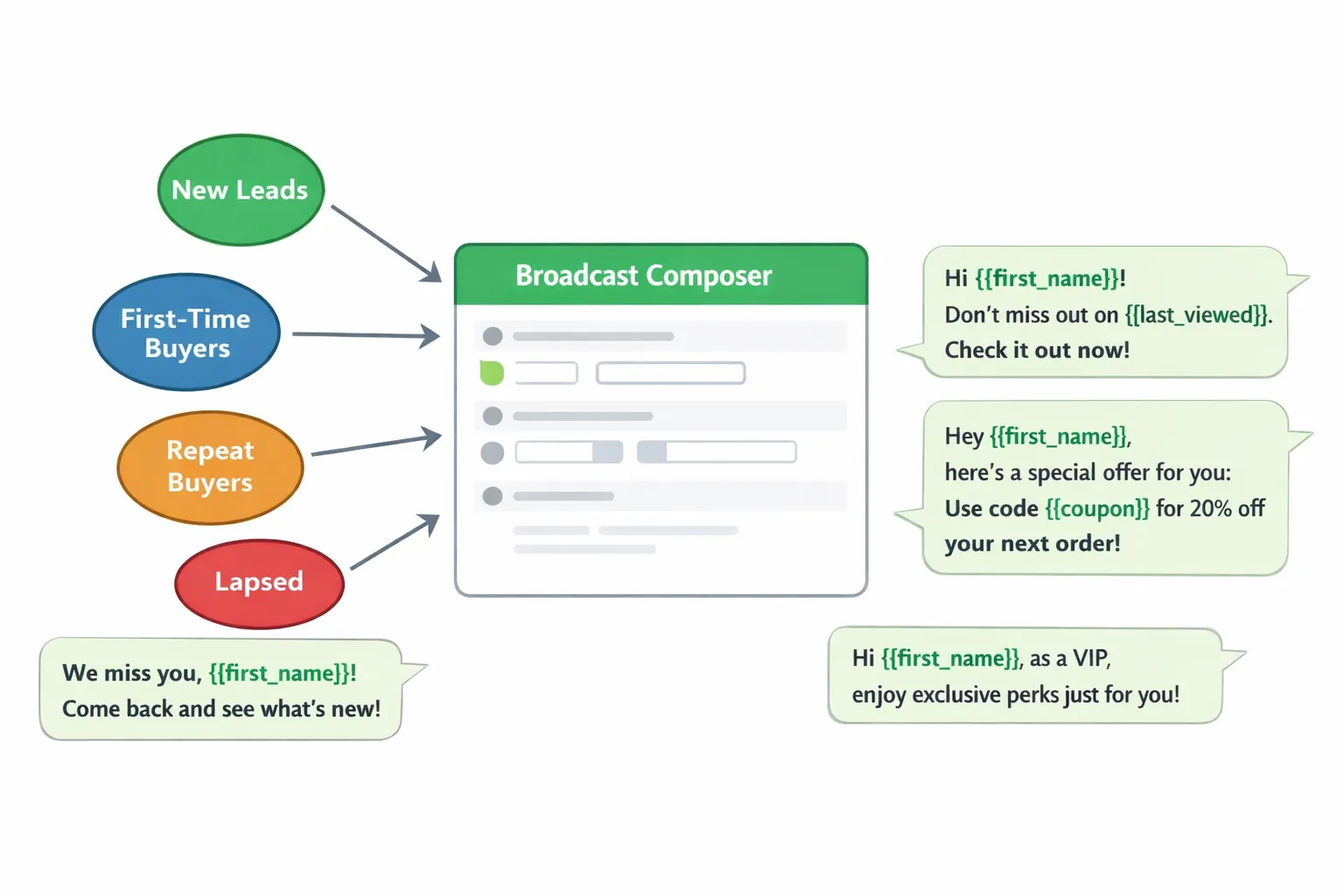
Turn WhatsApp into a performance channel by aligning segments, timing, and creative with customer intent. Trikon handles the data sync, templating, and deliverability so you can focus on offers that convert.
Build segments that mirror your lifecycle
Segment by stage: New leads, first-time buyers, repeat buyers, lapsed, VIPs.
Add behavioral/interest tags: category affinity, size, color, price sensitivity.
Ingest events: product views, carts, purchases, refunds/exchanges, support outcomes.
Trikon advantage:
Real-time tags from website and WhatsApp actions; auto-exclusion rules to avoid fatigue and duplicates.
Broadcasts the right way (compliant & relevant)
Use approved templates; personalize with {{first_name}}, {{last_viewed}}, {{category}}, and tailored incentives.
Time sends to behavior:
View → +2h: helpful guide or fit chart
Add-to-cart → +4h: social proof + size/compatibility info
No purchase → +24h: tailored offer or alternative
Respect opt-ins and quiet hours by region; throttle to protect deliverability.
Trikon advantage:
Drag-free campaign setup, template approval tracking, and built-in A/B tests for copy, timing, and incentive.
Abandoned cart recovery that feels helpful, not pushy
Nudge 1 (soft): “You left this in your cart” + quick reply [Checkout] [Change Size] [Ask a Question].
Nudge 2 (assist): Offer alternative color/size, answer top FAQ, or suggest a bundle that addresses the blocker.
Nudge 3 (incentive): Limited-time code for high-intent users; exclude serial bargain hunters or recent returners.
Trikon advantage:
Cart-aware logic inserts live items, price, and stock; suppresses messages if the order completes elsewhere.
Drip and retargeting flows
Onboarding: product care, setup, and first-use wins.
Replenishment: based on consumption windows (e.g., 30/60/90 days).
Cross-sell: trigger from support outcomes (e.g., “installed” → accessories).
Win-back: dynamic recommendations based on past views/purchases.
Trikon advantage:
Automations with clear reporting on delivery, replies, CTR, conversion, and revenue attribution.
Copy examples that convert
New lead (value-first): “Hi {{first_name}}, quick fit tip for {{last_viewed}} + 10% off your first order. Free returns if it’s not a match.”
Abandoned cart (assist): “Still deciding on {{cart_top_item}}? Most customers size {{size_rec}}. See customer photos here.”
VIP restock: “Back in stock: {{favorite_sku}}. Reserved for 24h under your name, {{first_name}}. Reply RESERVE to lock it in.”
Replenishment: “Running low on {{repeat_item}}? Reorder in 2 taps. Reply SKIP to snooze 14 days.”
Outcome: Segment-smart broadcasts and helpful recovery flows lift reply rates and revenue - while Trikon keeps everything compliant, measurable, and on brand.
Orders, Support, and Post‑Purchase Care (Without Headaches)
"Businesses must obtain prior user opt‑in before sending proactive messages and must use approved message templates for business‑initiated communications." - Source
Delight customers after the click - and keep revenue flowing - by managing confirmations, support, and loyalty inside WhatsApp. Trikon centralizes the work, automates the routine, and keeps you compliant by default.
Confirmations, tracking, and proactive service
Send instant order and payment confirmations, shipping updates, delivery‑day reminders, and out‑for‑delivery alerts.
Offer self‑serve returns/exchanges with interactive flows; let customers check order and refund statuses in chat to reduce tickets.
Proactively notify about delays or split shipments using approved templates to maintain trust and reduce “where is my order?” contacts.
Centralize support with SLAs and context
Operate from one shared inbox with agent assignment, skills‑based routing, and clear escalations.
Keep full conversation, order, and customer history at agents’ fingertips to avoid repetitive questions.
Use knowledge base snippets and quick replies to resolve common issues in seconds; track SLA timers and breach alerts.
Turn support into revenue
Detect replenishment or upgrade intent during conversations; trigger one‑tap reorders, compatible add‑ons, or bundle offers.
Follow resolution with review/UGC requests and NPS; invite satisfied customers to loyalty or referral programs.
Run targeted win‑back or replenishment reminders tied to support outcomes (e.g., successful setup → accessory suggestions).
Compliance guardrails baked in
Manage opt‑ins and preferences; send business‑initiated messages only with approved templates.
Honor quiet hours, apply rate limits, and log consent and template approvals for audits.
Maintain end‑to‑end audit trails for conversations, agent actions, and message history within Trikon.
Outcome: Faster resolutions, happier customers, and higher LTV - with Trikon’s API‑powered inbox, automations, and policy‑first safeguards doing the heavy lifting.
Measure and Optimize: KPIs, Benchmarks, and Experiment Ideas
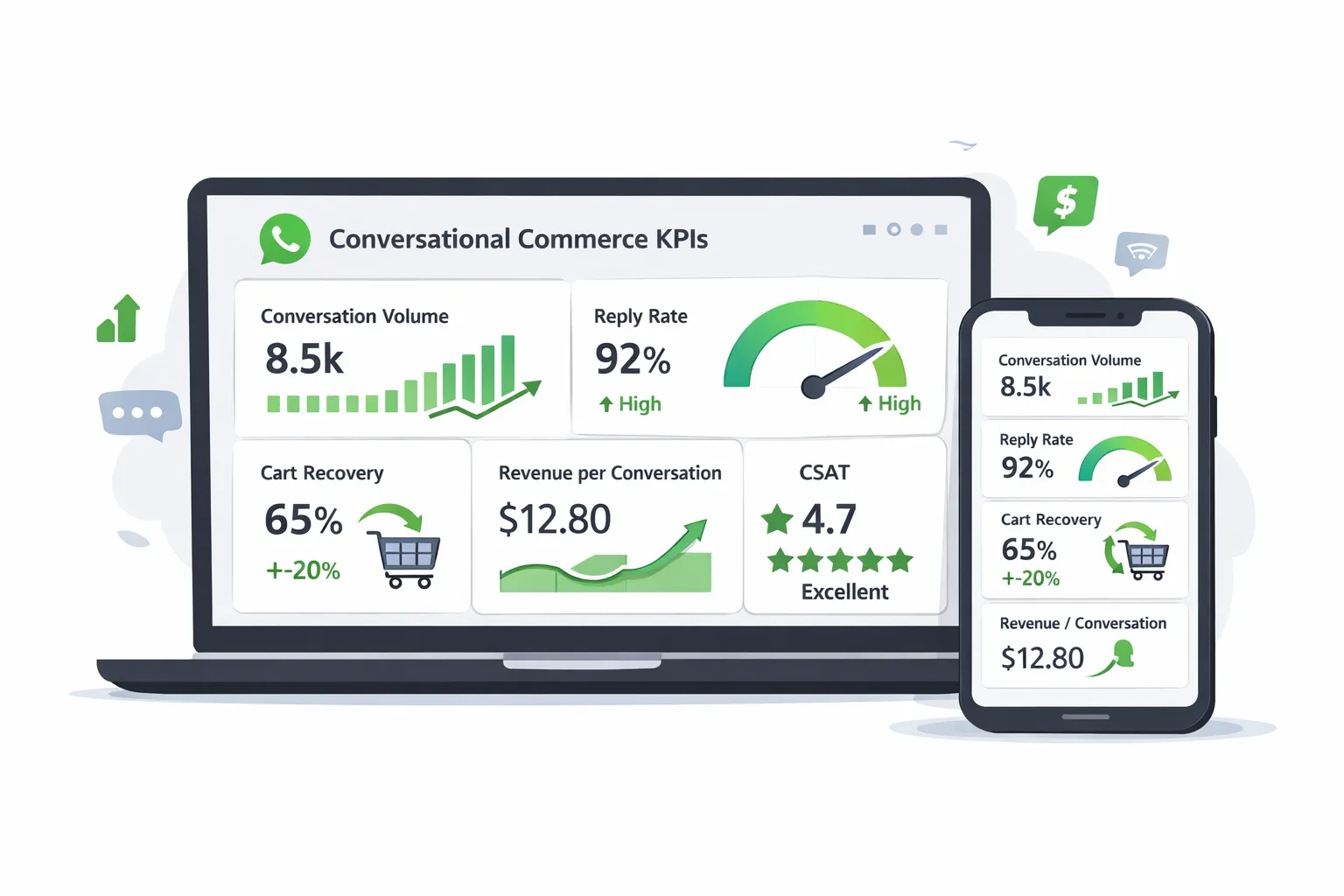
Great WhatsApp programs are built on measurement. Trikon gives you a single view across acquisition, engagement, commerce, and care so you can spot friction, run experiments, and prove ROI.
A full-funnel view of WhatsApp sales
Acquisition: ad CTR to conversation start, opt-in rate, cost per conversation.
Engagement: conversation open rate, reply rate, time to first response.
Commerce: add-to-cart rate in chat, purchase conversion, AOV, revenue per conversation.
Care: resolution time, CSAT, deflection rate, reorder rate.
Optimize relentlessly
Test entry points (QR vs ad), first-message scripts, offer framing, media (video vs image), and send windows.
Improve bot paths with drop-off heatmaps, better quick-reply wording, and catalog ordering tuned to demand and margin.
Prove ROI to your CFO
Attribute orders to conversation IDs and last/first touch; compute CAC and ROAS for Click‑to‑WhatsApp and broadcasts.
Model LTV uplift from replenishment, win-backs, and support-to-sales handoffs; roll into payback charts.
KPI framework and starter benchmarks
Funnel Stage | KPI & Definition | How to Measure in Trikon | Starter Benchmarks |
|---|---|---|---|
Acquisition | Conversation Start Rate: % of ad/link clicks that start a WhatsApp chat | UTM + deep link tracking; count new threads / clicks | 20–40% (varies by offer/geo) |
Acquisition | Cost per Conversation: spend divided by new chats | Ad platform spend synced to Trikon source tags | $0.50–$3.00 |
Engagement | Reply Rate: % of conversations with a customer reply | Conversation analytics; filter by source/segment | 30–60% |
Engagement | Time to First Response | SLA timer on first agent/bot response | < 60s bot, < 3m agent |
Commerce | Add-to-Cart in Chat | Clicks on “Add to Cart” / product views in chat | 15–35% |
Commerce | Purchase Conversion (Chat → Order) | Orders attributed to convo IDs / started chats | 8–20% |
Commerce | Average Order Value (AOV) | Revenue / orders from WhatsApp | Track vs. site AOV; aim ≥ site |
Commerce | Revenue per Conversation | Revenue / started conversations | $3–$15+ (category dependent) |
Care | First Contact Resolution (FCR) | % resolved without reopen/transfer | 60–85% |
Care | CSAT | In‑chat survey post‑resolution | ≥ 85% |
Care | Deflection Rate | % of answers handled by bot/self‑serve | 30–60% |
Care | Reorder Rate | % of customers reordering via WhatsApp | 10–25% |
Experiment ideas:
Message framing: value-first tip → soft offer vs. direct promo first.
Creative: static image vs. short video; lifestyle vs. product close-up.
Timing: within 2 hours of view vs. next morning; weekday vs. weekend.
Pathing: “budget → use‑case → SKU” vs. “use‑case → benefits → SKU.”
Incentives: free shipping vs. % off vs. bundle value; test decay timers.
With Trikon, you’ll see which segments, entry points, and templates move the needle - and scale the winners with minimal setup and rigorous attribution.
Your 30‑Day WhatsApp Commerce Launch Plan with Trikon
Move from zero to revenue in four focused sprints. This plan blends setup, automation, acquisition, and optimization - so you launch fast and scale with confidence on Trikon’s WhatsApp Business API platform.
Week 1: Foundations
Verify business, connect WhatsApp number, complete profile, set quick replies.
Verify your business and connect your WhatsApp number via Trikon (official WhatsApp Business API).
Complete profile: business name, logo, description, category, hours, website, and location.
Draft quick replies for FAQs (shipping times, returns, sizing/fit, payment options).
Add compliance language for opt-in and preference management.
Import catalog or sync from your site; map categories and hero SKUs.
Use Trikon’s website sync to import products, variants, inventory, and pricing.
Structure catalog for speed: categories → hero SKUs → variants (size/color).
Add benefit-led descriptions and 2–3 clean images per variant; include a short video where helpful.
Tag bestsellers and high-margin SKUs for promotion.
Success criteria by Day 7
WhatsApp number live, profile complete, 5–10 quick replies published.
Catalog synced with ≥50 core SKUs (or your full service list) and variants mapped.
Compliance checklist passed (opt-in language, template requests submitted).
Week 2: Automate and operationalize
Turn on Trikon chatbot for FAQs + guided selling; define human handoff rules and SLAs.
Configure keyword intents and AI recognition (shipping, sizing, stock, pricing, returns).
Build a choose-your-own-path flow (e.g., “Use-case → Category → SKU → Variant”).
Set takeover triggers: high AOV, negative sentiment, stalled carts, VIP tags.
Define SLAs by priority (P1 within 5 min, P2 within 15 min, etc.); enable alerts.
Configure order confirmations, shipping updates, and payment receipts via templates.
Submit and approve compliant templates for confirmations, shipping updates, reminders, back-in-stock.
Map variables (customer name, items, total, ETA, tracking URL) to your commerce system.
Test sandbox → live: ensure message formatting, links, and buttons render correctly.
Success criteria by Day 14
Bot correctly answers top 10 FAQs and routes complex cases to agents.
Human handoff and SLAs active in Trikon’s shared inbox; breach alerts working.
Transactional templates approved and automatically triggered on real orders.
Week 3: Traffic and first revenue
Launch Click‑to‑WhatsApp ads and website chat entry point; place store QR code.
Set up two ad sets (audience/lookalike) with at least two creatives each; optimize for cost per conversation.
Enable website chat and sticky “Message us on WhatsApp” buttons; add exit‑intent chat offer.
Print/storefront/event QR codes with unique deep links per placement.
Pass UTM parameters/ad IDs into chat; auto-tag source/medium/campaign in Trikon.
Run your first segmented broadcast (opt‑in only) with a simple, valuable offer.
Segment: New leads, first-time buyers, repeat buyers, lapsed, VIPs.
Personalize with name and last viewed/carted product; start value-first (guide/tip), then a soft incentive.
A/B test two hooks (benefit-first vs. incentive-first); send within approved quiet hours.
Success criteria by Day 21
Conversation starts from at least two entry points (ads + website).
First revenue recorded from WhatsApp (in‑chat cart/checkout or assisted conversion).
Broadcast reply rate ≥30%, purchase conversion 8–15% for warm segments.
Week 4: Optimize and scale
Review KPI dashboard; improve scripts, add media, and extend flows (cart recovery, replenishment).
Inspect funnel: conversation start rate, reply rate, add‑to‑cart, purchase conversion, revenue per conversation.
Improve first-message scripts; test video vs. image on top SKUs.
Turn on cart recovery: helpful reminder → assistive alt suggestion → time-limited incentive for high intent.
Add replenishment cadence (30/60/90 days) and post‑purchase tips to reduce returns.
Add retargeting and VIP drips; expand to bookings/appointments if relevant.
VIP drips for early access/restocks; loyalty points reminders.
Service flows: appointment booking, reminders, rescheduling, and deposits in chat.
Tighten agent macros and quick replies from Week 3 learnings.
Success criteria by Day 30
Revenue per conversation trending up; cart recovery 10–20%.
CSAT ≥85%, first response time <60s (bot) and <3m (agent).
Documented experiments with at least one winner to scale next month.
Team and process checklist
Roles
Owner/Admin: approvals, compliance, templates, data connections.
Marketer: campaigns, broadcasts, segmentation, creatives, reporting.
Support Lead: SLAs, macros, knowledge base, coaching, QA.
Agents: human handoff, order assistance, upsells, post‑purchase care.
Cadence
Daily: SLA dashboard, breach follow-ups, bot exceptions review.
Weekly: experiment review (entry points, scripts, incentives), KPI readout by segment/source.
Monthly: ROI readout (CAC, ROAS, revenue per conversation), backlog grooming (new templates, flows, integrations).
What you’ll have at Day 30
A compliant, shoppable WhatsApp storefront (profile, catalog, carts, payments) powered by Trikon.
Always-on automation for FAQs, guided selling, confirmations, and logistics updates.
Multiple high-intent entry points (ads, web, QR) with source-level attribution.
Segmented broadcasts, cart recovery, and replenishment flows driving predictable revenue.
A repeatable optimization loop to scale WhatsApp conversational commerce with clarity and control.
Start Selling on WhatsApp Today with Trikon
Make WhatsApp your highest‑converting sales channel with Trikon - the unified platform for WhatsApp conversational commerce, support, and automation.
Why Trikon
All-in-one WhatsApp platform: support, marketing, chatbots, bookings, and commerce in one place.
Minimal setup, no engineering; official WhatsApp Business API partner for reliability and compliance.
Higher conversions with broadcasts, segmentation, drips, and abandoned cart recovery.
Native WhatsApp product catalog, in‑chat carts, orders, and payments.
Hybrid automation: AI/keyword bots for FAQs and guided selling with seamless human handoff.
Centralized inbox with SLA tracking, analytics, and full conversation/order history.
Scalable for teams and agencies (white‑label ready), with WhatsApp sales automation built to grow.
What to do next (in under an hour)
Create your Trikon workspace, connect your WhatsApp Business number, import your catalog, and enable the starter bot.
Add your top entry point (Click‑to‑WhatsApp ad or website button) and send your first compliant broadcast to opted‑in users.
Turn on essential flows: order confirmations, shipping updates, and abandoned cart recovery.
Review your KPI dashboard (reply rate, add‑to‑cart, revenue per conversation) and iterate fast.
Get moving
Ready to turn conversations into revenue? Start your free trial and see how quickly WhatsApp selling can scale with Trikon.