


Why WhatsApp API for Developers in 2025 (What You’ll Build)
Developers in 2025 need channels that are fast to integrate, reliable at scale, and proven to convert. WhatsApp checks all three boxes, making it a top priority for CX, automation, and commerce teams building with the official WhatsApp Business Platform.
"WhatsApp serves over two billion users globally." - Source
What this guide covers
Direct Meta onboarding with WhatsApp Cloud API (official)
BSP-assisted onboarding (fast-track, production-ready)
End-to-end: app creation, WABA/number setup, tokens, webhooks, and first messages
What you’ll build by the end
A working Cloud API setup sending both template and session messages
A verified webhook receiving message and status events
A secure, permanent token flow suitable for staging/production
Why it matters for engineering teams
Lower time-to-first-message with Cloud API
Clear compliance guardrails (24-hour window, templates)
Predictable scaling, monitoring, and automation potential (chatbots, workflows)
SEO focus
This section is your starting point for a WhatsApp Business API developer guide and Meta WhatsApp API tutorial. It sets up the path for a clean WhatsApp Cloud API setup and shows exactly how to get WhatsApp API access. Keywords used naturally: WhatsApp API for developers, how to get WhatsApp API, Meta WhatsApp API tutorial, WhatsApp Cloud API setup, WhatsApp Business API developer guide.
Your Options to Get WhatsApp API Access: Cloud API vs BSP vs Unofficial (Pros/Cons)
Choosing the right path depends on your timeline, compliance needs, and how much tooling you want out of the box. Here’s a quick breakdown for developers comparing WhatsApp Cloud API setup, BSPs like Trikon, and why to avoid unofficial tools.
Option A - WhatsApp Cloud API (official, hosted by Meta)
Fastest dev path, direct control, best for engineering-led teams
Pay per conversation; first 1,000 user-initiated conversations free per WABA/month
"The WhatsApp Cloud API, hosted by Meta, enables businesses to send and receive messages through the official WhatsApp Business Platform endpoints." - Source
Option B - Business Solution Provider (BSP)
Examples: 360dialog, Twilio, MessageBird, and platforms like Trikon (official partner)
Pros: Faster go-live, tooling (inbox, automation), compliance support, SLA
Cons: Platform fees (but usually offset by time saved and reliability)
Option C - Unofficial/automation tools (avoid)
Risks: Violates Meta policy, number bans, no deliverability guarantees, security concerns
Not recommended for production or brands that care about compliance
Comparison at a glance
Criteria | Cloud API Direct | BSP (e.g., Trikon) | Unofficial tools |
|---|---|---|---|
Hosting | Hosted by Meta (Cloud API via Graph endpoints) | Hosted by BSP platform layer (often on Cloud API) + managed tooling | Device/browser emulation or unmanaged third-party setups |
Setup time | Hours to a day; you wire tokens, webhooks, templates | Minutes to hours; guided onboarding, immediate tooling | Minutes, but unstable and risky |
Control | Full API control; build your own stack | High control with API + GUI; guardrails and presets | Low/opaque; limited programmatic control |
Features | Core messaging, templates, webhooks | Messaging + shared inbox, automation/chatbots, broadcasts, analytics, SLA | Basic sending; fragile flows; no official templates |
Compliance risk | Low (official, documented policies) | Low (official, compliance guidance) | High (policy violations, bans likely) |
Ongoing ops | You manage retries, rate limits, monitoring | BSP manages infra, scaling, observability, support | Unreliable; no formal support |
Pricing model | Meta conversation pricing; first 1,000 user-initiated free per WABA/month | Meta conversation pricing + platform fee | Varies; often cheap but high hidden risk/cost |
How to choose quickly
Solo dev/PoC: Cloud API direct
Team needing shared inbox/automation/CRM: BSP (e.g., Trikon)
Regulated/mission-critical: BSP with compliance tooling and support
This overview helps developers decide how to get WhatsApp API access fast while balancing control, reliability, and compliance - core to any WhatsApp Business API developer guide or Meta WhatsApp API tutorial.
Prerequisites and Account Setup Checklist (Developer-Friendly)
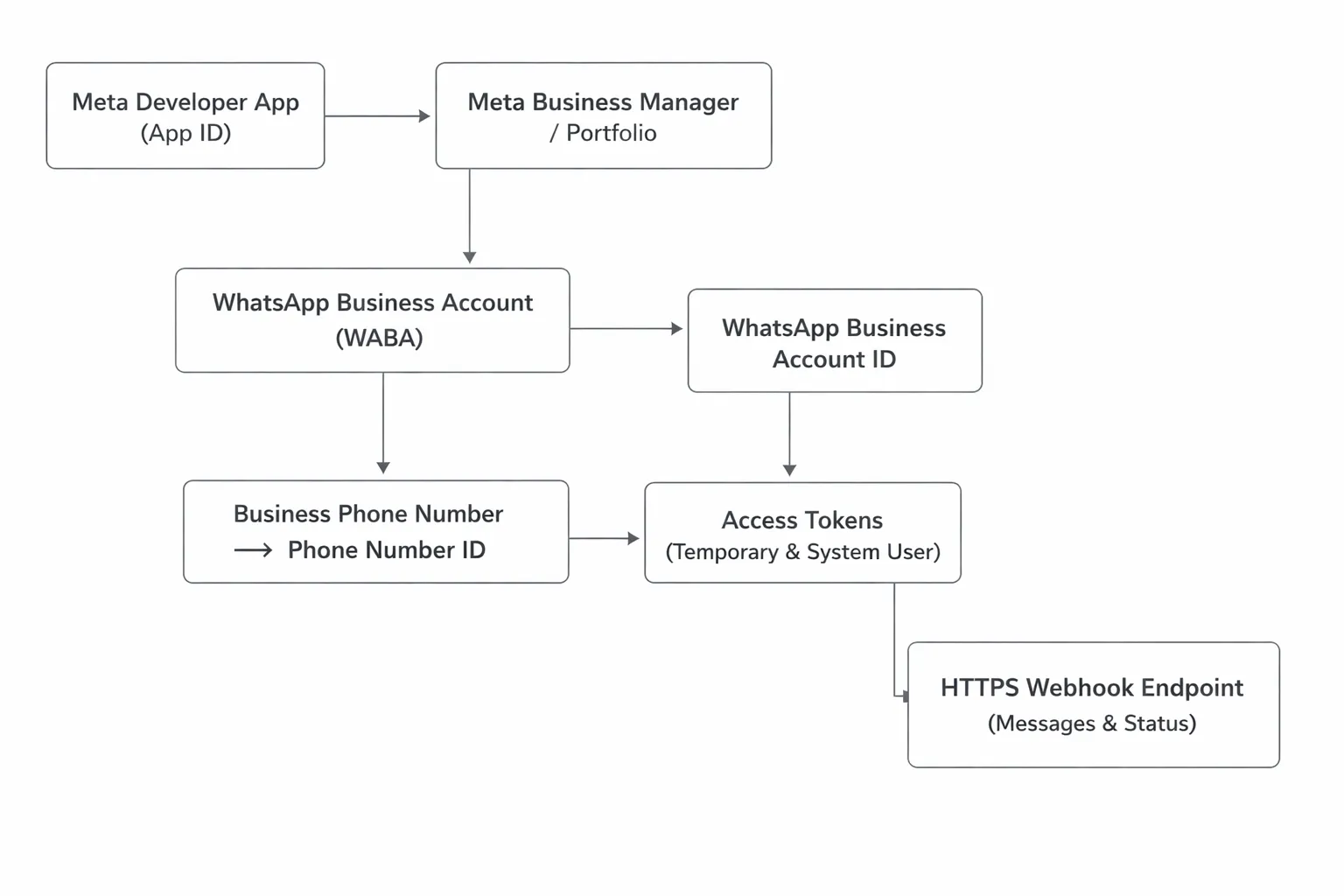
Accounts and assets you need
Meta Developer account and App (App ID)
Meta Business Manager/Portfolio
WhatsApp Business Account (WABA)
Phone number (not registered on WhatsApp, or migrate if needed)
Technical access and environment
Temporary token for sandboxing; system user for permanent token
Callback URL (public HTTPS) for webhook verification
Secure secret storage (.env, vault)
Compliance prerequisites
Opt-in policy, messaging categories (marketing vs utility/authentication), 24-hour customer-service window
Display Name rules and number verification
Fast checklist before you start coding
Developer registered? Business Manager access? WABA created?
Number available and payment method on file?
Webhook endpoint reachable via HTTPS?
Step-by-Step: WhatsApp Cloud API Setup (Meta App + Hello World)
1) Create a Meta app and add WhatsApp product
App type: Business; Add product: WhatsApp
Note your WABA ID and test phone number ID
2) Send your first template message (hello_world)
Use the temporary token and test number to send hello_world to your device
Reply to open the 24-hour session window
# Send hello_world template via WhatsApp Cloud API
curl -X POST "https://graph.facebook.com/v20.0/<TEST_PHONE_NUMBER_ID>/messages" \ -H "Authorization: Bearer <TEMPORARY_ACCESS_TOKEN>" \ -H "Content-Type: application/json" \ -d '{ "messaging_product": "whatsapp", "to": "<YOUR_WHATSAPP_USER_PHONE_NUMBER_WITH_COUNTRY_CODE>", "type": "template", "template": { "name": "hello_world", "language": { "code": "en_US" } } }'
3) Embedded signup to connect a real number
Add a business number and verify it (6-digit verification)
Display name review (ensure it matches branding)
4) Track basic metrics
Use response payloads and webhook receipts to confirm delivery/read
# After the user replies (within 24 hours), send a session (non-template) text
curl -X POST "https://graph.facebook.com/v20.0/<BUSINESS_PHONE_NUMBER_ID>/messages" \ -H "Authorization: Bearer <ACCESS_TOKEN>" \ -H "Content-Type: application/json" \ -d '{ "messaging_product":"whatsapp", "recipient_type":"individual", "to":"<YOUR_WHATSAPP_USER_PHONE_NUMBER_WITH_COUNTRY_CODE>", "type":"text", "text": { "body":"Great to hear from you! This is a session message." } }'
This sequence is the fastest WhatsApp Cloud API setup for developers and doubles as a quick Meta WhatsApp API tutorial. It’s the core “how to get WhatsApp API” flow used in most WhatsApp Business API developer guides.
Webhooks: Verify, Subscribe, Test, and Observe Events
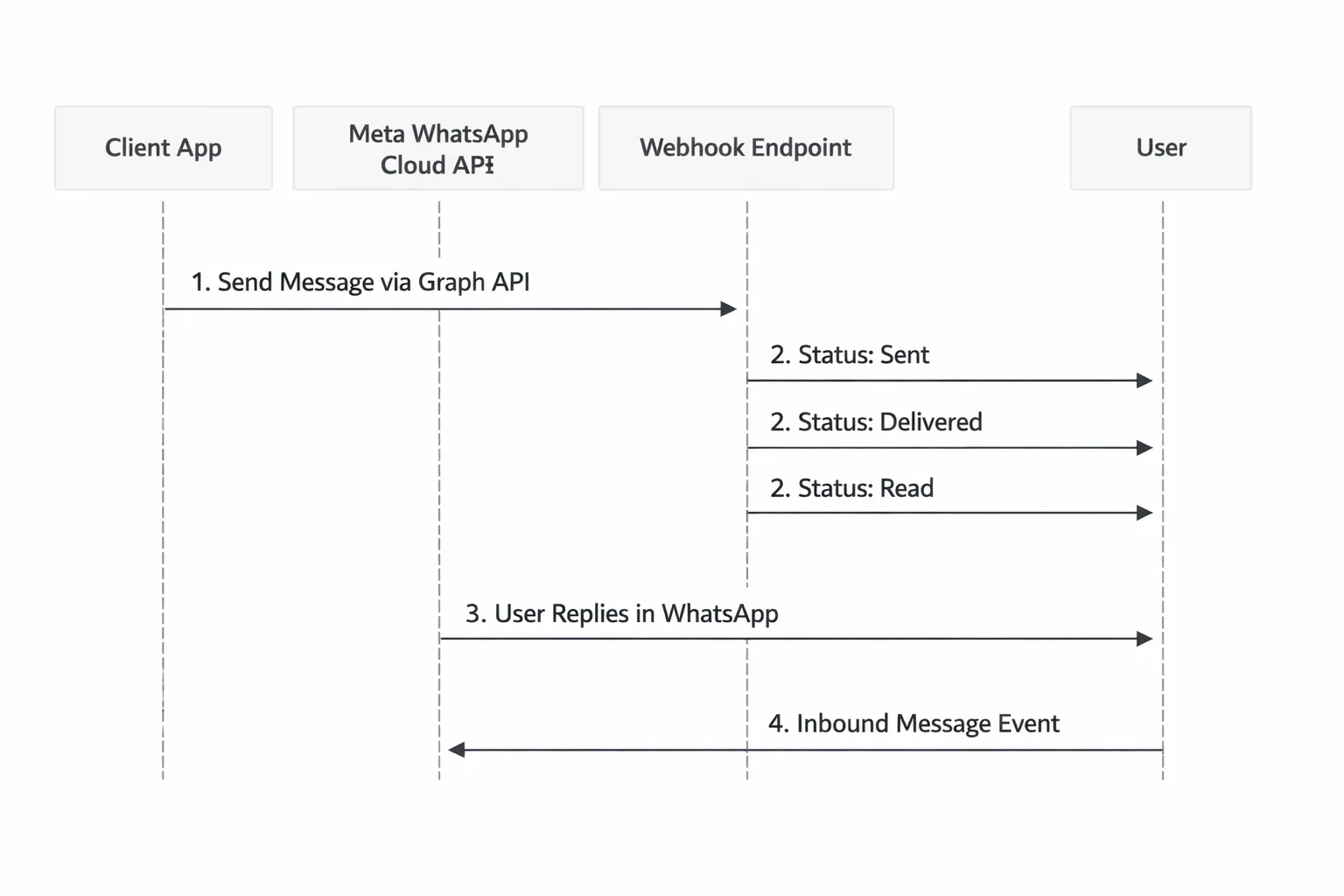
1) Verify your endpoint
Handle GET verify with hub.mode, hub.verify_token, hub.challenge
Store verify token securely; do not hardcode in client apps
2) Subscribe to WhatsApp fields
Subscribe your app/WABA to the messages field
Prefer least-privilege subscriptions
3) Test the flow
Trigger inbound and outbound events; inspect status updates, errors
4) Observability tips
Log minimal PII, redact messages as needed; store message IDs for reconciliation
Use retries/backoff and idempotency for webhook handling
// Minimal Express.js webhook server for WhatsApp Cloud API
import express from "express";
import crypto from "crypto"; const app = express();
app.use(express.json({ type: ["application/json", "application/*+json"] })); // Load from env or vault
const VERIFY_TOKEN = process.env.WHATSAPP_VERIFY_TOKEN || "";
const PORT = process.env.PORT || 3000; // 1) Verification endpoint (GET)
app.get("/webhook", (req, res) => { const mode = req.query["hub.mode"]; const token = req.query["hub.verify_token"]; const challenge = req.query["hub.challenge"]; if (mode === "subscribe" && token === VERIFY_TOKEN) { return res.status(200).send(challenge); } return res.sendStatus(403);
}); // 2) Webhook receiver (POST)
app.post("/webhook", (req, res) => { const body = req.body; // Basic validation if (body?.object === "whatsapp_business_account") { for (const entry of body.entry || []) { for (const change of entry.changes || []) { const value = change.value || {}; const messages = value.messages || []; const statuses = value.statuses || []; // Inbound user messages for (const msg of messages) { console.log("[INBOUND]", { from: msg.from, id: msg.id, type: msg.type, timestamp: msg.timestamp, text: msg.text?.body?.slice(0, 200), }); } // Delivery/read receipts for (const st of statuses) { console.log("[STATUS]", { id: st.id, status: st.status, // sent | delivered | read | failed timestamp: st.timestamp, conversation: st.conversation?.id, pricing: st.pricing?.category, error: st.errors?.[0], }); } } } // Acknowledge quickly; process asynchronously if heavy return res.sendStatus(200); } return res.sendStatus(404);
}); app.listen(PORT, () => { console.log(`Webhook server listening on port ${PORT}`);
});
Permanent Access Tokens, Security, and Environments
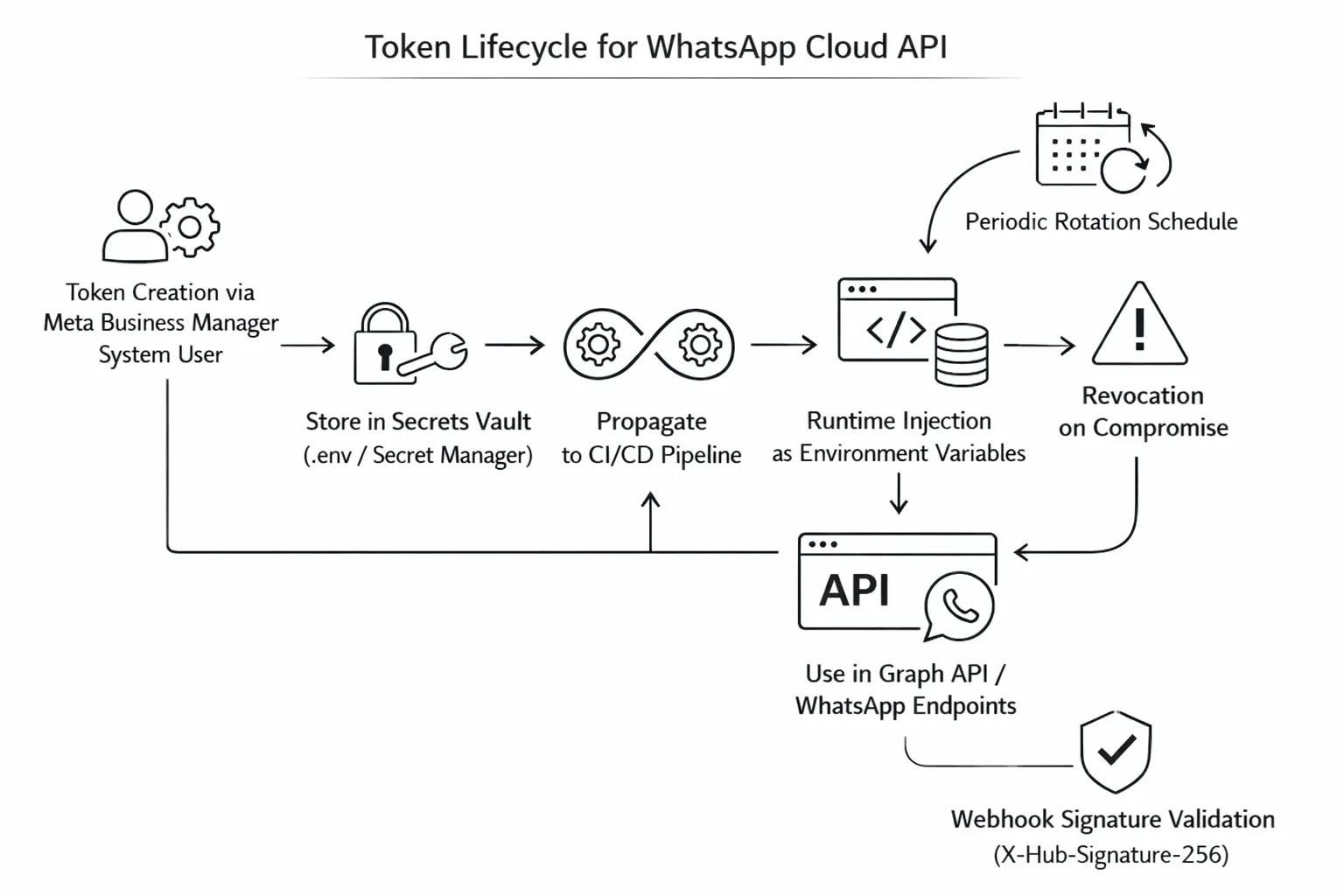
1) Create a system user and generate a permanent token
Assign your App and WABA with required permissions (whatsapp_business_messaging, whatsapp_business_management, business_management)
Store the token securely; rotate on a schedule
2) Secure-by-default practices
Secrets: use vault/secret manager; never commit to Git
Validate the X-Hub-Signature-256 header for webhook integrity
IP allowlisting and TLS only
3) Environment strategy
Separate dev/staging/prod WABAs and numbers
Template versioning and migration flows
Monitoring (latency, failures, quality rating)
# Pseudocode: Verify X-Hub-Signature-256 (HMAC-SHA256) for webhook
# Inputs:
# raw_body: exact request payload bytes
# app_secret: your Meta App Secret
# header_sig: value of 'X-Hub-Signature-256' header, format: 'sha256=HEX_DIGEST' function verify_webhook_signature(raw_body, app_secret, header_sig): if header_sig is null or not header_sig.starts_with("sha256="): return false provided = header_sig.split("=", 2)[1] # HEX_DIGEST from header expected_bytes = HMAC_SHA256(key=app_secret, message=raw_body) # bytes expected_hex = HEX_ENCODE(expected_bytes).lower() # Use constant-time comparison to prevent timing attacks return constant_time_equals(expected_hex, provided.lower())
Send Messages the Right Way: Templates vs 24‑Hour Session (with Examples)
"The first 1,000 user-initiated (service) conversations per WhatsApp Business Account each month are free." - Source
Template messages (business-initiated)
Categories (utility, marketing, authentication) and approval process
Utility: order updates, shipping notifications, reminders, post-purchase info.
Marketing: offers, promotions, back-in-stock, product recommendations.
Authentication: OTPs, login codes, verification flows.
Personalization with components and parameters
Use template components (header/body/footer/buttons).
Inject variables like customer name and order_id via parameters.
Ensure template copy is clear, compliant, and avoids spammy language.
Session messages (user-initiated within 24h)
Text, media, interactive, and location messages
Once the user sends you a message, a 24-hour customer-service window opens.
Within this window, send free-form content: text, media, and interactive messages.
Fallback strategy when window is closed
If the window expires, prompt opt-in or use an approved template (utility/marketing/authentication) to re-engage.
Conversation categories: use cases and compliance notes
Category | Common use cases | Example templates | Compliance notes |
|---|---|---|---|
Utility | Order/shipping updates, appointment reminders, service alerts | order_update, shipping_update, appointment_reminder | Informational only; avoid overt promotional language. Include clear brand and actionable info. |
Marketing | Offers, product drops, cart recovery, re-engagement | promo_alert, back_in_stock, cart_recovery | Requires prior opt-in for marketing; make opt-out simple. Respect local spam/consent laws. |
Authentication | OTPs, login verification, 2FA | otp_1fa, otp_2fa | Time-bound codes; secure phrasing; avoid sensitive PII in body. |
Working examples
# Send a utility/marketing template with parameters (name, order_id)
# Replace placeholders with your values: <PHONE_NUMBER_ID>, <ACCESS_TOKEN>, <USER_PHONE>
curl -X POST "https://graph.facebook.com/v20.0/<PHONE_NUMBER_ID>/messages" \ -H "Authorization: Bearer <ACCESS_TOKEN>" \ -H "Content-Type: application/json" \ -d '{ "messaging_product": "whatsapp", "to": "<USER_PHONE>", "type": "template", "template": { "name": "order_update", // or "promo_alert" for marketing "language": { "code": "en_US" }, "components": [ { "type": "body", "parameters": [ { "type": "text", "text": "Alex" }, // {{1}} = name { "type": "text", "text": "ORD-982143" } // {{2}} = order_id ] } ] } }'
# Send an interactive message (quick replies) within the 24-hour session window
# Requires the user to have messaged you in the last 24 hours
curl -X POST "https://graph.facebook.com/v20.0/<BUSINESS_PHONE_NUMBER_ID>/messages" \ -H "Authorization: Bearer <ACCESS_TOKEN>" \ -H "Content-Type: application/json" \ -d '{ "messaging_product": "whatsapp", "to": "<USER_PHONE>", "type": "interactive", "interactive": { "type": "button", "body": { "text": "How can we help you today?" }, "action": { "buttons": [ { "type": "reply", "reply": { "id": "help_order", "title": "Track order" } }, { "type": "reply", "reply": { "id": "help_agent", "title": "Talk to agent" } }, { "type": "reply", "reply": { "id": "help_return", "title": "Start a return" } } ] } } }'
Practical tips
Maintain opt-in records; avoid template rejections with clear, truthful copy and consistent branding.
Personalize responsibly; keep variables short and free of sensitive data.
Track message status and errors via webhooks; reconcile by storing message IDs and conversation IDs.
If a session is closed, re-engage with an approved template or ask for fresh opt-in to stay compliant.
Go‑Live Checklist: Verification, Numbers, Quality, Pricing, Rate Limits, Compliance
"Businesses must obtain user opt-in before sending messages. Free-form messages are allowed only within a 24-hour window after the user’s last message; outside this window, businesses may only send pre-approved message templates." - Source
Business verification and payments
Complete Business Verification in Business Manager; add payment method
Verify phone number ownership and display name
Quality rating and limits
Monitor phone number quality and messaging limits; improve via opt‑in and relevant templates
Pricing and cost control
Understand per‑conversation fees by category and country; use templates wisely
Reduce costs with segmentation and message timing
Policy compliance (non‑negotiable)
Obtain clear opt‑in; provide opt‑out
Respect the 24‑hour customer service window; use templates outside the window
Common production pitfalls
Token expiry/rotation failures
Webhook downtime and missed events
Template rejections and localization gaps
When to Use a BSP - And Why Trikon Accelerates WhatsApp Development
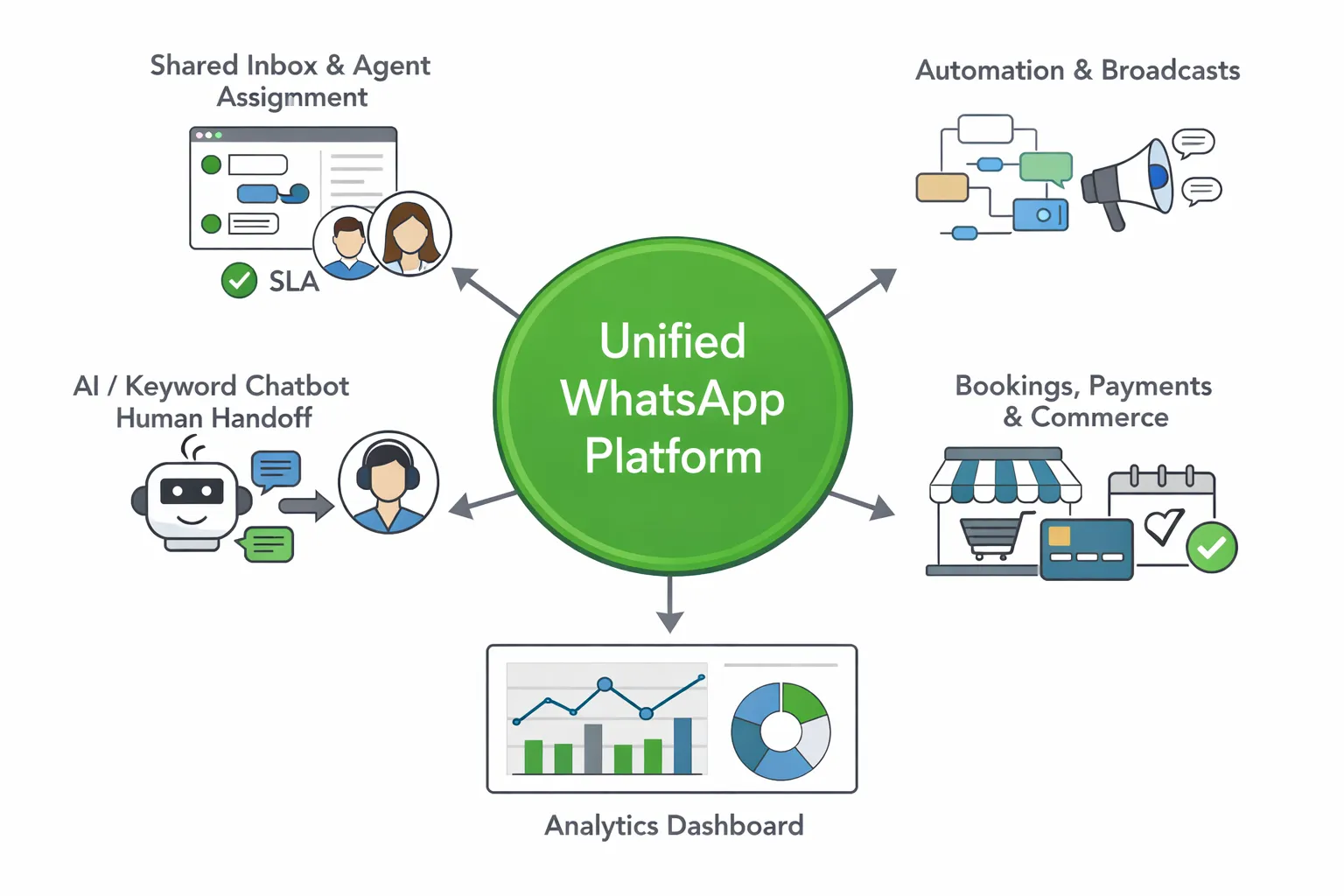
When a BSP is the right call
Need for a shared support inbox with SLAs and conversation history
Marketing automation (broadcasts, segmentation, drip, retargeting)
No‑code chatbots + human handoff; bookings and payments in chat
Faster go‑live and compliance guidance
How Trikon helps developers ship faster
Official WhatsApp Business API partner; reliable and scalable
Minimal setup; no complex flow builders; hybrid automation + agents
APIs and webhooks you can integrate with your stack; agency‑friendly/white‑label
Real workflows to implement in days, not months
D2C: campaigns, abandoned cart, WhatsApp storefront
Service ops: scheduling, reminders, approvals, payments
Support: unified inbox, SLAs, CSAT tracking, analytics
Migration and coexistence
Bring your existing WABA/number; keep Cloud API direct for core while using Trikon for ops/automation
Conclusion: Ship Faster with a Reliable WhatsApp API Platform (Try Trikon)
Recap: You learned the end-to-end Cloud API setup, created tokens (temporary and permanent), verified webhooks, sent template vs 24-hour session messages, and prepared for go-live with verification, pricing, and compliance.
For production speed, reliability, and growth: pair your engineering with an official, battle-tested platform that adds inboxes, automation, segmentation, analytics, and compliance guardrails.
Next step: Start building with the Cloud API to validate your flows, then plug into Trikon to scale support, marketing, chatbots, bookings, and commerce - without complex builders or long implementations.
CTA: Get started with Trikon today at https://whatsapp.trikon.tech/