
![Schedule Messages on WhatsApp: How to Automate Timed Sends [2026 Guide]](https://blog.trikon.tech/rails/active_storage/blobs/redirect/eyJfcmFpbHMiOnsiZGF0YSI6MTgzNiwicHVyIjoiYmxvYl9pZCJ9fQ==--3c54ebe74ed078cc6e5a432c655b48ace1df61c1/Schedule%20Messages%20on%20WhatsApp-%20How%20to%20Automate%20Timed%20Sends%20%5B2026%20Guide%5D-cover.webp)
Introduction: Schedule Messages on WhatsApp in Minutes
Timing is everything on WhatsApp. When you schedule message in WhatsApp, you turn manual, ad‑hoc sends into reliable, on‑time touchpoints that boost response rates and reduce operational drag. For modern teams, automation is the difference between “we meant to follow up” and “it’s already handled.”
"As of February 2025, WhatsApp had approximately 2 billion monthly active users (MAUs)." - Source
Why scheduling WhatsApp messages matters in 2026
Speed, consistency, and scale vs manual sending
Manual sending breaks under scale. Scheduling eliminates missed follow-ups, unplanned gaps, and off‑hour delays by using WhatsApp timed messages and a WhatsApp messages timer to dispatch at the perfect moment.
Consistency drives trust. Customers get the same, accurate information every time - appointment reminders, order updates, and renewals - without scrambling.
Scale with control. Queue, throttle, and monitor thousands of sends with schedule send in WhatsApp workflows, instead of context-switching between chats.
Where it fits: support, marketing, operations, commerce
Support: SLA‑aware reminders, ticket updates, and survey nudges that auto send WhatsApp message after resolution.
Marketing: launches, segmented broadcasts, and drip sequences that time message in WhatsApp for peak engagement.
Operations: appointment reminders, routing instructions, field‑team check-ins, and shift alerts with auto message in WhatsApp.
Commerce: abandoned cart recovery, back‑in‑stock alerts, and post‑purchase care that turn clicks into conversions.
What you’ll learn in this guide
Device-level options (Android, iPhone, Web) vs API-grade automation
How to time message in WhatsApp for higher engagement
Compliance and deliverability guardrails
Templates, timing playbooks, and measurement
TL;DR for busy teams
WhatsApp doesn’t natively offer schedule send in WhatsApp for business scale
You can auto send WhatsApp message reliably with an official WhatsApp Business API partner like Trikon
Use approved templates + timezone-aware scheduling + analytics to automate WhatsApp timed messages end-to-end
How WhatsApp Scheduling Actually Works (24‑hour rule, templates, and your options)
Scheduling on WhatsApp isn’t just “send later.” Under Meta’s 24‑hour customer service window, the type of message you send (and when) determines whether you can use free-form text or must use a pre‑approved template. Here’s how to schedule message in WhatsApp the right way - compliantly and at scale.
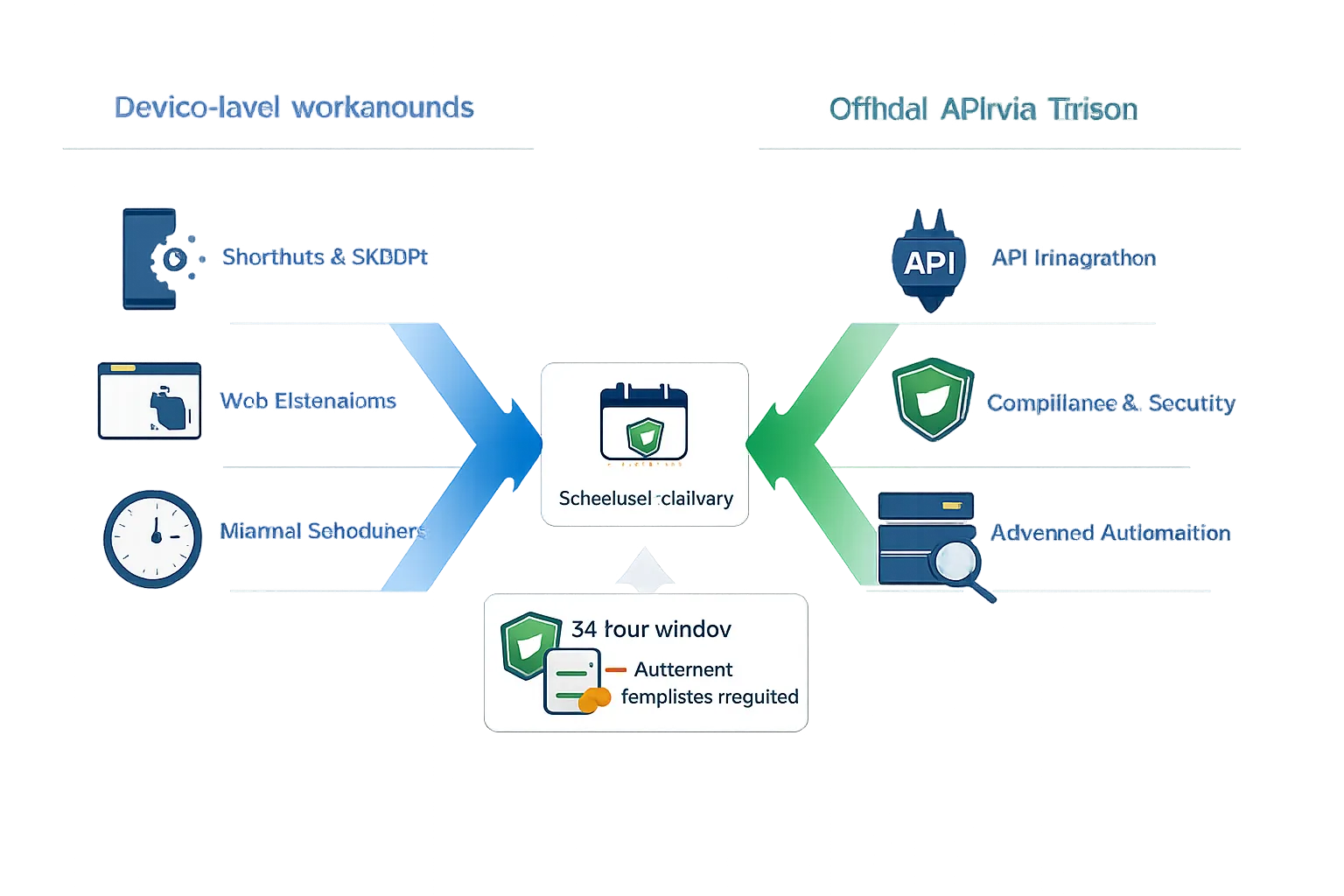
"After the 24‑hour customer service window, businesses must use pre‑approved template messages to initiate conversations." - Source
The 24‑hour customer service window explained
What you can/can’t send without a template
Within 24 hours of a customer’s last message: you can reply with free‑form, service-oriented messages (no template needed). This is ideal for support follow‑ups, order clarifications, or resolving an issue.
Outside 24 hours: you must use a pre‑approved template to initiate or re‑open the conversation. This applies whether you plan to time message in WhatsApp later (scheduled) or send immediately.
Template categories (marketing, utility, authentication) and approvals
Marketing: promotions, offers, product announcements, win-backs. Requires explicit opt‑in and template approval.
Utility: transactional updates such as order confirmations, shipping alerts, appointment reminders - often the backbone of WhatsApp timed messages and WhatsApp messages timer workflows.
Authentication: one‑time passwords (OTP) and verification codes.
Approval flow: draft your template (placeholders supported), submit for review via your WhatsApp Business API partner (e.g., Trikon), then schedule send in WhatsApp using the approved template with dynamic fields and timezone-aware delivery.
Options to schedule message in WhatsApp
Device-level workarounds
iPhone Shortcuts: can queue a message, but typically requires manual confirmation at send time; limited reliability for business use.
Android apps (e.g., SKEDit): rely on accessibility services; can be brittle, limited for broadcasts, and not policy-aware.
Web extensions: add “send later” to WhatsApp Web; convenient for light use but risky for scale and compliance.
API platforms (official WhatsApp Business API via partners like Trikon)
Compliance: templates, opt‑in capture, audit trails, and guardrails for the 24‑hour rule.
Scale: segmentation, bulk scheduling, throttling, and retry logic to auto send WhatsApp message reliably.
Reliability: official API routing, deliverability reporting, and SLA-backed uptime - no device dependencies.
Operations: analytics, UTM tracking, conversation labels, and a central inbox - essential for teams managing campaigns and support.
When to choose which path
Personal/light usage
Send the occasional reminder to yourself or a small group? Device-level workarounds can be enough for a simple WhatsApp schedule message scenario.
Business-grade automation and volume
If you need to run campaigns, support SLAs, or trigger workflows (cart recovery, renewals, appointments), choose an official API partner like Trikon. You’ll get approved templates, timezone-aware scheduling, analytics, and compliance - end-to-end control for every auto message in WhatsApp.
Quick video walkthrough (2–3 minutes)
A short visual overview of how templates get approved, how to schedule send in WhatsApp using the API, and how to monitor delivery and responses.
Schedule a Message on Any Device (Android, iPhone, Web) - Pros, Cons, and Risks
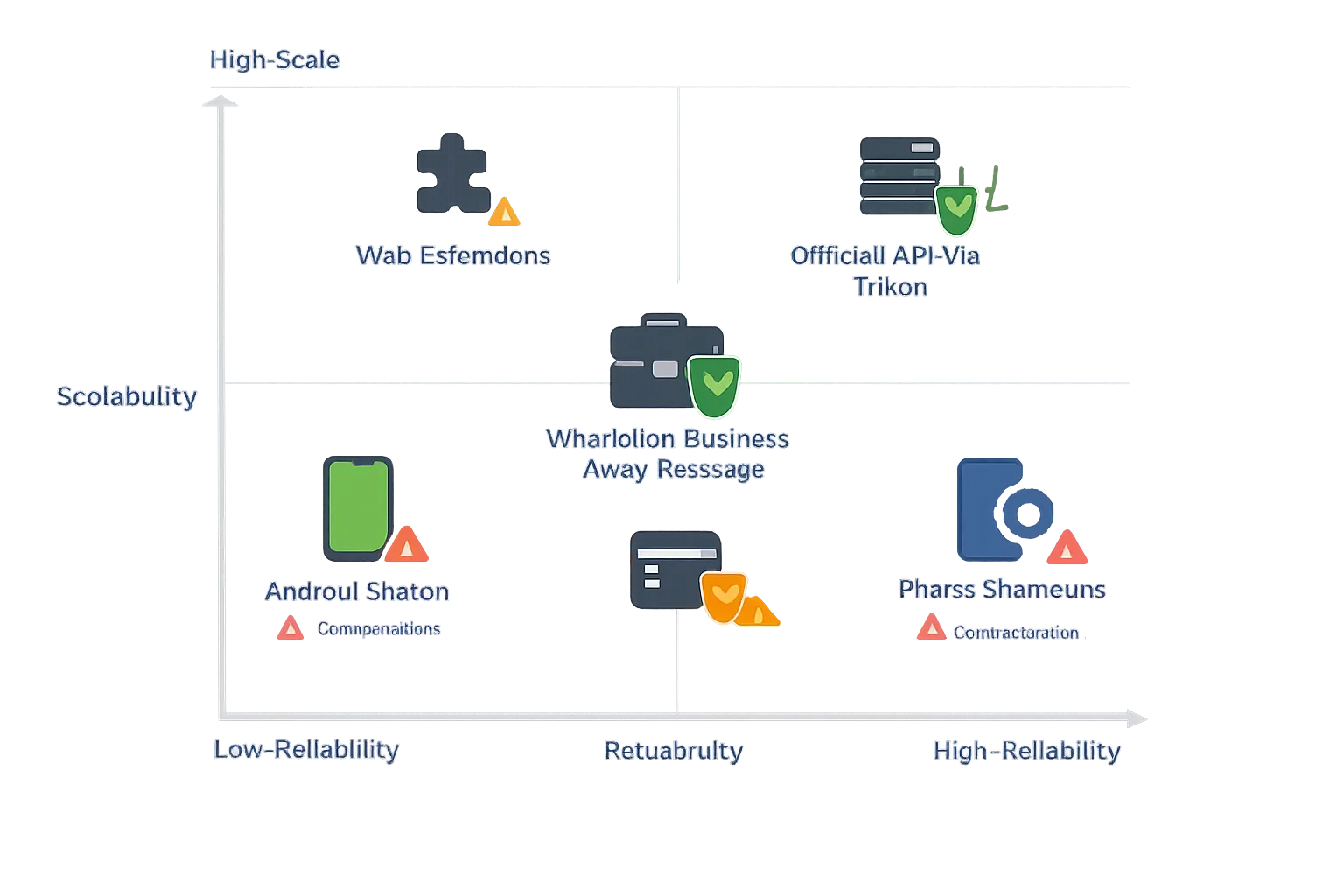
Choosing how to schedule message in WhatsApp depends on your goals. Device-level workarounds are fine for personal reminders, but business teams need compliance, scale, and analytics. Here’s a practical breakdown.
Android (SKEDit-style apps)
What it does, limitations (permissions, reliability, foregrounding)
Schedules outbound messages using accessibility permissions; some support images/files.
Requires persistent permissions; may need the app in the foreground; OEM battery savers can block sends.
Not built for broadcasts or segmentation; brittle if OS updates change permission behavior.
Suitable for: personal reminders, low volume
Good for one-off nudges to a few contacts. Not recommended for campaigns or SLAs.
iPhone (Shortcuts automation)
Trigger at time of day → user confirmation required
Can prepare a message at a scheduled time, but iOS typically prompts for manual confirmation; no unattended bulk sending.
Suitable for: personal, non-bulk
Handy for personal reminders or occasional follow-ups; not viable for business automation.
WhatsApp Web (browser extensions)
Convenience vs reliability and account risk
Adds a “send later” UI to WhatsApp Web; convenient for desktop users.
Dependent on browser/computer being on and connected; extensions can break when WhatsApp updates the web app.
Potential compliance risk and limited guardrails for opt‑ins/templates.
WhatsApp Business app (Away Message as a pseudo-scheduler)
One auto message use-case; not a true schedule send in WhatsApp solution
Away Message can auto-reply during set hours, but it’s a single canned reply - not targeted scheduling, no templates, and no analytics.
Comparison: workarounds vs official API
Reliability: device methods are fragile; the official API is server-side, monitored, and SLA-backed.
Scale: device methods don’t handle groups/bulk well; API supports segments, broadcasts, and throttling.
Compliance: device methods don’t enforce the 24‑hour rule or template usage; API partners like Trikon enforce policy by design.
Analytics: device methods have no delivery/read reporting; API includes dashboards, UTM tracking, and conversation metrics.
Methods comparison
Method | Reliability | Scale (contacts, groups, bulk) | Automation depth (recurring, triggers) | Compliance risk | Analytics & SLA | Best for |
|---|---|---|---|---|---|---|
Android SKEDit | Low–Medium (permission-dependent) | Low (few contacts) | Limited (basic time-based) | Medium–High | None | Personal reminders |
iPhone Shortcuts | Low (manual confirm) | Very Low | Limited (time-based, manual step) | Medium | None | Personal, non-bulk |
Web Extension | Medium (breaks on updates) | Low | Limited (send-later only) | Medium–High | None | Light desktop use |
WhatsApp Business Away Message | Medium (official app) | Very Low | Very Limited (auto-reply window) | Low–Medium | Minimal | Basic after-hours reply |
WhatsApp Business API via Trikon | High (server-side, official) | High (segments, broadcasts) | High (recurring, triggers, flows) | Low (policy-enforced) | Full analytics, SLAs | Business-grade automation |
API‑Level Automation with Trikon: Schedule Send in WhatsApp at Scale
When timing and reach matter, device workarounds won’t cut it. Trikon’s official WhatsApp Business API integration lets you schedule message in WhatsApp with enterprise-grade deliverability, compliance, and analytics - no engineering lift required.
Why API beats workarounds for businesses
Deliverability, compliance, analytics, and governance
Templates and opt‑ins enforced by design; robust routing and delivery reporting; full audit trails and access controls.
Hybrid automation + human handoff for complex queries
Use chatbots for FAQs and routine flows, then transfer to agents in the Support Inbox with full context, SLAs, and conversation history.
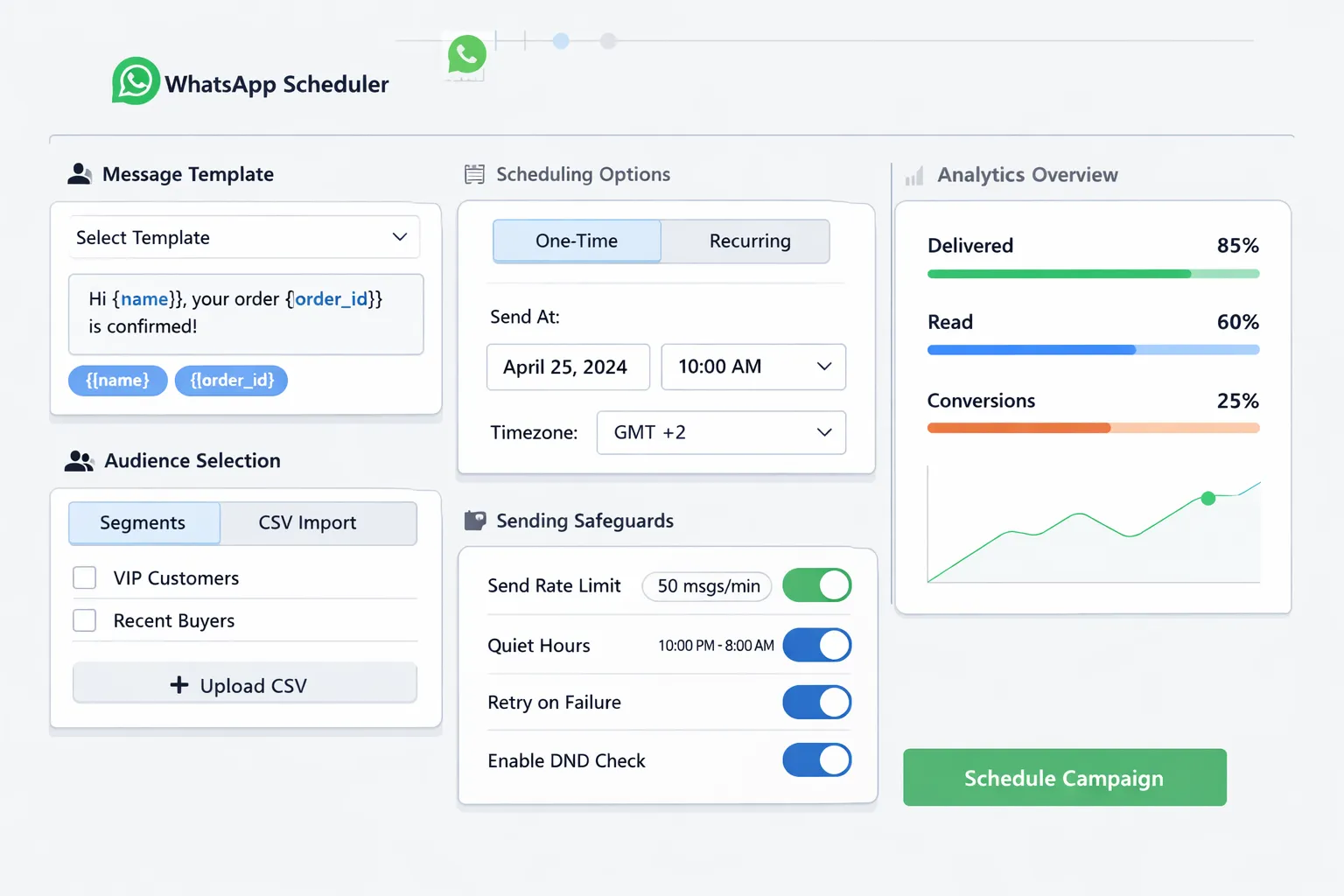
Step‑by‑step: auto send WhatsApp message with Trikon
Connect your WhatsApp Business number (official API)
Verify your business and number; Trikon handles API provisioning and compliance setup.
Create/submit template with dynamic fields (name, order, amount)
Draft marketing, utility, or authentication templates with placeholders (e.g., {{name}}, {{order_id}}, {{amount}}); submit for approval.
Build the audience (segments, tags, events) - or import CSV
Sync your store/CRM, build segments (VIPs, recent buyers, at‑risk), or upload CSVs with mapped fields.
Choose schedule: one‑time, recurring, timezone‑aware
Send immediately, schedule later, or set recurring jobs with customer‑local timezone targeting.
Add fail‑safes: throttling, quiet hours, retries
Control throughput, respect quiet hours by region, and enable smart retries for transient failures.
Launch, monitor SLA, route replies to Support Inbox
Track acceptance, delivery, and read status; route complex replies to agents with auto-assignment and SLAs.
Optimize with delivery/read/conversion insights
Measure clicks, replies, and revenue; iterate templates and timing for higher ROI.
What you can automate today
Reminders (appointments, payments, service)
Post‑purchase care (how‑to, warranty, review requests)
Cart recovery and browse abandonment
Subscription renewals and reactivations
VIP promos, back‑in‑stock, price drops
NPS/CSAT and feedback loops
Why Trikon
All‑in‑one: support inbox, marketing automation, chatbots, bookings, commerce
Faster go‑live: minimal setup, no engineering, no complex flow builders
Proven Use‑Cases and Timing Playbooks for WhatsApp Timed Messages
Design your WhatsApp timed messages to match customer intent and moment. Use timezone-aware scheduling, approved templates, and clear CTAs to lift engagement - then iterate with analytics. The playbooks below work whether you schedule message in WhatsApp with device workarounds or automate via Trikon’s official API.
Appointment & service reminders
48h confirm → 24h confirm → 1h nudge with quick reply buttons
Use utility templates with buttons like Confirm / Reschedule.
Goal: maximize show rate and reduce no‑shows with a gentle cadence.
Cart recovery
1h recovery link → 24h social proof → 72h incentive (if allowed by policy)
Outside the 24‑hour window, use approved marketing templates and opt‑ins.
Add short links and first‑name personalization to time message in WhatsApp for high intent.
Post‑purchase & onboarding
Day 1 thank you + how‑to → Day 3 tips → Day 7 review/NPS
Keep it helpful first, then ask for a review; track CSAT replies to auto route follow‑ups.
Subscriptions & billing
7‑day heads‑up → 1‑day reminder → payment success receipt
Utility templates with dynamic fields (plan, amount, due date); include a secure pay link.
Events & webinars
Registration confirm → 24h reminder → 1h “we’re starting”
Add “Join now” and “Add to calendar” buttons; use local-time scheduling to maximize show rate.
Internal ops (teams/field)
Shift, SLA, and task alerts scheduled to local time
Automate task assignments and SLA pings; throttle to avoid alert fatigue.
Playbook quick‑ref table
Use‑case | Suggested schedule | Template category (utility/marketing) | Key KPI (show rate, recovery rate, CSAT) | Notes (policy/quiet hours) |
|---|---|---|---|---|
Appointment & service reminders | 48h confirm → 24h confirm → 1h nudge | Utility | Show rate, no‑show reduction | Respect quiet hours; quick-reply buttons for Confirm/Reschedule; timezone-aware scheduling |
Cart recovery | 1h link → 24h social proof → 72h incentive | Marketing | Recovery rate, revenue/message | Requires opt‑in and approved templates outside 24h; cap frequency; test incentives |
Post‑purchase & onboarding | D1 thank you/how‑to → D3 tips → D7 review/NPS | Utility (D1–D3), Marketing (D7) | CSAT, review rate | Keep D1 helpful; use short links; OK to auto send WhatsApp message with template outside 24h |
Subscriptions & billing | 7‑day heads‑up → 1‑day reminder → payment receipt | Utility | Renewal rate, payment success | Include amount/due date; honor local quiet hours; retries for failed payments |
Events & webinars | Registration confirm → 24h reminder → 1h “starting now” | Marketing | Show rate, click‑through | Timezone-aware; include “Join now” button; throttle to avoid duplicates |
Internal ops (teams/field) | Shift alerts at T‑12h/T‑2h; SLA/task pings as needed | Utility | On‑time starts, SLA adherence | Internal use; schedule send in WhatsApp to local time; avoid off‑hours unless urgent |
For business-grade reliability, use Trikon to schedule send in WhatsApp with approved templates, a WhatsApp messages timer that respects quiet hours, and analytics to optimize every auto message in WhatsApp.
Templates You Can Copy: High‑Performing Messages with Variables
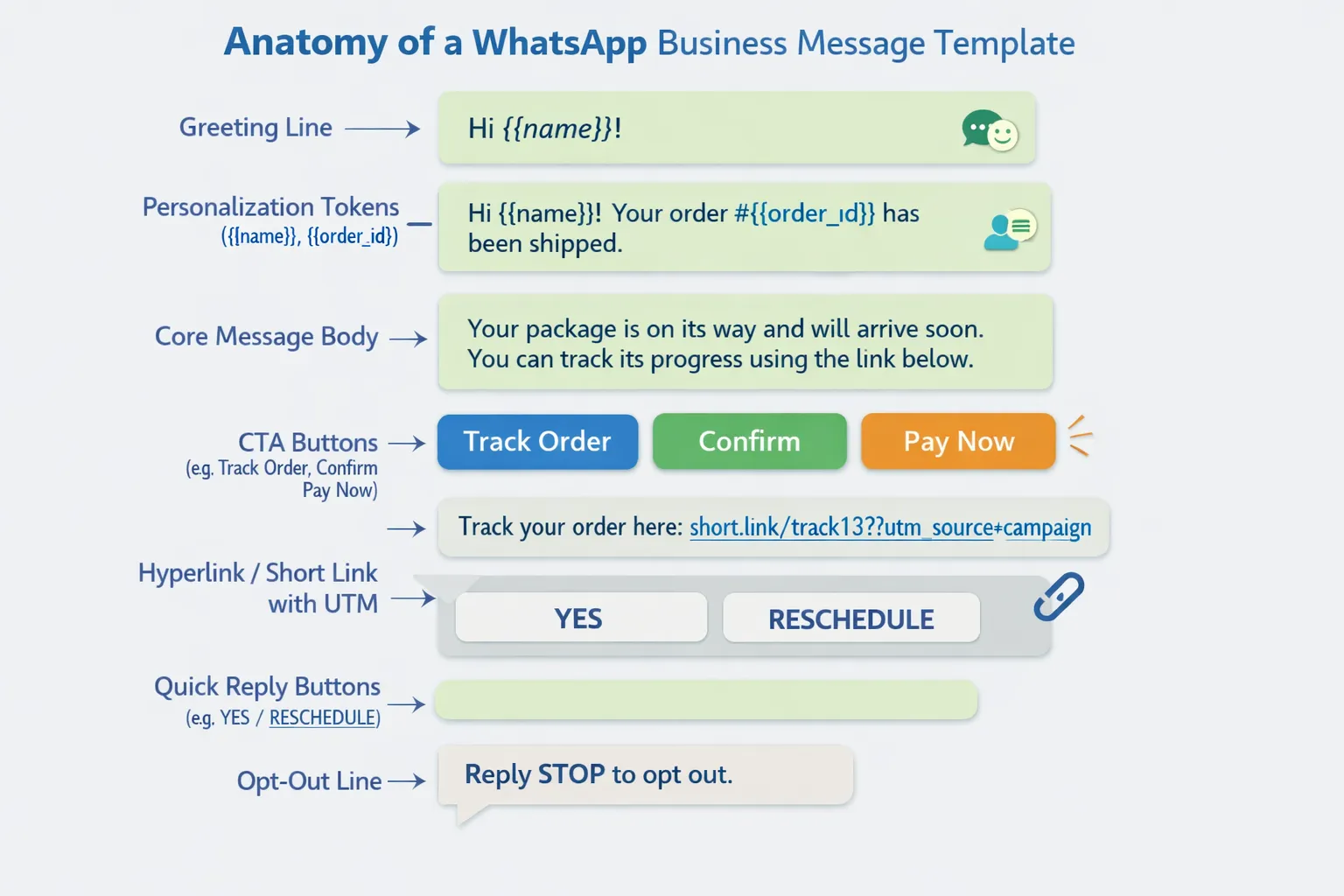
Design templates once; reuse them everywhere with dynamic fields and quick-reply buttons. Below are ready-to-approve examples you can paste into your template library and schedule with Trikon.
Utility templates (reminders, updates)
Appointment reminder (48h): dynamic name/date/time; quick replies YES/RESCHEDULE
Template name: appointment_48h_reminder
Category: Utility
Body: Hi {{name}}, reminder of your appointment on {{date}} at {{time}}. Reply YES to confirm or RESCHEDULE to pick a new time.
Buttons: [Quick Reply] YES, [Quick Reply] RESCHEDULE
Shipping update: order ID, tracking link, ETA
Template name: order_shipped_update
Category: Utility
Body: Great news, {{name}}! Order {{order_id}} is on the way. Track here: {{tracking_link}}. Estimated delivery: {{eta}}.
Buttons: [Call To Action] Track Order → {{tracking_link}}
Marketing templates (opt‑in required)
Cart recovery (1h): single CTA, short link with UTM
Template name: cart_recovery_1h
Category: Marketing
Body: Hey {{name}}, you left {{item_count}} item(s) in your cart. Complete your order here: {{checkout_link}}. Your selection is saved for the next few hours.
Buttons: [Call To Action] Complete Checkout → {{checkout_link}}
Footer: Reply STOP to opt out.
VIP offer: scarcity window, opt‑out hint
Template name: vip_drop_24h
Category: Marketing
Body: {{name}}, early access: {{product}} is live for the next 24h. Your VIP link: {{vip_link}}. Limited stock.
Buttons: [Call To Action] Shop Now → {{vip_link}}
Footer: Reply STOP to opt out.
Service/ops templates
Ticket update: SLA timer, agent name
Template name: ticket_progress_update
Category: Utility
Body: Hi {{name}}, this is {{agent_name}}. Your ticket {{ticket_id}} is in progress. ETA for next update: {{next_update_time}}.
Buttons: [Quick Reply] View Status, [Quick Reply] Talk to Support
Payment reminder: amount, due date, secure pay link
Template name: payment_due_notice
Category: Utility
Body: Hi {{name}}, payment of {{amount}} for {{plan}} is due on {{due_date}}. Pay securely here: {{pay_link}}.
Buttons: [Call To Action] Pay Now → {{pay_link}}
Footer: If you’ve paid, reply PAID and we’ll reconcile.
Template anatomy
Personalization tokens: {{name}}, {{order_id}}, {{amount}}, {{due_date}}
CTA buttons: Quick Replies for responses (YES/RESCHEDULE), CTAs for links (Track Order, Pay Now)
Fallbacks: Provide defaults for missing fields (e.g., {{name|there}})
Opt‑out copy: Footer line such as “Reply STOP to opt out.”
Localization tips
Timezone and language variants within categories
Provide localized date/time formats and language variants per market.
Use timezone-aware scheduling to send during local business hours.
Maintain consistent template names with locale suffixes (e.g., _en, _es, _ar).
Compliance, Deliverability, and Governance (Read This Before You Scale)
"Businesses must obtain clear opt‑in from recipients before sending proactive messages on WhatsApp and must provide straightforward instructions for opting out." - Source
Opt‑in and consent management
Capture, store timestamps, and channels; honor STOP/HELP
Record who opted in, when, and where (web form, checkout, in‑store QR, lead ad).
Store consent timestamps and proof (checkbox text, source page) for audits.
Provide clear HELP/STOP keywords and honor them instantly across all journeys.
Sync opt‑outs bi‑directionally with your CRM and Trikon to prevent accidental sends.
Template approvals and policy fit
Categories, prohibited content, appeals
Map use-cases to approved categories: Utility, Marketing, Authentication.
Avoid prohibited content: deceptive claims, restricted products, or sensitive personal data without proper basis.
If a template is rejected, revise tone or clarity and re‑submit; keep subject lines concise and non‑spammy.
Localize responsibly: align promos and disclosures with regional rules.
Sending hygiene
Quiet hours, throttling, retry logic, reputation protection
Respect local quiet hours; schedule by customer timezone and segment sensitivity.
Throttle bulk sends to avoid spikes in blocks and complaints.
Implement intelligent retries for transient failures; don’t loop retries indefinitely.
Monitor delivery/read rates, block rates, and spam signals; pause segments that underperform.
Data and privacy
Regional regulations (GDPR, LGPD), data retention, DSR workflows
Process data on a lawful basis (consent/contract) and minimize what you store.
Define retention windows for messages, events, and identifiers; purge on schedule.
Support Data Subject Requests (access, delete, rectify) with documented SLAs.
Protect data in transit and at rest; apply role-based access and audit trails.
For cross-border transfers, use approved mechanisms and vendor DPAs.
Measure What Matters: Metrics, Testing, and ROI
"Mailchimp's benchmarks indicate that the average open rate across all industries is 35.63%." - Source
Core metrics for scheduled programs
Delivery/accepted, read, reply, CTR, conversion, revenue per message
Delivery/accepted: confirms routing health and template eligibility.
Read rate: proxy for visibility; WhatsApp timed messages often outperform email on attention.
Reply rate: measures conversational pull; watch for helpful replies vs STOP/unsubscribe.
CTR: button/link effectiveness; use UTM tags to tie to web/app analytics.
Conversion: purchases, bookings, payments, or form submissions attributed.
Revenue per message (RPM): total attributed revenue / delivered messages.
Opt‑out and complaint rates; threshold guardrails
Monitor STOP rate and blocks per 1,000 messages; set internal guardrails by campaign type.
Pause segments with rising complaints; adjust frequency, copy, or targeting.
Testing roadmap
Cadence A/B, send‑time testing by timezone, CTA copy and buttons
Cadence: e.g., cart 1h vs 3h; reminders 48h/24h/1h vs 24h/2h.
Send‑time: test morning vs afternoon by customer local time; leverage Trikon’s timezone‑aware schedule send in WhatsApp.
CTA: one primary vs two options; verb-first copy (“Pay now,” “Track order”).
Segment‑level tests: VIP vs first‑time buyers
Personalize incentives and tone by cohort; maintain separate holdouts to measure incremental lift.
Reporting with Trikon
Unified dashboard, per‑template analytics, cohort comparisons
Track delivery → read → click → conversion funnels per template and per segment.
Compare cohorts (VIP, at‑risk, new buyers) and identify best timings for each.
SLA tracking in Support Inbox and bot deflection rate
Monitor agent SLA compliance, first‑response times, and resolution times.
Measure bot deflection (percent resolved by automation) to quantify efficiency ROI.
Benchmarking reality check
Why channel benchmarks vary by industry and opt‑in quality
Opt‑in quality, offer relevance, and list hygiene shape outcomes more than channel averages.
Maintain internal benchmarks: baselines per use‑case (cart recovery, appointments, renewals).
Use rolling 28‑day comparisons and campaign holdouts to measure true incremental ROI.
Pro tip: Tie spend to outcomes with a simple ROI model - Incremental revenue from scheduled flows minus costs (media, platform, ops) divided by costs. Iterate on timing, templates, and segments until revenue per message and retention improve.
Conclusion: Launch WhatsApp Scheduled Messaging with Trikon
The fast path to impact
Move from device hacks to official API scheduling to reliably schedule message in WhatsApp with deliverability, analytics, and policy compliance.
Use Trikon to automate reminders, promos, and operations with minimal setup - run WhatsApp timed messages, auto send WhatsApp message at scale, and track ROI in one place.
Your 7‑day rollout plan
Connect number → 2) Import contacts/segments → 3) Submit templates → 4) Schedule first 3 playbooks → 5) Enable quiet hours → 6) Track results → 7) Scale to new segments
Call to action
Start free trial or book a demo: https://whatsapp.trikon.tech/
Migrate your existing WhatsApp flows to Trikon in days, not months - unlock schedule send in WhatsApp, timezone-aware delivery, and an all-in-one inbox to manage every conversation.