

Using WhatsApp for Abandoned Cart Recovery: Why It Matters Now
The revenue leak most brands underestimate
Cart abandonment is when a shopper adds items to a cart but leaves before checkout. It’s the single biggest silent leak in ecommerce revenue - and it compounds across your funnel:
Growth: Every abandoned cart drags down conversion rate, masking true demand and inflating the spend needed to hit targets.
CAC payback: You already paid to acquire that click. When carts don’t convert, your payback period stretches or never materializes.
Cash flow: Unrecovered carts mean deferred revenue and slower inventory turns, especially painful during seasonal peaks.
"The average documented online shopping cart abandonment rate is 70.22% (last updated 2026); mobile tends to be even higher." - Source
Mobile is where most shopping journeys start - and stall. Small screens, form friction, and distractions increase drop-off. The urgency window to re-engage is short: the first hour is critical while intent is still warm, and timely, contextual nudges recover more carts at a lower effective CAC than late-stage retargeting.
Why email alone isn’t enough for modern shoppers
Email is valuable, but it’s not built for real-time recovery during fast-moving sales:
Inbox crowding and the Promotions tab mean your reminder might not surface until it’s too late - especially on peak days.
Many shoppers triage email and buy on mobile. Delayed opens blunt urgency, and one-way message flows make it hard to resolve last-mile objections (shipping, size, payment).
During flash deals, customers respond to immediacy. Mobile-first messaging (where consumers already spend their time) consistently sees higher open and response rates than email, enabling you to convert while intent is high.
Why WhatsApp fits abandoned cart recovery
WhatsApp gives you a high-intent, always-on, personal channel to turn almost-buyers into buyers:
Always-on, threaded conversations: Your reminder lives in the same chat thread customers already use daily - no login, no inbox spelunking.
Commerce-native actions: Use deep links back to the shopper’s cart, product cards, and in-thread quick replies to remove checkout friction in a tap.
Conversational commerce, not just reminders: Move beyond “nudge only.” Handle FAQs (shipping, returns), collect preferences, offer assisted selling, and escalate to a human when needed - all in one thread.
Automation at scale: Triggered WhatsApp cart reminders and drip sequences fire instantly on abandon events. With Trikon’s WhatsApp ecommerce automation, you get segmentation, rate limits, smart send windows, and hybrid automation + agent handoff - so every recovery attempt feels timely and personal.
Higher recoveries, faster: Real-time, two-way messaging closes the gap that email can’t - capturing impulse intent, answering objections, and enabling in-chat checkout steps that accelerate sales recovery.
Core use cases you can run with Trikon today:
WhatsApp abandoned cart recovery with deep links to pre-filled carts
Product cards and rich media reminders to reignite interest
Smart incentives (free shipping, time-bound offers) based on customer value
Objection handling via AI/keyword bots and seamless agent handoff
Post-recovery follow-through: confirmations, delivery updates, and cross-sells in the same thread
What this guide covers
In this guide, you’ll learn:
How WhatsApp cart reminders work and when to send them for maximum impact
Proven multi-touch recovery sequences and copy templates (gentle nudges, social proof, FOMO, incentives)
Psychology-backed tactics that turn hesitation into purchase
Automation + human handoff best practices inside WhatsApp
Compliance essentials (opt-in, template approvals, timing)
A step-by-step Trikon blueprint to launch WhatsApp sales recovery fast - without complex builders or engineering
If you’re relying on email alone, you’re leaving conversion on the table. With Trikon’s WhatsApp-first approach to abandoned cart recovery, you’ll meet shoppers where they are, reduce friction at the moment it matters, and turn intent into revenue - now.
WhatsApp vs Email for Abandoned Cart Recovery
Channel-by-channel reality check
Modern shoppers skim email but reply in chat. During peak sales, inboxes flood, reminders land in Promotions, and opens can lag until intent cools. In WhatsApp, notifications surface instantly where customers already spend their time - so your WhatsApp abandoned cart recovery nudges are noticed fast and answered faster. That time-to-notice and time-to-reply gap is what turns “almost-buyers” into buyers.
Email: Skimmed, batched, delayed opens - especially on sale days.
WhatsApp: Real-time, mobile-first replies in a familiar chat thread.
Result: WhatsApp cart reminders meet intent at the moment it’s highest, not hours later when the urge fades.
Conversion math: why WhatsApp cart reminders lift recovery
Higher read and response rates pull more shoppers back into checkout. With WhatsApp cart reminders and deep links to the exact cart, you can restore a warmed session in a tap.
Real-time follow-ups resolve last-mile friction before it kills the sale: shipping questions, coupon help, sizing/fit, payment method issues. Trikon’s hybrid automation handles FAQs instantly and routes complex cases to an agent - within the same thread - so you recover revenue without making shoppers switch channels.
When to use both (and how to avoid overlap)
Email still has a place for recap content and longer-form offers - just orchestrate together to avoid fatigue:
Staggered cadences:
T+15–30 min WhatsApp gentle nudge with cart deep link.
T+6–12 hours email with cart summary and benefits.
T+24–48 hours WhatsApp social proof or quick-reply Q&A (shipping/returns).
T+72 hours email incentive for fence-sitters.
Frequency caps: Limit total touches per 72 hours; suppress subsequent sends once a recovery event occurs.
Audience splits: Use WhatsApp for opted-in, mobile-first shoppers and high-intent segments; keep email for non-opted WhatsApp users and longer-form content.
Compliance: Maintain explicit WhatsApp opt-in and approved templates; honor opt-outs across both channels.
Proof in practice
"Lojas Renner achieved 50%+ increase in online conversion and ~70% higher read rates vs. other channels by using WhatsApp." - Source
Watch: How the WhatsApp Business Platform enables cart recovery
WhatsApp vs Email: Which channel fits abandoned cart recovery best?
Metric | What it means for recovery | ||
|---|---|---|---|
Deliverability/placement | Lands directly in the customer’s WhatsApp chat thread | Often filtered to Promotions or ignored during peak | WhatsApp visibility accelerates time-to-notice; fewer missed reminders |
Typical read rate | Very high; often 2–4x higher than email | Moderate; inbox competition reduces opens | More shoppers see your reminder, growing returned sessions |
Typical CTR | Higher; tap-to-cart deep links and quick replies | Lower; link-out from inbox to site | Fewer steps back to checkout = less drop-off |
Avg. time-to-open | Minutes; real-time push on mobile | Hours to days; batched inbox checks | Faster opens preserve impulse intent and FOMO |
Reply friction (high/low) | Low - one-tap, in-thread chat | High - email replies are slow and non-transactional | Lower friction surfaces objections early and increases recovered orders |
Personalization depth | Dynamic product cards, cart deep links, quick replies, coupons in-thread | Merge tags, dynamic content blocks; no in-thread actions | Rich commerce elements reduce confusion and clicks required to buy |
Real-time 2-way chat (yes/no) | Yes - automation + human handoff in one thread | No - largely one-way; replies aren’t ideal for resolving purchase blockers | Conversational commerce converts hesitations into sales |
Session-based follow-ups (yes/no) | Yes - 24-hour session + compliant template notifications | No native session; relies on scheduled sequences | Timely sequences triggered by abandon events lift recovery rate |
Compliance/opt-in | Explicit WhatsApp opt-in; approved templates and opt-outs | Opt-out model; comply with CAN-SPAM/GDPR | Higher trust and relevancy on WhatsApp sustain performance |
Cost model | Per-conversation pricing via WhatsApp Business API; high ROI with targeted triggers | ESP platform fees + volume-based sends | WhatsApp pays for itself through higher recovered order value and speed-to-close |
Note: Higher visibility, faster replies, and richer in-thread actions on WhatsApp translate into more returned sessions, fewer unresolved blockers, and a greater share of recovered orders - often with smaller incentive spend. With Trikon’s WhatsApp ecommerce automation, you can orchestrate both channels, cap frequency, and route conversations to agents when needed to maximize ROI across your recovery mix.
How WhatsApp Cart Recovery Works
1) Consent and opt-in collection
Earn the right to message first, then recover revenue with precision. Effective opt-in placements include:
On-site prompts: checkout checkbox, sticky banner, exit-intent popup
Offline-to-online: QR codes at retail/packaging, POS receipts
Cross-channel: link in email/SMS, social bio, landing pages
Post-purchase nudges: order confirmation page, delivery updates
Make the value exchange clear to increase opt-in rates:
Immediate utility: cart reminders, order/shipping updates
Exclusivity: early access, VIP deals, restock alerts
Convenience: support in chat, faster resolutions, saved carts
2) Event triggers your system should track
Your recovery engine runs on clean, timely events. Track and pass:
Core events: cart created, checkout started, payment failed, session timeout, browse abandonment
Enrichment fields: product IDs/names, images, prices, variants, inventory status, category/brand, discount eligibility
Threshold logic: “shipping threshold remaining,” “only X left,” personalized coupon eligibility
Context: device type, locale, currency, last interaction channel
These inputs power targeted WhatsApp abandoned cart recovery flows that feel personal and precise.
3) Template categories and the 24-hour service window
Marketing templates (proactive): Use Meta-approved Marketing templates to send abandoned cart nudges outside the 24-hour window. Keep copy concise, compliant, and clearly value-led.
The 24-hour service window: When a customer replies, the 24-hour window reopens for freeform service messages. Use it to resolve objections in real time (shipping, sizing, payment) and complete the recovery.
Designing follow-ups:
T+15–30 min: gentle reminder with cart deep link
If no response: product card + social proof
On reply: switch to service flow; leverage quick replies and dynamic FAQs
If window closes: resume with the next approved Marketing template
4) Personalization that moves the needle
Use contextual, commerce-ready elements that reduce clicks and doubt:
Dynamic product cards: product name, image, price, variant
Cart deep-links: one tap back to pre-filled checkout
Localized currency and shipping estimates
Identity cues: first name; category/brand affinity; recently viewed
Smart offers:
“You’re $12 from free shipping” (threshold nudges)
“Back in stock - limited quantity” (inventory-aware)
“BNPL available at checkout” (payment confidence)
“Apply SAVE10” (time-bound incentive for fence-sitters)
5) Building the conversation
Turn reminders into recoveries with guided paths:
Quick replies:
“See my cart”
“Ask a question”
“Apply discount”
“Shipping & returns”
Branching based on objections:
Price: highlight value props, bundle savings, loyalty points
Shipping: thresholds, alternative methods, delivery dates
Sizing/fit: size guide, exchange policy, expert assist
Timing: preorder/backorder ETAs, restock subscribe
Hybrid handoff: automation resolves FAQs; escalate to an agent for complex cases - without breaking the WhatsApp thread.
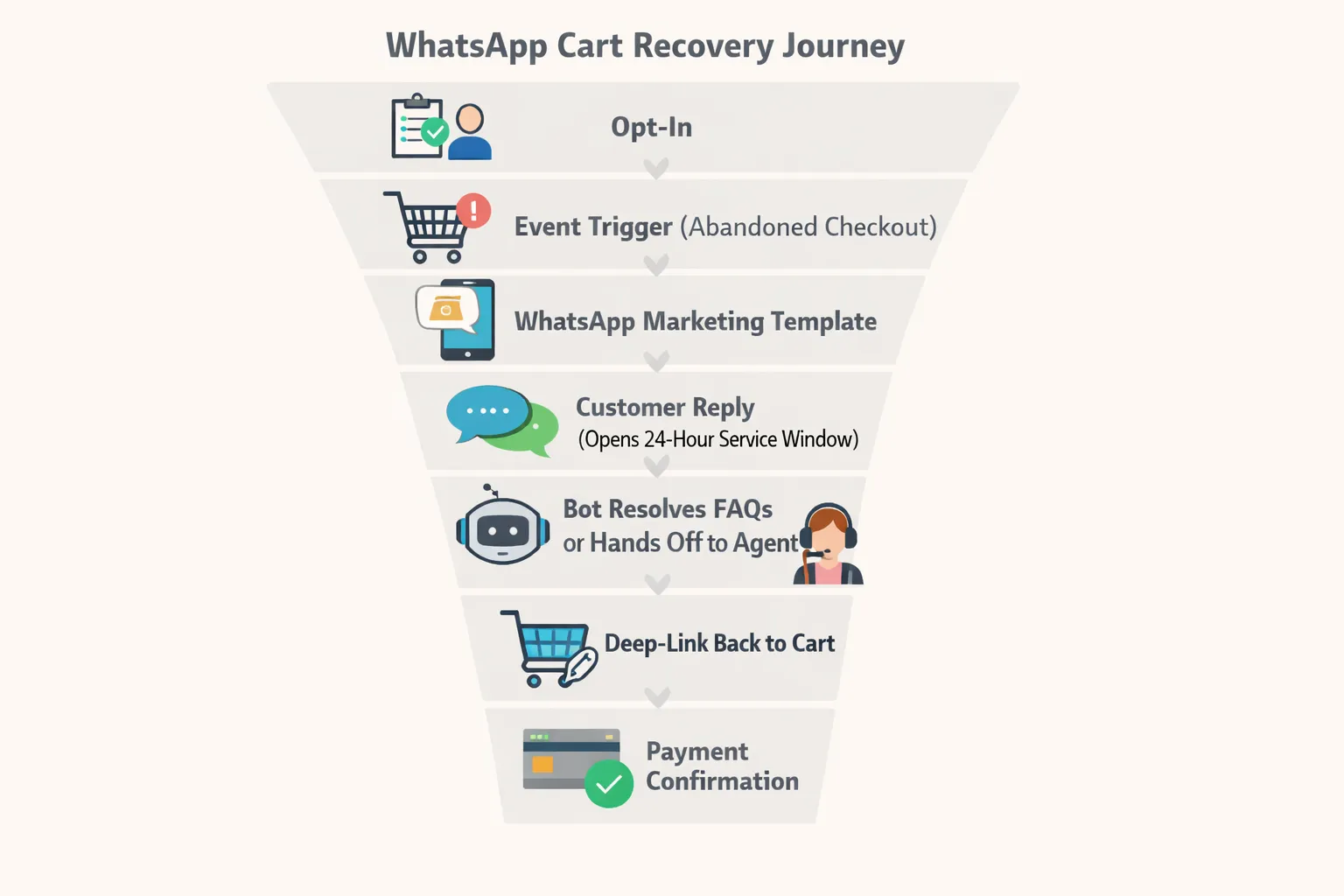
A 5-Step WhatsApp Recovery Playbook
Timing and angle overview
T+15 min: Gentle reminder with cart deep-link (no discount).
T+20 hours: Value builder (USP, benefits, care tips, social proof snippet).
T+48 hours: Scarcity/FOMO (low stock, limited-time perk) with authenticity.
T+4 days: Personalized discount (modest, single-use, time-bound).
T+7 days: Final booster (slightly higher incentive with 24h expiry) and feedback option.
Branching logic for replies
If "Need help" → Bot answers FAQs (shipping/returns/size) → warm handoff if needed.
If "Too expensive" → Reveal discount earlier or suggest BNPL.
If "Bought elsewhere" → Switch to nurture: related picks, wishlist follow-up.
Guardrails
Respect quiet hours and apply frequency caps; auto-stop after purchase or opt-out.
Regionalize language, currency, and incentives to keep messages relevant.
Trikon feature mapping
Marketing Automation: drips, segmentation, and retargeting flows that fire off abandon events.
WhatsApp Storefront: product cards and deep links back to pre-filled carts.
Chatbots: AI/keyword flows to resolve objections; Support Inbox for escalation.
Payments & order sync: coupon validation, BNPL mention, and order confirmation in-thread.
Recovery sequence blueprint
Step & delay | Message angle | Example first line | Primary CTA | Personalization tokens to include | Trikon feature used |
|---|---|---|---|---|---|
Step 1 – T+15 min | Gentle reminder, no discount | “Hey [FirstName], you left [ProductName] in your cart - want to finish up?” | View Cart | First name, product name/image, cart deep link, local currency | Flow + Catalog card |
Step 2 – T+20 hrs | Value builder (USP, benefits, care tips, social proof) | “Customers love [ProductName] for [KeyBenefit] - rated [Rating]★” | Learn Why / View Cart | Product benefits, rating/review snippet, price, image | Flow + Catalog card |
Step 3 – T+48 hrs | Scarcity/FOMO (authentic) | “Heads up: Only [LowStockQty] left in your size - don’t miss out.” | Reserve My Cart | Stock level, variant/size, cart deep link | Flow + Inventory flag |
Step 4 – T+4 days | Modest, single-use discount | “Just for you: [Code] saves [Discount]% - valid today only.” | Apply Discount | First name, single-use code, cart total, expiry | Flow + Coupon |
Step 5 – T+7 days | Final booster + feedback option | “Last call: extra [Boost]% ends in 24h. Not buying? Tell us why.” | Complete Purchase / Share Feedback | First name, upgraded code, countdown, quick-reply survey | Flow + Coupon + Bot reply |
Note: Pair each message with quick replies like “View cart” and “Need help,” and route complex questions to an agent without breaking the thread.
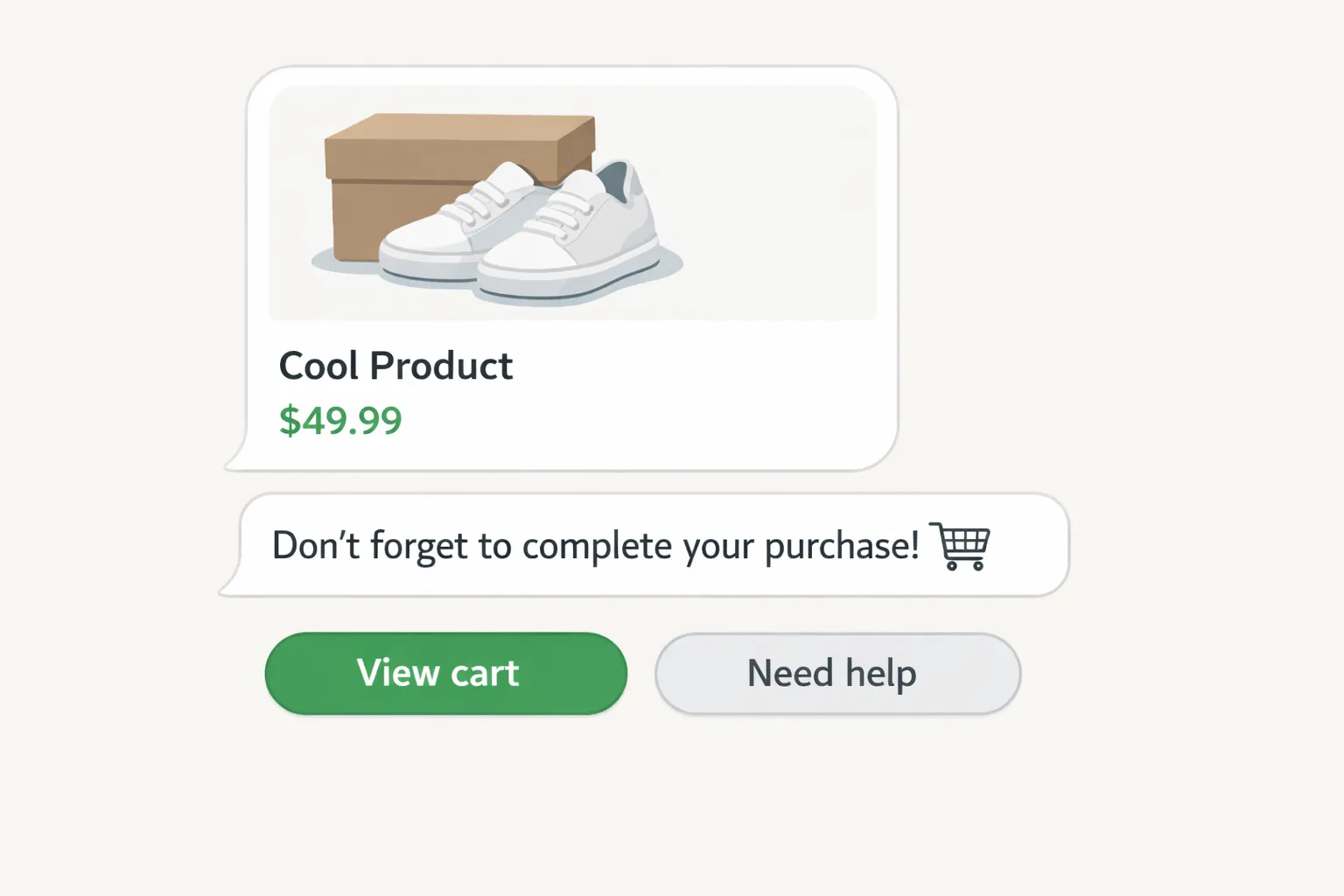
Persuasion Tactics That Work on WhatsApp
Scarcity and urgency (done right)
Use authentic inventory signals: “Only 3 left in M” or “Back Friday perk ends in 2 hours.”
Be explicit about end times and conditions. Countdown phrasing (“ends at 11:59 pm local time”) builds urgency without sounding spammy.
Pair scarcity with a cart deep-link so action is one tap away.
"60% of people make purchases because of FOMO, often within 24 hours." - Source
Social proof and reassurance
Drop a short UGC quote or rating snippet: “4.7★ from 1,284 shoppers.”
Add care/use tips that reduce post-purchase anxiety: “Machine-wash cold; dries in 30 minutes.”
Reinforce credibility with badges in-text (e.g., “30-day returns,” “2-year warranty”) and a quick-reply to view reviews.
Risk reversal and friction reducers
State your free returns/exchanges window up front and link to policy.
Show a dynamic shipping threshold: “You’re $12 from free shipping - add socks to qualify.”
Offer size/fit guidance and a quick-reply Q&A: “Sizing help” launches bot -> agent handoff if needed.
Clarify delivery dates early: “Order in the next 2h for delivery by Friday.”
Price sensitivity strategies
Reveal incentives progressively: modest code at T+4 days, boosted 24h code at T+7 days.
Use targeted perks before discounts: free shipping, bundle savings, loyalty points.
Present BNPL or split-pay to reduce upfront friction and maintain AOV.
Anchor value with “why it costs what it costs” (materials, durability, warranty).
Copy and UX
Keep lines short and skimmable; front-load the value in the first 1–2 lines.
One primary CTA per message; place secondary actions as quick replies.
Use branded, trustworthy deep-links back to the exact cart or product.
Localize currency, sizing, and phrasing to match the shopper’s locale.
Maintain a helpful, human tone; avoid all caps and overuse of emojis.
Automation + Human Handoff for Superior CX
Always-on automation
AI/keyword chatbots handle FAQs instantly - shipping timelines, returns/exchanges, COD availability, sizing/fit - and log objections for follow-up.
Behavior-tuned drips adapt to each shopper: category interest, AOV band, geography/time zone, and device type, ensuring messages arrive when intent is highest.
Smart triggers reopen conversations compliantly, push dynamic product cards, and attach cart deep-links so customers can complete checkout in a tap.
When humans step in
Escalate automatically for complex questions (ingredients, compatibility), high-AOV or multi-item carts, VIP segments, or negative sentiment.
Trikon routes these chats to priority queues with SLA rules and assignment. Agents see the full conversation history, cart contents, and prior offers - so they respond with context and confidence.
Real-world recovery scenario (narrative)
A shopper abandons a high-value skincare bundle.
T+15 min: Trikon sends a gentle WhatsApp reminder with a product card and cart deep-link.
Shopper replies: “What are the active ingredients?”
The bot shares concise INCI details, usage tips, and a sensitivity note, then detects lingering hesitation.
Trikon escalates to an agent. The agent recommends a smaller starter size, adds a single-use coupon, and applies it in-thread.
The shopper taps the deep-link, confirms payment, and receives an order confirmation - all inside WhatsApp.
Why Trikon
Shared Support Inbox with agent assignment, SLA tracking, and full conversation/cart history for precise assistance.
Seamless bot-to-agent transfer; run operations like coupon application, payments, and order confirmations entirely in WhatsApp.
Minimal setup and speed-to-value - no complex builders or engineering required. Trikon’s hybrid model blends 24×7 automation with human expertise for a conversion-first experience.
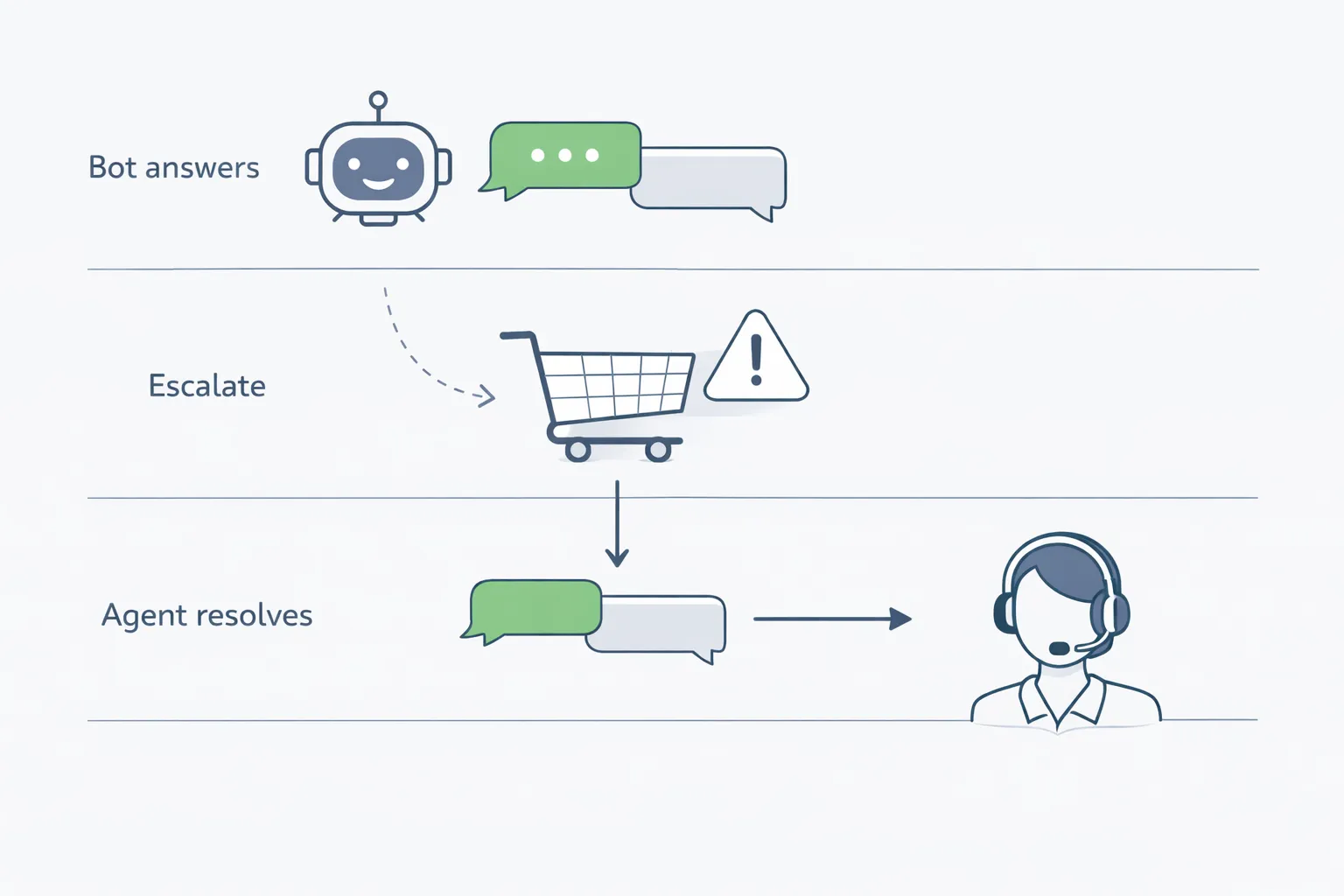
Compliance Essentials for WhatsApp Cart Reminders
Opt-in rules you must follow
Obtain explicit consent where the user understands they’ll receive WhatsApp messages from your brand.
Identify your brand clearly at opt-in and in every message.
Provide an easy, in-thread opt-out (e.g., “Reply STOP to opt out”) and honor it instantly.
Preview channel value at opt-in: cart reminders, order updates, early access, VIP deals, and frequency expectations.
Log consent source, timestamp, and policy version. Trikon automatically records opt-in metadata and synchronizes opt-out status across campaigns.
"You may only contact people on WhatsApp if: (a) they have given you their mobile phone number; and (b) you have received opt-in permission from the recipient confirming that they wish to receive subsequent messages or calls from you. You may only initiate conversations using an approved Message Template (as defined in our documentation)." - Source
Template management
Use the Marketing template category for proactive cart reminders outside the customer care window.
Keep templates concise, value-forward, and compliant; avoid spammy phrasing or excessive capitalization/emojis.
Maintain a high quality score: monitor block rates, opt-outs, and negative feedback. Trikon flags quality dips and suggests safer variants.
Localize content (language, currency, units) and A/B test short variants (subject line equivalent, CTA label, copy tone) to protect template quality and performance.
Personalize using approved placeholders only (e.g., first name, product name, price, cart link).
The 24-hour customer care window
What resets it: a customer’s reply (any inbound message) reopens a 24-hour service window for free-form support messages.
What doesn’t: sending a business-initiated template alone does not grant free-form messaging; you must wait for a reply to enter the service window.
Planning responses: prioritize fast, helpful replies within the 24-hour window. Trikon’s bots answer instantly and escalate to agents when complexity, value, or sentiment warrants human help.
Frequency and quiet hours
Daily caps: limit proactive cart reminders to 1–2 messages per 24 hours per shopper.
Suppress after purchase, opt-out, or when the cart is cleared to avoid fatigue and protect quality.
Respect quiet hours by region (e.g., 9 p.m.–8 a.m. shopper local time) with Trikon’s send windows and timezone awareness.
Stagger multichannel touches (email + WhatsApp) and enforce channel-level frequency caps to prevent overlap.
Data privacy
Practice data minimization: store only what’s needed (opt-in status, cart link, product metadata).
Secure handling of PII: encryption at rest and in transit, access controls, and role-based permissions in Trikon.
Honor retention and deletion: respect data subject requests; auto-expire recovery context after defined windows.
Maintain audit trails: Trikon logs template versions, consent source/timestamp, send history, and agent actions for compliance reviews.
How to Launch WhatsApp Cart Recovery with Trikon (Step-by-Step)
Prerequisites
WhatsApp Business API access via Trikon
Meta Business verification completed, business display name approved, sender number connected.
Marketing templates submitted for approval (abandoned cart, social proof, FOMO, incentive, feedback).
Catalog/products synced
Sync your ecommerce catalog to Trikon’s WhatsApp Storefront for dynamic product cards and cart deep-links.
Ensure accurate images, price, variants, stock status, and localized currency.
Payments configured (where supported)
Connect your payment provider for in-thread checkout steps, coupon validation, and order confirmations.
Enable BNPL/split-pay messaging if available.
Configure data and events
Connect your ecommerce platform
Native connectors (e.g., Shopify, WooCommerce, Magento) or webhook/SDK for custom stacks.
Map core events
Cart created, checkout started, payment failed, session timeout, browse abandonment.
Pass attributes with each event
Product: ID, name, image URL, price, variant/size, inventory status, category/brand.
User: first name, phone (opt-in state), locale, currency, new vs returning, VIP status, AOV band.
Context: device, last channel touch, UTM/source, timestamp.
Define computed fields
Shipping threshold remaining, low-stock flags, coupon eligibility, time-in-cart, risk flags (high AOV, repeat abandoner).
Build the recovery flow
Import Trikon’s ready templates
Gentle reminder (no discount), value builder, scarcity/FOMO, modest discount, final booster + feedback.
Localize copy
Language, currency, units (US/EU sizing), delivery dates, regional holidays.
Set delays and cadence
T+15 min, T+20 hours, T+48 hours, T+4 days, T+7 days (adjust per category and AOV).
Attach dynamic product cards
Product name, image, price, variant; include a deep-link back to the exact cart/checkout.
Add quick replies for speed
“View cart,” “Need help,” “Apply discount,” “Shipping & returns.”
Set automation and handoff rules
Define bot Q&A topics
Shipping timelines, returns/exchanges, COD availability, sizing/fit, payment methods, BNPL.
Escalation triggers
Keywords (“agent,” “human,” “complaint”), negative sentiment, high-AOV carts, VIP customers, repeated questions, payment failures.
SLA timers and assignment
Priority queues for high-value sessions; e.g., P1: 15 minutes, P2: 1 hour.
Route by skill (product line, language), working hours with on-call coverage.
Compliance guardrails
Quiet hours by region, frequency caps, opt-out handling, auto-stop on purchase.
Segmentation and testing
Segment audiences
AOV bands (e.g., <$75, $75–$200, >$200), category affinity (apparel vs skincare), new vs returning, geography/time zone, device type.
Test what matters
Opening line/first 120 characters, CTA label, social proof snippet vs benefit, incentive size/type (free shipping vs % off), FOMO timing.
Control for incremental lift
Holdout/control groups, rotation by segment, sequential testing to stabilize winners.
Personalization variations
Size/variant reminders, shipping threshold nudges, BNPL availability callouts.
Measure and optimize
KPIs
Read rate, reply rate, CTR to cart, recovery rate (purchases ÷ abandon events), recovered revenue, time-to-recovery, agent touch rate, opt-out/block rate, template quality score.
Funnel diagnostics
Delivered → Read → Click → Checkout started → Payment → Order confirmation.
Iterations
Incentive laddering (modest → time-bound booster), FOMO timing calibration, FAQ coverage expansion, language/currency localization improvements.
Cost and ROI
Track conversation-category costs and recovered margin; prioritize high-ROI segments and suppress low-lift cohorts.
Quality governance
Monitor negative feedback and opt-outs; refresh copy/templates to maintain high quality scores.
Speed-to-value with Trikon
Launch timeline (typical)
Day 0–1: Connect storefront, verify business, import catalog.
Day 2–3: Map events, load templates, localize copy, set cadences and guardrails.
Day 4–5: Configure bot Q&A, escalation rules, SLAs, and agent assignment.
Day 6–7: Dry run in sandbox, enable holdout tests, go live with first segments.
Why Trikon
Go live in days - no engineering, no complex visual builders.
Unified platform for marketing automation, chatbots, support inbox, storefront, and payments inside WhatsApp.
White-label ready for agencies: multi-brand management, custom branding, shared assets, performance dashboards.
Launch your WhatsApp abandoned cart recovery with Trikon to convert more carts at lower effective CAC - meeting shoppers where they already are, and turning intent into revenue fast.
Industry Playbooks: What to Say (and When)
D2C fashion/beauty
Reminder: “Your shade is still in stock - want pro tips before you buy?”
Value: Share a quick care/how-to carousel; include a “Size & Fit help” quick reply.
FOMO: “Only 3 left in your size - reserve now.”
Grocery/CPG
Reminder: Lead with freshness and convenience: “Your cart’s still fresh - lock in today’s delivery.”
Value: Suggest smart add-ons to reach free shipping: “Add milk or snacks to save on delivery.”
FOMO: “Delivery slot cutoff at 6 pm - book now.”
Home & electronics
Value: Highlight warranty length, setup support, and a BNPL option to reduce friction.
FOMO: “Accessory bundle price drops for 2 hours - complete your setup.”
Services/appointments
Reminder: “Your booking is almost complete - pick a slot now.”
Value: Share expert profiles, certifications, and an easy reschedule option to reassure.
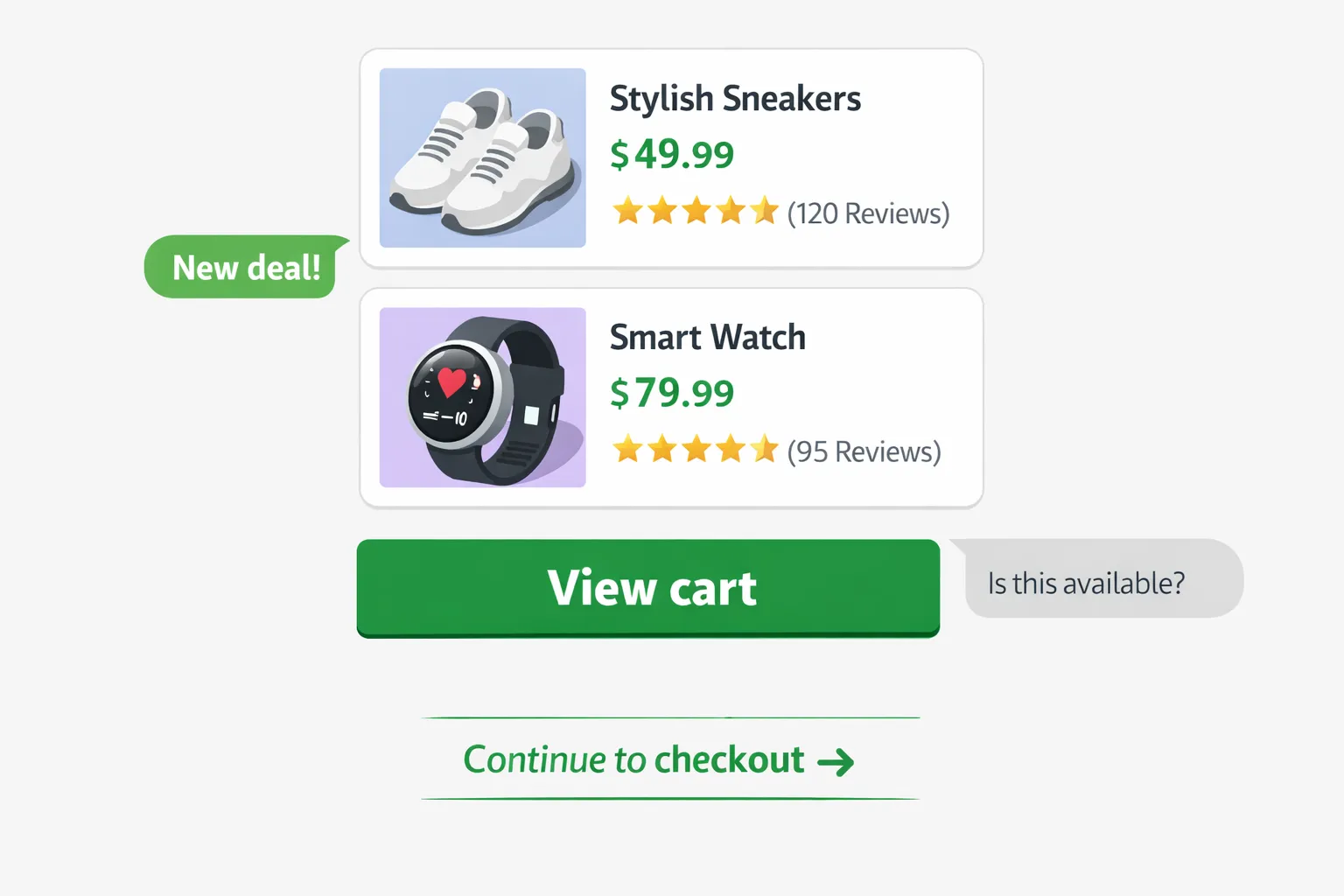
Sample WhatsApp copy blocks (plug-and-play)
Reminder:
“Hey {{first_name}}, you left {{product_name}} in your cart. Ready to check out?”
CTA: “View cart” → {{cart_link}}
Value nudge:
“Top pick: {{product_name}} - customers love it for [key benefit]. Need tips?”
CTA: “See why” → {{cart_link}}
FOMO:
“Only a few {{product_name}} left - reserve yours now.”
CTA: “Return to cart” → {{cart_link}}
Discount:
“Just for you: use {{discount_code}} before {{expires_at}} to save today.”
CTA: “Apply code” → {{cart_link}}
Feedback:
“Not buying {{product_name}} today? Tell us why - we’ll make it right.”
Quick replies: “Too pricey” | “Shipping” | “Other” → routes to bot/agent
Get Started: Turn Abandoned Carts into Sales with Trikon
WhatsApp abandoned cart recovery outperforms email-only reminders because it meets shoppers in the moment. Real-time visibility, 2‑way chat, and deep links back to pre-filled carts make recovery faster and more consistent - while hybrid automation + human handoff resolves last‑mile objections that email can’t.
What you can expect with Trikon:
Higher read/response rates and more sessions returned to checkout via WhatsApp cart reminders
Faster time-to-recovery and higher recovered revenue with dynamic product cards and cart deep-links
Richer personalization (locale, currency, inventory, threshold nudges) and compliant automation
Hybrid support: AI/keyword bots for FAQs, seamless agent handoff for complex cases
Reliable, scalable WhatsApp ecommerce automation as an official WhatsApp Business API partner
Next steps to launch this week:
Connect your store and sync products/catalog
Import Trikon’s proven templates and localize copy
Map abandon events (cart, checkout started, payment failed) and set timing rules
Enable bot Q&A topics and escalation to agents with SLAs
Turn on your first 5‑step recovery sequence and a small holdout to measure lift
Measure impact in 30 days:
Track read rate, CTR to cart, reply rate, recovery rate, recovered revenue, and time-to-recovery
Scale winning variants across segments (AOV bands, categories, geographies) and refine incentives/FOMO timing
Ready to accelerate WhatsApp sales recovery? Book a demo or start now at https://whatsapp.trikon.tech/.