

Overview: What Is WhatsApp Automation and Why It Matters Now
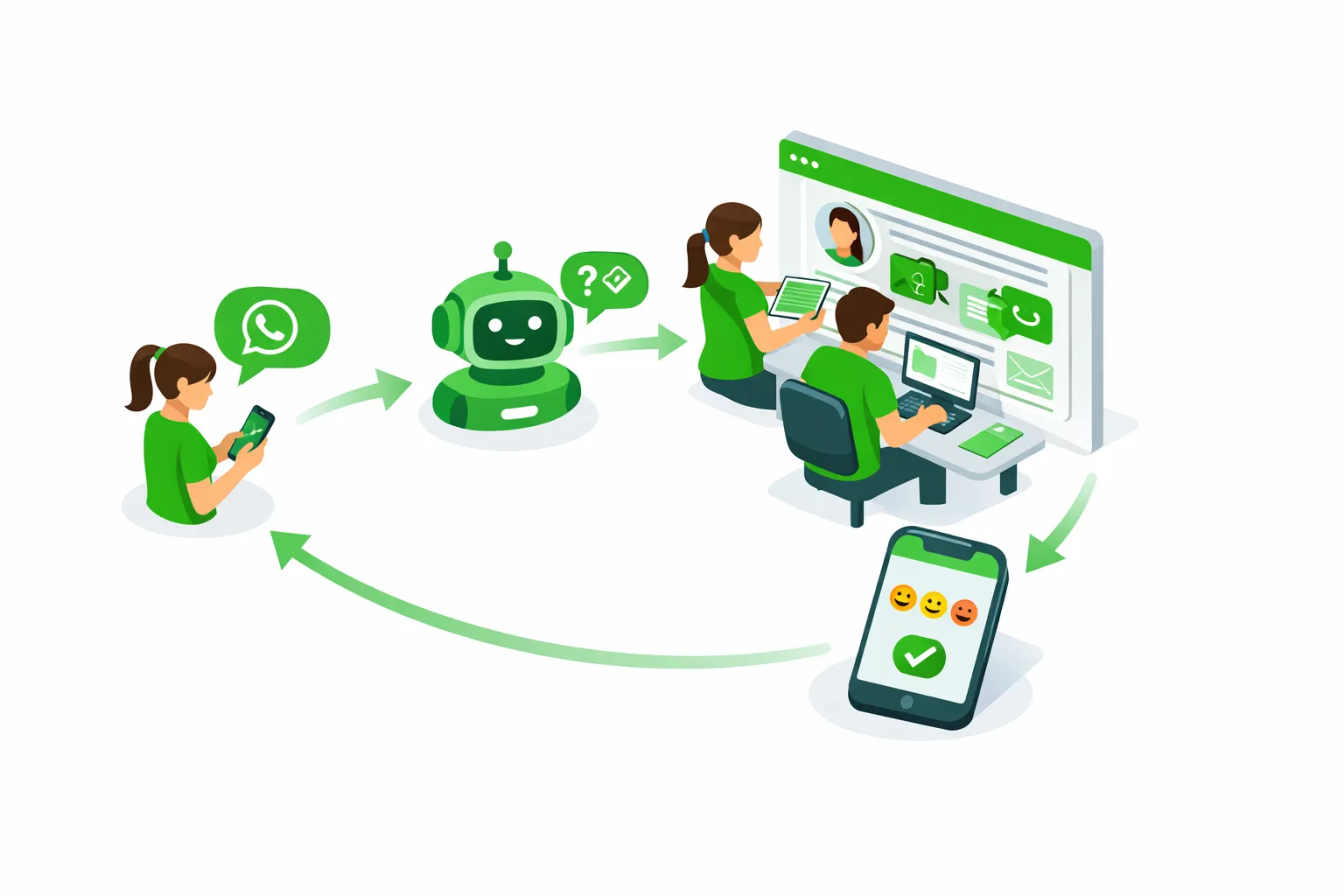
WhatsApp automation means using the official WhatsApp Business API/Cloud API, chatbots, and rule-based workflows to run automated conversations and notifications on WhatsApp. In simple terms, it takes repetitive tasks off your team’s plate - sending WhatsApp automated messages (welcome, order updates, reminders), answering FAQs with a WhatsApp AI chatbot, and triggering WhatsApp workflow automation based on customer actions - so you can respond instantly and scale without adding headcount.
"WhatsApp has 3 billion monthly active users worldwide (Mar 2025)." - Source
Why businesses use WhatsApp automation today
Higher reach and engagement: Customers already live on WhatsApp, so WhatsApp automation for business delivers better visibility than email/SMS.
Real-time conversations: Respond in seconds, 24/7, with WhatsApp chatbot automation while seamlessly handing off to agents when needed.
Faster resolutions: Route inquiries, surface answers, and close tickets faster to boost CSAT and protect SLAs.
More sales and conversions: Recover abandoned carts, run segmented broadcasts, and guide buyers through purchase with WhatsApp Cloud API automation.
Lower support costs: Deflect repetitive queries and streamline operations with automation-first flows.
What this guide covers
Core building blocks: WhatsApp Cloud API, AI/keyword chatbots, message templates, and compliant opt-ins
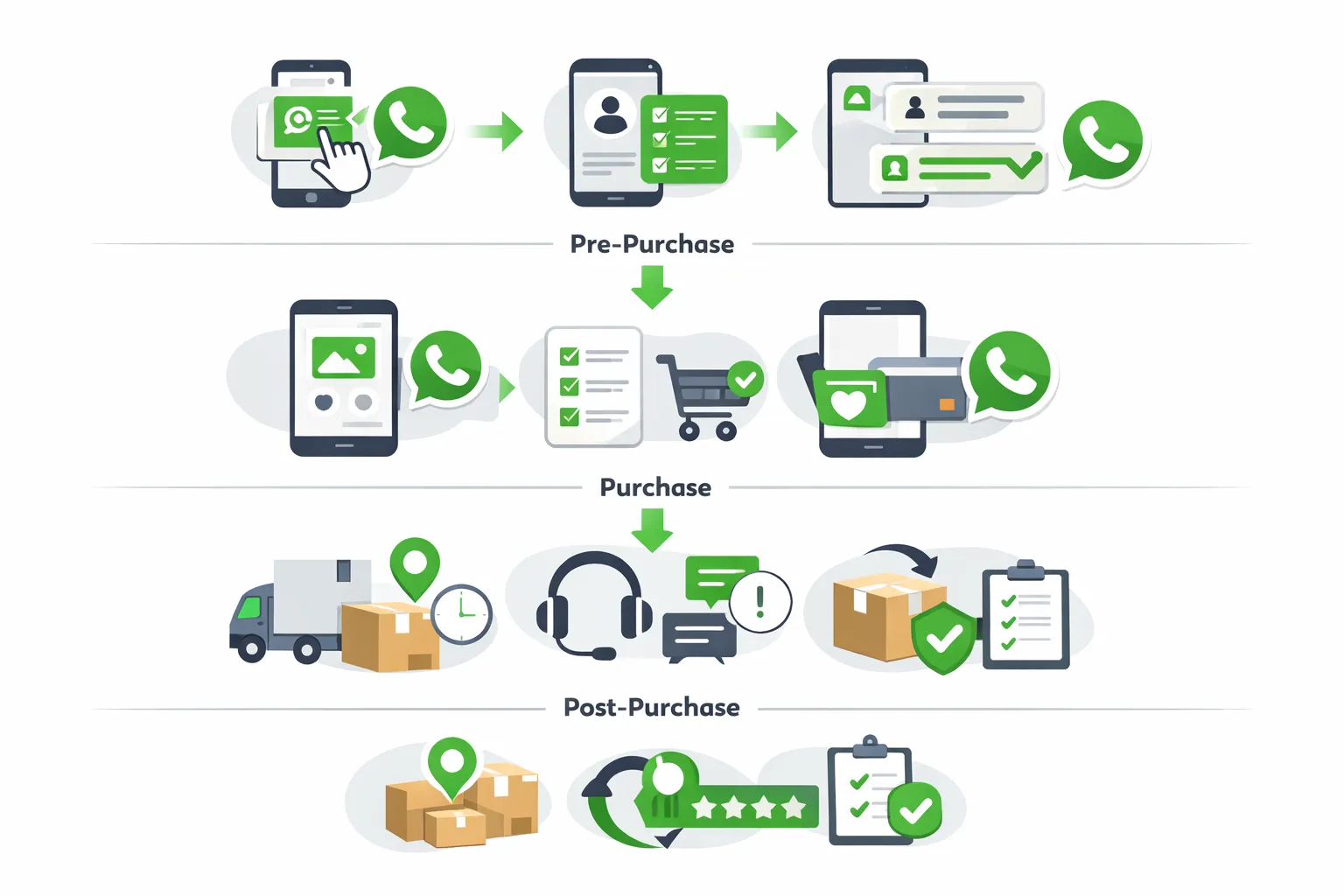
Use cases across the funnel: marketing broadcasts and journeys, sales assist and recovery, support and ticketing, bookings and operations
Benefits and ROI: conversion lift, cost savings, and speed-to-resolution
Setup steps: from account approval to first automated flow
Automation vs. manual messaging: when to automate, when to escalate to a human
Real examples and FAQs to help you go live fast
What you’ll take away
When to automate vs. hand off to humans: Use bots for FAQs, status checks, and routine workflows; route complex or high-value conversations to agents.
How to stay compliant: Use approved templates, clear opt-ins, and respect the 24-hour service window.
How to launch quickly with Trikon: As an official WhatsApp Business API partner, Trikon helps you onboard fast, build no-code flows, deploy AI/keyword bots, and manage a hybrid model in one unified inbox.
Who this guide is for
D2C and e‑commerce brands that want higher conversions and automated order updates
Service businesses that rely on appointments, reminders, and follow-ups
Enterprise support teams that need a centralized WhatsApp inbox with SLAs
Marketing and automation agencies delivering WhatsApp business automation at scale
By the end, you’ll have a clear blueprint to use WhatsApp automation examples and best practices to turn WhatsApp into a full-funnel channel - without complex builders or engineering.
How WhatsApp Automation Works: Components, Cloud API, and AI Chatbots
Core building blocks
WhatsApp Cloud API vs. Business App
WhatsApp Business App: Best for very small teams and low-volume messaging. You get basic auto‑replies (greeting/away), quick replies, a simple catalog, and limited broadcasts.
WhatsApp Cloud API (official, via Meta): Purpose‑built for scale. It enables WhatsApp automation for business - multi‑agent inboxes, message templates, webhooks, integrations, and advanced WhatsApp chatbot automation. Use it when you need compliance, reliability, segmentation, analytics, and automation at scale.
Message categories
Template messages (formerly HSM): Pre‑approved templates used for business‑initiated outreach (e.g., order updates, reminders, promos with opt‑in). Required to message outside the 24‑hour window.
Session messages: Free‑form messages within the rolling 24‑hour customer service window, after a user sends you a message.
Interactive messages: Rich components like quick reply buttons, call‑to‑action buttons, lists, and product messages (catalogs/carts).
Flows: Guided, app‑like experiences inside WhatsApp (multi‑step data capture, bookings, surveys) to streamline self‑service.
Automations
Keyword/rule‑based replies: Fast, no‑code auto‑responses for FAQs, order status, store hours, and routing (“agent,” “refund,” “reschedule”).
AI chatbots: Use intent detection and entity extraction to understand questions, handle FAQs, gather details, and hand off when needed.
Sequences (drips): Time‑based follow‑ups such as onboarding sequences, nurture flows, or post‑purchase care.
Event‑triggered messages: Behavior‑based automation (abandoned cart, COD confirmation, shipment updates, no‑show follow‑ups).
Integrations and webhooks
CRM and CDP: Sync profiles, segments, tags, and past interactions.
Ecommerce and OMS: Products, carts, orders, returns, and delivery events for real‑time triggers.
Bookings and calendars: Appointments, reminders, reschedules.
Payments: Links, confirmations, receipts.
Webhooks: Real‑time callbacks from Cloud API to trigger workflows based on incoming messages and status updates.
Human handoff
Define escalation rules (e.g., sentiment, intent, or value). When the bot detects complexity, route to an agent with full conversation history, customer profile, and previous actions - so agents never start cold.
Maintain SLAs with queueing, priority tags, and assignment logic; re‑open sessions with compliant templates when needed.
Video: WhatsApp Business API Explained (2024) - https://www.youtube.com/embed/Gt0gxw6eFvI
A quick primer on WhatsApp Business API fundamentals - how it differs from the app and how automation works at scale.
"To send a business-initiated message to a customer outside the 24-hour window, you must use a message template that has been approved by WhatsApp." - Source
Note: Meta also requires explicit user opt-in for business-initiated messaging. Collect consent clearly (website, forms, checkout, QR codes) and store proof.
The hybrid model
Automation handles repetitive, high‑volume tasks: FAQs, order updates, address changes, appointment reminders, verification steps, and re‑engagement.
Agents handle complex or high‑value scenarios: escalations, exceptions, sensitive cases, VIP customers, negotiations, and refunds with policy discretion.
What good looks like:
Clear routing: intents and rules that assign conversations to the right team automatically.
SLA policies: time‑to‑first‑response/resolve targets with alerts and ownership.
Full conversation history: unified timelines across marketing, sales, support, bookings, and payments for context‑rich service.
Where Trikon fits
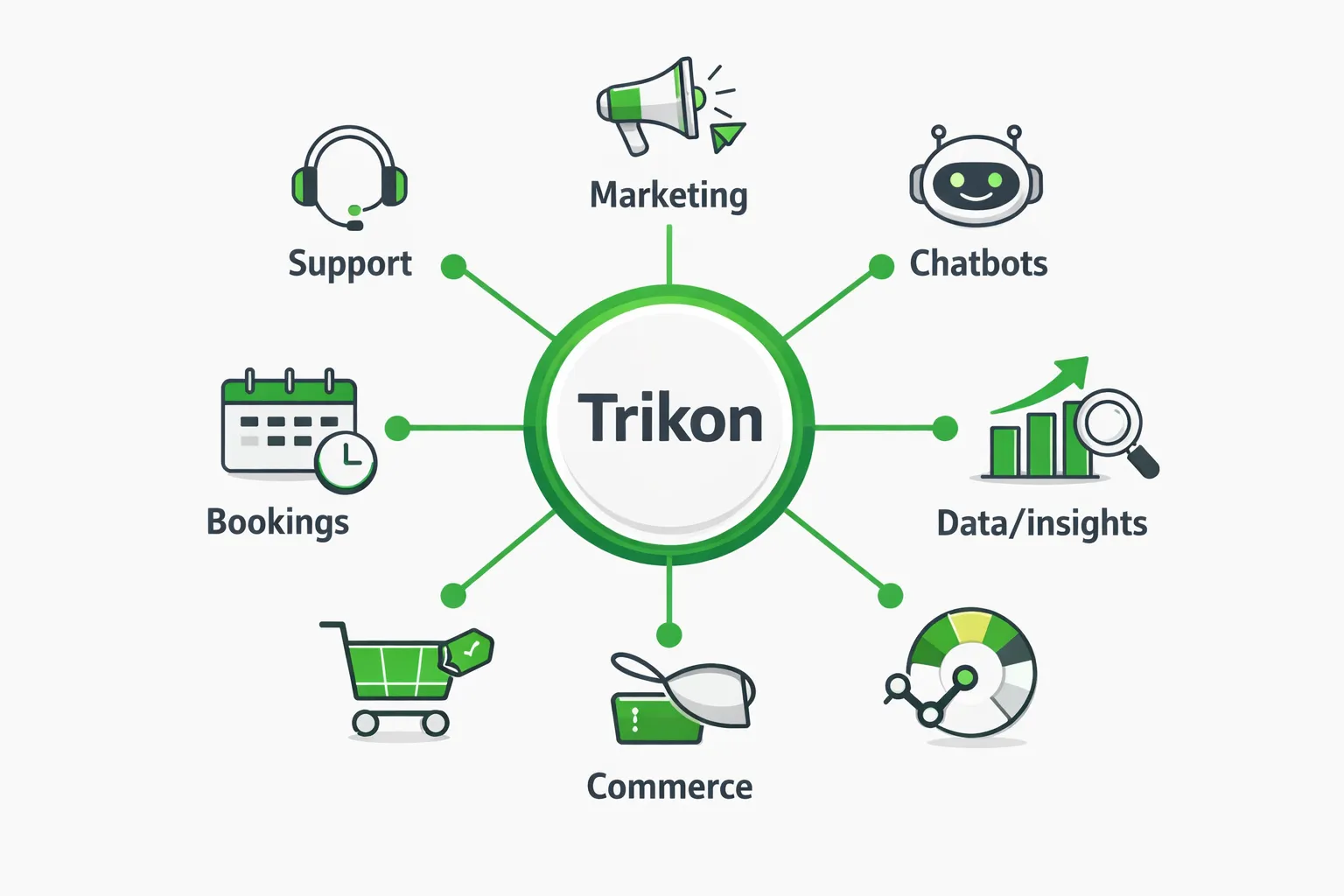
Trikon runs on the official WhatsApp Business API/Cloud API and unifies support, marketing automation, chatbots, bookings/operations, and commerce in one place. You get:
Minimal setup and fast go‑live - no complex builders or engineering
Hybrid automation with AI/keyword bots plus seamless agent handoff
A shared inbox with SLAs, assignments, and full conversation history
Ecommerce, CRM, and booking integrations, abandoned cart recovery, and a WhatsApp storefront that scales reliably with your growth
With Trikon, WhatsApp workflow automation becomes a practical, compliant, and revenue‑generating channel - end‑to‑end.
WhatsApp Automation vs Manual Messaging (and When to Use Each)
Head-to-head comparison
Response speed and availability: Automation replies instantly, 24×7; manual messaging is limited to working hours and agent availability.
Personalization at scale: Automation personalizes with templates, variables, and CRM data; manual personalization is strong but limited by time and memory.
Consistency and compliance: Automation enforces approved templates, opt-ins, and disclosures; manual replies vary by agent and are harder to control at scale.
Cost and scalability: Automation scales to thousands of conversations without linear headcount growth; manual support scales by hiring and training.
CX quality: The hybrid model wins - bots handle repetitive tasks; agents focus on complex or sensitive issues with full context.
Decision framework
When to automate
FAQs: hours, return policy, shipping timelines, warranty
Order status and account updates
Reminders: appointments, payments, renewals, replenishment
Cart recovery and post-purchase nudges
Basic triage: capture intent, verify identity, collect details
When to hand off to humans
Complex billing or refunds
VIP accounts or high-value sales opportunities
Policy exceptions, compliance-sensitive or emotional scenarios
Escalations and multi-step problem solving
Issues requiring negotiation, empathy, or discretion
Measuring success
SLAs: time-to-first-response and time-to-resolution across bot and agent
CSAT and NPS: post-conversation surveys
FRT and AHT: first response time and average handle time
Resolution rate and deflection rate
Revenue influenced: recovery, upsell, and retention from automated flows
Comparison table
Dimension | Manual Messaging | WhatsApp Automation | Best Practice/Notes |
|---|---|---|---|
Response speed & availability | Business hours; queue delays | Instant, 24×7 | Use automation for first response and FAQs; escalate seamlessly |
Personalization | High but time-consuming | Scalable via templates, CRM data | Combine dynamic fields with segments and behavior |
Consistency & compliance | Varies by agent | Enforces templates, opt-ins, policies | Centralize approvals and audit logs |
Scalability & cost | Scales via headcount | Scales via workflows | Automate repetitive tasks to cap costs |
Context & history | Depends on agent notes | Centralized timeline available | Share full history on handoff |
CX quality | Human empathy | Fast, reliable self-service | Hybrid model delivers best outcomes |
Analytics | Limited/manual | Built-in metrics & dashboards | Track FRT, CSAT, resolution, revenue |
Training & ramp | Ongoing coaching | Configure once; iterate | Keep content and flows updated |
High-Impact WhatsApp Automation Use Cases (Sales, Marketing, Support, Operations)
Marketing and growth
Lead capture and qualification: Use click-to-WhatsApp ads and website chat entry points to start a session; capture name, intent, and preferences, then score and segment automatically.
Broadcasts and drips: Send segmented promotions, launches, and educational drips using approved templates; personalize with purchase history and behavior.
Product catalogs and promos: Showcase items with interactive product messages and carts; test incentives and time-bound offers.
Sales and conversion
Abandoned cart recovery: Trigger dynamic cart links with tailored incentives (free shipping, discount tiers); A/B test copy and send times.
Back-in-stock and price-drop alerts: Notify opted-in shoppers with personalized product links and urgency cues.
Guided selling: Use interactive lists, carousels, and WhatsApp Flows to recommend products, collect preferences, and move to checkout.
Customer support
24×7 FAQ bot: Handle shipping, refunds, warranty, and policy queries; detect intent and escalate to agents with full context.
Order status and returns: Pull live status, generate return labels, and track SLAs; automate updates at each milestone.
Operations and bookings
Appointments/reservations: Send confirmations, reminders, reschedule links, and location pins; reduce no‑shows.
Payments and invoices: Share secure payment links, invoices, and receipts; confirm settlement automatically.
Service updates and ETAs: Notify customers of technician/driver ETAs with live tracking and follow-up surveys.
Examples by industry
D2C/e‑commerce: Cart recovery, back‑in‑stock, order tracking, RMAs.
Salons/clinics: Appointment booking, prep instructions, post‑visit care plans.
Restaurants/hospitality: Reservations, waitlist, room/meal upgrades, concierge chat.
Education: Course inquiries, enrollment reminders, payment plans, attendance.
Logistics: Pickup scheduling, proof of delivery, incident triage, SLA alerts.
Use‑case design table
Team/Goal | Trigger (event/behavior) | WhatsApp asset (template/session/interactive) | Automation logic (rule/AI) | Primary KPI |
|---|---|---|---|---|
Marketing: Launch promo | Segment joins “High‑intent” | Template + buttons | Rule-based segmentation | CVR |
Marketing: Nurture drip | New lead captured | Template → session follow-ups | Rule-based timing | CVR |
Sales: Abandoned cart | Checkout started, no purchase | Template with dynamic cart link | Rule-based + AI send-time | CVR / Revenue |
Sales: Back‑in‑stock | Inventory replenished | Template + product message | Rule-based trigger | CVR |
Support: Order status | User asks “Where’s my order?” | Session reply + interactive list | AI intent detection | CSAT |
Support: Returns | “Return item” intent | Template → session workflow | AI + rules for eligibility | Resolution rate |
Operations: Appointment | Booking created | Template confirm + reminder | Rule-based timing | No‑show rate |
Operations: Payment | Invoice generated/overdue | Template with pay link | Rule-based retries | DSO / Collection rate |
Post‑purchase: Feedback | Delivery confirmed | Template → CSAT survey | Rule-based + AI sentiment | CSAT / NPS |
Loyalty: Reorder | Consumption window approaching | Template + quick replies | Rule-based cohorting | AOV / Repeat rate |
Benefits and ROI of WhatsApp Automation You Can Prove
Faster first response and lower handle times: Auto‑acknowledgements and AI/keyword bots cut FRT from minutes to seconds and surface the right macros, lowering AHT; customers feel heard sooner, boosting CSAT/NPS.
24×7 coverage without extra headcount: Automation answers after-hours queries, queues complex cases, and routes intelligently - driving agent productivity gains and protecting SLAs.
Higher conversion rates: Timely nudges on browse/click/cart events and price‑drop/back‑in‑stock alerts capture high intent and reduce leakage.
Revenue lift from upsell/cross‑sell and reactivation: Segment by behavior and purchase history to recommend add‑ons, bundles, and replenishment, and to revive dormant customers.
Reduced no‑shows and better on‑time payments: Automated reminders, confirmations, and smart retries lower missed appointments and speed collections.
Centralized data improves targeting and LTV: Unified profiles and conversation history power better segmentation, offers, and retention strategies.
"The average documented online shopping cart abandonment rate is around 70%." - Source
Building your ROI case
Inputs to track
Messaging: sends, deliveries, reads, sessions opened, replies
Commerce: assisted revenue, recovered carts/orders, AOV uplift, repeat rate
Support: tickets deflected, CSAT/NPS, FRT/AHT, resolution rate
Operations: no‑show reduction, on‑time payment rate, DSO
Efficiency: staff hours saved, cost per conversation, cost per resolution
Sample calculations
Recovered revenue (cart recovery)
Formula: Recovered Orders × Avg Order Value (AOV)
Example: 300 recovered orders × $62 AOV = $18,600/month
Assisted revenue (broadcasts/flows)
Attribute orders with last‑click or multi‑touch models to WhatsApp flows; sum net revenue minus discounts
Support cost savings
Formula: (Deflected Tickets × Cost per Ticket) + (Hours Saved × Fully Loaded Agent Hourly Cost)
Example: 1,000 deflected tickets × $3.50 + 120 hrs × $25 = $3,500 + $3,000 = $6,500/month
Productivity lift
Measure conversations/agent/hour before vs after automation; translate delta into headcount avoided
No‑show and collections impact
No‑shows avoided × Avg booking value; DSO improvement × average daily sales
Tie it together with a simple ROI model
Monthly Benefit = Recovered Revenue + Assisted Revenue + Support Savings + Ops Savings
Net ROI = (Monthly Benefit − Platform & Messaging Costs) ÷ Platform & Messaging Costs
With Trikon’s hybrid automation - AI/keyword bots, compliant templates, and a shared inbox with SLAs - you can attribute gains clearly, iterate quickly, and scale proven ROI across marketing, sales, support, and operations.
WhatsApp Cloud API Essentials: Templates, Windows, and Compliance
Message types and windows
Conversation categories: Marketing (offers, promotions), Utility (updates like order status, reminders), Authentication (OTP and verification). Pricing varies by category; review Meta’s latest pricing by conversation type and region.
24‑hour customer service window: You may send free‑form session messages within 24 hours of the user’s last message. To message outside this window, you must use an approved message template to re‑open the conversation.
"Businesses have a 24-hour window to respond to customer messages; outside this period, they must use pre‑approved message templates to initiate conversations." - Source
Template best practices
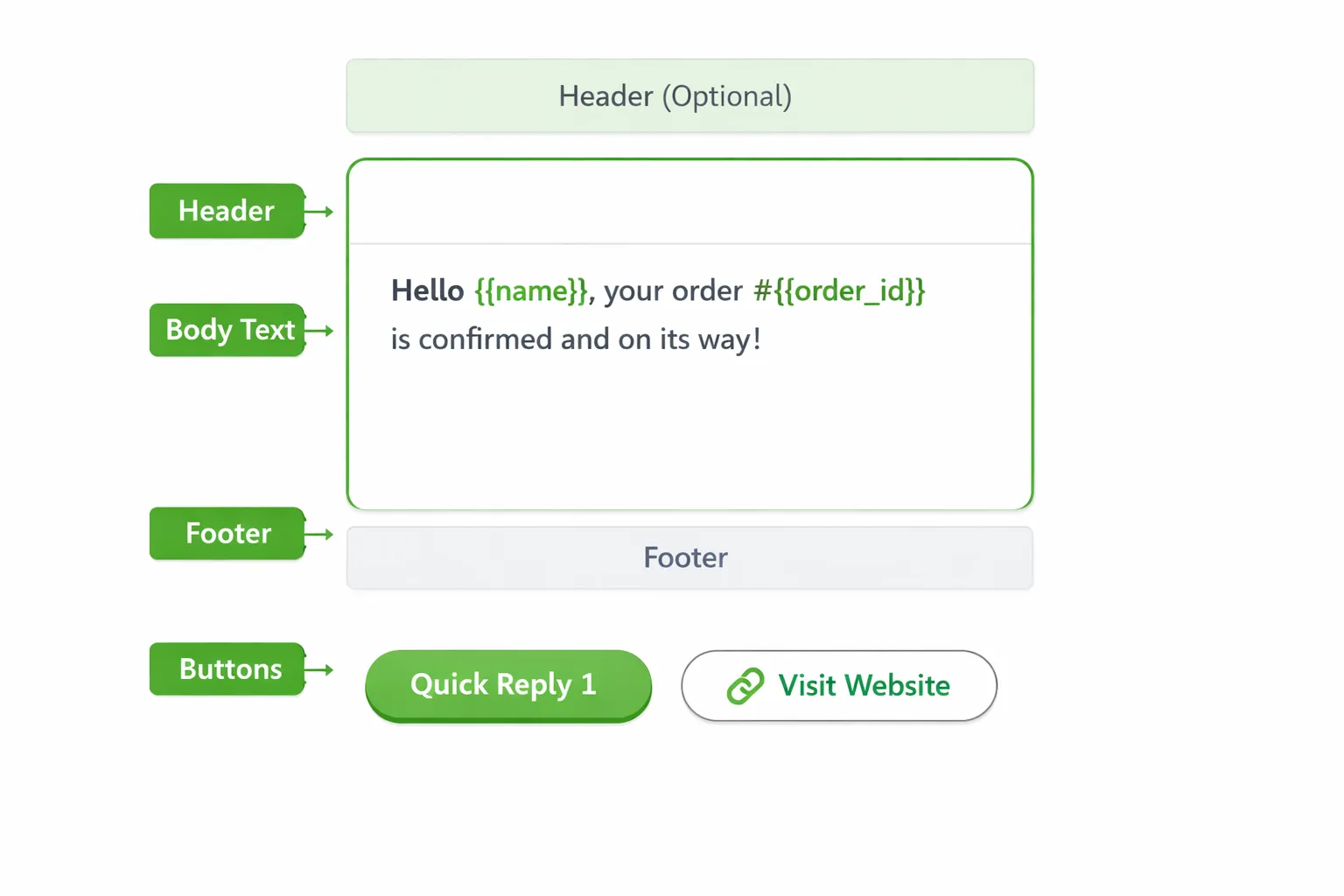
Structure: Header (optional), body, footer, and buttons. Use variable placeholders (e.g., {{name}}, {{order_id}}, {{delivery_date}}) for personalization.
Clarity and purpose: One purpose per template (e.g., order confirmation, appointment reminder). Avoid vague or spammy language.
Buttons: Add Quick Reply for simple choices and URL buttons for deep links (cart, tracking, payment).
Localization: Create localized versions (language, currency, formats) and provide examples during submission.
Testing: Validate variables, links, and fallbacks before sending at scale.
Opt‑ins and consent
Collect explicit opt‑in across web forms, app screens, POS, and Click‑to‑WhatsApp (CTWA) ads.
Be transparent about message types (e.g., updates, offers). Store timestamp, source, user agent, and intent for auditability.
Honor opt‑out keywords and provide easy unsubscribe paths.
Quality and deliverability
Template quality rating: Meta tracks user feedback and engagement. Poor quality can reduce deliverability.
Rate limits and tiers: Your sending capacity scales with quality and volume. Improve reputation via relevant content, proper opt‑ins, and low block rates.
Continuous improvement: Monitor read/reply rates, blocks, and customer feedback; refine templates and targeting.
Security and compliance
Data handling: Minimize PII in templates and messages; use secure links for payments and account actions.
Auditing: Maintain records of consent, templates, and campaign logs; restrict access by role.
Privacy alignment: Adhere to regional regulations (GDPR/CCPA/PDPA). Provide data access/deletion paths and retention policies aligned with your jurisdiction.
For business‑initiated messages outside the service window, use approved templates:
"To send a business‑initiated message to a customer outside the 24‑hour window, you must use a message template that has been approved by WhatsApp." - Source
Trikon: All‑in‑One WhatsApp Automation Platform (Support, Marketing, Chatbots, Bookings, Commerce)
Why Trikon
Official WhatsApp Business API partner: Built for reliability, compliance, and scale - so your automations stay performant as volumes grow.
Faster go‑live: Minimal setup, prebuilt flows, and no complex visual builders or engineering required.
Hybrid automation + human handoff: AI/keyword bots handle repetitive work; a shared inbox with SLAs, routing, and full conversation history empowers agents to resolve complex cases.
What you can automate in Trikon
Support Inbox: Auto‑triage inquiries, assign to the right agent or team, track SLA timers, and hand off from bot to human with full context (profile, orders, history).
Marketing Automation: Send compliant broadcasts, build segments, run drips and retargeting flows, re‑engage lapsed buyers, and recover abandoned carts - end‑to‑end.
No‑code Chatbots: Configure keyword and AI logic, support small‑talk, collect data with buttons/lists, and escalate seamlessly when intent gets complex.
Bookings & Operations: Automate appointments, reminders, confirmations, rescheduling, and payments - reduce no‑shows and improve utilization.
WhatsApp Storefront: Sync your catalog, enable carts and orders, and offer in‑chat checkout with website sync for real‑time stock and pricing.
Proof points for teams
D2C brands: Lift CVR and AOV via event‑based nudges, back‑in‑stock/price‑drop alerts, and personalized recommendations.
Service businesses: Cut no‑shows with smart reminders, send instant confirmations, and secure deposits in chat.
Enterprises/support teams: Improve SLA adherence, reduce backlogs with deflection, and raise CSAT through context‑rich handoffs.
Agencies: White‑label ready and scalable across clients - standardize playbooks, report outcomes, and launch faster.
Getting started
Connect your WhatsApp number, import your catalog/CRM, choose approved templates, and switch on core flows (cart recovery, order updates, appointment reminders, FAQ bot). Trikon handles the rest so you can launch in days - not months.
Implementation Blueprint: Launch WhatsApp Automation in 14 Days
Day 1–3: Foundation
Verify business and connect WhatsApp Cloud API via Trikon
Verify Meta Business Manager, add legal business info, and request your WhatsApp Display Name.
Add/verify your sender number, set the business profile, and configure webhooks through Trikon.
Configure essentials
Set your brand voice, quiet hours, and escalation rules.
Define categories you’ll send: marketing, utility, authentication.
Define goals and KPIs
Cart recovery rate, assisted revenue, CSAT/NPS, first response time (FRT), average handle time (AHT), sessions opened/replied, delivery/read rates, deflection rate.
Establish baselines from the past 30 days (email/chat/phone) for fair comparisons.
Day 4–7: Core flows
Turn on high‑impact flows
Welcome/FAQ assistant: intents for shipping, returns, warranty, hours, “talk to agent.”
Order status: self‑serve tracking and return initiation.
Abandoned cart: dynamic cart link with incentive testing (free shipping vs % off).
Appointment reminders: confirm/reschedule, location pin, add to calendar.
COD → prepaid nudge (if applicable): incentives, payment links, retries.
Draft and submit templates
Create EN + top locales with variables (e.g., {{name}}, {{order_id}}, {{cta_url}}).
Add buttons: Quick Reply (“Track order,” “Chat with agent”) and URL (“View cart,” “Pay now”).
Keep one purpose per template; avoid spammy language; submit early to account for approval time.
Day 8–10: Personalization + data
Connect CRM/ecommerce
Map events: product_viewed, add_to_cart, checkout_started, purchase, shipped, delivered.
Sync customer attributes: new vs returning, VIP, LTV, risk flags, last_seen_channel.
Create segments and journeys
Segments: New customers, repeat buyers, VIP/high LTV, at‑risk (refund/complaint), dormant (>90 days).
Journeys/drips: onboarding (tips, UGC), post‑purchase care, replenishment, win‑back.
Personalization: dynamic products, name, locale, local currency, and time‑zone‑aware send times.
Day 11–12: QA and handoff
QA checklist
Test triggers, variables, links, and timing; confirm opt‑in/opt‑out behaviors.
Validate interactive components (buttons/lists), fallbacks, and error states.
Confirm session vs template rules within and outside the 24‑hour window.
Human handoff
Define intents that escalate; verify agent routing, skills, and SLA timers.
Ensure full context on handoff: customer profile, order history, past conversations, bot transcript.
Pilot cohort
Launch to a small, representative segment; monitor delivery, replies, resolution rates, and CSAT.
Day 13–14: Go‑live and monitor
Controlled rollout
Enable frequency caps per use case (e.g., 2 marketing templates/week, unlimited utility).
Progressive scaling by segment to protect quality and template ratings.
Monitor in Trikon
Track sends/deliveries/reads, sessions opened, FRT/AHT, CSAT/NPS, recovered carts, assisted revenue, deflection rate.
Watch template quality, block rates, and opt‑out signals; refine copy and targeting.
Iterate weekly
A/B test incentives (free ship vs % off), timing (1h vs 4h), and creative.
Tune segments (VIP thresholds, dormancy windows), expand locales, and add new flows (back‑in‑stock, price‑drop, reorder).
Review SLA adherence and escalation accuracy; update bot intents and agent macros.
With Trikon, most teams complete API setup, template approvals, and the first four production flows inside two weeks - going live with a hybrid model that proves ROI quickly and scales reliably.
FAQs: WhatsApp Automation for Business
1. WhatsApp Business App vs WhatsApp Cloud API - which should I choose?
Choose the WhatsApp Business App if you’re a solo or very small team needing basic autoresponses (greeting/away), quick replies, and light broadcasts.
Choose the WhatsApp Cloud API for scale: automation at volume, approved templates, analytics, multi‑agent inboxes, integrations (CRM/ecommerce), and robust compliance. Trikon runs on the official API to deliver reliable WhatsApp automation for business.
2. Is WhatsApp automation legal and compliant?
Yes - when you follow Meta policies: collect explicit user opt‑in, use approved templates for business‑initiated messages outside the 24‑hour window, and honor opt‑out.
Align with privacy laws (e.g., GDPR/CCPA): store consent source/timestamp, minimize PII, and secure data. Trikon enforces template/opt‑in controls and auditing.
3. Do I need developers to launch?
Not with Trikon. You can go live quickly using no‑code templates, prebuilt flows (cart recovery, order updates, appointment reminders), and guided setup. No engineering required for WhatsApp workflow automation.
4. How do AI chatbots and human agents work together?
AI/keyword chatbots handle repetitive FAQs, status checks, and data capture; they deliver instant WhatsApp automated messages 24×7.
Complex or sensitive issues route to agents with full context (profile, orders, past messages) inside Trikon’s shared inbox with SLAs.
5. What KPIs should I track?
Delivery/reply rates, sessions opened, First Response Time (FRT), Average Handle Time (AHT), CSAT/NPS
Revenue metrics: recovered carts/orders, assisted revenue, AOV, repeat rate
Efficiency: tickets deflected, time saved per conversation, SLA adherence, template quality rating
6. Can I sell directly on WhatsApp?
Yes. Use catalogs, carts, interactive product messages, and secure payment links. Trikon’s WhatsApp storefront syncs with your website to keep inventory, pricing, and orders in sync for seamless conversational commerce.
7. How do I prevent spam complaints?
Use clear opt‑in, value‑led content, and frequency caps. Localize language and timing, provide easy opt‑out, and keep purpose‑built templates (e.g., order updates, reminders) to maintain high template quality and deliverability.
8. Does WhatsApp automation work for appointments and services?
Yes. Automate confirmations, reminders, rescheduling, deposits, and post‑visit follow‑ups. Trikon supports bookings/operations end‑to‑end to reduce no‑shows and improve utilization.
Conclusion: Turn WhatsApp Into a Revenue Channel with Trikon
WhatsApp automation turns messaging into measurable growth. By streamlining support with instant answers and smart routing, accelerating sales with timely nudges, strengthening retention through personalized journeys, and simplifying operations with reminders and payments, you get faster resolutions, higher conversion rates, and lower costs - all in the channel your customers use daily.
Start simple and prove value quickly. Switch on the high‑impact flows first - abandoned cart recovery, order updates, and an FAQ assistant - then layer in personalization, segmentation, and testing (timing, incentive, copy). Use a hybrid model where automation handles repetitive queries while agents focus on complex cases, supported by full conversation history and SLAs.
Ready to move fast? Trikon helps you launch on the official WhatsApp Business API without engineering - bringing marketing, support, AI/keyword chatbots, bookings, and commerce into one platform. Go live in days, not months, and turn WhatsApp into a reliable revenue channel.
Try Trikon: https://whatsapp.trikon.tech/