


Introduction: What the WhatsApp 24‑Hour Rule Actually Means for Businesses
WhatsApp’s 24-hour rule - also known as the customer service window - defines when you can send free‑form messages in a conversation after a customer writes to you. Within those 24 hours, you can reply with anything relevant to support, sales, or operations. After the window closes, you must use approved message templates to re‑engage, which changes how support SLAs, marketing broadcasts, and notifications are planned.
For growing brands, the rule isn’t a limitation - it’s a framework. With the right automation, templates, opt‑in strategy, and escalation paths, you can stay compliant and still drive conversions, faster resolutions, and reliable operations at scale. Trikon helps you operationalize all of this on the WhatsApp Business Platform - combining a shared inbox, automation, chatbots, workflows, and storefront into one place so you never miss the window.
TL;DR
WhatsApp’s 24-hour customer service window controls when you can send free-form messages after a user writes to you.
After 24 hours, you must use approved message templates (business-initiated) to re-engage.
This guide explains how it works, compliance requirements, and practical strategies to increase engagement and revenue using Trikon.
"WhatsApp is used by over 2 billion people globally." - Source
Why this matters now
Messaging is where customers already are and expect timely, relevant responses.
The rule affects support SLAs, marketing broadcasts, and operational notifications.
Key terms you’ll see throughout
Customer Service Window (24-hour rule): The 24 hours after a user’s last message when free‑form replies are allowed.
User‑initiated conversation: Starts when a customer messages you; you can reply freely within 24 hours.
Business‑initiated conversation: Starts when you message a user outside the 24-hour window using an approved template.
Message Templates: Pre‑approved, structured messages required for business‑initiated outreach and re‑engagement.
Conversation Categories: Service, Utility, Authentication, and Marketing - each with its own pricing and use cases.
Quality signal/ratings: WhatsApp’s measure of user experience and complaint rates that can affect your sending limits.
Opt‑in: Explicit permission from users to receive messages (especially for marketing templates).
Escalation paths: Clear routes to a human agent or other channels (phone, email, web) required for compliant automation.
With Trikon, you can automate replies inside the 24-hour window, trigger the right template after it closes, and orchestrate human handoffs and SLAs - all in one compliant WhatsApp Business Platform.
The 24‑Hour Customer Service Window Explained (with examples)
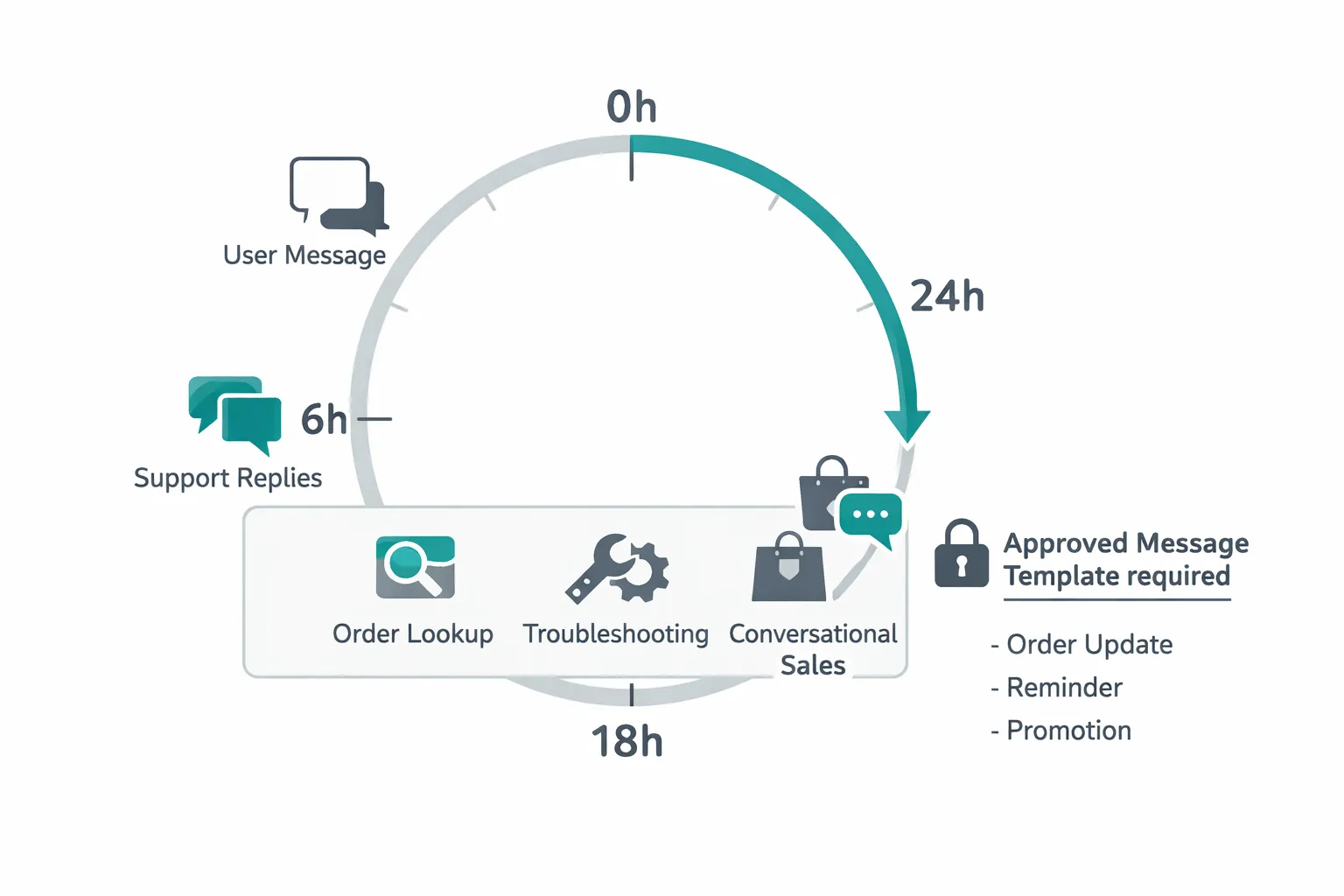
How the timer works
When the user messages you, the 24-hour clock starts.
Each new user message resets the 24-hour window.
Within the window: send free‑form support and conversational messages.
After the window: you can only send approved templates (business‑initiated) to re‑open a conversation.
What this means in practice: if a customer writes at 10:04 a.m., you may send free‑form replies until 10:04 a.m. the next day. If the customer writes again at 6:15 p.m., the window resets to 6:15 p.m. the following day. After the window closes, any follow‑up must be sent via an approved template (e.g., order update, reminder, promotion).
User‑initiated vs Business‑initiated conversations
What counts as user‑initiated:
The customer sends your WhatsApp number a message, replies to your message, clicks a WhatsApp CTA, or interacts with your chatbot - any of these open a user‑initiated conversation that allows free‑form replies for 24 hours.
When and why you must use templates for business‑initiated:
If the 24‑hour window has closed and you need to reach out (e.g., payment reminder, back‑in‑stock alert, order ready for pickup, promo), you must use an approved Message Template to re‑engage. Templates ensure compliance and deliverability at scale.
"You may reply to a user message without use of a Message Template as long as it's within 24 hours of the last user message. Outside the 24-hour customer service window, you may only send messages via approved Message Templates." - Source
Practical scenarios to make it concrete
Weekend/holiday messages when agents are offline:
A customer writes Saturday at 8 p.m.; your team returns Monday morning. If you miss the 24‑hour window, use a template to follow up (e.g., “Thanks for your message - an agent is ready to help now. Reply with your order number.”).
High‑volume spikes and overflow:
During a sale, replies can slip past 24 hours. Use Trikon automations to send last‑minute reminders inside the window and switch to templates when it closes (e.g., “We’re on it - expect an update shortly” vs a templated “Update on your request”).
Failed delivery / opt‑out edge cases:
If a message can’t be delivered (e.g., user changed device/number) or a user opts out, stop messaging. Maintain suppression lists and honor preferences across support and marketing.
What you can send within vs. outside the 24‑hour window
When | What you can send | Template required | Typical use cases | Cost implication |
|---|---|---|---|---|
Within 24h (free‑form) | Any relevant free‑form replies | No | Live support, troubleshooting, order lookups, in‑context cross‑sell/upsell, follow‑up questions | Billed as user‑initiated conversation per WhatsApp pricing |
After 24h (template‑only) | Pre‑approved Message Templates | Yes | Order updates (shipped/delivered), appointment reminders, payment prompts, back‑in‑stock alerts, promotions | Billed as business‑initiated conversation by category (Utility, Authentication, Marketing, Service) |
Quick compliance reminders
Keep human escalation paths available:
Always offer routes to a live agent or alternate channels (phone, email, web). Trikon supports seamless human handoff from bots to agents.
Watch quality ratings; avoid spammy behavior:
Use clear opt‑in, send relevant content, and respect frequency. Poor quality signals can limit your messaging tier.
Why the rule matters: CX, operations, and revenue impact
Customer experience implications
Expectation of quick answers and consistent follow‑up:
Customers message because they expect immediacy. The 24‑hour window aligns with those expectations - miss it and trust drops.
Avoiding dead‑ends after 24 hours:
Don’t let conversations stall. Use approved templates to re‑engage with context (e.g., “We’re back - can we still help with your return?”) so the thread feels continuous.
Operational challenges
Staffing for off‑hours and weekends:
Plan coverage models that combine lightweight after‑hours staffing with automation to keep replies inside the window.
SLA design aligned to the service window:
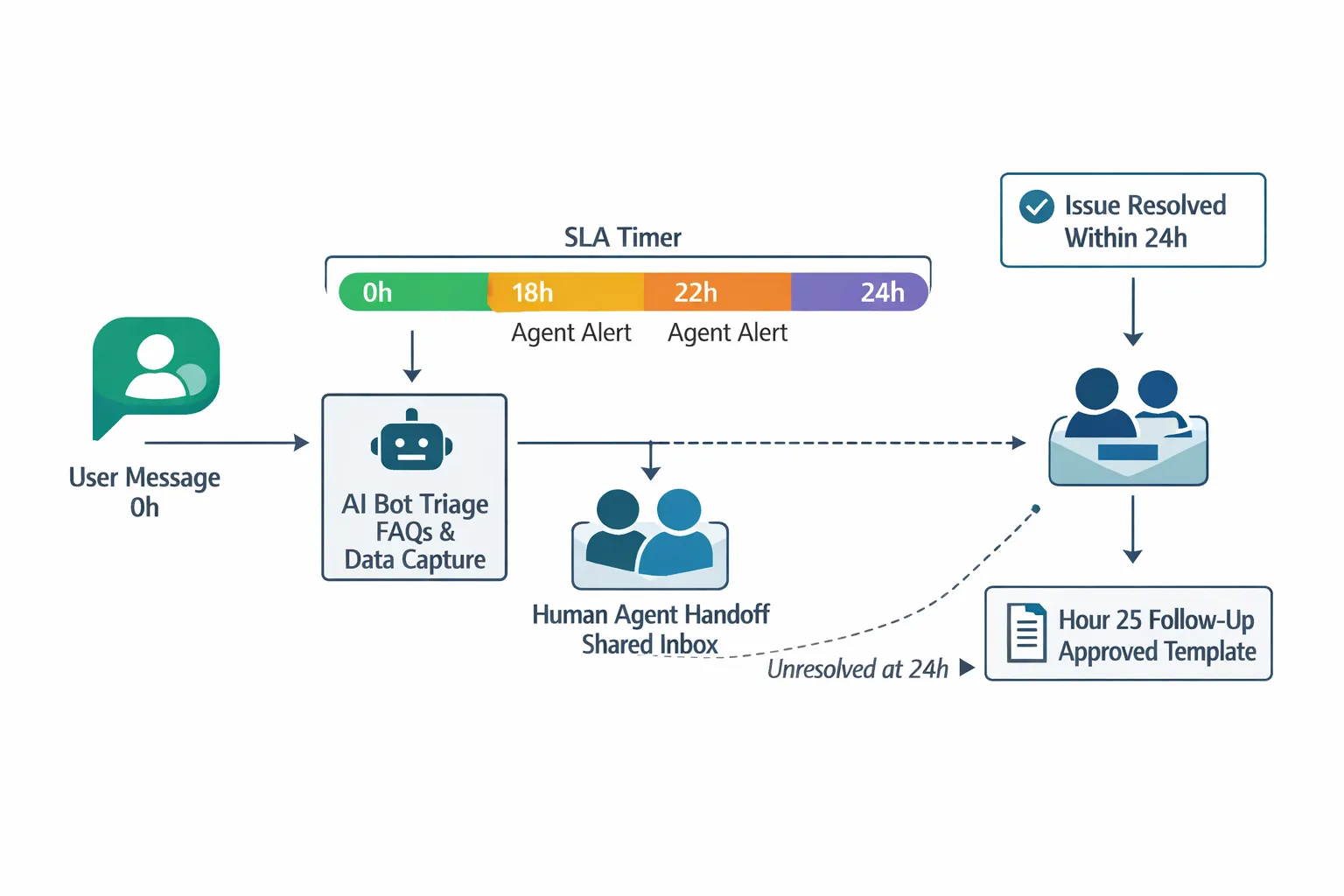
Define response SLAs that ensure first response and resolution milestones occur well before hour 24, with alerts at 18–20 hours.
Automation vs human handoff:
Use bots for FAQs, forms, and triage; route complex cases to agents with full context. Maintain clear escalation paths to phone/email.
Revenue outcomes
Recovering carts and completing transactions:
Send in‑window nudges and, if needed, follow with compliant templates (e.g., payment reminder, low‑stock alert) to convert intent into orders.
Proactive service updates that prevent cancellations/returns:
Proactively notify of delays or pickup readiness; timely updates reduce churn and post‑purchase anxiety.
Edge cases to plan for
Partial conversations, multi‑channel journeys (email/web → WhatsApp):
Sync identifiers so conversations continue seamlessly when users hop from web or email to WhatsApp, preserving context and timing.
Users who opt‑out mid‑flow:
Honor preferences instantly across all automations and suppress lists; provide clear re‑opt‑in paths.
Image explainer
Conversation categories, costs, and when to use each
The four WhatsApp conversation categories
Service (user‑initiated)
What it is: Opens when a customer messages you and you reply within 24 hours.
When to use: Live support, troubleshooting, FAQs, clarification questions, status lookups.
Why it matters: No template needed; handle as much as possible here to avoid extra costs.
Utility (e.g., order updates, reminders)
What it is: Business‑initiated, transactional updates that move an order or request forward.
When to use: Ship/ready‑for‑pickup notices, delivery reschedules, payment confirmations, appointment reminders.
Why it matters: High trust, high relevance - keeps customers informed and reduces churn.
Authentication (OTP, verification)
What it is: Time‑sensitive one‑time passwords or verification codes.
When to use: Login verification, order confirmation, high‑risk actions, consent confirmation.
Why it matters: Security‑critical flows; keep messages short, fast, and compliant.
Marketing (offers, campaigns, re‑engagement)
What it is: Promotional and win‑back outreach sent with explicit opt‑in.
When to use: Back‑in‑stock, new arrivals, seasonal offers, abandoned cart nudges, reactivation.
Why it matters: Revenue driver - use segmentation and timing to maximize ROI and protect quality ratings.
With Trikon, you can set up templates for Utility, Authentication, and Marketing, auto‑route Service conversations to agents or bots, and enforce compliance with opt‑ins and escalation paths out‑of‑the‑box.
How charging works at a glance
Conversations are billed per 24‑hour session by category:
Service opens when you reply to a user’s message within 24 hours.
Utility/Authentication/Marketing open when your first template of that category is delivered.
What triggers a new paid conversation vs remains within an open session:
Sending a template in a category with no currently open session for that user starts a new paid conversation of that category.
Once a conversation is open, you can exchange additional messages (including contextual follow‑ups) within that 24‑hour window without re‑opening costs.
If you send a template from a different category during the same period, it can open an additional paid conversation.
After 24 hours elapse with no user message, you must use a template to re‑engage - this opens a new business‑initiated conversation.
Trikon advantage:
Cost‑aware sending logic consolidates updates into existing sessions when possible and warns when a new send will open a new billable conversation.
Choosing the right category strategically
When to convert Service to Utility or Marketing (with templates):
Start in Service to resolve issues quickly. If a follow‑up will occur outside 24 hours, switch to a Utility template (e.g., shipping update) to keep the thread active later.
For re‑engagement or offers once the issue is resolved, pivot to a Marketing template - but only with valid opt‑in and relevant targeting.
Minimizing costs with smart timing and segmentation:
Bundle transactional updates within the same Utility session (e.g., “shipped,” then “out for delivery”) rather than opening multiple conversations hours apart.
Trigger time‑boxed campaigns to align with existing open sessions when possible.
Segment by lifecycle stage and intent to send fewer, higher‑quality Marketing templates and protect quality ratings.
Use Authentication sparingly and only when needed; complete the rest of the flow within the session to avoid unnecessary re‑opens.
Proof that customers want to message businesses
Messaging drives faster decisions and deeper trust. Use categories to match intent - Service for speed, Utility for clarity, Authentication for safety, and Marketing for growth. Trikon orchestrates all four in one place, so every send is timely, compliant, and cost‑efficient.
"Approximately 70% of people feel more connected to businesses they can message." - Source
Compliance essentials: Opt‑in, templates, and escalation paths
Opt‑in requirements and best practices
Clear consent language and category‑specific opt‑ins:
Collect explicit permission for the types of messages you’ll send (Utility, Marketing, Authentication). Keep records of how/when consent was obtained.
Use clear labels (e.g., “Order updates via WhatsApp,” “Product offers via WhatsApp”) and provide easy opt‑out instructions.
How to present value and frequency expectations:
Set expectations up front: what users will receive, how often, and how to stop. This reduces blocks and improves quality ratings.
Offer preference controls (e.g., choose topics or frequency). Trikon stores consent metadata and enforces it across campaigns and automations.
"You may only contact people on WhatsApp if: (a) they have given you their mobile phone number; and (b) you have received opt‑in permission from the recipient confirming that they wish to receive subsequent messages or calls from you." - Source
Template approvals 101
Naming, placeholders, content guidelines:
Use descriptive names (e.g., utility_order_shipped, mkt_back_in_stock). Keep placeholders specific ({{name}}, {{order_id}}, {{delivery_date}}).
Ensure the body is clear, accurate, and matches the category intent. Include mandatory variables and avoid ambiguity.
Avoiding disallowed content and misleading claims:
No spammy language, sensitive data requests (full card numbers, IDs), or prohibited verticals. Don’t misrepresent urgency or discounts.
Keep localization and compliance in mind - age‑gating where required, correct language per region. Trikon validates templates and routes for approval automatically.
Human escalation paths (required)
In‑chat agent transfer, phone, email, web support:
Provide clear, immediate ways to reach a human. Trikon supports one‑tap agent takeover, plus fallback links to phone, email, and help center.
Handling sensitive data and privacy:
Avoid collecting sensitive identifiers in chat. If necessary, redirect to secure forms or payment links. Adhere to your published privacy policy and regional regulations.
Quality signals and enforcement
Quality ratings, user reports, delivery issues:
Monitor quality signals and complaint rates; high blocks or spam reports can throttle your sending limits.
How to keep your number in good standing:
Honor opt‑outs instantly, segment for relevance, cap frequency, and send during expected hours. Use Trikon’s send‑time optimization and suppression lists to protect deliverability and tier limits.
Winning strategies to maximize the 24‑hour window
SLA design and routing
Prioritize user‑initiated messages with countdown timers:
Give user‑initiated threads priority routing. Display a visible countdown in your inbox so agents see remaining time at a glance.
Escalation rules as the window nears expiry:
At 18h, mark conversations “at risk” and auto‑route to the best‑available agent; at 22h, escalate to a specialist queue or supervisor.
Proactive out‑of‑hours (OOH) autoresponders
Set expectations instantly (when you’re back, alternate channels):
After-hours auto‑replies should state your next staffed window and provide phone/email/help‑center links.
Encourage the user to reply again during staffed hours to reopen the window:
Prompt a quick reply (“Reply ‘HELP’ when you’re back, and we’ll pick this up immediately”) to reset the 24‑hour clock.
Hybrid automation: bots + humans
AI/keyword bots for FAQs and triage:
Use bots to answer FAQs, collect order IDs, and classify intent - reducing handle time before an agent steps in.
Seamless handoff for complex issues:
Enable one-tap agent takeover with full transcript and context; preserve the timer so agents know the remaining window.
Alerts and fail‑safes
Agent nudges at 18h/22h:
Send in‑platform and mobile alerts to assigned agents and backup queues as the timer approaches critical milestones.
Auto‑update templates queued for hour 25 if needed:
If the window expires, automatically send a compliant template (e.g., “We’re ready to help - reply to continue”) to re‑engage.
Image idea
Template tactics that convert (post‑24h re‑engagement)
What “good” templates look like
Purpose‑driven (utility, authentication, marketing):
Align copy with the intended category and outcome - move the next step forward, don’t restate history.
Clear, concise, personalized; easy CTA:
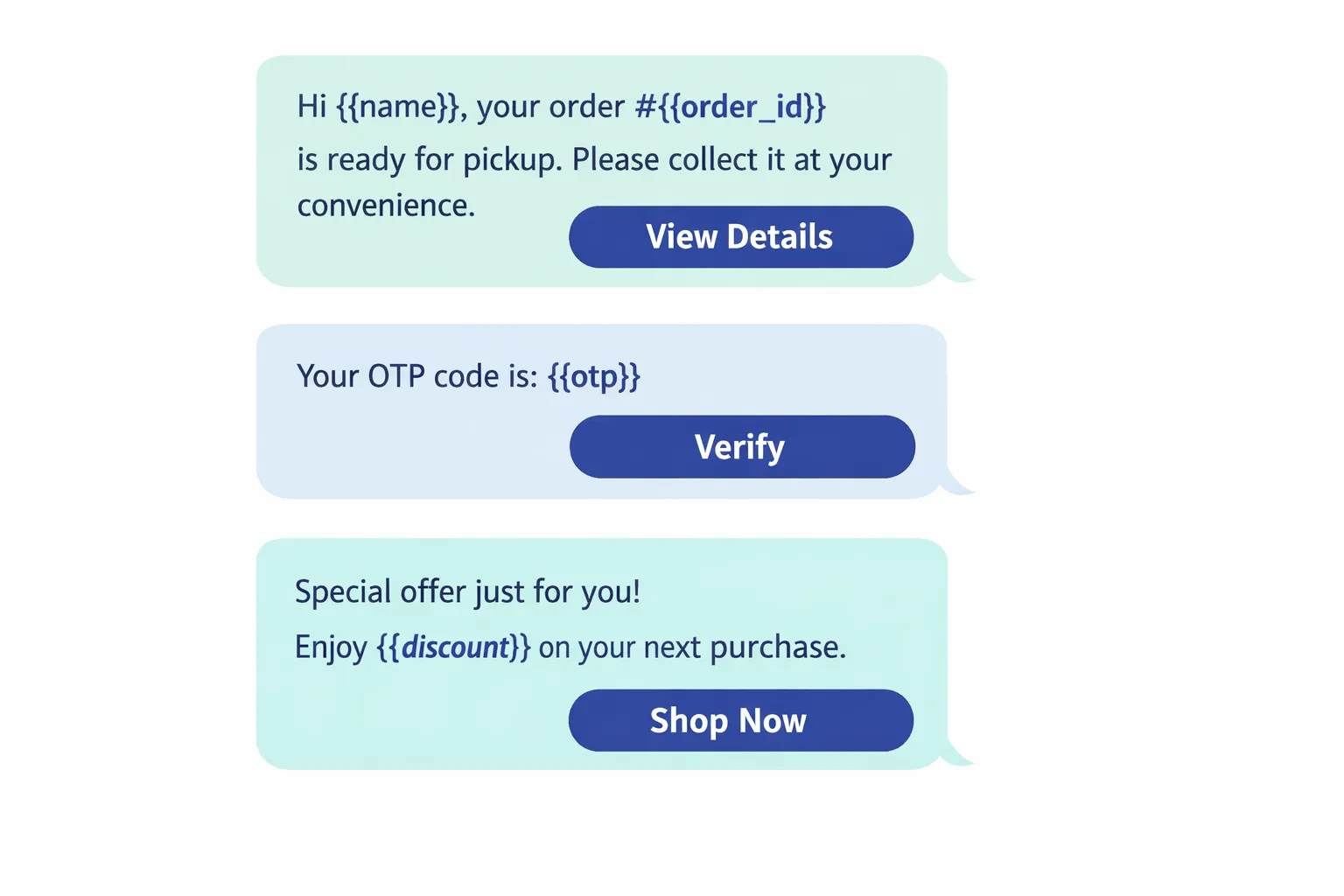
Use a single action per template (View order, Reschedule, Pay now, Verify, Shop now). Keep it scannable and bias to plain language.
Personalization at scale
Using variables ({{name}}, {{order_id}}, {{date}}, {{amount}}):
Personalize the greeting and the task. Include contextual details that reduce effort for the user.
Segment‑aware content (VIP customers, recency/frequency/value):
Adjust offers and tone by lifecycle stage (new vs VIP), category interest, and predicted value.
Optimization
A/B testing copy and timing windows:
Test subject phrasing, CTA verbs, and send times (e.g., 25–28 hours vs day 3) to find lift without hurting quality.
Respecting quiet hours and frequency caps:
Honor regional quiet hours and cap marketing sends. Use recency/frequency rules to avoid fatigue and protect quality ratings.
Governance
Naming conventions, version control, and approvals:
Example: utility_order_ready_v3_en, auth_otp_login_v2, mkt_back_in_stock_v1. Track variants and archive low performers.
Monitoring quality feedback per template:
Watch blocks, mutes, and engagement. Retire or rewrite templates with declining quality to maintain sending tiers.
High‑performing template examples
Category | Use case | Example copy with variables | Primary CTA | When to send |
|---|---|---|---|---|
Utility | Order ready | Hi {{name}}, your order #{{order_id}} is ready for pickup at {{location}}. Please collect by {{date}}. | View pickup details | Immediately after status changes to “ready” (post‑24h if needed) |
Utility | Delivery reschedule | Hi {{name}}, delivery for order #{{order_id}} is scheduled on {{date}}. Need a different time? | Reschedule | 24–48h before scheduled delivery |
Utility | Appointment reminder | Hi {{name}}, your appointment with {{provider}} is on {{date}} at {{time}}. Reply 1 to confirm or 2 to change. | Manage appointment | 24h before the appointment |
Marketing | Cart recovery | Still deciding, {{name}}? Your cart totaling {{amount}} is waiting. | Complete checkout | 25–48h after abandonment (with opt‑in) |
Marketing | Back‑in‑stock | Good news, {{name}} - {{product_name}} is back in stock. Limited quantities. | Shop now | When inventory is available (send during active hours) |
Marketing | Re‑engagement with incentive | {{name}}, here’s {{discount}} off your next order - valid until {{date}}. | Redeem offer | After inactivity threshold (e.g., 14–30 days), within opt‑in scope |
Image
Implementing the 24‑hour strategy in Trikon (step‑by‑step)
Quick start
Connect your WhatsApp Business API account (Meta Business Partner integration):
Authenticate your business number, verify your display name, and map your WhatsApp line to Trikon.
Import teams, roles, and assign SLAs:
Sync users, create queues, and set SLA policies for first response and resolution to ensure you stay well within the 24‑hour window.
Configure the shared inbox for speed
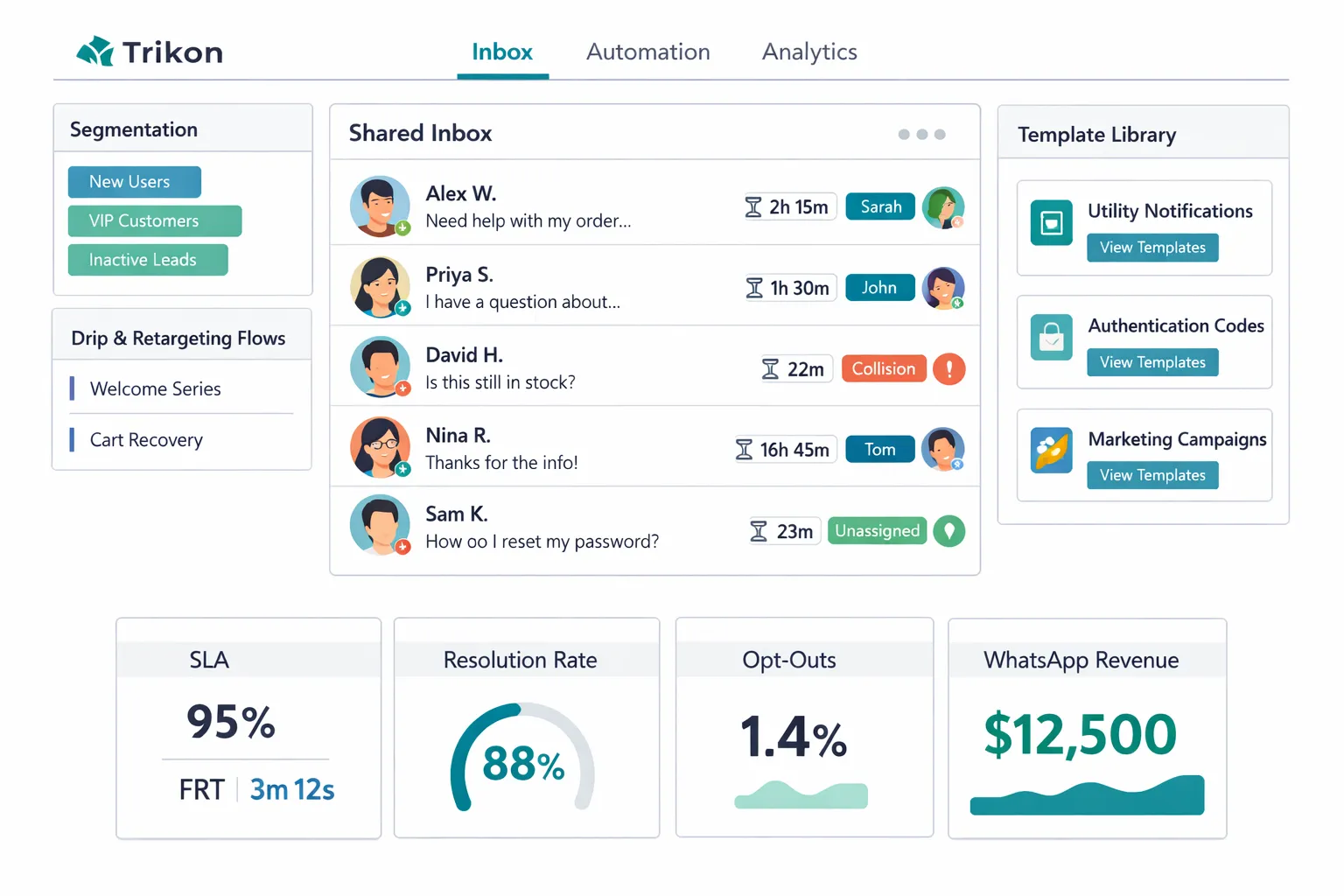
Conversation timers, agent assignment, collision prevention:
Turn on visible countdown timers; use round‑robin or skill‑based routing; prevent double‑replies with collision detection.
Conversation history + context for faster responses:
Centralize the full thread - messages, events, tags, orders - so agents answer with context and fewer back‑and‑forths.
Automations that matter
OOH autoresponders, keyword/AI chatbot triage:
Auto‑acknowledge outside working hours and collect essentials; route intents like “order status” or “returns” to the right queue.
Drip sequences, segmentation, and retargeting flows:
Segment by lifecycle and intent; schedule follow‑ups that respect quiet hours and template categories.
Abandoned cart recovery and in‑chat storefront:
Detect abandoned carts, trigger compliant templates, and let users browse, add to cart, and pay inside WhatsApp.
Human handoff and escalation
One‑click agent takeover:
Seamlessly transition from bot to human, preserving transcript and timers.
Phone/email escalation paths:
Provide compliant alternatives (phone, email, web support) for complex or sensitive cases.
Measure and improve
SLA adherence, first response time, resolution rate, revenue from WhatsApp:
Monitor operational health and tie conversions to conversations to quantify ROI.
Template performance (send, deliver, read, reply, opt‑out):
Track quality signals per template and iterate on copy, timing, and segmentation.
Visual cue
Advanced playbooks for different teams and industries
E‑commerce and D2C
Browse abandonment, cart recovery, order updates, back‑in‑stock:
Browse abandonment: Trigger a Utility or Marketing template when a user views products but doesn’t add to cart (opt‑in required for Marketing). Personalize with {{product_name}} and dynamic links.
Cart recovery: Send a Marketing template 25–48 hours after abandonment with {{amount}} and {{discount}} when applicable. Follow with a Service reply if the user responds to clarify sizing, shipping, or payment.
Order updates: Use Utility templates for “confirmed,” “shipped,” “out for delivery,” and “ready for pickup.” Chain updates inside the same Utility conversation window to minimize costs.
Back‑in‑stock: Target segmented audiences (wishlist, waitlist, high intent) with Marketing templates and inventory‑aware throttling to prevent oversell.
Upsell/cross‑sell within utility/marketing templates:
Add 1 relevant recommendation or bundle to Utility updates (e.g., “Complete your look with {{related_item}}”).
In Marketing, segment by category affinity, AOV, and recency/frequency to keep offers relevant and protect quality ratings.
Trikon tips:
Use in‑chat storefront and payments to shorten the path to purchase.
Automate intent capture (size, color, delivery preferences) via bot before agent handoff.
Service businesses (appointments and reminders)
Automated booking confirmations, reschedules, reminders, follow‑ups:
Confirmation: Send a Utility template at booking with {{date}}/{{time}}/{{location}} plus Add‑to‑Calendar.
Reschedule flow: Offer quick replies (“1 Confirm, 2 Reschedule”) and route “Reschedule” to bot‑led timeslot selection.
Reminders: Use staggered reminders (72h/24h/2h) to reduce no‑shows, then a same‑day reminder with parking or check‑in instructions.
Follow‑ups: Post‑visit feedback and review prompts; for healthcare/regulated services, comply with local privacy rules and avoid sensitive data in chat.
No‑show reduction tactics:
Request a small deposit via payment link in Utility templates; offer easy reschedule to retain revenue.
If a no‑show happens, send a Marketing reactivation template with limited‑time slots or incentives.
Trikon tips:
Calendar integrations power real‑time availability in chat; bots collect required info and hand off to agents when needed.
Enterprise support teams
Tiered SLA policies, priority queues, multilingual support:
Tiered SLAs: Assign stricter SLAs to VIP or incident‑related threads; use countdown timers and supervisor alerts at 18h/22h.
Priority queues: Route by severity, customer tier, and product line; enable on‑call rotations for off‑hours coverage.
Multilingual: Auto‑detect language and route to native agents or provide interim bot translations with clear disclosure.
Compliance logging and audit trails:
Maintain detailed logs of templates, timestamps, escalations, and agent actions. Store consent proofs and opt‑out events.
Mask sensitive data in transcripts; push sensitive workflows to secure portals.
Trikon tips:
Shared inbox with collision prevention and role‑based permissions; exportable audit trails for audits and QA.
Agencies and partners
White‑label deployments:
Deploy branded instances by client with unified governance; template libraries and analytics packaged per brand.
Reusable templates, shared playbooks, and reporting packages:
Build vertical‑specific template packs (e.g., retail cart recovery, clinic reminders, hospitality confirmations) with naming conventions and localized variants.
Standardize playbooks for 24‑hour window handling: OOH messages, at‑risk escalations, hour‑25 re‑engagement templates.
Offer ROI dashboards: conversation categories, session costs, conversions, revenue attributed to WhatsApp.
Trikon tips:
Multi‑tenant management, role‑based access, and cloning of automations and segments accelerate onboarding and consistency across client portfolios.
Conclusion: Make WhatsApp your highest‑converting service and sales channel with Trikon
The 24‑hour rule protects users and rewards timely, relevant engagement.
With Trikon, you get a fast go‑live, compliant automation, hybrid human handoff, and revenue‑driving templates out of the box.
Start today to centralize support, marketing, bookings, and commerce in WhatsApp.
The WhatsApp 24‑hour rule isn’t a limitation - it’s a framework for exceptional customer experience. Trikon helps you operationalize it end‑to‑end: automate FAQs and triage with AI/keyword bots, route complex issues to agents, trigger the right templates after the window, and track SLAs, quality, and revenue in one place. As an official WhatsApp Business API partner, we focus on reliability, compliance, and scale so you can convert more conversations into revenue.
Launch your WhatsApp program with Trikon - an official WhatsApp Business API partner focused on reliability, compliance, and scale. Visit https://whatsapp.trikon.tech/