

Introduction: WhatsApp Broadcast vs WhatsApp API - why this choice matters in 2025
If WhatsApp is where your customers spend their time, it should also be where your business does support, marketing, and commerce. But success hinges on picking the right path: the simple Broadcast feature inside the WhatsApp/WhatsApp Business app, or the official WhatsApp Business API delivered by partners like Trikon. Your choice determines how far you can scale, how compliant and reliable your outreach is, and how quickly you turn conversations into revenue.
"WhatsApp messages achieve open rates of ~98%, and 80% are read within five minutes." - Source
Those engagement numbers are why the stakes are high. This guide gives you a clear, product-led way to compare WhatsApp Broadcast vs API - so you can launch the right strategy on Trikon, fast.
Search intent and what you’ll learn
Define the options:
WhatsApp Broadcast (in the WhatsApp/WhatsApp Business app): one-to-many messages sent directly to contacts who saved your number, with manual workflows and list limits.
Official WhatsApp Business API: a scalable, compliant messaging platform for automation, segmentation, analytics, and two-way conversations - delivered via a Meta-approved partner like Trikon.
Preview the key differences you’ll evaluate:
Limits: WhatsApp broadcast limits (e.g., list size, “saved contact” constraint) vs tiered messaging and higher throughput on API.
Automation: manual sends vs triggers, drip campaigns, chatbots, and retargeting via API.
Deliverability & compliance: app-level constraints vs template approvals, quality ratings, and policy alignment on API.
Analytics: minimal insight in app vs full funnel analytics, cohort tracking, and SLA metrics.
Pricing: free app vs transparent, per-conversation pricing on the API.
Best-fit use cases: simple announcements vs scalable, personalized lifecycle engagement.
Outcome: a practical decision framework to choose the right path - and a next step to launch with Trikon (an official WhatsApp Business API partner) so you can go live quickly and grow confidently.
Quick context
Why brands are moving to WhatsApp for support, marketing, and commerce:
Sky-high engagement and response speed make WhatsApp ideal for time-sensitive updates, sales follow-ups, and customer care.
Conversational journeys convert better: richer media, quick replies, payments, bookings, and storefronts inside chat.
Unified customer history and SLAs improve service quality and team productivity.
Where Broadcast fits vs where the API wins:
Broadcast (app): best for small, occasional one-to-many updates - think simple announcements to a saved-contact list. Great for getting started, but capped by list size, manual effort, and limited analytics.
API (with Trikon): best for scalable, automated, compliant customer engagement - think segmented broadcasts, drip campaigns, AI/keyword chatbots, abandoned-cart recovery, appointments, payments, and a shared inbox with SLAs and full analytics.
Ready to evaluate “WhatsApp broadcast vs API” for your brand and see the difference Trikon can make? Start your WhatsApp strategy the right way at https://whatsapp.trikon.tech/.
WhatsApp Broadcast vs WhatsApp Business API: what they are and how they work
What is WhatsApp Broadcast?
One-to-many message distribution from the WhatsApp/WhatsApp Business app.
Recipient experience: your message lands as a private 1:1 chat; their reply returns only to you (not to others).
Constraints: up to 256 contacts per broadcast list, recipients must have your number saved, manual sending with minimal analytics and no automation.
"Only contacts who have your number saved in their address book will receive your broadcast messages." - Source
What is the WhatsApp Business API?
The official Meta Business Platform, accessed through approved partners like Trikon, for compliant, large-scale messaging.
Built for automation and growth: templates and flows, segmentation, drip/retargeting campaigns, AI/keyword chatbots with human handoff, and a shared inbox with agent assignment and SLAs.
Enterprise-grade operations: multi-agent access, conversation history, analytics and reporting, QA/quality tiers, and integrations with CRM, payments, storefronts, and bookings - so you can run marketing, support, and commerce in one place.
At-a-glance differences
Broadcast = basic reach, light ops, limited scale and insight.
API = automation, reliability, compliance, analytics, and measurable ROI - ideal for segmentation, lifecycle marketing, and support at scale with Trikon.
Feature-by-feature comparison (Broadcast vs API)
What buyers evaluate most
Reach and limits (per-send and per-day realities)
Automation and personalization depth
Deliverability and policy compliance (24-hour window, template categories)
Analytics, attribution, and ROI
Team workflows (shared inbox, SLAs)
Integrations (CRM, eCommerce, payments)
Pricing model and scalability
Visualize the difference
Here’s a simple way to picture WhatsApp broadcast vs API: one-to-many “blasts” vs API-powered lifecycle messaging plus two-way support at scale (with segmentation, chatbots, human handoff, and analytics).
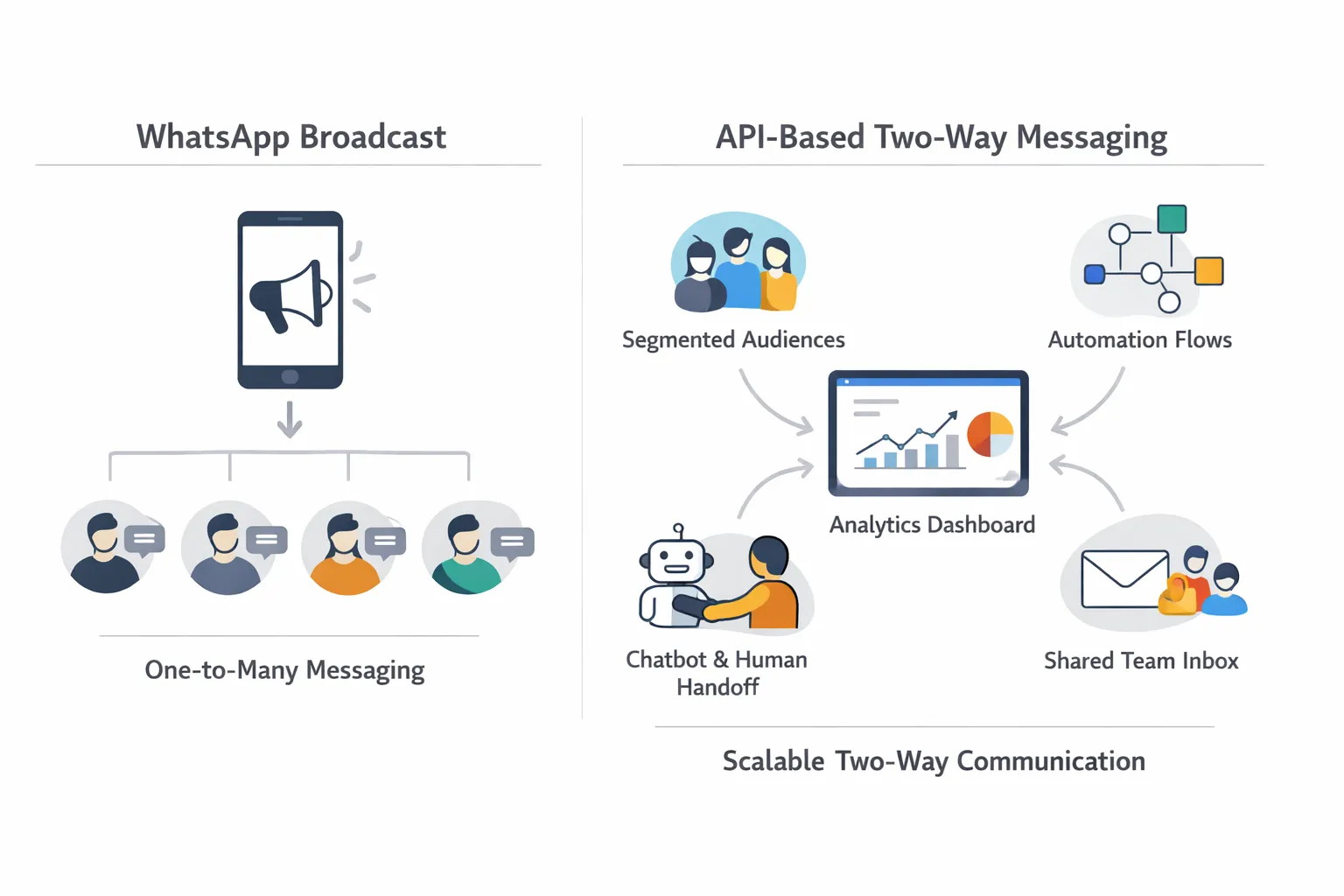
Below is a quick buyer’s snapshot to compare WhatsApp Broadcast limits and workflows against core WhatsApp API features in a clear WhatsApp messaging comparison.
Feature | WhatsApp Broadcast | WhatsApp Business API |
|---|---|---|
Reach limits | Up to 256 contacts per broadcast list; manual sends | Tiered sending and higher throughput with approved templates; built for large volumes |
Opt-in/Address book requirement | Recipients must have your number saved to receive messages | Requires explicit user opt-in per WhatsApp policy; no address-book save required |
Automation (drips, triggers) | None; entirely manual | Full automation: triggers, drip campaigns, retargeting flows, abandoned cart, reminders |
Personalization | Basic message copy only; no dynamic fields | Dynamic variables, segmentation, and event-based targeting for true 1:1 at scale |
Two-way support & handoff | Replies land in your private chat; no routing | Hybrid automation + human handoff, routing, SLAs, and conversation assignment |
Analytics & reporting | Minimal insight; no campaign analytics | Delivery/read metrics, funnel analytics, attribution, quality rating, and spend tracking |
Team inbox | Single device/account; no shared inbox | Shared inbox with roles, agent assignment, collision detection, and SLAs |
Integrations | None | Deep integrations: CRM, eCommerce, payments, bookings, data warehouses |
Compliance (templates/24-hour rule) | App-level constraints; no template system | Template approvals, marketing/utility/authentication categories, 24-hour window compliance |
Pricing model | Free app feature (no campaign-level analytics) | Per-conversation pricing by Meta plus platform fees; transparent and scalable |
Scalability | Limited by list size, manual effort, and device | Multi-agent access, automation, segmentation, and high throughput by design |
Typical use cases | Simple announcements to a small, saved-contact list | Lifecycle marketing, support at scale, operations (appointments, payments), and commerce-driven ROI |
Limits, deliverability, and compliance (what most teams overlook)
Core constraints with Broadcast
256 contacts per list; manual list management; recipients must have saved your number.
Limited control over timing/frequency; no official analytics; harder to A/B test.
Compliance fundamentals with the API
Opt-in is mandatory. Understand conversation types: customer-initiated (service) vs business-initiated (requires approved templates).
The 24-hour customer care window: after 24 hours from the user’s last message, you must use a pre-approved template to re-engage.
Template categories - marketing, utility, and authentication - govern what you can send and how it’s priced; follow best practices to prevent a spammy experience (clear value, opt-outs, expected cadence).
"WhatsApp uses conversation-based pricing with categories (Marketing, Utility, Authentication, Service) and enforces a 24-hour customer service window; outside the window, businesses must use approved templates." - Source
Deliverability best practices
Collect explicit opt-ins across touchpoints; set content and frequency expectations at opt-in.
Segment by intent and lifecycle; prioritize relevance (recent purchasers vs dormant leads).
Throttle larger sends, respect quiet hours, and localize timing by timezone.
Monitor quality signals (blocks, reports, response rates); iterate templates to protect your quality rating.
Keep templates short, contextual, and actionable; include clear ways to stop or change preferences.
Automation, scalability, and team workflows with the API (powered by Trikon)
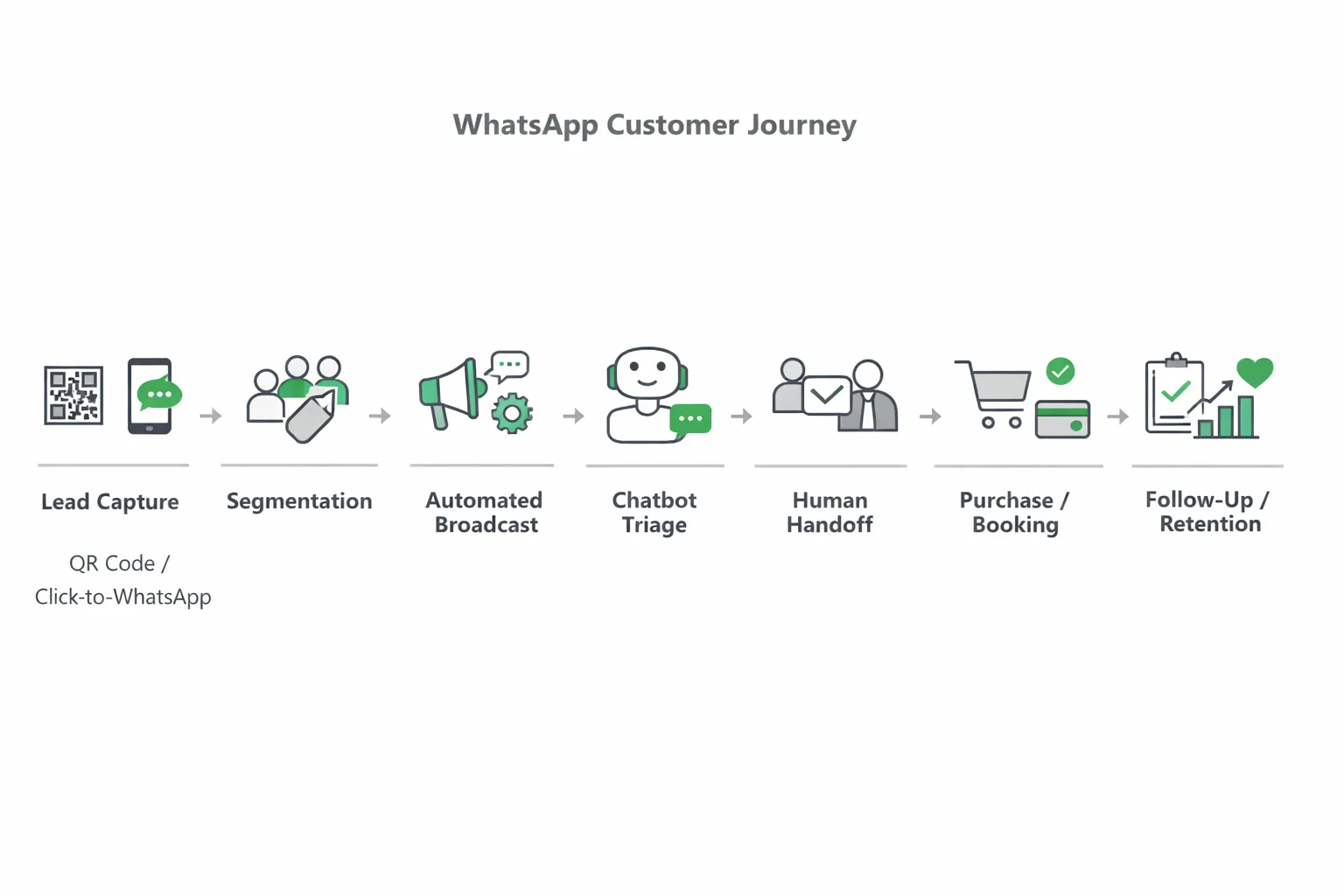
Turn WhatsApp into a full funnel
Lifecycle automation: set up always-on journeys that welcome new contacts, onboard first‑time buyers, educate with tips or tutorials, trigger replenishment nudges, and win back dormant users.
Campaigns that convert: run segmented broadcasts, drip sequences, retargeting flows, and abandoned cart recovery - all with approved templates and throttling to protect deliverability.
Hybrid support that delights
AI/keyword chatbots for FAQs and routing: deflect repetitive questions, collect context, and triage to the right team based on intent, language, or priority.
Seamless human handoff into a shared inbox: Trikon routes conversations to agents with assignment rules, SLAs, and full conversation history, so customers get fast, consistent answers.
Real operations in chat
Bookings, appointments, reservations, and payments inside WhatsApp: customers can pick a time, confirm, and pay - no channel switching.
WhatsApp Storefront: sync your catalog, enable carts and orders, and connect to your website or OMS for smooth inventory and fulfillment.
Why Trikon
Minimal setup and fast go-live: skip complex visual builders - launch campaigns, bots, and inbox workflows in days, not months.
Built for growth: API-grade reliability, compliance, and scalability, plus agency-friendly tools and white‑label options for multi-brand management.
Pricing, ROI, and total cost of ownership
How pricing differs
Broadcast (app): free to use, but time-intensive. Manual list management, sending, and follow-ups translate into ops cost - and limited measurement makes optimization difficult.
API: conversation-based pricing with transparent categories (marketing, utility, authentication, service). First 1,000 service conversations per month are often free from Meta (subject to current policy), making early scale affordable and predictability high as you grow.
Measuring what matters
Track delivery, read, and reply rates; time-to-first-response; CSAT; and revenue attribution by campaign, segment, and template.
Optimize send windows, content templates, and audience segments to improve conversion and CAC/LTV impact.
Use funnel analytics to tune automations (e.g., abandoned cart and replenishment) and protect quality ratings.
"85% of consumers prefer to message with brands (up from 65% in 2019)." - Source
Why ROI tends to favor the API
Automation eliminates manual work and response lag, increasing agent capacity and reducing costs.
Analytics and attribution enable continuous improvement across campaigns and journeys.
Reliability, segmentation, and personalization raise open/reply rates and conversions - turning WhatsApp into a predictable revenue channel at scale.
When to use WhatsApp Broadcast vs WhatsApp API (decision framework)
Quick rules of thumb
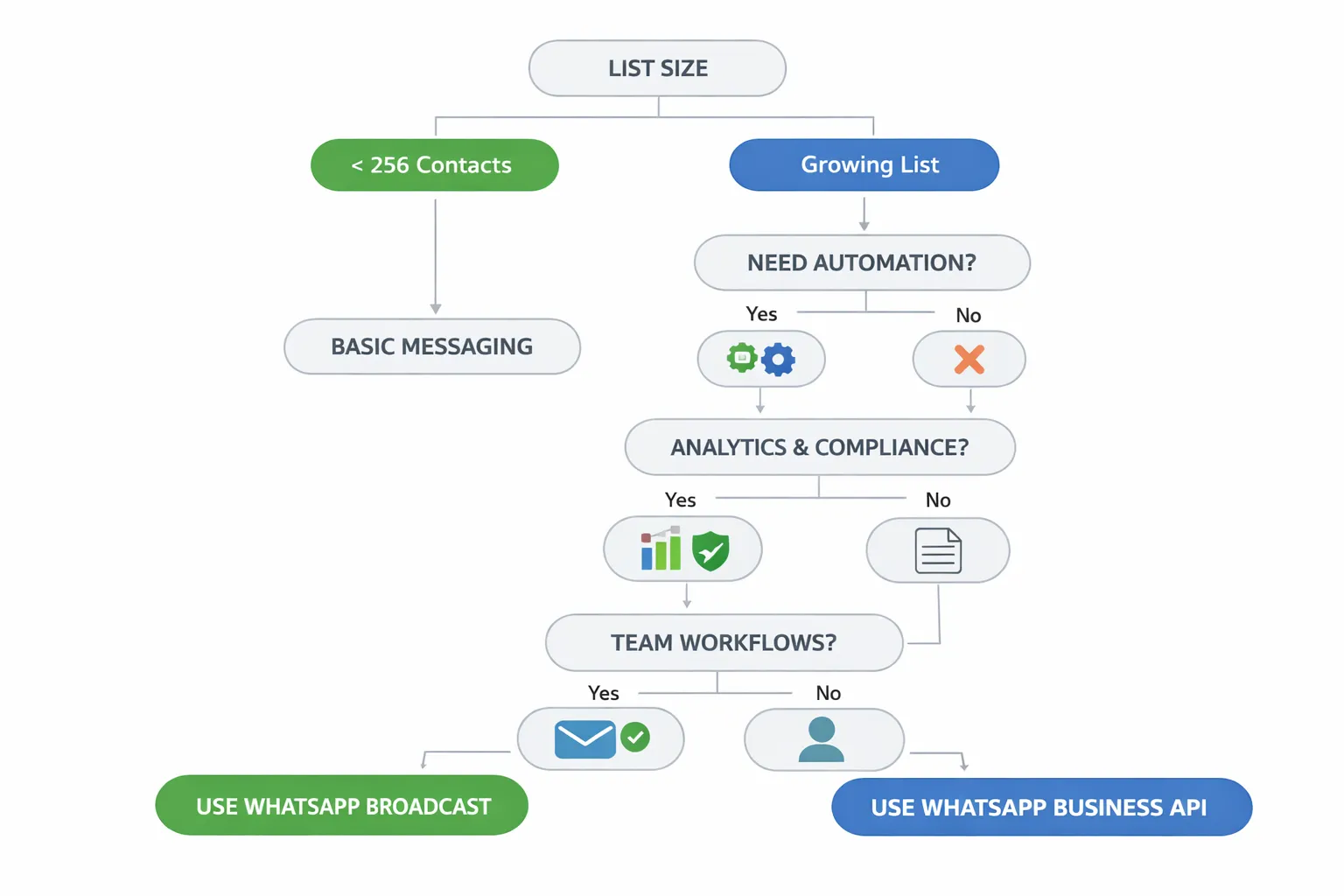
Choose Broadcast when: you have a very small list, send low-frequency updates, don’t need automation or analytics, and everyone has your number saved.
Choose the API when: you need segmentation, personalization, automation, a shared inbox, compliance controls, analytics, and scale.
Decision criteria
List size and growth trajectory
Required automation depth and team collaboration
Compliance risk tolerance and brand standards
Systems integration needs (CRM, ecommerce, helpdesk)
Measurement and ROI requirements
Brief description: Use the matrix below as a prescriptive guide to quickly select the best-fit option for your stage and requirements.
Factor | Best fit for Broadcast | Best fit for API |
|---|---|---|
Audience size | Micro-lists (<256), stable | Growing lists, many segments, high volume |
Frequency | Occasional updates | Regular campaigns, lifecycle journeys |
Personalization need | Low; generic announcements | High; dynamic fields, behavior-based |
Two-way support | Basic 1:1 replies in the app | Hybrid automation + human handoff with routing/SLAs |
Analytics need | Minimal | Deep campaign and funnel analytics, attribution |
Team size | Solo or very small team | Multi-agent teams, shared inbox, roles |
Integrations | None required | CRM, ecommerce, payments, helpdesk |
Typical messages | Local updates, simple notices | Cart recovery, back-in-stock, reminders, promos, support |
Time-to-value | Immediate for small sends | Fast go-live with partner (Trikon), scalable long-term ROI |
Real examples by industry
D2C/eCommerce: use the API for cart recovery, back-in-stock alerts, personalized upsells, and replenishment reminders.
Services/appointments: use the API for confirmations, reminders, and no-show reduction with automated follow-ups.
Local updates to a micro-audience: use Broadcast for infrequent notices where everyone has your number saved.
Getting started: from first broadcast to full API rollout (with Trikon)
If you’re starting with Broadcast (app)
Create a broadcast list, confirm everyone has saved your number, and keep copy concise with a single CTA.
Respect frequency and quiet hours; avoid message fatigue by spacing sends and rotating themes.
Track lightweight KPIs: reply rate, link click-through, and manual uplift indicators (e.g., redemptions, footfall mentions).
If you’re ready for the API (Trikon)
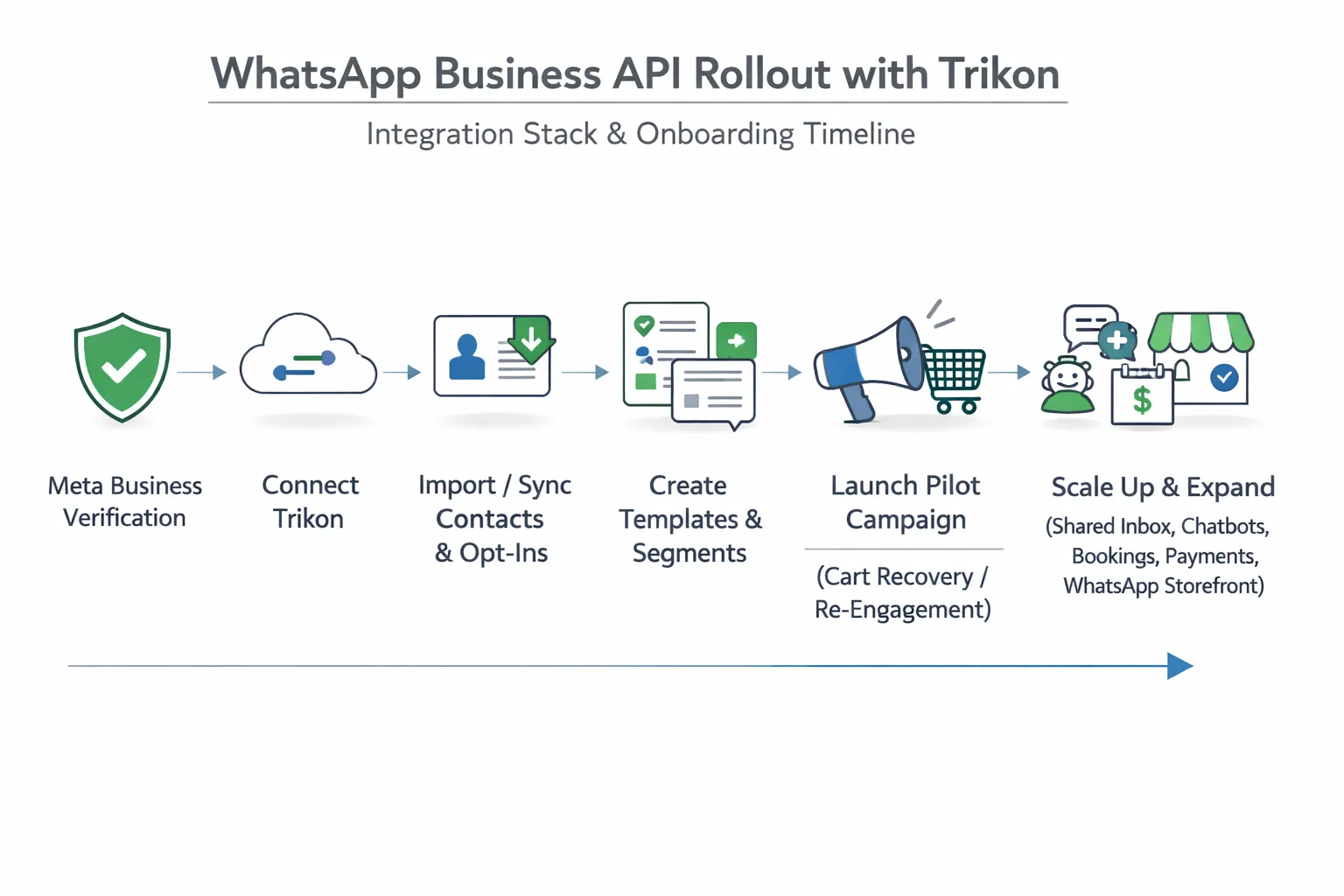
Step 1: Verify your Business and phone number with Meta; choose a recognizable display name.
Step 2: Connect Trikon; import/sync contacts from your CRM/ecommerce; standardize explicit opt-ins.
Step 3: Create approved templates (marketing, utility, authentication); define segments and success metrics.
Step 4: Launch a pilot flow - cart recovery, replenishment, or re-engagement; measure delivery/read/reply rates and attributed revenue; iterate templates and timing.
Step 5: Scale to multi-team operations: shared inbox with SLAs and assignment, AI/keyword chatbots, bookings/appointments, payments, and a WhatsApp Storefront synced with your site.
Speed-to-value checklist
Go live in days, not months with Trikon’s minimal setup.
Reuse proven playbooks for broadcasts, drips, and retargeting.
Start with one revenue-positive flow (e.g., abandoned cart) to self-fund expansion into support and commerce.
FAQs: WhatsApp Broadcast vs WhatsApp Business API
Is Broadcast really capped at 256 contacts per list?
Yes. WhatsApp Broadcast (inside the WhatsApp/WhatsApp Business app) is limited to 256 recipients per list. If you need to reach more people, you must create multiple lists and send manually - making scale and measurement difficult.
Can I run promotional messages with the API?
Yes - using Marketing templates on the official WhatsApp Business API, provided you have explicit opt-in and follow Meta’s policies. Templates must be approved before use, and you should offer clear value and easy opt-out to protect quality ratings and deliverability.
Do recipients need to save my number?
Broadcast: Yes. Only contacts who have saved your number will receive your broadcast.
API: No address-book save is required, but explicit user opt-in is mandatory per WhatsApp policy.
Can multiple agents reply from the same number?
Yes with the API. Trikon provides a shared inbox, agent assignment, SLAs, collision detection, and full conversation history so teams can collaborate from one WhatsApp number. Broadcast (app) is single-device/single-user by design.
What analytics do I get with the API vs Broadcast?
Broadcast: Minimal insight - no official campaign analytics.
API (with Trikon): Delivery/read/reply metrics, funnel and cohort analytics, attribution to revenue, template performance, agent SLAs, and quality ratings.
How fast can I go live with Trikon?
Most teams go live in days, not months. Trikon streamlines Business verification, number setup, template approvals, and data sync - then launches a pilot (e.g., cart recovery or re‑engagement) before scaling to support, marketing, and commerce.
What about the 24-hour window and how do templates work?
If a customer messages you, you can reply freely within a 24-hour customer care window. After 24 hours, you must use an approved template (Marketing, Utility, or Authentication) to re-engage. Trikon helps you manage template approvals, categories, and compliant triggers.
How does pricing work and how do I control costs?
API pricing is conversation-based by category (e.g., Service, Marketing, Utility, Authentication), with country-level rates. Many businesses receive the first 1,000 Service conversations/month free (subject to Meta’s policy).
Control costs by:
Driving more customer-initiated (Service) conversations
Using precise segmentation and suppressing uninterested audiences
Optimizing template content and send windows to maintain quality
Resolving issues within 24 hours to avoid initiating new paid conversations
Automating FAQs with chatbots to reduce agent load and repeat contacts
If you need simple, occasional updates to a tiny, saved-contact list, Broadcast can work. For segmentation, automation, analytics, and multi-agent workflows that scale - and to turn WhatsApp into a revenue channel - choose the WhatsApp Business API with Trikon.
Conclusion: Turn WhatsApp into a revenue channel with Trikon
Bottom line
Use WhatsApp Broadcast for small, simple, infrequent updates to known contacts.
Choose the WhatsApp Business API when you need automation, team workflows, analytics, compliance, and scale.
Why Trikon
All-in-one platform: support, marketing automation, chatbots, bookings/operations, and storefront in one place.
Faster go-live with minimal setup; hybrid automation + human handoff for better CX; reliable and compliant as an official Meta partner.
Next step
See how fast you can launch your first revenue-positive WhatsApp flow on Trikon: https://whatsapp.trikon.tech/
Book a demo or start your trial to turn conversations into conversions.