

WhatsApp Business API for Growth in 2026
Growing brands do not need another disconnected channel. They need one place to support customers, recover carts, send campaigns, automate repetitive work, and keep sales moving without forcing the team to juggle five tools.
That is exactly why the WhatsApp Business API matters in 2026.
If you run a D2C or eCommerce brand, a service business built on appointments, an enterprise support team with SLA targets, or an agency delivering automation for clients, WhatsApp is no longer just a messaging app. It is becoming the operating layer for customer experience, conversational commerce, and revenue recovery.
The challenge is that many teams still search for things like download WhatsApp Business API, whatsapp business api free, whatsapp business api login, or whatsapp business api app expecting a simple install. In reality, the API is not a consumer app download. It is an official business platform that needs the right setup, provider, workflows, and governance.
This guide explains how to get WhatsApp Business API, how to use it strategically, what the Cloud API changes, what to look for in a provider, and why businesses increasingly choose a no-code, unified platform like Trikon Tech to launch faster without heavy engineering effort.
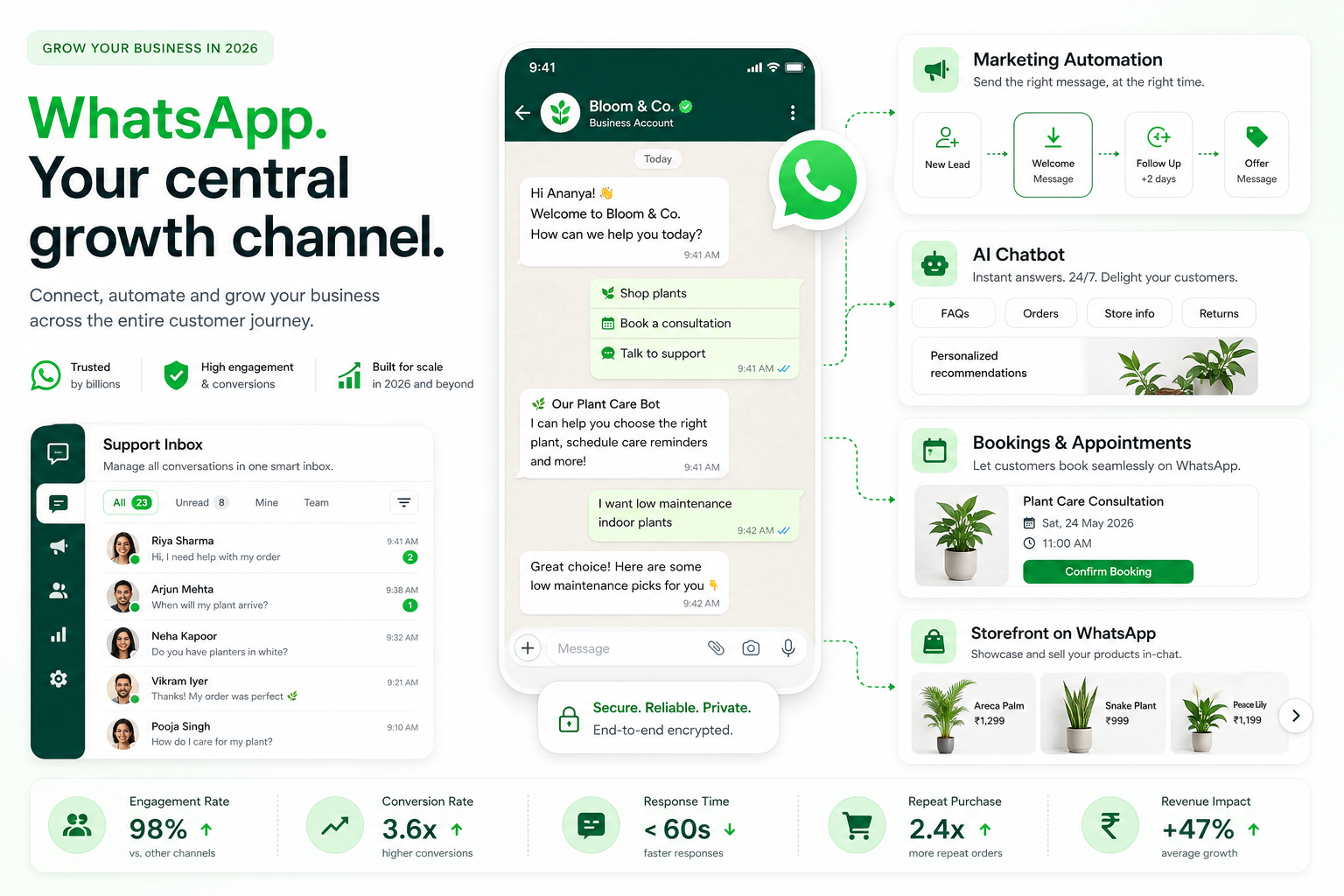
"As of early 2026, WhatsApp has surpassed 3 billion monthly active users worldwide." - Source
"WhatsApp Business messages achieve approximately 98% open rates, far above typical email performance." - Source
Why businesses are shifting to WhatsApp-first growth
The strongest competitor articles all agree on the basics: WhatsApp is high-engagement, works well for support, and supports automation. But most stop at surface-level features.
The deeper shift is this: customers increasingly want to discover, ask, buy, confirm, reschedule, and get support inside one chat thread.
That is why WhatsApp is winning across multiple business models:
D2C and eCommerce brands use it for cart recovery, order updates, upsells, and retargeting
Service businesses use it for bookings, reminders, confirmations, and payments
Support teams use it for shared inboxes, agent routing, SLA management, and escalation
Agencies use it to offer chatbot automation and campaign services, including white-label delivery
Sales teams use it for lead qualification and faster follow-up than email
The opportunity in 2026 is not just messaging more people. It is reducing friction across the customer journey.
What the WhatsApp Business API actually is
The WhatsApp Business API is the official infrastructure businesses use to connect WhatsApp to software, workflows, CRMs, support desks, bots, and campaigns at scale.
Unlike the WhatsApp Business app, the API is built for:
multi-user teams
CRM integration
automation
template-based outbound messaging
analytics
role-based access
customer service operations
marketing automation
commerce workflows
This is why queries like whatsapp business chat api, whatsapp business message api, whatsapp business api client, and whatsapp business account api all point to the same broader need: turning WhatsApp into a real business system, not just a phone-based inbox.
Important clarification: there is no true “WhatsApp Business API download”
A common misconception is that businesses can simply search whatsapp business api download, whatsapp business api apk, or free whatsapp business api download and install it like a mobile app.
That is not how the platform works.
The API is accessed through:
Meta’s WhatsApp Business Platform / Cloud API
or an official WhatsApp Business API provider / partner
So when businesses ask how to download WhatsApp Business API, the practical answer is:
apply for access
connect a verified business number
choose a platform or build against the API
configure templates, workflows, and integrations
WhatsApp Business App vs WhatsApp Business API vs Cloud API
Most articles explain the difference only briefly. But for decision-makers, this is one of the most important distinctions.
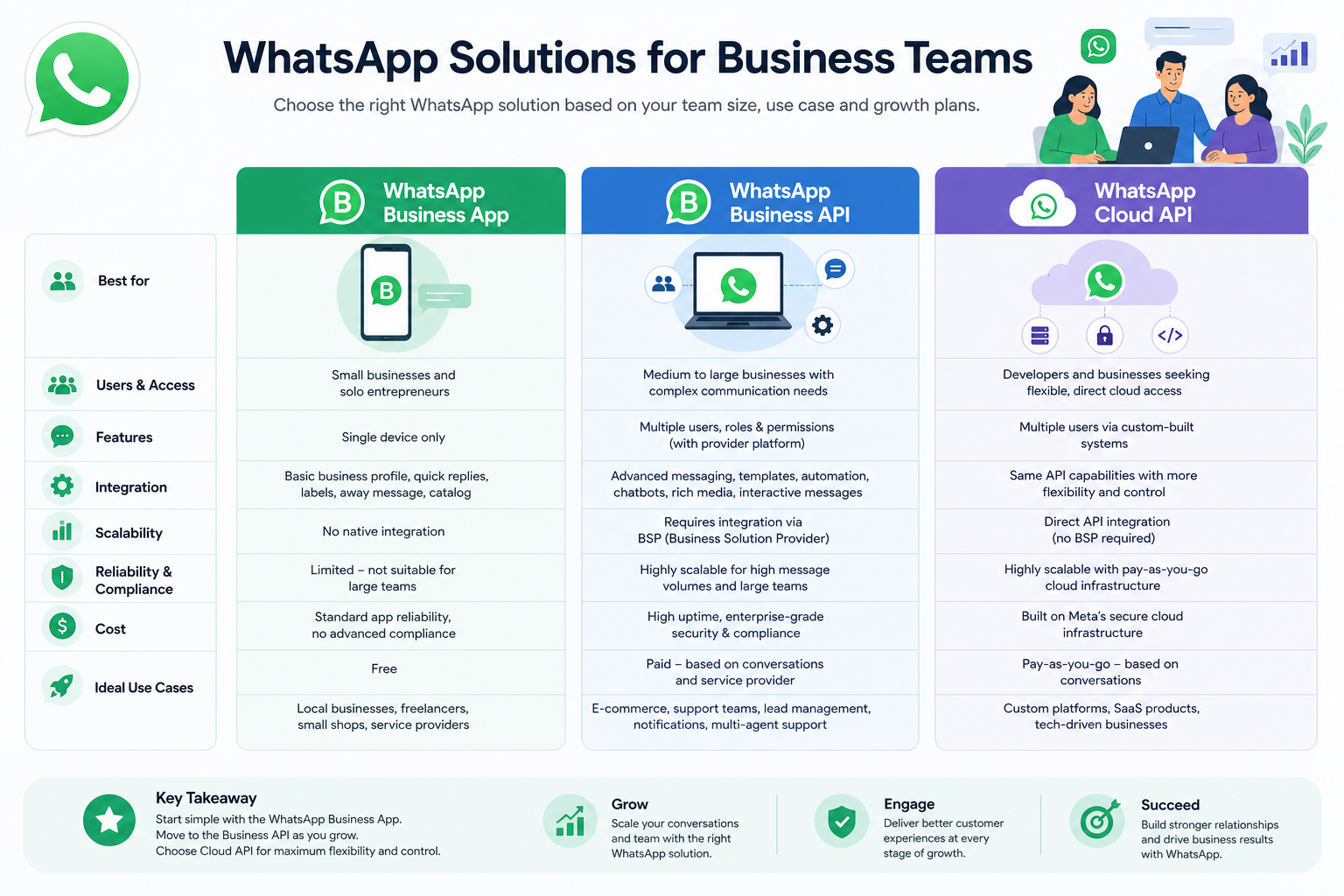
Option | Best for | Main limitation | Best use case |
|---|---|---|---|
WhatsApp Business App | Very small teams | Limited multi-user collaboration and automation | Single-owner small business |
WhatsApp Business API | Growing or complex teams | Needs setup and platform support | Marketing, support, automation, scale |
WhatsApp Business Cloud API | Businesses wanting official cloud-based API access | Raw access still requires product and workflow setup | Developer-led builds or platform-backed deployment |
WhatsApp Business App
Good for simple use. Not good for scale.
WhatsApp Business API
Best for companies that need centralized communication, team workflows, and outbound campaigns.
WhatsApp Business Cloud API
This is Meta’s cloud-hosted model for the API. It reduces infrastructure complexity versus older on-premise approaches, but most businesses still need a platform layer for usability.
That is where Trikon becomes valuable: it gives teams the benefits of the official WhatsApp Business API and WhatsApp Business Cloud API without forcing them to build everything from scratch.
How WhatsApp Business API works in practice
At a practical level, the API supports two major conversation types:
Customer-initiated conversations
A user messages your business first. This opens a service window in which support, qualification, and assistance can happen naturally.
Typical triggers include:
website chat buttons
QR codes
click-to-WhatsApp ads
order support
appointment requests
product questions
Business-initiated conversations
A business sends an outbound message after the customer has opted in, usually using approved templates.
Typical use cases include:
order updates
reminders
abandoned cart messages
promotions
reorder nudges
booking confirmations
payment alerts
This is why whatsapp business api messaging, whatsapp business api send message, and whatsapp business api to send message are such high-intent searches. Businesses do not just want access. They want to use WhatsApp as a predictable outbound engine.
The biggest content gap: WhatsApp is no longer just support
One major gap across competitor posts is that they talk about messaging, but not enough about full-funnel operations.
In 2026, winning brands use WhatsApp across five connected layers:
Support
Marketing
Automation
Operations
Commerce
Trikon is built exactly around this model.
1. Shared support inbox
Instead of one number controlled by one person, teams get a shared inbox with:
agent assignment
SLA tracking
conversation ownership
internal collaboration
full customer history
This is critical for whatsapp business api support and whatsapp business api customer service use cases, especially when response times affect conversion and retention.
2. Marketing automation
Trikon enables no-code campaigns for:
broadcasts
segmentation
drip flows
retargeting
abandoned cart recovery
lead nurturing
This is where whatsapp business api for marketing and whatsapp business api marketing become revenue tools, not just notification tools.
3. AI and rule-based bots
Many repetitive queries should never hit a live agent.
With Trikon, businesses can build no-code flows for:
FAQ deflection
lead qualification
order status
booking intake
after-hours handling
And when the issue becomes complex, the conversation hands off to a human with full context intact.
4. Operational workflows inside chat
Appointments, reminders, reservations, confirmations, and payments can happen inside WhatsApp.
That matters for clinics, salons, automotive businesses, education, hospitality, and local service brands.
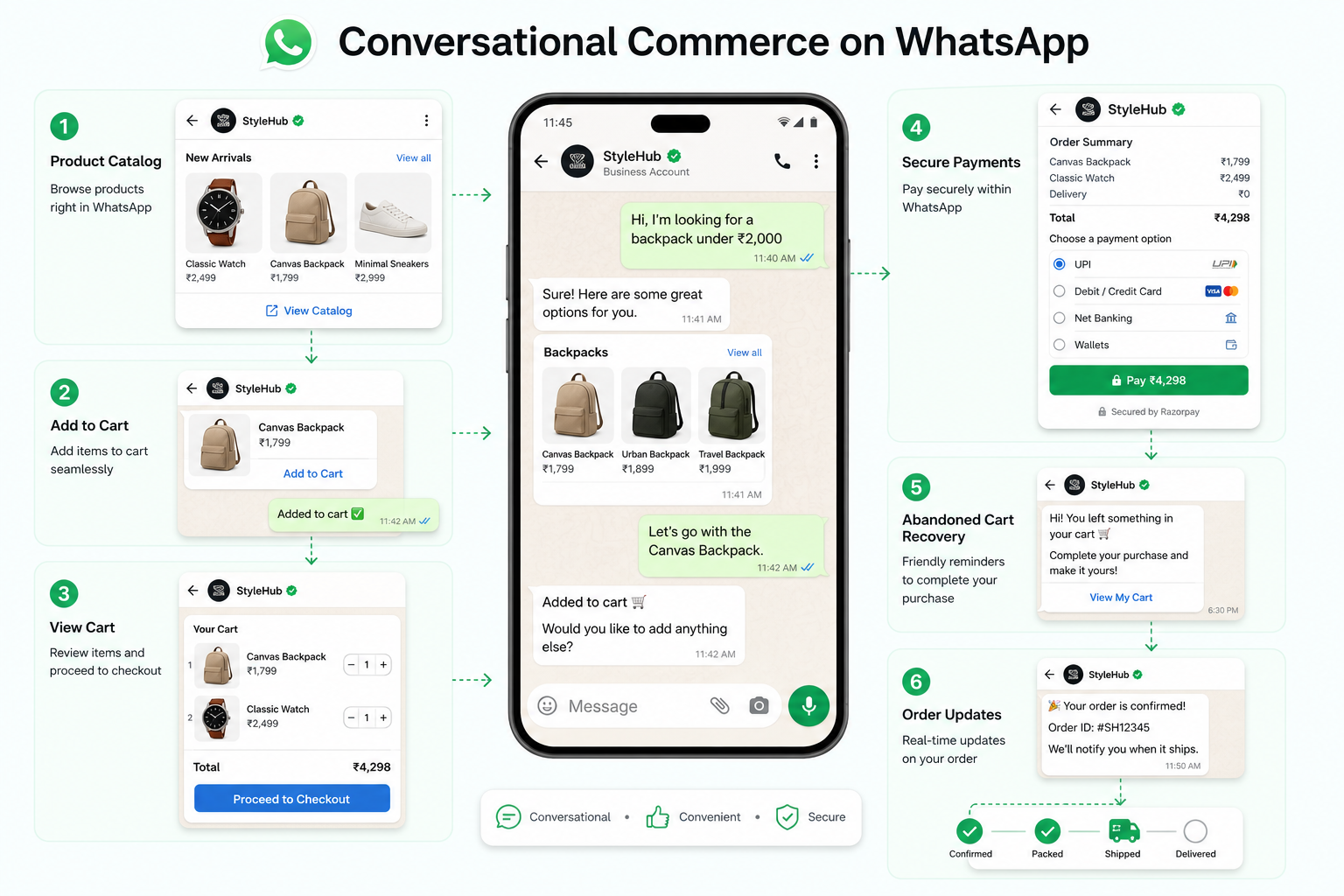
5. Conversational commerce
Customers can browse products, ask questions, add to cart, place orders, and complete key buying steps in chat.
That makes WhatsApp far more than a notification channel.
How to get WhatsApp Business API in 2026
If your goal is to apply for WhatsApp Business API, get WhatsApp Business API access, or choose an official WhatsApp Business API partner, the path is simpler than many articles make it sound.
Step 1: Define your use case
Before any setup, decide what you need WhatsApp to do.
Examples:
support and ticket deflection
campaign broadcasting
CRM-linked sales follow-up
abandoned cart recovery
appointment automation
storefront and order flows
This determines your templates, integrations, inbox design, and automation logic.
Step 2: Choose an official provider or platform
A strong WhatsApp Business API solution provider should offer more than raw access.
You want:
official partner status
onboarding help
template support
no-code automation
team inbox
CRM integrations
reporting
campaign tools
human handoff from bots
commerce support
For teams without large engineering resources, Trikon is especially attractive because setup is minimal and the operating layer is already built.
Step 3: Verify your business and number
You typically need:
a business presence
a phone number not actively tied to a conflicting WhatsApp setup
business verification steps where required
display name approval
Step 4: Configure messaging templates
Outbound business-initiated messages often require approved templates.
These include:
utility messages
marketing messages
authentication or verification flows where applicable
Step 5: Connect your workflows
This is where the real business value appears:
connect CRM
build lead routing
define agent queues
set SLAs
create bot flows
launch campaigns
build booking or cart recovery journeys
Step 6: Go live and optimize
The best results come from iteration:
improve opt-ins
test segmentation
refine templates
tune automation
reduce human load
track conversion by conversation type
What setup looks like with Trikon
A lot of blogs explain the API but skip the operational reality. Access alone is not the win. Usability is.
With Trikon, the process is designed for fast deployment:
Connect your official WhatsApp Business account
Set up your team inbox and agent rules
Launch no-code automations and support flows
Sync your store, CRM, or website forms
Start campaigns, reminders, and recovery journeys
Use human handoff where complexity needs empathy or expertise
For growing teams, this avoids the usual problem of getting API access but still having no usable support system, no campaign interface, and no way for non-technical teams to launch workflows.
WhatsApp Business API integration: what matters most
Searches like whatsapp api integration for business, whatsapp business api integration, whatsapp business api crm, and whatsapp business api for website all point to one truth: standalone chat is not enough.
Your WhatsApp setup should integrate into your business stack.
CRM integration
WhatsApp should enrich your CRM, not sit outside it.
You want to sync:
lead source
lifecycle stage
order data
previous interactions
notes and ownership
campaign responses
This allows better segmentation and better follow-up.
Website integration
A WhatsApp button is just the start.
Advanced website integration can trigger:
product inquiries
quote requests
booking conversations
lead capture
abandoned checkout recovery
click-to-chat journeys
eCommerce integration
For online stores, WhatsApp works best when connected to:
product catalogs
cart status
order status
payment states
customer segments
Support integration
Support teams need:
routing
tags
priority queues
SLA timers
escalation flows
customer context
Trikon’s shared support inbox makes this practical for real teams, not just technically possible.
WhatsApp Business API for marketing in 2026
Competitor content often mentions campaigns, but not enough about what actually drives results.
WhatsApp marketing works best when it feels personal, timely, and action-oriented.
High-performing WhatsApp marketing use cases
Use case | Why it works | Trikon advantage |
|---|---|---|
Abandoned cart recovery | High intent, low friction | No-code flows and retargeting |
Back-in-stock alerts | Immediate relevance | Segmented broadcast targeting |
Drip sequences | Nurtures leads over time | Simple automation builder |
Reorder reminders | Great for repeat purchase categories | Trigger-based journeys |
Win-back campaigns | Re-engages dormant buyers | CRM-based segmentation |
Event or appointment reminders | Reduces no-shows | Bookings and reminder workflows |
What winning campaigns do differently
They are:
permission-based
segmented
behavior-triggered
concise
easy to respond to
linked to next action
This is where Trikon’s marketing automation stands out. Teams can launch broadcasts, drip flows, retargeting, and recovery campaigns without heavy developer support.
WhatsApp Business API for customer support
Support on WhatsApp fails when businesses treat it like a personal inbox.
It succeeds when the experience is structured.
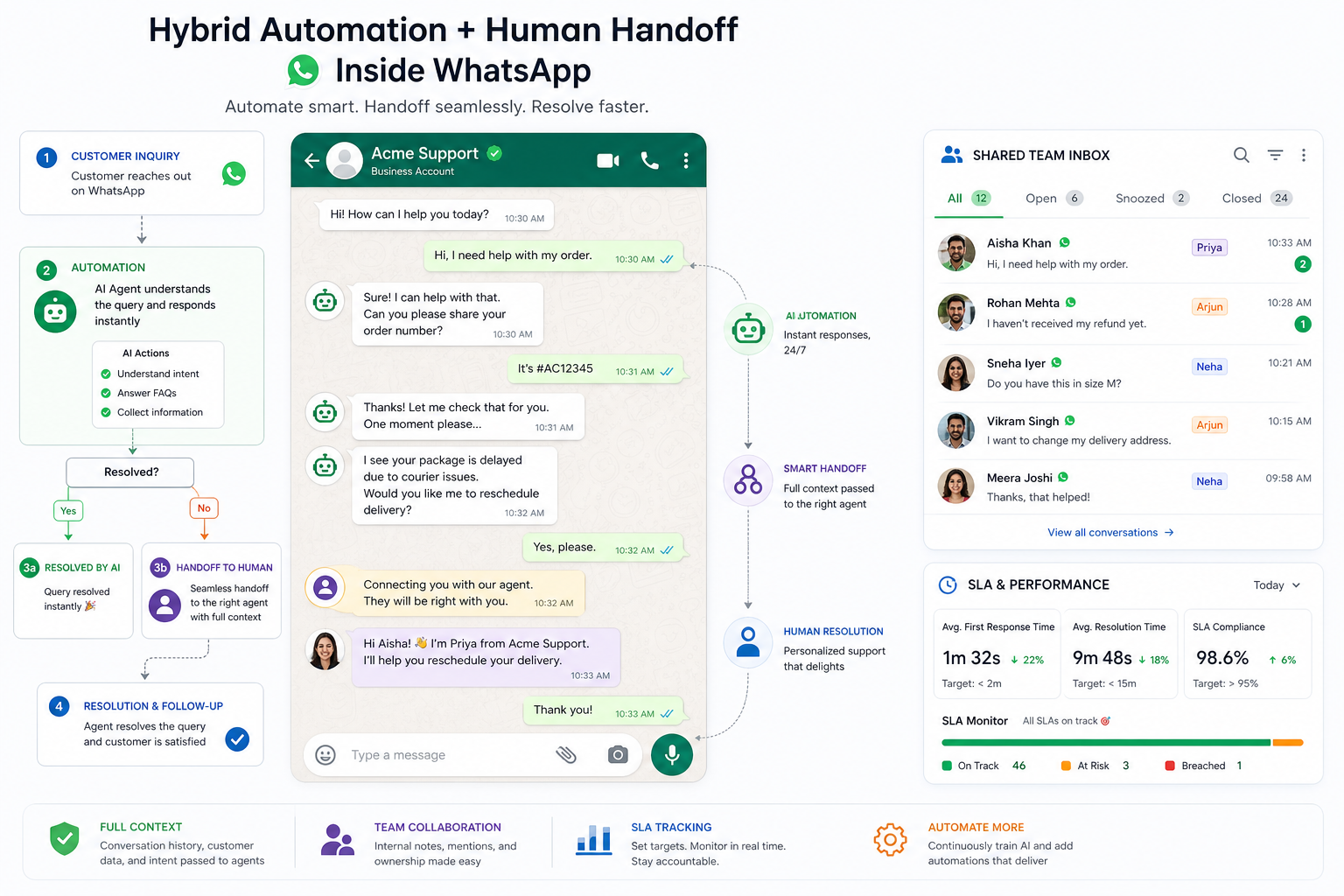
What enterprise-grade support needs
shared inbox
agent assignment
ownership rules
SLA monitoring
queue prioritization
customer profile context
chatbot triage
seamless handoff
Why hybrid support wins
Pure automation frustrates users. Pure manual support does not scale.
The winning model is hybrid:
automation handles repetitive questions instantly
agents step in for exceptions, escalations, and high-value interactions
This hybrid approach is central to Trikon’s value proposition. Businesses reduce manual load, keep 24/7 responsiveness, and still preserve a human experience when it matters.
WhatsApp bots and no-code automation
Searches like whatsapp business api bot, whatsapp business bot api, and whatsapp business api automation are really asking one question:
How do we automate without building a custom system?
That is one of the clearest gaps in competitor pieces. They discuss bots, but not enough about who actually builds and maintains them.
What no-code automation should handle
welcome journeys
lead capture
lead qualification
FAQs
order status
booking requests
document collection
after-hours replies
routing by language, intent, or geography
What should still go to humans
complaints
account-specific edge cases
negotiation-heavy sales
VIP handling
emotionally sensitive support
With Trikon, both keyword-based and AI-triggered flows can be set up without deep engineering resources, making it viable for SMBs, mid-market brands, and agencies managing multiple clients.
WhatsApp for bookings, reminders, and operational workflows
This is one of the most overlooked use cases in competitor articles.
If your business relies on appointments, reservations, confirmations, or recurring reminders, the API is not just a messaging tool. It is an operations channel.
Strong-fit industries
clinics and healthcare services
salons and beauty businesses
home services
travel and hospitality
education and coaching
automotive service centers
real estate teams
Common workflows
appointment request
slot confirmation
reminder sequence
reschedule flow
no-show prevention
payment reminders
feedback collection
Trikon makes these workflows possible inside the same system as support and marketing, which is a major advantage over fragmented stacks.
Conversational commerce: selling directly in WhatsApp
Most guides mention catalogs. Fewer explain the larger commerce opportunity.
With the right platform, WhatsApp can support:
product discovery
FAQ-led conversion
product recommendations
catalog browsing
cart recovery
order placement
payment prompts
post-purchase support
Why this matters
Every additional click to another channel creates drop-off.
If the customer can ask, compare, confirm, and buy inside the same thread, conversion friction falls sharply.
Trikon’s storefront advantage
Trikon supports:
product catalogs
cart and order experiences
website sync
sales conversations in one thread
post-purchase messaging and support continuity
That is especially powerful for D2C, retail, and social commerce brands.
WhatsApp Business API in India: why demand is rising so fast
Searches like whatsapp business api in india, whatsapp api for business india, and whatsapp business api india reflect a real market shift.
India is one of the strongest WhatsApp-first markets globally for both customer communication and commerce intent.
Why WhatsApp is especially strategic in India
customers are already deeply familiar with the channel
mobile-first behavior is dominant
businesses need faster response cycles than email supports
service and commerce interactions often start in chat
small and mid-sized teams want scale without complex engineering
For Indian brands, agencies, and service operators, a no-code platform matters even more because speed-to-launch is often a competitive edge. Trikon is well positioned here because it combines official partner trust with minimal setup complexity.
Cloud API, documentation, and developer considerations
Some users specifically search for whatsapp business api documentation, whatsapp business api key, whatsapp business api cloud, whatsapp business cloud api, and whatsapp web business api.
Here is the simple breakdown.
Official documentation
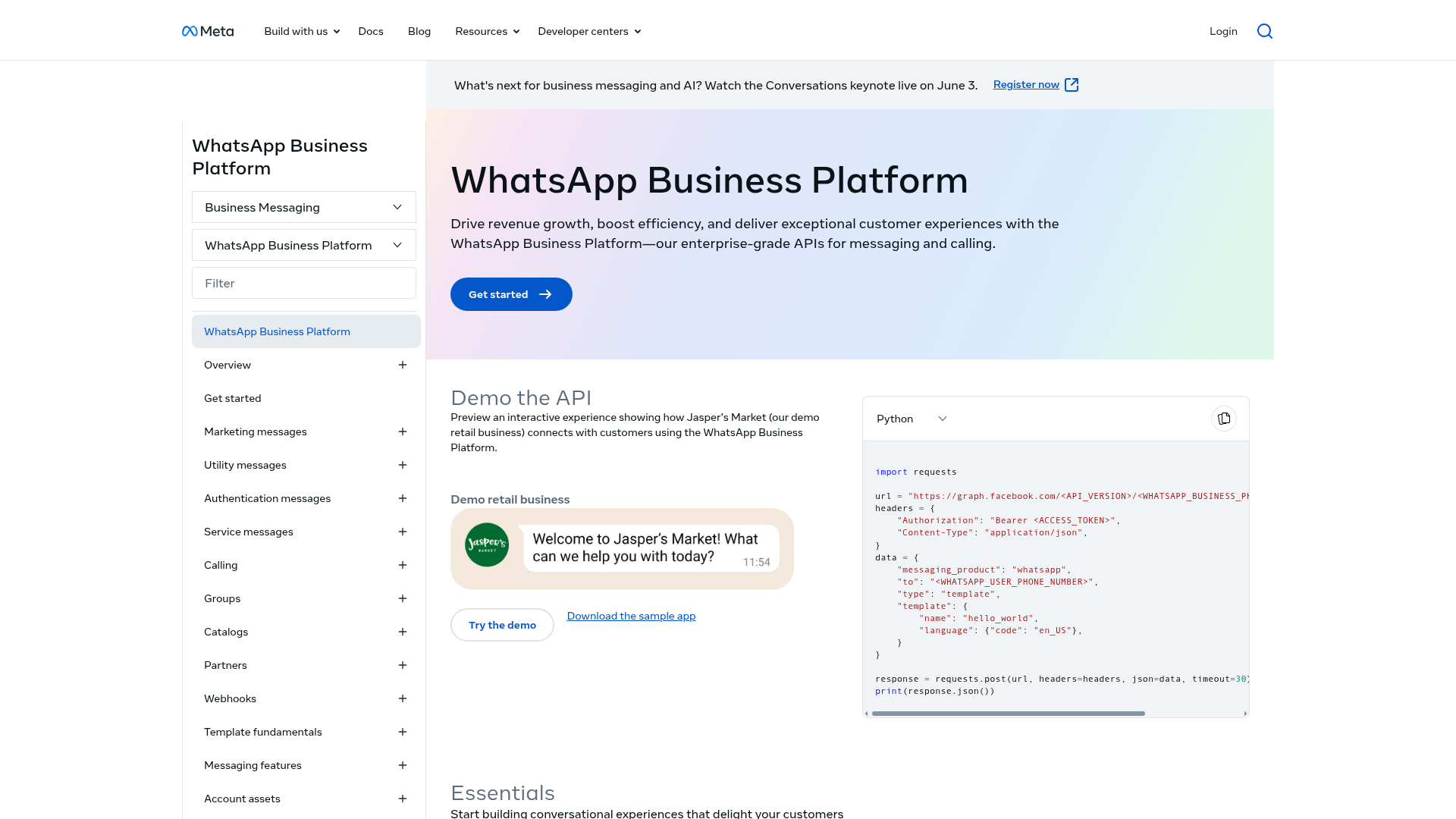
The Meta developer documentation explains endpoints, message types, webhooks, templates, and Cloud API behavior.

But documentation is not a business system
Documentation helps developers connect things. It does not automatically give you:
shared inboxes
agent SLAs
usable dashboards
no-code bot flows
segmentation UI
campaign launch tools
booking workflows
storefront experiences
That is why many teams that initially think they need only the API later realize they actually need a full WhatsApp Business API platform.
When raw API access makes sense
Raw access can work if you have:
internal engineering resources
product managers for messaging ops
design capacity for workflows
support ops maturity
time to build and maintain tooling
When a platform is the better choice
A platform like Trikon is the better choice when you need:
speed
no-code control
lower technical overhead
centralized CX
unified marketing and support
agency-ready deployment
How to choose the best WhatsApp Business API provider
This is where the top-ranking articles are often too generic. “Best” depends on whether the provider helps you ship value, not just connect an endpoint.
What to look for
Criteria | Why it matters |
|---|---|
Official partner status | Compliance, trust, and reliability |
Shared team inbox | Essential for support and sales collaboration |
No-code automation | Faster launch, less engineering dependency |
Campaign tools | Needed for marketing and revenue use cases |
CRM integration | Critical for segmentation and context |
Human handoff | Prevents bot dead ends |
Commerce support | Important for D2C and retail |
Operational workflows | Key for appointments, reminders, payments |
Scalability | Important for agencies and growing brands |
Onboarding support | Reduces time-to-value |
Where Trikon stands out
Trikon fits the modern definition of a strong official WhatsApp Business API solution provider because it combines:
official partner trust
shared support inbox
SLA and agent assignment
no-code automation
24/7 chatbot coverage
campaign and retargeting tools
bookings and reminders
storefront and commerce flows
minimal engineering dependency
agency-ready and scalable deployment
That combination is especially valuable for businesses that want a single platform rather than a patchwork of inbox, bot, CRM plugin, and broadcast tool.
Common mistakes businesses make
Mistake 1: choosing access without workflows
Getting API approval is not the same as launching a business-ready channel.
Mistake 2: over-automating
Bots should accelerate service, not trap customers.
Mistake 3: treating support and marketing separately
The best WhatsApp experiences connect acquisition, conversion, and support.
Mistake 4: no ownership or SLA design
If multiple agents use WhatsApp without structure, response quality drops quickly.
Mistake 5: ignoring commerce and operations
If you only use WhatsApp for notifications, you leave value on the table.
A practical rollout plan for 2026
For teams wondering whatsapp business api how to use or use whatsapp business api, this rollout plan is usually the fastest path to ROI.
Phase 1: Foundation
connect official account
assign number
set inbox roles
define support SLAs
create key templates
Phase 2: Customer service
launch shared inbox
add FAQ automation
build human escalation paths
track first response and resolution times
Phase 3: Revenue workflows
launch abandoned cart recovery
create lead nurture sequences
segment by lifecycle stage
add retargeting broadcasts
Phase 4: Operations
automate reminders
enable bookings or reservation flows
add payment prompts where relevant
Phase 5: Commerce expansion
connect catalog
enable in-chat purchase flows
sync website and post-purchase journeys
Trikon is designed to support this progression without requiring a replatform every time you expand your use cases.
Final verdict: the winning WhatsApp strategy in 2026
In 2026, the question is not whether businesses should use WhatsApp. It is whether they will use it as a fragmented inbox or as a full growth system.
The best WhatsApp Business API setup is the one that combines:
official access
simple deployment
centralized support
no-code automation
strong marketing workflows
operational execution
conversational commerce
human-quality CX at scale
That is why Trikon is compelling.
As an official WhatsApp Business API partner, Trikon gives businesses a practical way to turn WhatsApp into a complete business channel, not just a chat endpoint. Support teams get a shared inbox with SLA control and full context. Marketing teams get broadcasts, segmentation, drip flows, and abandoned cart recovery. Operations teams can run reminders, bookings, and payments. Commerce teams can sell inside chat. And all of it works with a hybrid model where automation handles repetitive volume while humans step in for complex conversations.
If your team wants to get WhatsApp Business API access, launch quickly, and actually turn it into measurable growth, Trikon is the smart next step.