
-cover.webp)
WhatsApp Business API Use Cases for Every Business in 2026
Customers expect instant, personal, and trusted conversations - right where they already spend their time. In 2026, WhatsApp has evolved from a simple chat app into a full-funnel growth channel for sales, support, marketing, and operations. With automation, analytics, and secure templates, the WhatsApp Business API lets brands deliver proactive service, personalized promotions, and seamless commerce at scale - without adding friction to the customer journey.
"WhatsApp messages achieve approximately a 98% open rate, with 80% of messages read within five minutes." - Source
Trikon helps you turn these outcomes into repeatable wins. As an official WhatsApp Business API partner and unified engagement platform, Trikon brings support, marketing automation, chatbots, bookings, and commerce together - so you can run the entire customer lifecycle inside WhatsApp.
What you’ll learn in this guide
20+ practical WhatsApp API use cases across Sales, Support, Marketing, and Operations
Real-world examples, recommended approaches, and pitfalls to avoid
2025/2026 policy updates that affect marketing and automation
How Trikon turns WhatsApp into a full customer lifecycle channel
Why WhatsApp now: from chat to full-funnel growth
Changing consumer behavior and instant messaging dominance
Customers choose messaging over calls and email. WhatsApp provides real-time, two-way, multimedia conversations that feel natural and convenient.
WhatsApp vs email/SMS: engagement, conversion, trust
WhatsApp consistently outperforms email/SMS on open rates, CTRs, and response time, while verified business profiles and encryption increase trust and completion rates.
API shift: from manual replies to automated, data-driven workflows
The WhatsApp Business API unlocks automation (chatbots, broadcasts, retargeting), event-triggered messaging, segmentation, and analytics - turning WhatsApp into an always-on growth engine rather than an agent-only inbox.
Policy note for 2025/2026: Recent Meta updates introduced marketing frequency caps, portfolio-based messaging limits (faster scaling), and region-specific restrictions for certain marketing templates. This guide shows compliant ways to sustain reach and conversion under these rules.
How this guide is organized (SEO-focused)
Sales & conversational commerce (click-to-WhatsApp, guided selling, checkout)
Marketing automation (broadcasts, drips, retargeting)
Support automation (AI chatbots, SLAs, handoff)
Operations (appointments, verifications, workflows)
Implementation roadmap with Trikon
Throughout, we’ll highlight WhatsApp API use cases, WhatsApp Business API examples, and WhatsApp automation use cases - plus implementation tips using Trikon’s shared inbox, marketing automation, chatbots, bookings, and storefront features to drive measurable revenue and CX improvements.
What is the WhatsApp Business API (and how it differs from the App)
The WhatsApp Business API is the enterprise-grade backbone for scalable, automated messaging. Unlike the free Business App (best for solo owners and micro teams), the API enables integrations, automation, and a shared inbox so multiple agents and bots can collaborate, with analytics and SLAs to manage quality at scale.
Core concepts
API vs App: scale, automation, integrations, shared inbox
Business App: manual chats on a few devices; limited broadcasts and basic labels.
Business API: multi-user access, event-triggered automation, CRM/ecommerce integrations, central inbox with assignment, SLAs, reporting.
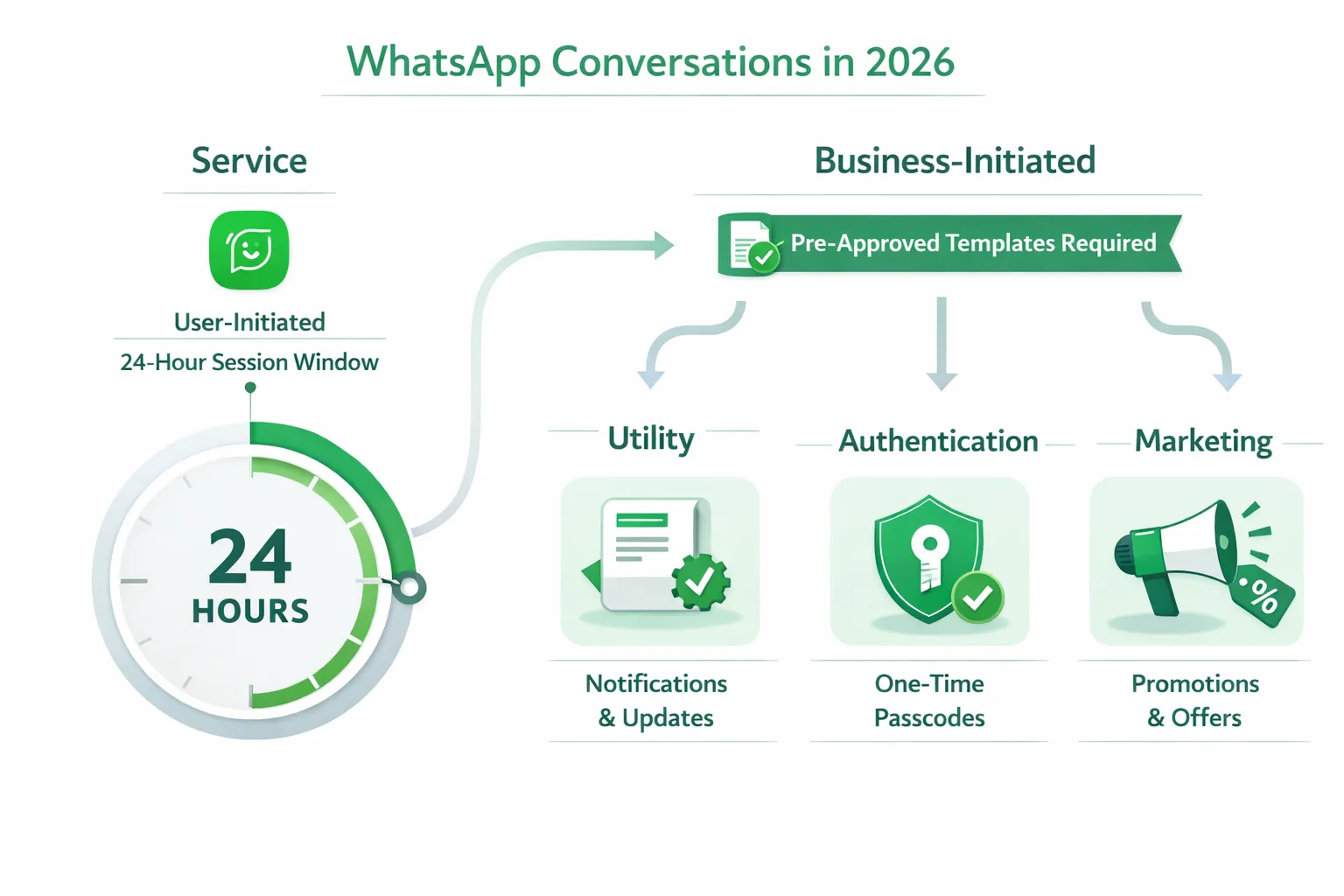
Conversation types in 2026: Service (user-initiated 24-hr), and business-initiated categories (Utility, Authentication, Marketing)
Service: user-initiated messages within a 24-hour session window; free-form responses allowed.
Business-initiated: require pre-approved templates and are billed by category - Utility (updates and reminders), Authentication (OTP/verification), Marketing (promotions and recommendations).
Quality rating, template approvals, 24-hr session window
Meta evaluates template quality and engagement; poor ratings reduce reach.
Templates must be approved before use; free-form only within active 24-hour service windows.
2025/2026 updates leaders must know
"Meta introduced per-user marketing frequency limits and portfolio-based scaling, changing how brands plan WhatsApp outreach." - Source
Marketing Message Lite API (beta) and per-user frequency limits
Frequency caps restrict how many marketing messages a user can receive across businesses; exceeding caps triggers errors and reduced delivery.
Portfolio-based messaging limits and scaling windows
Messaging limits now operate at the business portfolio level, allowing faster scaling across numbers and simplified operations.
Regional points: US marketing template pause; free-form in open conversations still allowed
In the U.S., sending marketing template messages is paused; brands can still use utility/authentication templates and respond within open 24-hour service windows.
Why Trikon vs a raw API connection
All-in-one platform: support, marketing, chatbots, bookings, and commerce
No-code flows, fast go-live, hybrid bot + agent handoff
SLA tracking, storefront sync, segmentation, drip/retargeting
Official WhatsApp Business API partner with reliability, compliance, and scale
WhatsApp Business App vs WhatsApp Business API vs Trikon
Capability | Business App | Business API | Trikon Platform |
|---|---|---|---|
Users/devices | 1 phone + limited linked devices | Unlimited users via connected platforms | Unlimited agents with roles, teams, and assignment |
Automation | Basic greetings/away | Templates, webhooks, chatbots via custom dev | No-code chatbots, triggers, flows; hybrid bot + agent |
Broadcasts/segmentation | Small lists, limited labels | Large-scale via API; custom segments require engineering | Built-in broadcasts, segments, drips, retargeting |
Storefront/checkout | Manual product sharing | Requires custom build/integration | Native WhatsApp storefront, carts, abandoned cart recovery |
Shared inbox & SLAs | Basic chat view | Depends on your middleware | Unified inbox, SLAs, collision control, notes, history |
Analytics | Limited | Raw events; custom dashboards required | Out-of-the-box campaign, inbox, and bot analytics |
Time-to-value | Fast for micro use | Longer - engineering and approvals | Fast go-live; minimal setup, no complex builders |
Verification support | N/A | Through BSP | Guided verification and template approvals |
Trikon turns the API into outcomes: faster go-live, automated journeys, and measurable revenue lift - without heavy engineering.
WhatsApp API Use Cases for Sales (Conversational Commerce)
Turn discovery into purchase without leaving WhatsApp. With Trikon’s WhatsApp Business API platform, you can capture leads, guide buyers, accept payments, and recover revenue automatically - while agents jump in only when needed.
1) Click-to-WhatsApp Ads to Lead Capture
Tie ad clicks directly to WhatsApp with a pre-filled greeting that asks for name, intent, and consent.
Use Trikon’s auto-tagging to link each chat to the ad set/campaign for ROI attribution.
Best practice: include a first-message offer or quiz hook to boost reply rates; store opt-in in your CRM via Trikon.
2) Lead Qualification & Smart Routing
Auto-score leads on budget, timeline, and intent with quick replies; enrich with UTM parameters.
Route hot leads to sales instantly with full context (ad source, quiz answers, last pages viewed).
Pitfall to avoid: sending all leads to human agents; let Trikon’s bot qualify first to protect team bandwidth.
3) Guided Selling Quiz (Product Finder)
Ask 3–5 quick questions (use buttons/lists) to match needs to the right SKU/plan; display images, price, and benefits.
Personalize recommendations by inventory and margin rules; escalate to a human for complex choices.
Pro tip: A/B test question order and product tiles; track quiz-to-cart and quiz-to-purchase rates.
4) WhatsApp Catalog & In-Chat Storefront
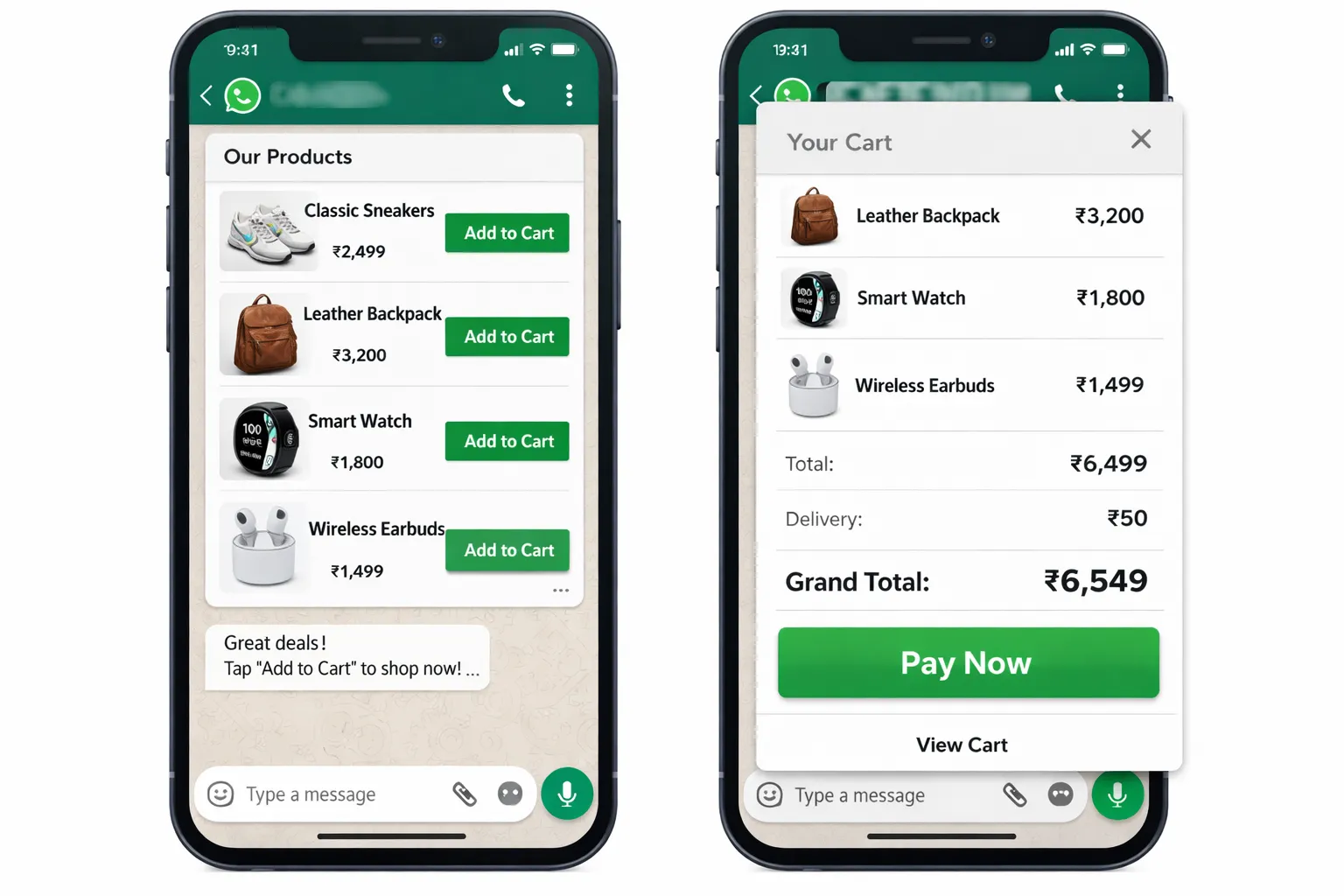
Showcase dynamic product lists, rich cards, and availability; let buyers add to cart and check out in chat.
Sync products, variants, stock, and pricing from your ecommerce platform to Trikon’s WhatsApp storefront.
Reduce friction: pre-fill shipping details for returning customers and offer 1-tap reorder.
5) In-Chat Payments & UPI Links
Send payment links and UPI options directly in the thread; confirm payments and generate receipts automatically.
Use Trikon’s payment status webhooks to trigger fulfillment and thank-you flows the moment funds clear.
Compliance tip: ensure payment messages use approved template categories when business-initiated.
6) Abandoned Cart Recovery (Multi-touch)
Trigger timed nudges with product image + CTA; escalate from reminder → social proof → limited-time incentive.
Segment by cart value and SKU type; cap frequency to protect template quality and avoid blocks.
Track: cart recovery rate, time-to-recover, and revenue per reminder; let Trikon auto-suppress converted users.
7) COD-to-Prepaid Conversion
After COD order, send a small incentive to switch to prepaid (e.g., 3–5% off or free shipping) with a secure pay link.
Auto-cancel COD if the buyer doesn’t confirm; reduce RTO and logistics costs with Trikon’s confirmation flows.
Measure: COD→prepaid conversion rate, RTO reduction, and net margin lift.
8) Back-in-Stock / Price-Drop Alerts
Capture “Notify Me” interest on PDP and WhatsApp; send personalized alerts with live stock and price.
Prioritize high-intent segments (wishlists, repeat viewers) and include size/color pre-selection for 1-tap checkout.
Pitfall: spamming broad segments - use Trikon’s segmentation to target genuine intent.
9) Quote-to-Cash for Services/B2B
Share proposals, revisions, and approvals in chat; collect deposits and schedule start dates without leaving WhatsApp.
Keep a structured audit trail in Trikon’s shared inbox; auto-remind on expiring quotes.
Add rich media (decks, PDFs, videos) and quick-approve buttons to compress sales cycles.
10) Reorder & Subscription Renewals
Predictive prompts based on last purchase date or plan expiry; show 1-tap reorder and cross-sells.
For subscriptions, automate renewal reminders, failed payment recovery, and plan upgrades in chat.
KPIs: reorder rate, renewal rate, AOV change, and churn reduction.
Trikon advantage for sales
Chat storefront with inventory sync and in-chat carts
Native payment links/UPI, order confirmations, receipts, and fulfillment triggers
Drip retargeting (browse/cart/bounce), segmentation, and A/B testing
Agent inbox with SLAs, assignment, notes, and full journey context
No-code flows to launch quizzes, recovery nudges, and upsells in minutes - not months
WhatsApp Marketing Examples & Automation Use Cases
"WhatsApp messages achieve CTRs ranging from 15% to 80%, whereas email CTRs typically fall between 2% and 5%." - Source
Build an always-on growth engine with compliant, segmented messaging that customers actually read - then convert. Below are high-impact WhatsApp marketing examples and automation use cases you can launch quickly with Trikon.
11) Segmented Broadcast Campaigns (Compliance-First)
Segment by behavior (views, carts, purchases), RFM tiers, category affinity, and geography.
Use verified marketing templates with personalization variables and product images.
Apply frequency caps and quiet hours; include a clear opt-out in every send.
12) Drip & Onboarding Series
Timed, multi-step sequences for Day 0/3/7 to activate first purchase or first feature use.
Mix education (how-to videos, FAQs) with soft CTAs and incentives.
Use Service sessions (within 24 hours) for free-form replies; switch to Marketing templates after.
13) Event & Drop Announcements with Countdowns
Pre-drop waitlists with reminders and stock counters to build FOMO.
Use list messages for sizes/colors and a single-tap “Add to Cart.”
Send last-chance nudges just before the drop window closes.
14) Referral & Loyalty Activation
Share unique referral links and track redemptions end-to-end in chat.
Push points balance, tier status, and upgrade nudges with tailored rewards.
Automate milestone perks (birthdays, anniversaries) to boost repeat orders.
15) WhatsApp Channels for Broadcasting
Publish one-to-many updates (drops, stories, content). No opt-in needed for Channels.
Drive followers into 1:1 chats via “Chat with us” CTAs for guided selling and checkout.
Repurpose top-performing Channel content into segmented broadcasts.
16) Price-Drop / Back-in-Stock Journeys
Trigger messages from real-time catalog changes (price or inventory).
Pre-fill variant/size and include “Buy Now” with in-chat checkout.
Prioritize high-intent users (wishlists, PDP re-visits) to protect quality score.
17) Win-Back Campaigns (60/90-day lapsers)
Personalize by last category/brand purchased; include image carousels and quick replies.
Test incentives vs. content-led reactivation; cap frequency to avoid blocks.
Follow up with a lighter nudge if unopened, then suppress non-engagers.
Recommended approach
Consent-first growth, frequency caps, value-led creative, A/B tests
Pitfalls: over-broadcasting, generic templates, no opt-out
Trikon advantage for marketing
Segmentation, broadcasts, drip builder, retargeting, Channel-to-Chat CTAs
Dynamic catalog sync, price-drop/back-in-stock triggers
Template QA, analytics, and suppression to protect quality ratings
Campaign type → Template category → Primary KPI → Trikon feature
Campaign type | Template category | Primary KPI | Trikon feature |
|---|---|---|---|
Launch promo | Marketing | CTR, CVR, revenue per send | Broadcasts with segmentation, A/B variants, countdowns, Channel-to-Chat CTAs |
Win-back (60/90-day) | Marketing | CTR, CVR, repeat revenue | Drip builder, dynamic recommendations, suppression of recent buyers |
Price-drop | Marketing | CTR, CVR, revenue per send | Catalog sync, price-change triggers, segment retargeting |
Back-in-stock | Utility (or Marketing if promotional) | CTR, CVR, revenue per send | Inventory webhooks, variant pre-selection, in-chat checkout |
Onboarding drip | Service (24h) or Marketing (outside 24h) | Activation rate, time-to-first-action | Event-triggered drips, template switching, educational rich media |
Trikon turns strategy into execution: build compliant segments, launch drips and retargeting in minutes, auto-protect template quality with smart suppression, and track revenue per send with end-to-end analytics.
WhatsApp Support Automation Use Cases
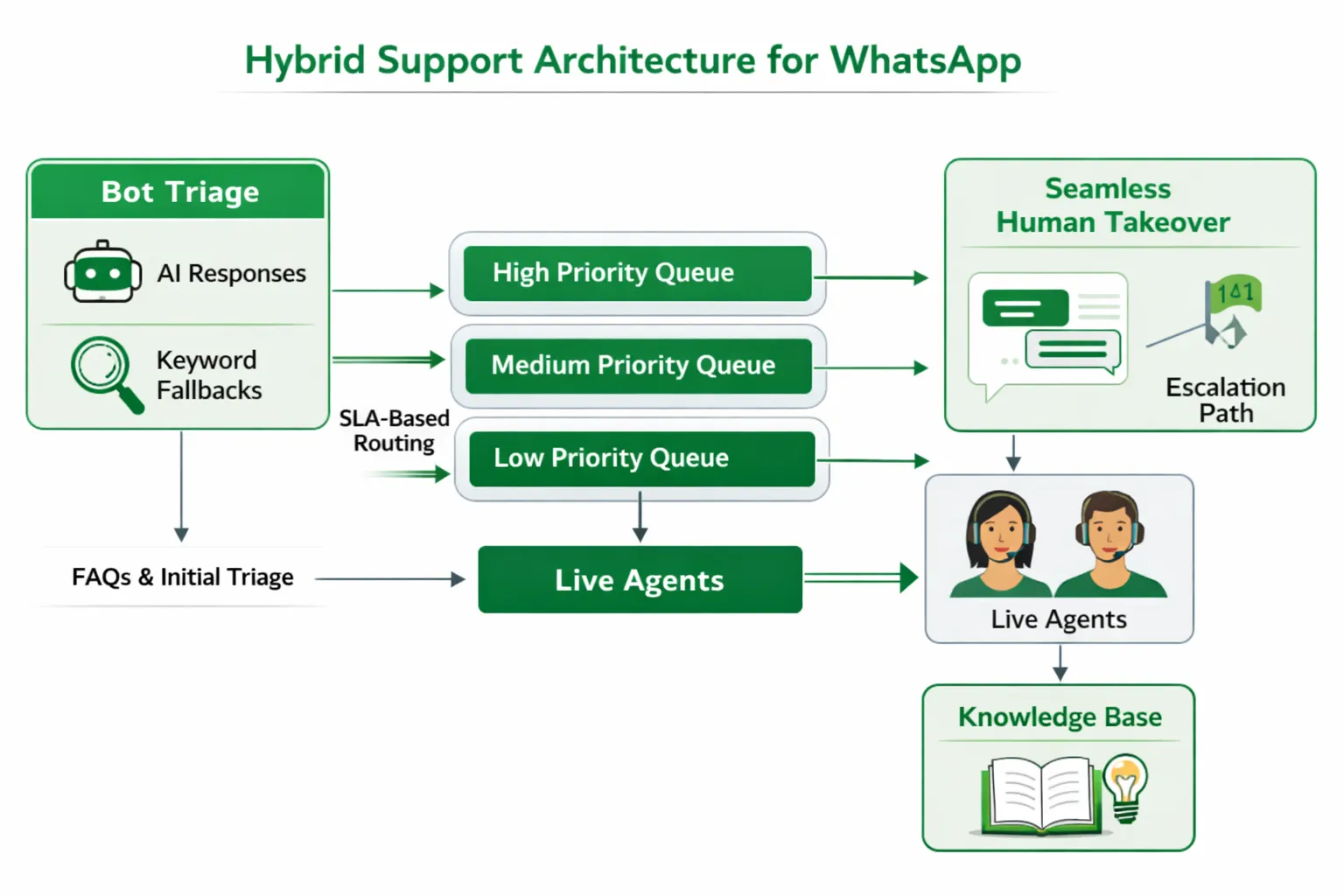
Deliver fast, friendly, and consistent support 24/7 - then hand off to the right human with full context when it matters. Trikon blends AI, rules, and a unified inbox to reduce resolution time and raise CSAT.
18) 24/7 FAQ Bot (AI + Keywords)
Deflect repetitive questions (order status, shipping, pricing, policies) with instant answers.
Detect intent via AI and keywords; use buttons/lists for clarity; log unresolved intents to improve the bot.
Escalate to an agent when confidence is low or the user asks for human help.
19) Rich Media Troubleshooting
Let customers send photos/videos and PDFs for faster diagnosis (damaged item, setup issues).
Auto-generate a guided checklist; request specific angles or serial numbers to speed resolution.
Store media against the ticket so agents don’t ask customers to repeat themselves.
20) Order Modification, Returns & Exchanges
Self-serve flows to change address, cancel items, or edit quantities (within policy windows).
Automate return labels, pickup scheduling, and refund options; update status in real time.
Use conditional logic to validate eligibility and prevent misuse.
21) Warranty & Claims Processing
Guided forms in chat with document capture (invoice, photos, videos) and OTP verification.
Assign claim IDs, show status and SLAs in-thread, and trigger reminders for missing info.
Integrate with your warranty/ERP system to auto-create cases and updates.
22) Smart Routing, SLAs & Agent Assignment
Route by priority, product line, language, and customer tier; balance workloads automatically.
SLA timers and breach alerts; internal notes and mentions for fast collaboration.
Full history in one thread - no context switching or duplicate requests.
23) Multilingual Support
Auto-detect language; use localized templates and knowledge articles.
Let customers switch language any time; route to native speakers when needed.
Ensure compliance with locale-specific disclosures and policies.
24) CSAT/NPS Collection & Feedback Loops
Trigger short CSAT/NPS surveys post-resolution with buttons (1–5) and follow-up logic.
Auto-open corrective workflows for detractors and invite promoters to review or refer.
Feed insights into your knowledge base and training playbooks.
Trikon advantage for support
Unified inbox with SLAs, automation + agent hybrid, knowledge reuse
AI/keyword bots, rich media capture, and guided forms in chat
Skills-based routing, assignments, internal notes, and collision control
Out-of-the-box analytics on deflection rate, FRT/ART, CSAT, and backlog trends
WhatsApp Operations & Workflow Use Cases
"NCL ICB received NHS first approval to use WhatsApp and AI for appointment scheduling, enabling patients to book, reschedule, and cancel 24/7 in chat." - Source
25) Appointment Booking & Rescheduling
Real-time slots pulled from your calendar; book, confirm, and modify in chat.
Auto-send confirmations, add-to-calendar links, and pre-visit instructions.
Pitfalls to avoid: double-bookings and stale availability - use webhooks and conflict checks.
26) Reminder Cadences & No-Show Recovery
Multi-touch reminders (T-24h, T-3h, T-30m) with Quick Reply confirm/reschedule.
If no response, trigger smart reschedule prompts and offer the next best slot.
Track show rate, reschedule rate, and lead time improvements.
27) Field Service Dispatch & Technician ETAs
Share live technician location, ETA updates, and arrival alerts.
Pull parts inventory and job notes into the chat; capture on-site photos and signatures.
Close the loop with job completion summaries and instant CSAT.
28) KYC & Document Collection
Securely capture IDs, proofs, and selfies; validate format and completeness in real time.
Show verification status (received → under review → approved/needs info).
Automate nudges for missing documents and expiry reminders.
29) OTP / Multi-Factor Authentication
Use Authentication templates with time-bound passcodes (e.g., valid for 5–10 minutes).
Lock sensitive steps (KYC submission, payment method update) behind MFA.
Log attempts, throttle retries, and auto-expire codes for security.
30) Ticketing & QR/Pass Delivery
Deliver event tickets, boarding passes, or appointment QR codes directly in chat.
Update itineraries (gate changes, delays, venue shifts) with a single message.
Reissue lost passes on-demand and log verification scans.
31) Internal Approvals & Alerts
Manager approvals for discounts, refunds, or escalations via one-tap buttons.
Inventory threshold alerts, SLA breach pings, and incident updates in relevant channels.
Role-based routing and audit trails for compliance.
Trikon advantage for operations
Bookings module with calendar sync, availability checks, and rescheduling flows
Authentication templates, OTP/MFA, and policy-driven security controls
Secure file capture for KYC, auto-validation, and status dashboards
Real-time flow triggers (inventory, logistics, calendar) and analytics to optimize no-shows, cycle times, and SLA compliance
WhatsApp Business API Examples by Industry
E-commerce & D2C
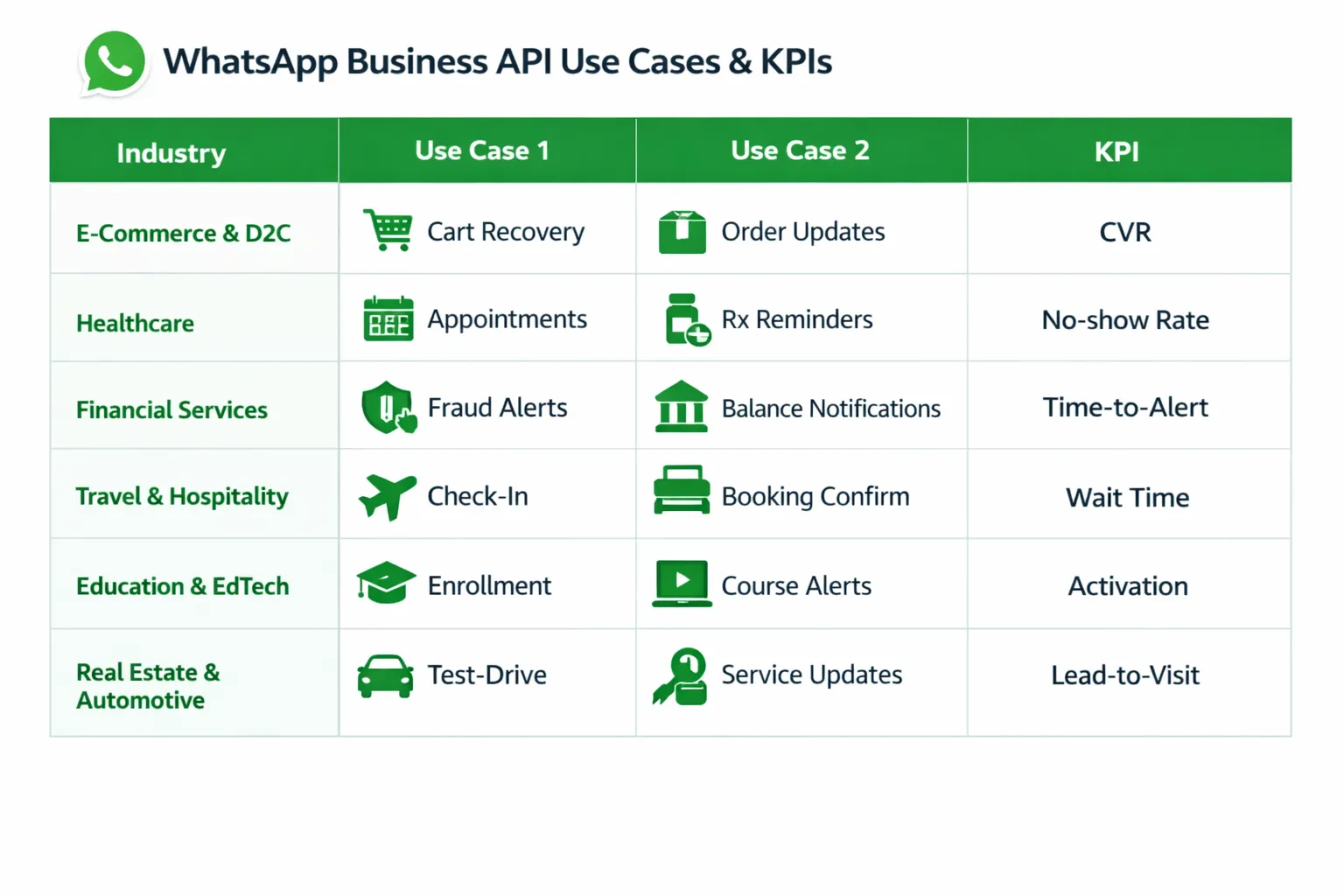
Cart recovery with progressive nudges and dynamic images
COD confirmation and COD→prepaid incentives to reduce RTO
Catalog browsing with in-chat checkout and 1-tap reorder
KPIs: cart recovery rate, COD→prepaid conversion, AOV lift, repeat purchase rate
Healthcare
Appointment booking, reminders, and rescheduling flows
Test results notifications and follow-up instructions
Telemedicine triage and video link delivery
KPIs: no-show reduction, time-to-appointment, patient satisfaction (CSAT)
Financial Services
Real-time fraud and transaction alerts, balance updates
KYC and document capture with verification status
Loan progression updates and EMI reminders
KPIs: fraud response time, activation rate, delinquency reduction
Travel & Hospitality
Booking confirmations, digital check-in, and mobile keys
Itinerary changes, gate updates, delay notifications
24/7 concierge for upgrades, dining, and local tips
KPIs: check-in wait time, upsell rate, service response time
Education & EdTech
Enrollment workflows and fee reminders with payment links
Class updates, timetable changes, and assignment reminders
Study material delivery and learning nudges
KPIs: activation rate, attendance rate, completion rate
Real Estate & Automotive
Lead qualification (budget, location, readiness) with smart routing
Site-visit/test-drive scheduling and reminders
Document and financing flows, post-visit follow-ups
KPIs: lead-to-visit rate, time-to-appointment, conversion rate
Mapping outcomes
No-show reduction (appointments, visits, test drives)
AOV lift and upsell rate (catalogs, concierge, guided selling)
First contact resolution (FCR) and response SLAs (support workflows)
CAC payback and revenue per send (segmented campaigns and retargeting)
Trikon operationalizes these playbooks with native catalog sync, bookings, payment links, automation, and a shared inbox - so each vertical can launch proven WhatsApp journeys fast and scale them with analytics.
Compliance & Quality: Protect Reach and Reputation
Staying compliant isn’t just a legal checkbox - it’s how you protect deliverability, quality ratings, and ROI on WhatsApp. In 2026, per-user frequency caps, portfolio-level limits, and stricter quality scoring mean brands must pair thoughtful consent practices with disciplined messaging and data governance. Trikon bakes these rules into your workflows so you can move fast without risking blocks.
Opt-in methods that scale
Checkout checkboxes
Make consent explicit (checkbox unchecked by default) with clear value statements (order updates, early access, support).
Store timestamp, source (checkout), session/country, and terms link for auditability.
QR at POS
Print scannable QR codes to a consent flow; confirm opt-in via WhatsApp message with a quick-reply “Yes.”
Attribute store/location and staff ID to measure in-store acquisition.
Click-to-WhatsApp ads
Use ad copy that sets the right expectation (offers/updates). Capture consent and UTM tags in the first message.
Map ad sets to segments for downstream targeting and ROI reporting.
Website modals
Use just-in-time prompts on PDP/cart pages with incentives; validate phone format, locale, and channel preferences.
Offer granular opt-ins (orders only, promotions, both) to minimize future opt-outs.
Template quality & approvals
Clear intent
Choose the correct category (Utility, Authentication, Marketing) and keep Utility templates strictly transactional.
Minimal promo in utility
Don’t “stuff” promos into Utility or Authentication templates; violations hurt quality and approvals.
Variables tested
Validate placeholders (names, SKUs, prices) and add fallback values to avoid broken or confusing messages.
Localized copies
Submit localized versions by market; align currency, date/time formats, and regional compliance text.
Helpful structure
Use headers, media, and buttons (CTA/Quick Replies) for clarity; avoid excessive links or caps/emoji spam.
Frequency, timing, and consent logs
Respect per-user limits
Enforce frequency caps by segment and user engagement; auto-suppress recent non-responders to protect quality score.
Local prime hours
Send in local time windows (e.g., evenings/weekends for B2C) and set brand quiet hours to reduce blocks.
Maintain opt-out
Include an easy “Stop” option in marketing messages; process immediately and confirm status change in-thread.
Gold-standard logging
Record consent source, timestamp, IP/country, and policy version. Keep a durable consent ledger and expose it to support.
Session stewardship
Use free-form replies only within 24-hour Service windows; re-open with the right template when sessions expire.
Data privacy & retention
Secure-by-design
Encrypt sensitive docs in transit and at rest; mask PII in logs and redact attachments after review.
Retention policies
Apply channel-specific data lifecycles (e.g., OTPs 5–10 minutes; KYC docs purge on schedule); make retention configurable by region.
Access control
Enforce least-privilege roles, IP allowlists, and session timeouts. Audit every view/export of PII.
Compliance readiness
Support DSR/DSAR workflows (access, deletion), maintain cross-border transfer controls, and document DPIAs as needed.
Pitfalls to avoid
Cold messaging without consent
Template stuffing (promo inside Utility/Authentication)
Over-broadcasting to broad lists; ignoring suppression rules
Disregarding quality scores, error codes, or spike in blocks
Reusing generic templates that fail localization or clarity checks
Storing sensitive documents indefinitely or without role controls
Trikon makes compliance operational
Consent capture at every entry point (checkout, QR, ads, web) with a unified consent ledger
Template QA, localization, and automated category checks before submission
Send-time optimization, quiet hours, throttling, and automatic suppression to protect quality ratings
Role-based access, encryption, retention schedules, and full audit trails - ready for audits and policy changes
KPIs, Benchmarks, and Optimization Loops
Turn WhatsApp into a provable growth engine by tracking the right metrics, running clean experiments, and closing the loop weekly. This section outlines the core KPIs to measure for engagement, revenue, and support efficiency - plus an experimentation framework and a practical reporting cadence with Trikon.
Core engagement metrics
Delivery rate
Definition: delivered messages / sent messages. Monitors sender health, template quality, and infra issues.
Improve: template clarity, list hygiene, throttling, and send-time optimization.
Open/read rate
Definition: messages marked read / delivered. Early indicator of subject relevance, timing, and trust.
Improve: stronger lead-in copy, localized timing, verified profile strength.
Reply rate
Definition: users who reply / users messaged. Key for Service flows and two-way offers.
Improve: use buttons/lists, direct questions, and clear next steps.
CTR (click-through rate)
Definition: link clicks / delivered (or opened). Primary for commerce and promo flows.
Improve: visual product cards, concise CTAs, social proof, urgency mechanics.
Negative signals to watch
Block rate, opt-out rate, and complaint replies. Spike alerts should auto-pause broadcasts and trigger creative/segment reviews.
Revenue and efficiency metrics
Conversion rate (CVR)
Definition: purchasers / clickers (or responders). Segment by campaign, template, and product category.
Revenue per send (RPS)
Definition: attributed revenue / messages sent. Roll up by campaign and segment for channel ROI.
Average order value (AOV)
Track AOV lift from guided selling and bundles vs. web-only journeys.
Cart recovery rate
Definition: recovered orders / abandoned carts targeted. Break down by reminder step (1st/2nd/3rd).
CAC and LTV
Attribute CTWA (click-to-WhatsApp) costs to downstream orders; measure cohort LTV for subscribers acquired in WhatsApp.
Service efficiency
Deflection rate: inquiries resolved by bot / total inquiries.
FCR (first contact resolution): resolved in first session / total cases.
FRT/ART: first response and average resolution time vs SLAs.
CSAT/NPS: post-resolution satisfaction and loyalty intent.
Operational KPIs
No-show rate, reschedule rate, OTP success rate, KYC completion rate, pass issuance rate, and time-to-fulfillment.
Experimentation framework
Hypothesis-driven tests
Define one primary metric per test (e.g., RPS, CVR, or reply rate). Set minimum sample size and a fixed test window.
Segment-based A/B tests
Variables to test: timing (day/time), creative (image vs video vs text), offer type/amount, CTA wording, message length, list vs buttons, and template category (where allowed).
Keep treatment/control balanced on recency, value, and geography to avoid bias.
Holdout groups and incremental lift
Maintain a persistent holdout (never messaged) per audience to measure true lift.
For big promos, use geo or account holdouts to guard against cross-channel contamination.
Guardrails
Frequency caps per segment, quiet hours, and negative-signal thresholds that auto-throttle sends.
Pre-flight checks: template category alignment, localization, variable validation, link tracking (UTMs).
Attribution hygiene
Use UTMs on all links, tie inbound sessions to WhatsApp source, and reconcile with server-side events.
Compare last-click vs. multi-touch to understand WhatsApp’s assist role.
Reporting cadence with Trikon
Daily
Deliverability, read rate, CTR, reply rate by campaign.
Alerts on block/opt-out spikes, infra errors, and template quality dips.
SLA adherence (FRT/ART) and bot deflection trend.
Weekly
Revenue per send by segment, cart recovery funnel, COD→prepaid conversions.
CSAT/NPS rollups, FCR by category, backlog and aging.
Experiment results: winning creatives/times/offers; next-test backlog.
Monthly
Subscriber growth, list health (opt-in vs opt-out), LTV by acquisition source (CTWA vs organic).
ROI snapshot: spend vs attributed revenue, CAC payback, cohort retention.
Policy/quality review: template mix (Utility/Marketing/Auth/Service), quality scores, frequency compliance.
With Trikon, teams get:
Dashboards by use case (acquisition, recovery, reorder, support) and automated cohort views.
Revenue and efficiency snapshots with drilldowns to template, segment, product, and agent.
Real-time alerts on deliverability, blocks, and opt-outs, plus recommended actions.
Built-in A/B testing, holdouts, and suppression logic to measure incremental lift and protect quality - so you continuously improve results without risking reach.
Your WhatsApp API Go-Live Plan (with Trikon)
Launch fast, stay compliant, and scale with confidence. This roadmap turns WhatsApp into a full-funnel channel - covering setup, integrations, templates, and the first automations that deliver measurable ROI.
1) Verify and connect
Meta Business verification
Confirm legal entity, website, business details; assign Admin roles.
Number registration
Choose a dedicated number (not in use on App). Configure two-step verification/PIN.
Display name approval
Align with brand name/policies; set category, description, hours, and channels.
Trikon connection
Connect WABA to Trikon; validate webhooks and delivery receipts in sandbox.
Deliverables: verified business, registered number, approved display name, Trikon API/live webhook test message.
2) Foundations
Opt-in capture points
Checkout checkbox (unchecked by default), click-to-WhatsApp ads, website modals, QR at POS.
Consent language
Clear value exchange (orders, support, offers); link to privacy; store timestamp/source/version.
Brand profile
Logo, description, hours, website, catalog link; verified business display for trust.
Quick replies and lists
Create reusable snippets (order status, shipping, returns, address change) and list menus to standardize responses.
Deliverables: consent ledger, profile complete, reusable reply library.
3) Integrations
Ecommerce/CRM/helpdesk sync
Products, inventory, orders, customers, tags/segments, tickets; enable bi-directional updates.
Product catalog
Sync titles, images, variants, prices, stock; map collections to WhatsApp storefront.
Payment providers
Configure payment links, UPI, wallets, success/failure webhooks; test refund signals.
Data/attribution
UTM standards for links; server-side events; revenue attribution to campaigns and use cases.
Deliverables: live catalog in WhatsApp, real-time order/payment webhooks, unified customer profile in Trikon.
4) Templates & policies
Template mix
Utility (order updates, back-in-stock), Authentication (OTP/MFA), Marketing (promos, win-back), Service flows.
Localization
Language variants, currency/date formats, regional compliance text.
QA checks
Variables validated (fallbacks), media sizing, button copy, link tracking, category correctness.
Compliance guardrails
Frequency caps, quiet hours, opt-out in promotional messages, audit-ready consent logs.
Deliverables: approved templates across categories, localization complete, QA checklist signed.
5) Launch high-ROI flows first
Cart recovery (multi-touch)
Reminder → social proof → incentive; suppress on purchase; measure recovery and RPS.
COD→prepaid conversion
Incentivize switching post-order; confirm COD intent to reduce RTO.
Order updates
Confirmation, packed, shipped, delivered; attach tracking; deflect WISMO to bot.
24/7 FAQ bot
Cover top intents (order status, returns, refunds, sizing, store hours); human handoff for low-confidence cases.
Deliverables: live flows with KPIs, suppression rules, and alerting on errors/blocks.
6) Scale and govern
Segmentation
RFM tiers, product/category affinity, geography, language, lifecycle stage.
Drips & retargeting
Onboarding series, price-drop/back-in-stock, win-back, reorder/renewal.
SLA policies
FRT/ART targets by queue; skills-based routing; breach alerts and escalation.
Quality score monitoring
Template quality, block/opt-out trends; auto-throttle and creative review on spikes.
Rate limits and pacing
Respect per-user frequency caps; portfolio-based scaling; staged rollouts/holdouts for lift measurement.
Deliverables: segmentation library, drip calendar, SLA dashboards, quality/rate-limit alerting.
Timelines & ownership
Typical go-live: 7–14 days with Trikon’s no-code setup
Days 0–2: Verification, number, display name, Trikon connect (IT/Ops)
Days 2–5: Foundations (Marketing/CX), consent capture live
Days 3–7: Integrations (IT/Engineering + Trikon), catalog/payments/webhooks
Days 5–9: Templates approved and localized (Marketing + Compliance)
Days 7–10: Pilot flows (cart recovery, order updates, FAQ bot) with small segments (Marketing/CX)
Days 10–14: Scale flows, add COD→prepaid, start onboarding drips; activate dashboards/alerts (Marketing/CX/Ops)
Owners: Marketing (campaigns/segments), CX (support/SLA), Ops (orders/logistics), IT (integrations/security), Compliance/Legal (policies/retention)
Go-live criteria: delivery/read rates within benchmarks, no error spikes, verified consent logging, positive net recovery/revenue per send, SLA adherence.
Common pitfalls (and fixes)
Over-broadcasting on day 1
Fix: staged rollouts, segment caps, send-time optimization, holdouts.
No opt-out
Fix: add “Stop” quick reply; instant suppression and confirmation.
Hard-to-read templates
Fix: concise copy, media headers, clear CTAs, validated variables, localized formats.
No analytics
Fix: enforce UTMs, enable server events, set dashboards for RPS, CVR, cart recovery, FCR/CSAT.
Template stuffing (promo in Utility/Authentication)
Fix: keep categories clean; re-submit correctly; monitor quality scores.
Ignoring frequency caps/quality signals
Fix: automated throttling, alerting on blocks/opt-outs, creative/segment review loop.
With Trikon, teams launch in weeks - not months - using no-code flows, a unified inbox with SLAs, storefront and payments in chat, and baked-in compliance. Start with high-ROI WhatsApp automation use cases, then scale to full lifecycle journeys with governance and clear ROI reporting.
Turn WhatsApp into a Complete Business Channel with Trikon
The WhatsApp Business API is now a full-funnel growth engine across sales, marketing, support, and operations - powering high-intent conversations, in-chat commerce, and always-on automation that boosts conversion and satisfaction while lowering costs.
Trikon brings it all together: a shared support inbox with SLAs and full history, AI/keyword chatbots for 24/7 answers, compliant broadcasts and drip campaigns, bookings and payments in chat, and an in-chat storefront synced to your catalog - delivered with minimal setup and a hybrid automation + agent model.
From Click-to-WhatsApp lead capture to guided selling, abandoned cart recovery, proactive order updates, and operational workflows (appointments, verifications, KYC, ticketing), Trikon operationalizes the best WhatsApp API use cases into measurable outcomes.
Ready to increase conversions, cut support volume, and deliver 24/7 customer experiences where your customers already are - inside WhatsApp?
Take the next step: launch your WhatsApp strategy with Trikon today at https://whatsapp.trikon.tech/