

WhatsApp Business App and API Coexistence: What It Is and Why It Matters in 2025
Coexistence lets you use the same WhatsApp number in two places at once:
The WhatsApp Business App for human, day-to-day messaging
The WhatsApp Cloud API (via a BSP like Trikon) for automation, broadcasts, templates, and integrations
It removes the “either/or” tradeoff so you can keep the human touch while scaling with automation - ideal for small and mid‑market teams that live in the App but need API power.
"Meta’s official guide explains how a number registered in the WhatsApp Business App can be onboarded to the Cloud API and includes a feature comparison for coexistence." - Source
Editors’ note: Official Meta documentation confirming onboarding Business App numbers to Cloud API with a side‑by‑side feature comparison.
What “WhatsApp coexistence” means (use one number in both App and Cloud API)
Use WhatsApp Business App for manual, 1:1 conversations, groups, and Status
Use WhatsApp Cloud API (through a BSP like Trikon) for automation, templates, broadcasts, and integrations
Messages are mirrored (echoed) between App and API for recent history
Why this is different from the old model
Previously: you had to deregister the App to move to API; history often lost; forced switch to an API-only inbox
Now: keep the App active and layer API automation on top; preserve recent history and daily App workflows
When coexistence is a good fit
SMBs and mid‑market teams with strong App habits that want scalable automation
Brands needing hybrid automation + human handoff without process disruption
Agencies managing many client numbers that need quick wins without heavy integration work
Core value in plain language
Keep the human touch in the App; add reliable automation and analytics in API
Faster go‑live; minimal change management; fewer risks during migration
SEO notes: WhatsApp coexistence, WhatsApp Business App vs API coexistence, WhatsApp Business API coexistence, use WhatsApp app with API, WhatsApp automation integration, API and app together, WhatsApp BSP coexistence support
How WhatsApp Coexistence Works Under the Hood (App + Cloud API Together)
Coexistence connects your WhatsApp Business App and the WhatsApp Cloud API (via a BSP like Trikon) to the same phone number, so human chats continue in the App while automation, templates, and integrations run through the API - without disrupting your team’s daily workflows.
"Over 175 million people message a WhatsApp business account every day." - Source Editors’ note: Verify via Meta’s Newsroom post on WhatsApp for shopping, payments, and customer service (Oct 2020).
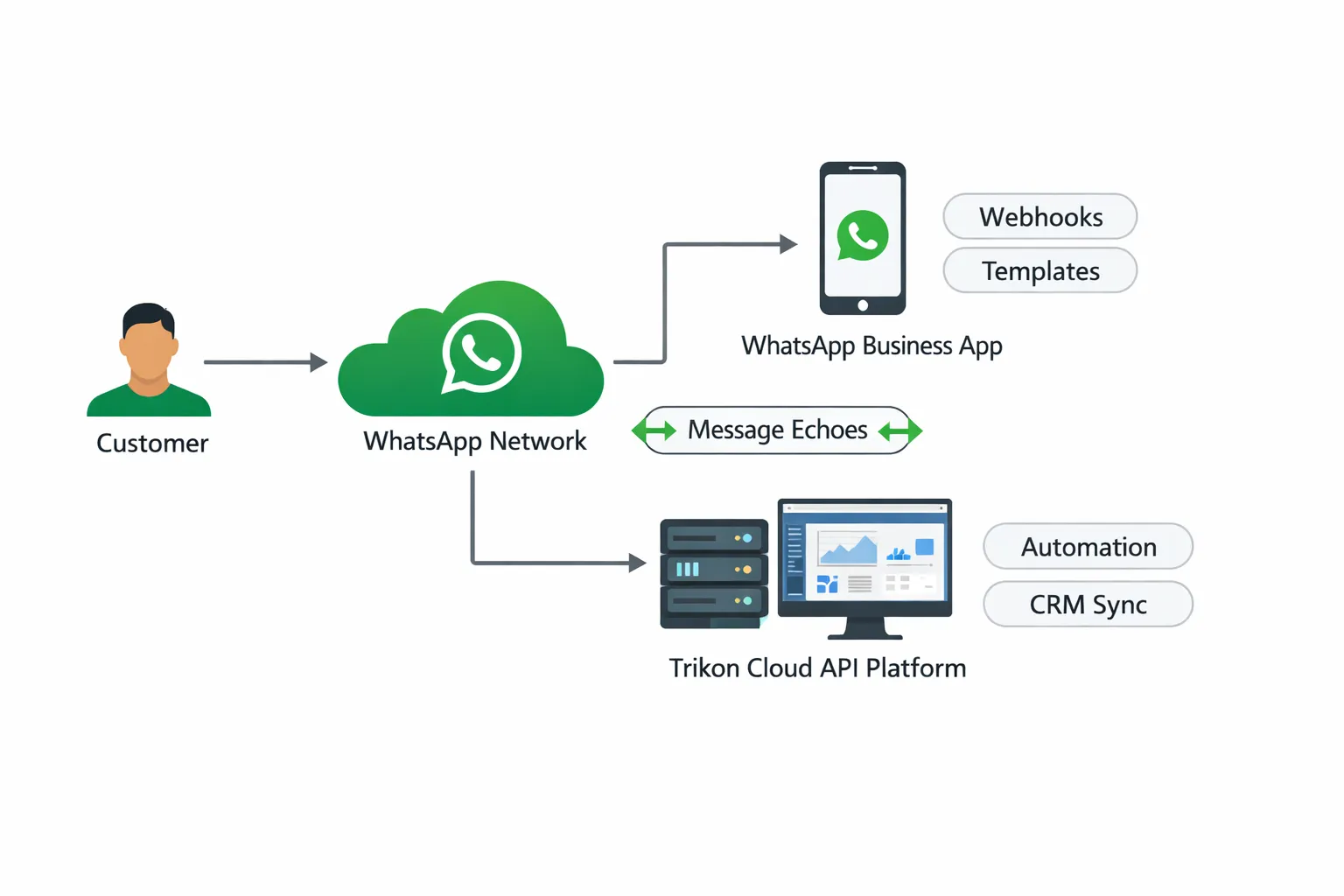
Message echoes and sync
API-sent messages appear in the Business App; App-sent messages appear in the API inbox (recent history is mirrored using echoes).
History sync window: recent months (varies by Meta/BSP policy; commonly up to ~6 months for 1:1 chats).
Group messages aren’t mirrored to the API; mirroring focuses on 1:1 conversations for oversight and automation triggers.
Watch a short Trikon walkthrough (App + Trikon Inbox, message echoes, and reopening a conversation with a template):
Session rules and templates
App side: reply freely as usual - no 24‑hour customer service window or template requirements.
API side: must follow WhatsApp’s 24‑hour window. To initiate or re‑open a conversation, send a pre‑approved template (e.g., order update, reminder, promo).
Practical flow: human chats stay flexible in the App; when the window lapses, Trikon triggers a compliant template to re‑open via API and resumes automation.
Who controls what
App controls:
1:1 manual messaging, groups, and Status
Business profile edits (name, address, website)
Labels (local to the App) and catalogs (where available)
API controls (via Trikon):
Templated notifications, bulk broadcasts, and drip flows
Automations and chatbots with AI/keyword logic + human handoff
CRM/webhooks, segmentation, analytics/insights, SLA tracking
Omnichannel context if integrated (e.g., CTWA, attribution)
Reliability and delivery
Webhooks carry App-side activity into the API where supported so automations and CRM stay in sync.
Some companion/linked devices may not trigger echoes; ensure the primary device is active and follow Meta’s supported device guidance.
BSP stability matters:
Retries and rate limiting to protect deliverability at scale
Error handling for expired sessions, template rejections, and opt-out logic
Fallbacks to human agents in Trikon’s inbox if automations fail or time windows lapse
SEO notes: WhatsApp coexistence, API and app together, WhatsApp automation integration, use WhatsApp app with API, WhatsApp BSP coexistence support
Enabling Coexistence (Step‑by‑Step) and BSP Differences
"Meta documents how to onboard WhatsApp Business App users to the Cloud API and lists unsupported countries/regions for coexistence." - Source Editors’ note: Verify unsupported regions and onboarding requirements via the official Meta Developers page.
Prerequisites
WhatsApp Business App installed and active on the primary device
Supported country/region for the phone number; up‑to‑date WhatsApp Business App version
Meta Business Manager access with admin permissions on the business
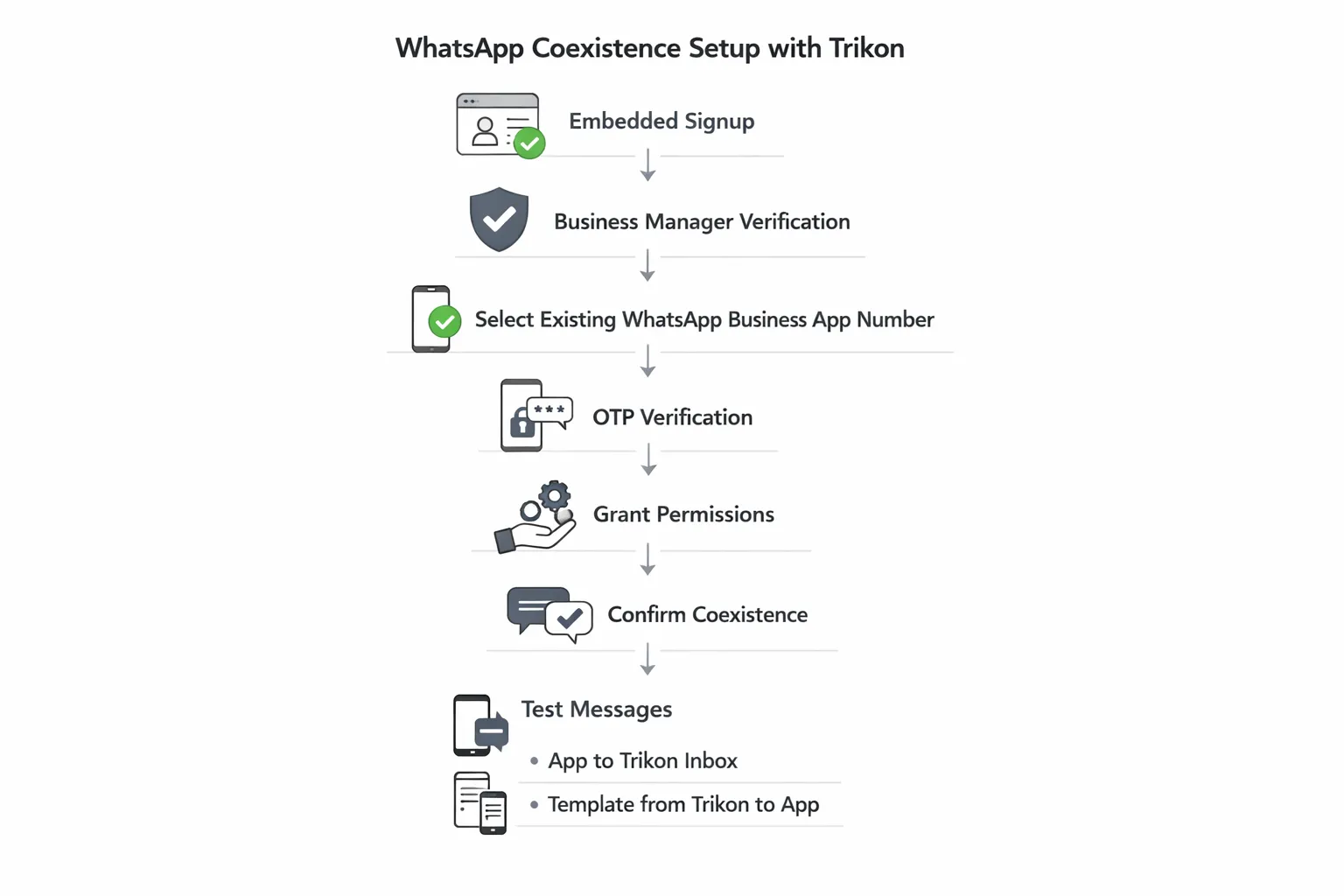
Step-by-step with Trikon (Embedded Signup)
Start in Trikon (official WhatsApp Business API partner)
Verify Business Manager and select or create your WABA
Choose “Use an existing WhatsApp Business App number”
Complete ownership verification (OTP) and grant requested permissions
Confirm coexistence; do not uninstall the Business App
Test end-to-end:
Send a message from the App and confirm it echoes into Trikon’s shared inbox
Send a template from Trikon to re‑open a conversation and verify it appears in the App
Device and linking notes
After onboarding, unsupported companion devices may be unlinked; re‑link only supported companion clients
Open the WhatsApp Business App periodically to keep the account active and ensure echoes continue
BSP differences to know
History sync window length and timing (e.g., how many months of 1:1 chats are mirrored)
Webhook delivery robustness and echo behavior on multi‑device setups
Built‑in tools:
Shared inbox features (assignment, SLAs, collision detection)
Automation depth (bots, flows, triggers) and CRM/webhook flexibility
Analytics granularity (campaign attribution, CTWA, funnel metrics)
Cost transparency (message categories, template approvals, overage handling)
Do’s and Don’ts
Do keep the Business App installed and active; do test templates and quick replies end‑to‑end
Don’t deregister the number from the App; don’t rely on unsupported companion devices for mission‑critical workflows
SEO notes: WhatsApp coexistence setup, WhatsApp Business App vs API coexistence, use WhatsApp app with API, WhatsApp BSP coexistence support, onboarding Business App users to Cloud API
What Works Where: WhatsApp Business App vs WhatsApp Cloud API in Coexistence
High-level rules of engagement
App retains consumer-like conveniences (groups, Status, freeform replies)
API specializes in automation, templates, analytics, integrations, and multi‑agent workflows
Nuances that matter
Broadcast lists in App may be limited/disabled; use API broadcasts for scale and segmentation
Business profile edits remain in the App; sync effects vary by setup
Groups and certain content types (e.g., disappearing/view‑once) aren’t mirrored to API
Tip: Use the API for anything repeatable or time‑sensitive; keep complex, high‑context conversations in the App or Trikon Inbox
Feature | Business App (coexistence) | Cloud API (coexistence) |
|---|---|---|
1:1 chats | Yes (freeform replies; mirrored to API) | Yes (appears in App via echoes; governed by API rules) |
Groups | Yes (manage and chat in App) | Not mirrored to API (use App for group activity) |
Status | Yes (post/view in App) | Not supported |
Labels | Yes (local to App; not synced) | Use tags/attributes in BSP/CRM (not App labels) |
Catalogs | Managed in App (where available) | Send product messages if connected via Commerce; management outside API UI |
Calls (voice/video) | Available in App (where supported) | Not supported via API |
Business profile edits | Yes (edit name, address, website in App) | Not editable via API (App controls profile) |
Templates (HSM) | Not applicable | Yes (initiate/re‑open conversations; approvals required) |
Broadcasts/campaigns | Limited/disabled under coexistence; small reach | Yes (at scale with segmentation and scheduling) |
Chatbots/automation | Basic quick replies/away messages | Yes (AI/keyword bots, flows, triggers, handoff) |
Analytics/insights | Basic App-level info | Advanced insights (campaigns, CTWA, funnels) via BSP |
Multi‑agent inbox | Limited to App devices | Yes (shared inbox, assignment, SLAs, collision control) |
CRMs/webhooks | Not available | Yes (webhooks, CRM sync, data enrichment) |
Session rules | No 24‑hour window; reply freely | 24‑hour window enforced; templates required to re‑open |
Day‑to‑Day Usage: Choosing the Right UI - App, Trikon Shared Inbox, or Both
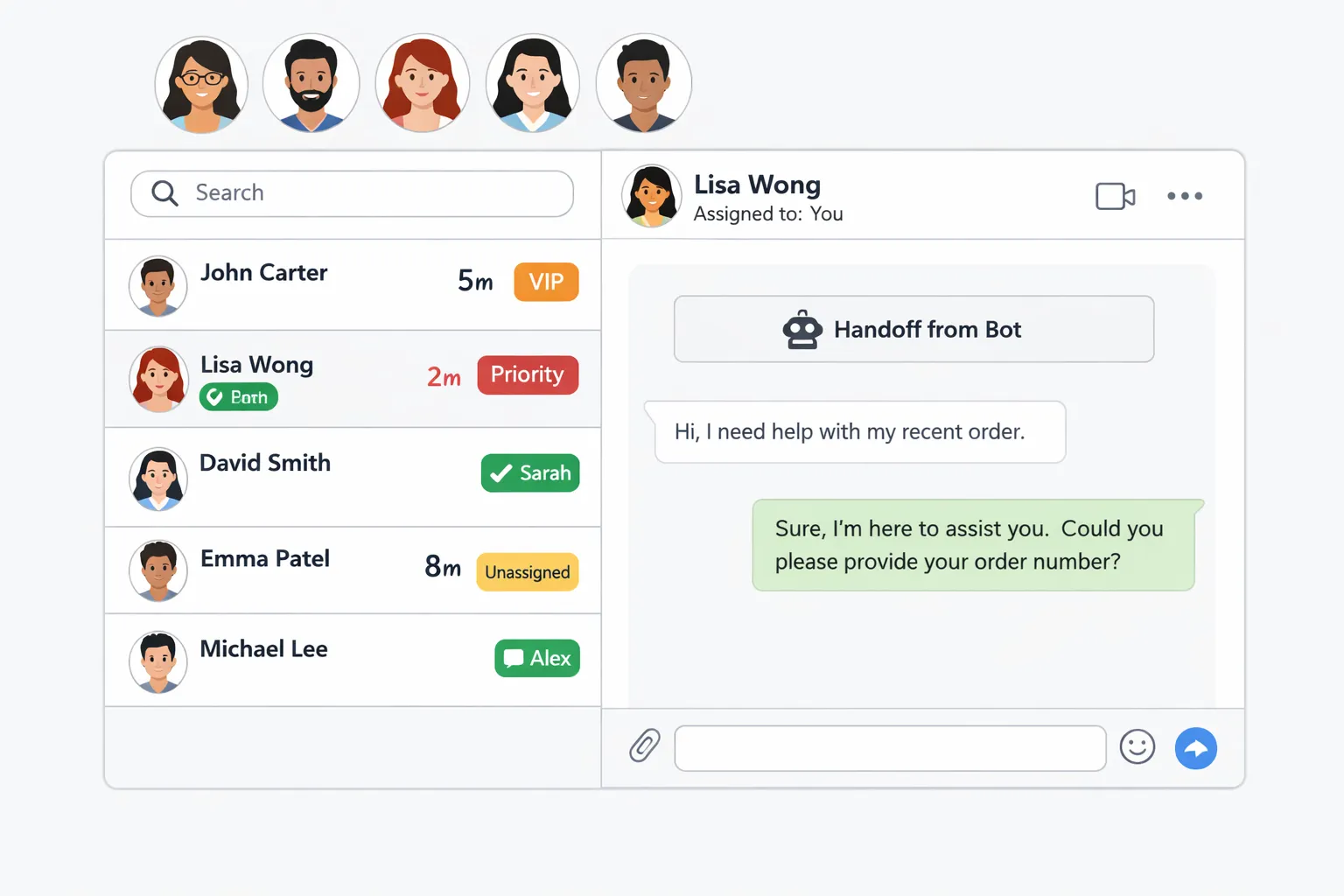
For support teams (SLAs, assignment, collision avoidance)
Work primarily in Trikon’s shared inbox for multi‑agent routing, SLAs, canned replies, and tags
App remains useful for owner/operators and ad‑hoc executive replies
For marketing teams (broadcasts, segmentation, retargeting)
Build campaigns and segments in Trikon; use templates for promotions, back‑in‑stock, and event reminders
See campaign responses in the inbox and hand off to agents when needed
For operations (bookings, payments, workflows)
Drive appointments, reservations, and order updates via API automations
Let staff jump into the App for complex cases or escalations
Human + bot collaboration
Always-on bot handles FAQs and data capture; handoff rules bring agents in with full history
Automation Playbook: Real Workflows That Mix API Automation and App Conversations
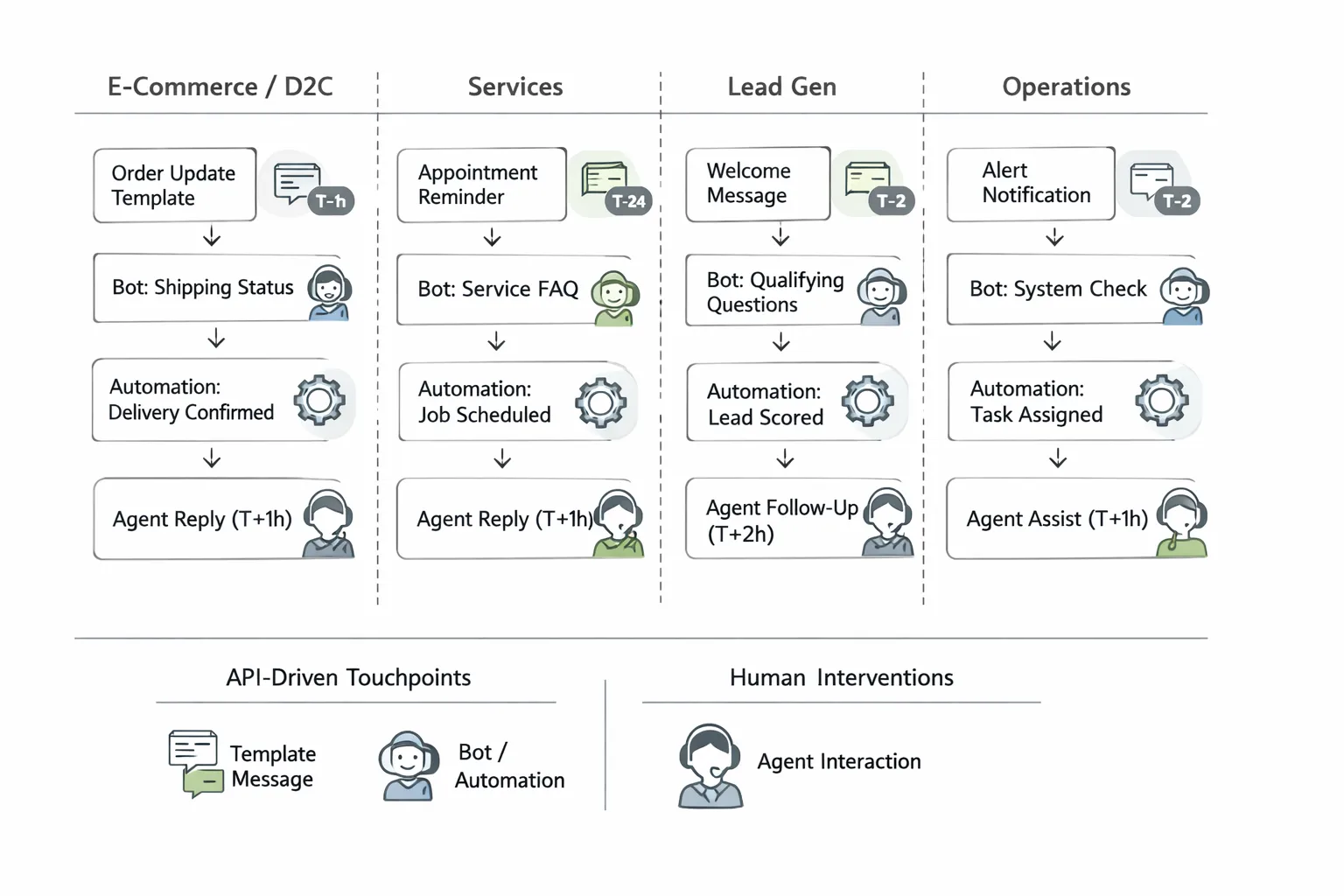
D2C and ecommerce
Abandoned cart recovery: API sends template nudge → bot offers assistance → agent in Trikon or App closes sale
Order lifecycle: confirmation, shipping, delivery + post‑purchase care/feedback
Service businesses (appointments and reminders)
Booking flow: customer requests time → bot proposes slots → confirms booking → API reminders (T‑24, T‑2) → App follow‑up if needed
Lead gen and sales (Click‑to‑WhatsApp ads)
CTWA ad → API bot qualifies lead (intent, budget, timeline) → auto‑routing to sales queue → App-based voice note or call for high‑value leads
Operations and field teams
Job dispatch: API assigns visit → technician confirms arrival → completion form in chat → invoice and payment link
Measurement and improvement
Track read/reply rates, time to first response, conversion, CSAT; iterate templates and flows monthly
Use case | Trigger | Automated via API | Handled in App (when) | Primary KPIs |
|---|---|---|---|---|
Abandoned cart recovery | Cart created, no checkout after T+1h | Yes: send template, bot assist | When customer asks for product advice or pricing nuance | Recovery rate, revenue per cart |
Order updates | Order placed/shipped/delivered | Yes: transactional templates | Exceptions, delays, or replacement requests | Delivery CSAT, ticket deflection |
Post-purchase feedback/Upsell | Delivery confirmed T+1d | Yes: feedback prompt, cross-sell | Negative feedback or VIP follow-up | CSAT, NPS, repeat purchase rate |
Appointment booking | Customer requests slot | Yes: bot proposes, confirms | Edge cases, reschedules, special requests | Booking completion, no‑show rate |
Appointment reminders | T‑24 and T‑2 | Yes: scheduled templates | Last‑minute changes or cancellations | No‑show reduction, response rate |
CTWA lead qualification | Ad click to WhatsApp | Yes: capture intent/budget | High‑value leads for voice note/call | Qualified lead rate, cost per SQO |
Sales nurturing | 24h window lapsed | Yes: re‑open with template | Complex negotiation or pricing | Time to first response, close rate |
Field job dispatch | New work order | Yes: assign, confirm arrival | On‑site issues, escalations | SLA attainment, first‑time fix rate |
Limitations, Edge Cases, and Gotchas (Read Before You Launch)
App features that change under coexistence
Broadcast lists: use API broadcasts; App lists may be disabled/limited once coexistence is enabled
Disappearing/view-once/live location: often disabled or not mirrored to the API
Voice/video calls: not exposed via API; experience may vary by device/app version
Other App niceties: some App-only actions (e.g., certain message controls) can behave differently; validate with a pilot group
Multi-device realities
Companion devices may be unlinked after onboarding; unsupported companions won’t trigger webhooks/echoes into the API
Always test echoes after (re)linking devices to confirm App → API mirroring and automation triggers
Keep the primary device active and online for reliable message sync
Verification and status
Official Business Account (green badge) support may not be available for COEX numbers; follow current Meta-verified options where applicable
Expect separate review/approval flows for business information and templates on the API side
Migration and WABA constraints
COEX numbers generally can’t be migrated between WABAs without first disconnecting coexistence
Do not uninstall the Business App; keep it installed and open it periodically to maintain active status
If you must change BSPs/WABAs, plan for a controlled cutover to avoid template or webhook downtime
Compliance reminders
API side must respect the 24‑hour session window; use approved templates to initiate or re‑open conversations
Maintain explicit opt‑ins for marketing templates; honor opt-outs across App and API
Monitor quality rating and blocklists; adjust frequency, targeting, and copy to protect deliverability
Store consent, campaign metadata, and customer preferences in your CRM for auditability
SEO notes: WhatsApp coexistence, WhatsApp Business App vs API coexistence, use WhatsApp app with API, WhatsApp automation integration, API and app together
Best Practices for SMBs Using WhatsApp Coexistence
Build on what already works
Keep frontline staff in the App for nuanced chats; move repeatable steps to automation
Identify top 10 FAQs and set up bot/quick-reply answers; let agents focus on high‑context conversations
Map handoffs: define when automation stops (e.g., billing disputes, VIP customers) and route to agents in Trikon
Design templates that feel human
Personalize with variables; give clear next actions; avoid spammy phrasing
Add opt‑out language where appropriate and keep messages short, scannable, and specific
Test multiple versions (tone, CTA placement, emoji use) and track opt‑out/quality impacts
Segment and schedule smartly
Use cohorts (new vs. returning, high AOV, lapsed) and local-friendly send windows
Respect time zones and frequency caps; avoid back-to-back promo blasts
Trigger campaigns off events (cart created, item back in stock, appointment booked) instead of generic blasts
Bot with purpose, handoff with grace
Bot answers FAQs and captures info; clearly signal when a human joins; preserve context
Keep flows short; offer “talk to a human” at every step for accessibility
Use structured data capture (name, order ID, intent) so agents see context immediately in Trikon
Tie into your systems
Connect CRM, order data, and appointments so replies are contextual and fast
Sync tags/segments from your ecommerce or CRM to trigger precise API templates
Log key events (opt‑ins, purchases, appointments) through webhooks for measurement and compliance
Measure and iterate
Track time to first response, assisted conversions, and CSAT; A/B test templates monthly
Review quality rating, blocklists, and opt-out rates; adjust frequency and targeting
Build a weekly dashboard: session reopen rate, bot containment rate, agent handle time, revenue per broadcast
Governance and security
Roles/permissions in Trikon; audit logs; PII handling and data retention policies
Enforce template approval workflows and naming conventions (e.g., “promo_restock_en_v1”)
Document escalation paths, after-hours rules, and fallback behaviors when the 24‑hour window expires
SEO notes: WhatsApp coexistence, WhatsApp Business App vs API coexistence, use WhatsApp app with API, WhatsApp automation integration, API and app together, WhatsApp BSP coexistence support
BSP Landscape and Recommendations: WhatsApp Coexistence Support
What to look for in a BSP
Proven coexistence onboarding flow and clear rollback path
Reliable message echoes and webhook delivery across devices
History sync clarity; analytics and data export options
Built-in shared inbox, automation, and CRM integrations
Transparent pricing for conversations, templates, and add‑ons
Strong template governance (naming, approvals, versioning) and opt‑in management
Multi‑device guidance and support for companion device quirks
Clear SLAs, uptime, and rate‑limit handling for high‑volume sends
Security posture: roles/permissions, audit logs, data retention controls
Migration support (between BSPs/WABAs) with minimal downtime
RFP questions to ask:
What is your history sync window and how long does initial sync take?
How do you handle echoes from the App on multi‑device setups?
What fallbacks trigger when the 24‑hour window lapses?
How granular are analytics (CTWA attribution, campaign ROI, agent SLAs)?
Which CRMs and commerce platforms do you integrate with natively?
How do you bill for conversation categories, templates, media, storage, and seats?
Red flags:
Vague coexistence documentation or no rollback guidance
Hidden fees for basic features (inbox, reports, webhooks)
Limited analytics/export or data lock‑in
Vendors to evaluate
Trikon (official WhatsApp Business API partner; strong hybrid automation + shared inbox; fast go‑live)
360dialog (Cloud API specialist; broad ecosystem integrations)
Gupshup, MessageBird, Twilio (developer-friendly platforms with marketing and support features)
WOZTELL/Sanuker (omnichannel with coexistence support)
Why Trikon for coexistence
All‑in‑one: shared Support Inbox, Marketing Automation, no‑code Chatbots, Bookings & Commerce in a single platform
Hybrid model: 24×7 automation with seamless agent handoff and SLA tracking; full conversation history and assignment
Minimal setup and speed‑to‑value: embedded signup, no engineering required; quick template approvals and campaign launch
Advanced analytics: CTWA attribution, campaign and cohort reporting, agent performance, and session reopen rates
Deep integrations: CRM/webhooks, ecommerce/product catalogs, payments, and website sync
Compliance and reliability: official WhatsApp Business API partner, quality monitoring, opt‑in governance, clear pricing
Scalability and agency‑friendly: segmentation, drip/retargeting, white‑label options, and multi‑brand management
SEO notes: WhatsApp coexistence, WhatsApp Business App vs API coexistence, WhatsApp Business API coexistence, use WhatsApp app with API, WhatsApp BSP coexistence support
Conclusion: When Coexistence Is Right - and How to Start with Trikon
Coexistence is the pragmatic path for teams who live in the WhatsApp Business App but need the scale, compliance, and insights of the Cloud API. It preserves your familiar App workflows while unlocking automation, templates, analytics, and CRM integrations - without risky migrations or lengthy build-outs.
When to choose coexistence
You want to keep the Business App for human conversations but need automation, broadcasts, and CRM integration
You’re upgrading from App-only without risking data loss or heavy change management
You need a hybrid model (automation + human handoff) that keeps teams productive and customers satisfied
Quick evaluation checklist
Supported country/number and device setup confirmed
Templates drafted for core journeys (orders, reminders, promos)
Roles/permissions set in Trikon; bot + handoff rules ready
Data piping aligned (CRM, ecommerce, bookings), with clear opt-in and governance
Next steps with Trikon
Book a demo, connect your existing App number via Embedded Signup, and launch your first automated journey in days - not weeks
Start small (one journey, e.g., order updates or abandoned cart), measure results, then scale broadcasts and AI automation
Monitor session windows, template performance, and quality ratings; iterate monthly for steady gains
Trikon turns WhatsApp into a complete business channel - support, marketing, chatbots, bookings, and commerce - so you can combine automation with the human touch and grow faster with WhatsApp coexistence. Get started at https://whatsapp.trikon.tech/