


TL;DR - WhatsApp Business App vs WhatsApp Business API (Quick Answer)
The short version
WhatsApp Business App: Free mobile app for small businesses. Single number, basic automation (greeting/away/quick replies), catalog, broadcasts up to 256 contacts (only to users who saved your number), no team assignment or deep integrations.
WhatsApp Business API (incl. Cloud API): Built for scale. Multi‑agent shared inboxes, automations and chatbots, approved templates, broadcasts at scale with opt‑in, CRM and ecommerce integrations, analytics, reliability and compliance. Paid (Meta fees + potential BSP/platform fees).
Who should use what
Choose the App if you’re a solo owner or micro team handling low daily volume and need quick, personal chats with a storefront and basic automation.
Choose the API if you’re growing (multi‑agent, SLAs, segmentation, campaigns, automations, analytics) or need to integrate WhatsApp into your stack.
Key functional differences you’ll feel day one
Users and devices: App = single phone + linked devices; API = unlimited agents via platforms like Trikon.
Automation: App = basic autoresponders; API = AI/keyword bots, flows, triggers, and human handoff.
Marketing: App = 256 recipients; API = large‑scale broadcasts with segmentation and templates.
Integrations: App = limited; API = CRMs, ecommerce, payments, bookings, analytics.
Compliance: App = simple; API = opt‑ins, templates, categories, quality and rate limits, audit trails.
Important note
API and Cloud API follow WhatsApp’s policies (24‑hour customer service window, template approvals, category pricing). Always obtain user opt‑in before messaging.
"As of March 2025, WhatsApp had 3 billion monthly active users worldwide." - Source
The WhatsApp Product Family at a Glance (Messenger, Business App, Business API/Cloud API)
Three different tools, three different jobs
WhatsApp (personal Messenger): Private, person‑to‑person messaging; not built for teams or scale.
WhatsApp Business App: Small‑business toolkit on mobile with profile, catalog, labels, and basic automations.
WhatsApp Business API (incl. Cloud API): APIs that power automation, integrations, multi‑agent support, and large‑scale campaigns via platforms like Trikon.
Where Cloud API fits
Cloud API is Meta‑hosted access to the WhatsApp Business Platform. You still pay Meta’s messaging fees but skip your own server hosting. Most growing brands still prefer a partner platform (like Trikon) to get inboxes, bots, campaigns, analytics, and compliance out of the box.
What to keep in mind
Interface: App is an app; API/Cloud API is infrastructure used through partner platforms.
Scale: App for low volume; API/Cloud for multi‑agent operations and automation across thousands of chats.
"Grow lead generation, conversational commerce, engagement marketing, and so much more with enterprise-level WhatsApp APIs." - Source
Quick comparison: Business App vs Business API vs Cloud API
Product | Who it’s for | Interface | Users/devices | Automation | Broadcast capacity | Template messages | Integrations | Pricing model | Setup complexity | Typical time to go live |
|---|---|---|---|---|---|---|---|---|---|---|
WhatsApp Business App | Solo owners/micro teams | Mobile app (with linked devices) | 1 phone + up to 4 linked devices | Basic (greeting, away, quick replies) | Up to 256 contacts; only to contacts who saved your number | No (free-form chats only) | Very limited (no native CRM) | Free app | Low | Minutes |
WhatsApp Business API | SMBs to enterprises scaling support/marketing | Used via platforms like Trikon (shared inbox, bots, campaigns) | Unlimited agents via partner platform | Advanced: chatbots, flows, triggers, human handoff | Large-scale (opt‑in required), segmentation, scheduling | Yes (WhatsApp‑approved templates) | Deep: CRM, ecommerce, payments, bookings, analytics | Meta messaging fees + partner/BSP fees | Medium–High | 1–7 days via partner |
WhatsApp Cloud API | Teams that want Meta‑hosted API without self‑hosting | API access; typically surfaced through a partner like Trikon | Unlimited (depends on platform) | Same as API (depends on platform) | Same as API (depends on platform) | Yes (WhatsApp‑approved templates) | Same as API (depends on platform) | Meta messaging fees (+ optional partner fees) | Medium | Same day to a few days (faster if already verified) |
Inside the WhatsApp Business App - Features, Limits, and Ideal Use Cases
Core features you’ll use right away
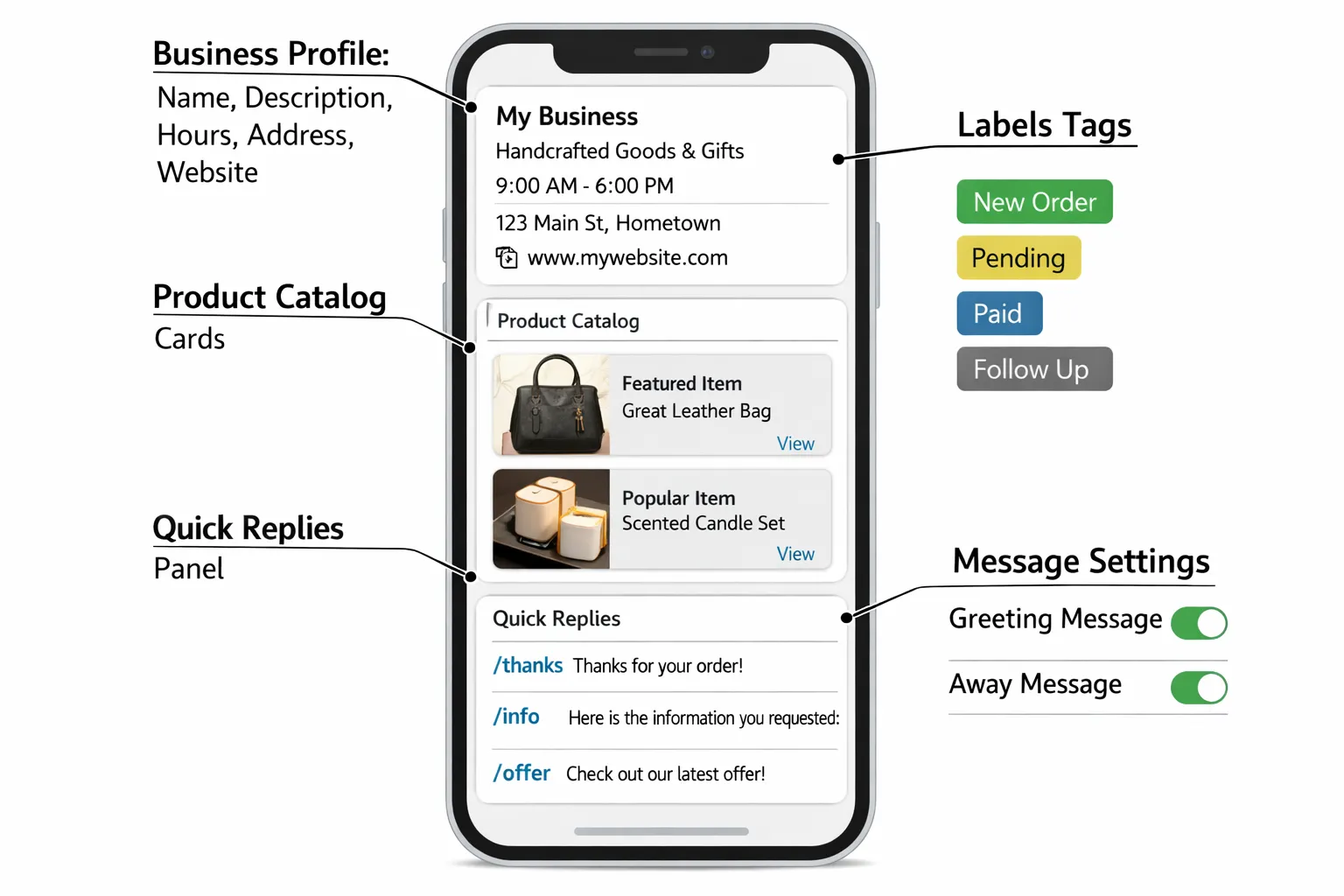
Business profile: Name, description, address, website, hours.
Catalog: Showcase products/services; customers can ask about items directly.
Quick replies, greeting and away messages; labels for chat organization.
Broadcasts: Up to 256 contacts, delivered only if recipients saved your number.
Multi‑device: 1 phone + linked devices; not built for multi‑agent workflows.
Where the App shines
Low daily chat volume; owner‑led support and sales.
Hyperlocal retailers, solo pros, and early‑stage D2C brands.
Where the App struggles
Multi‑agent collaboration, SLAs, audit trails.
Segmented marketing at scale; advanced analytics and lifecycle automation.
Complex workflows (orders, bookings, payments) fully inside chat.
Inside the WhatsApp Business API (incl. Cloud API) - Automation, Scale, and Integrations
What you unlock with the API
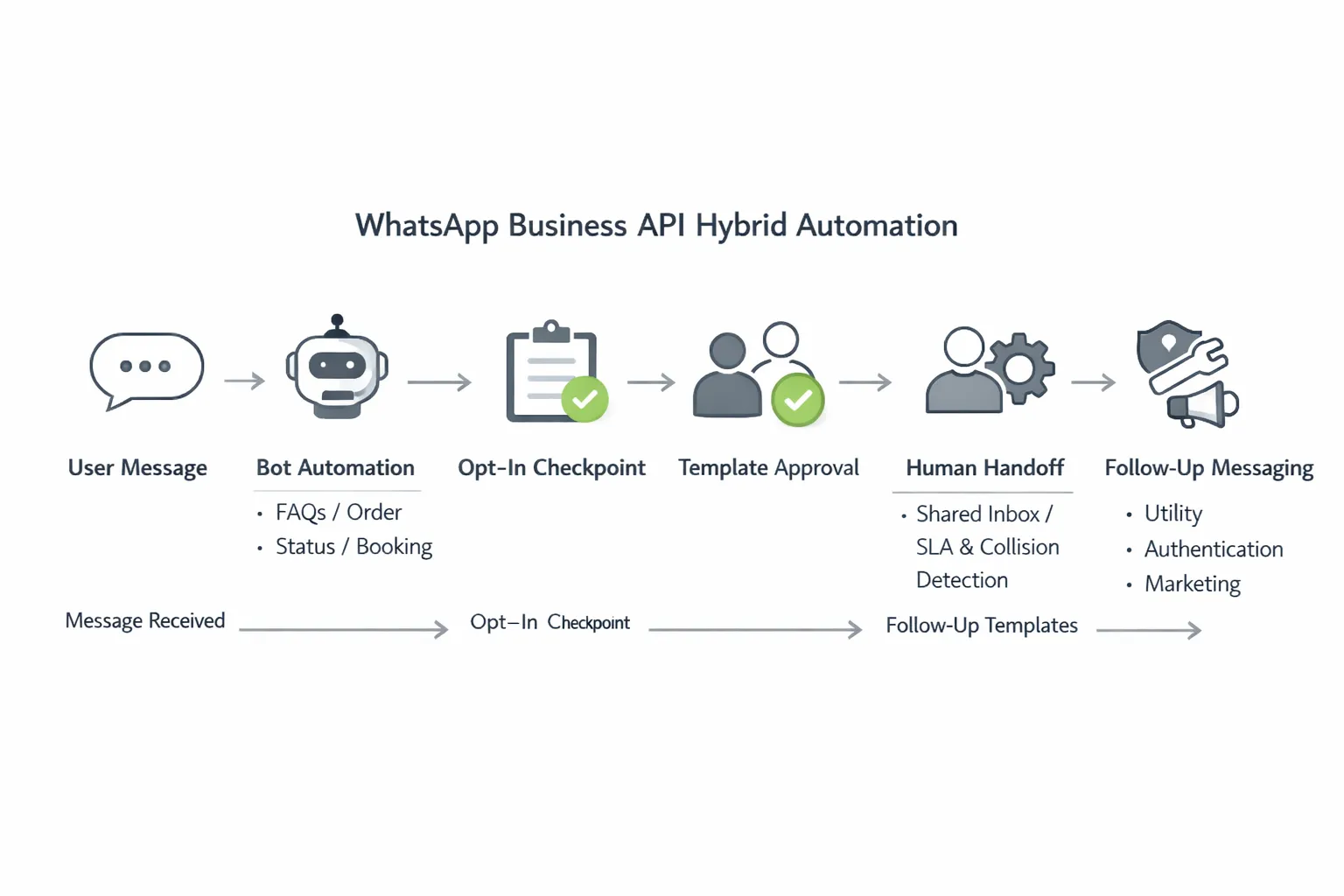
Shared inboxes and agent assignment, SLAs, collision detection, and conversation history.
Automation and chatbots: Keyword/AI flows, intent routing, self‑service, and human handoff.
Message templates and categories (utility, authentication, marketing) with approval workflow.
Broadcasts and campaigns with segmentation, A/B testing, and opt‑in management.
Integrations: CRM, ecommerce, payments, bookings, analytics, and data warehouses.
24‑hour window and messaging quality
Customer service window: Free‑form replies within 24 hours of the user’s last message.
Outside the window: Use approved templates; respect opt‑in and category rules.
Quality and rate limits: Performance and user feedback influence messaging tiers.
"Businesses have 24 hours to respond to a user with free-form messages. After 24 hours, only template messages can be sent." - Source
Cloud API vs going via a partner platform
Cloud API (Meta‑hosted) simplifies infra hosting but still requires building the business layer.
A partner platform like Trikon bundles inbox, automation, segmentation, campaigns, analytics, and compliance so teams can launch fast without engineering.
Pricing, Message Limits, and Compliance (What to Expect)
Pricing models in plain English
WhatsApp Business App: Free to download and use (data/SIM charges may apply).
WhatsApp Business API / Cloud API: Meta charges by conversation category and country; partners may add platform fees. Check the official pricing page and your partner plan.
Templates and categories
Marketing, Utility, Authentication templates; approval required; respect opt‑in and content policies.
Limits, quality, and reputation
Messaging limits scale with quality; poor user feedback can reduce your limits.
Compliance must‑dos
Obtain explicit opt‑in, provide clear value, honor preferences, and maintain audit trails.
Pricing & limits cheat sheet
Option | Cost model | Broadcast rules | Template use | Quality/reputation | Analytics | Typical go‑live time | Who pays what |
|---|---|---|---|---|---|---|---|
WhatsApp Business App | Free app (carrier/data may apply) | Up to 256 contacts; only to people who saved your number | Not applicable (free‑form only) | Not applicable (no API messaging tiers) | Basic chat info only | Minutes | No Meta fees; no platform fees |
WhatsApp Business API / Cloud API | Meta fees by country and category; partner/BSP platform fees may apply | Large‑scale broadcasts (opt‑in required), segmentation via platforms like Trikon | Required for outbound/after 24‑hours (Marketing, Utility, Authentication) | Quality rating affects messaging limits and throughput | Advanced reporting via platforms (campaigns, SLAs, funnels) | Same day to ~1 week (faster via partner) | You pay Meta message fees + partner/platform plan |
Note: For exact rates and rules, see Meta’s official pricing page.
"When customers send you a message from an Ad that clicks to WhatsApp or Facebook Page call-to-action button, for the following 3 days (72 hours), all of your messages are not charged." - Source
High‑Impact Use Cases (Support, Marketing, Bookings, and Commerce)
Support and operations
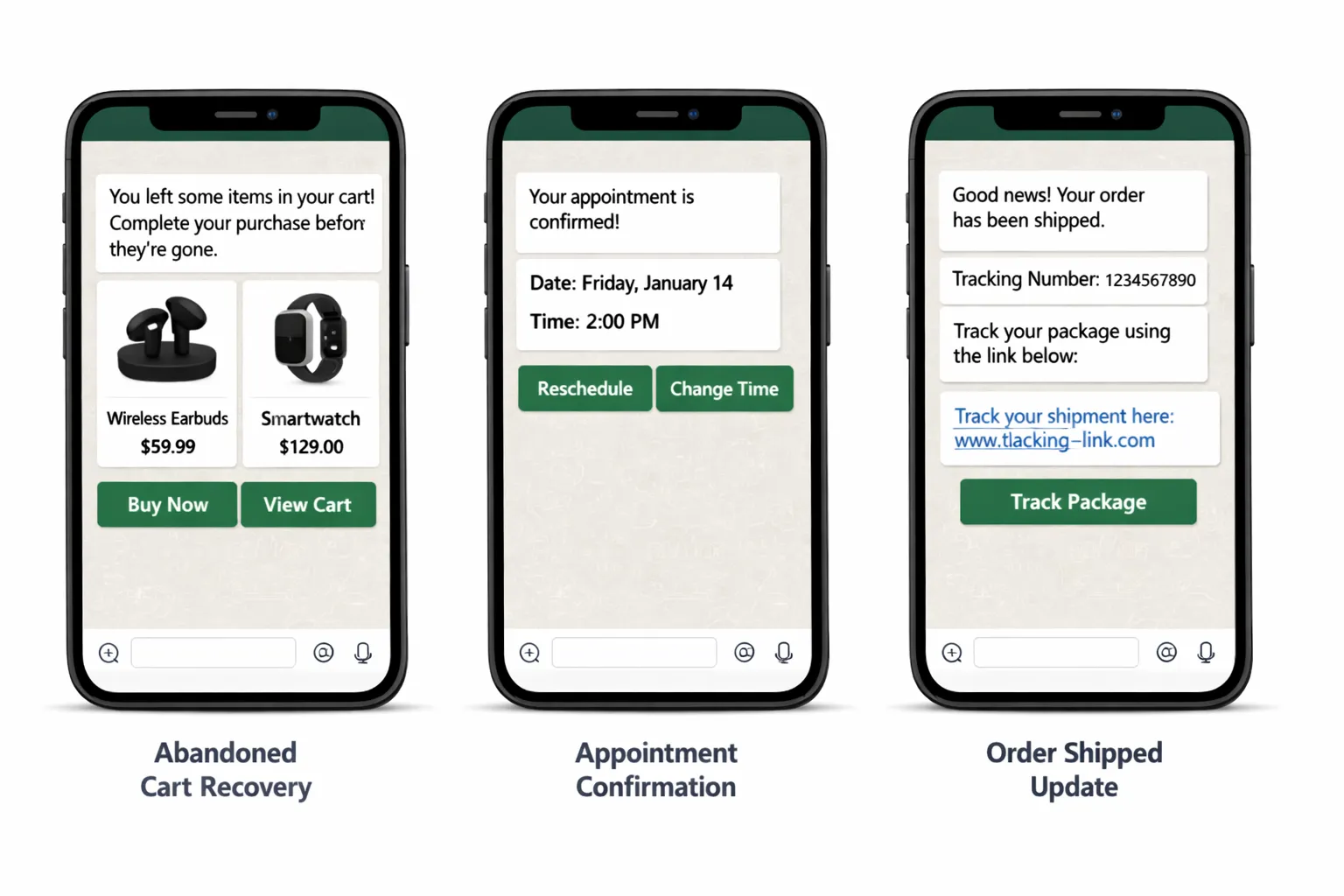
FAQ deflection with bots; order status and returns; SLA tracking and escalations.
Proactive service alerts (shipping, appointments, outages) via templates.
Marketing and growth
Product drops, back‑in‑stock, and seasonal promos to opted‑in segments.
Drip campaigns and retargeting (browse/click/abandoned cart flows).
Bookings, payments, and commerce in chat
Appointment scheduling, reminders, and rescheduling.
Pay‑by‑link, COD verification, and in‑chat storefront browsing.
How Trikon maps to these
Support Inbox with agent assignment and conversation history.
Marketing Automation for broadcasts, segmentation, drips, and retargeting.
No‑code chatbots with seamless human handoff.
Bookings & Operations and WhatsApp Storefront for end‑to‑end journeys.
When to Choose the App vs When to Switch to the API (Decision Framework)
Choose the WhatsApp Business App if
Daily WhatsApp messages: ~5–30; handled by a founder or single agent.
You need a profile, catalog, quick replies, and basic autoresponders.
No immediate need for multi‑agent routing, deep integrations, or analytics.
You’re testing product–market fit and want a fast, zero‑cost setup.
Your broadcasts are small and local, and most customers have saved your number.
Switch to the WhatsApp Business API if
Daily messages: 50+ or multiple agents; you need SLAs and accountability.
You plan campaigns, segmentation, and automations tied to your CRM/ecommerce.
You must run bookings/payments/support workflows entirely in WhatsApp.
You need templates, approvals, and compliance controls at scale.
You want analytics (conversion, CSAT, agent performance) and audit trails.
You’re ready for multi‑agent shared inboxes, bots, and human handoff via a platform like Trikon.
Red flags that you’ve outgrown the App
Missed messages and duplicate replies; no way to assign owners.
Broadcast limit pain (256 cap) and “saved‑number only” delivery.
Manual copy‑paste between systems; no analytics on conversion and CSAT.
Slow response times without SLAs; lack of escalation or collision detection.
Inability to run advanced journeys (cart recovery, renewals, COD verification) reliably.
Not sure? Start on the App for speed, then move to the API when volume, team size, or automation needs grow - platforms like Trikon make the switch fast and low‑lift.
Implementation Paths - Cloud API, BSPs, and Why Platforms Like Trikon Win on Time‑to‑Value
Three ways to access the API
Direct Cloud API (Meta‑hosted): Requires developer time to build inboxes, bots, and campaigns.
On‑prem/self‑hosted API: Highest control; highest complexity.
Business Solution Provider (BSP)/platform: Fastest go‑live with packaged inbox, automation, campaigns, and analytics.
Getting started checklist
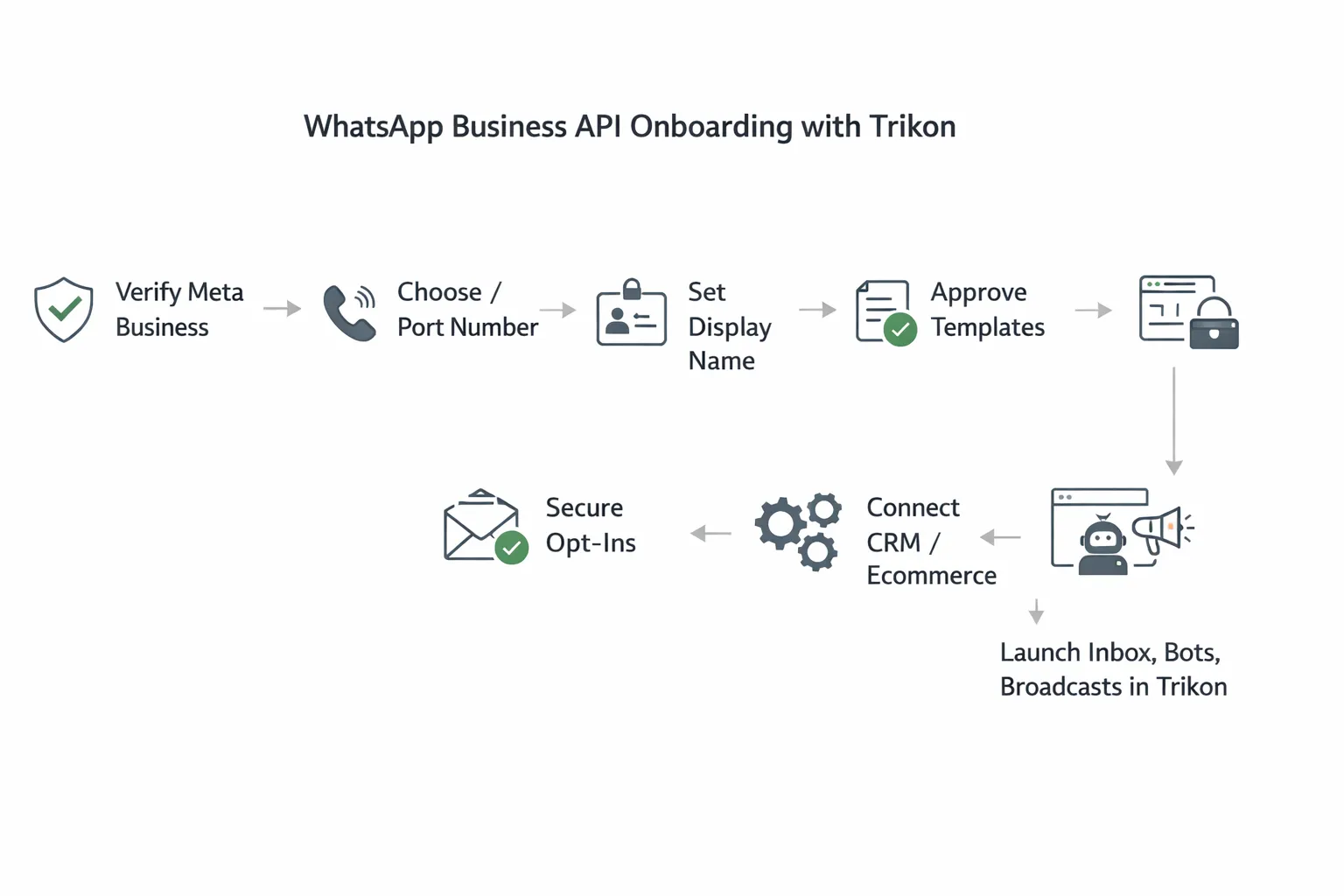
Verify Meta Business, choose/send number, set display name, secure opt‑ins, prepare templates, connect CRM/ecommerce.
Number migration considerations
You can migrate an existing number from the App to the API (one‑way). Plan downtime and data handover with your provider.
Why Trikon
Minimal setup, no engineering required; hybrid automation + human handoff; storefront, bookings, and payments in chat; agency‑friendly scale.
Frequently Asked Questions (Straight Answers)
Can multiple users manage one WhatsApp?
App: Not reliably (1 phone + linked devices; no assignments). API: Yes, via shared inboxes (e.g., Trikon) with roles and SLAs.
Does the API support voice calls and WhatsApp Groups?
Voice calls from API aren’t generally supported; Groups aren’t supported for API senders. Use 1:1 or approved templates.
How do broadcasts differ?
App: 256 recipients and must have saved your number. API: Large‑scale broadcasts to opted‑in users using approved templates; segmentation and analytics available.
Can I keep my catalog?
Both App and API support catalogs; API lets you drive in‑chat storefront and order flows via a platform like Trikon.
What about the green verification tick?
Available for eligible brands via Official Business Account review; not guaranteed. Trikon can guide application.
How fast can we go live?
With Trikon, most teams launch in days: verify, connect number, import contacts/opt‑ins, approve templates, start messaging.
Conclusion - Choose the Right WhatsApp Path and Launch with Trikon
Choosing between the WhatsApp Business App and the WhatsApp Business API comes down to volume, team size, automation needs, and integration depth. If you’re just starting, the App is a great on‑ramp. When you need multi‑agent support, SLAs, automation, campaigns, and commerce inside chat, the API (or Cloud API) via a platform like Trikon is the clear next step.
Trikon is an official WhatsApp Business API partner that brings support, marketing, chatbots, bookings/operations, and a WhatsApp storefront into one place - so you can manage the entire customer lifecycle right inside WhatsApp. Go live fast, automate what’s repeatable, and hand off complex cases to agents without losing context.
Next step: Book a personalized walkthrough and see Trikon in action: https://whatsapp.trikon.tech/